Reviewing and Testing the Vantrue Nexus 5S

File this one under "Because I Can." I decided to do some stress testing on the VP03(II) and VP05(II) hardwire kits to see how they perform. I have several decades worth of power supply design experience (mostly in the context of high-powered, Class-A audio amplifiers) so I thought this would be an interesting and revealing exercise. Power supplies need to be able to deliver both voltage and current, according to their specification. Poorly designed power supplies will exhibit a decreasing level of voltage as current demands are ramped up, whereas robustly designed power supplies will be able to maintain their rated voltage output as current demands are increased. Given my previous experience with Vantrue products, I had good expectations headed into this measurement exercise.

Spoiler: I was not disappointed.
Hardwire Measurement.webp


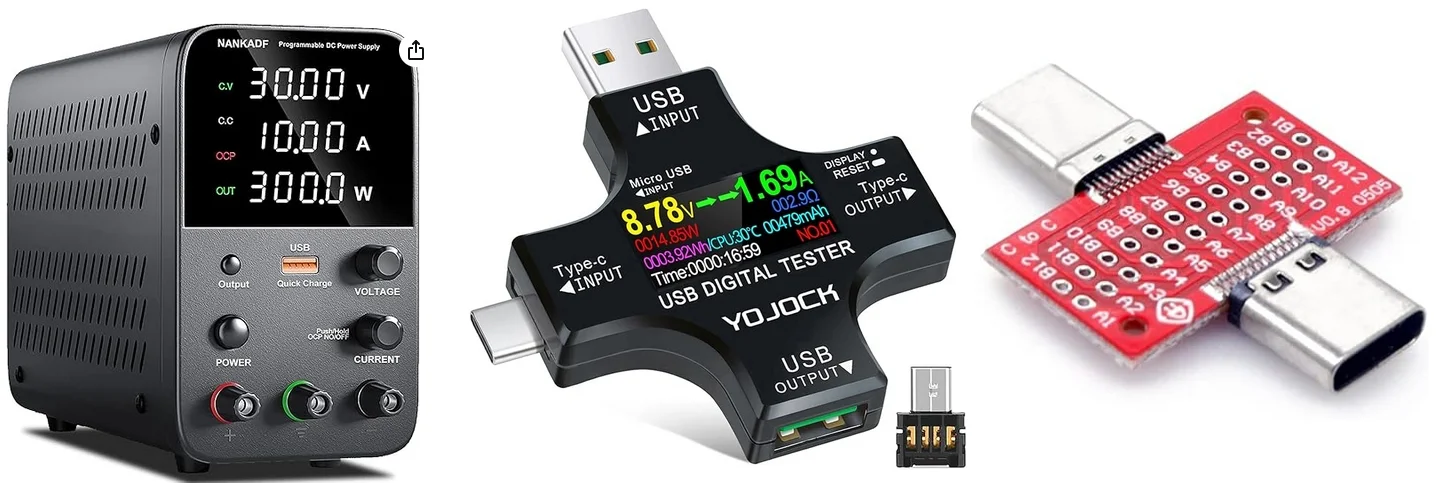
To perform this test, I connected the Vantrue hardwire kits a bench top 30v 10A switched mode variable power supply. I connected each of the Vantrue hardwire kits to the power supply (one at a time), connected a USB-C power meter, and a USB-C breakout board with wire leads soldered to the board's power supply pins. At the end of the chain was a series of Mills MRA-12 wire wound 12w power resistors left over from tube amp building and speaker crossover work I've done. I soldered them together in various parallel and series configurations to present suitable loads for the hardwire kits.

Here are the results:
VP03 Voltage and Current.webp


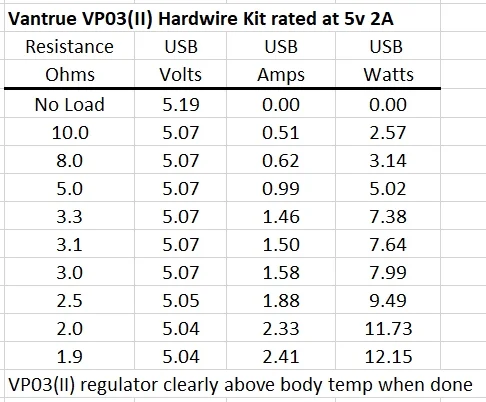
The VP03(II) kit delivers its highest voltage level with no load attached (no surprise there). Once a load is connected to the output, the voltage dropped to 5.07v and stayed there until the current draw hit about 1.6A. Above this level, the voltage dropped and held steady at 5.04v. This is excellent performance under load, with the regulator maintaining voltage above 5.0v at the end of the 2-meter long USB-C wire end! This is especially true given that the VP03(II) is only rated to 2.0A output current and I pushed it to 2.4A of output current. I didn't want to go much higher as I was already exceeding its design specification. At the end of a few minutes worth of testing, the plastic shell of the regulator was clearly (but not alarmingly) above body temperature when I picked it up.

VP05 Voltage and Current.webp


Similarly, the VP05(II) kit delivers its highest voltage level with no load attached. Once a load is connected to the output, the voltage dropped to 5.00v and declined only slightly (by 0.02v) as I increased the current draw up to 2.44A. This, again, is excellent performance under load, with the regulator maintaining output voltage of 4.98v at the end of the 2-meter long USB-C wire end! I didn't want to go much higher with a the resistor load as my resistor sets were already getting rather warm. At the end of my set of measurements, the plastic shell of the regulator showed no discernible temperature rise.

Both the VP03(II) and VP05(II) power supplies performed very well during this test! The more robust design (2.5A current delivery capability) of the voltage display VP05(II) hardwire kit over that of the VP03(II) (2.0A current delivery capability) was readily apparent: the voltage output barely decreased as I increased the current draw and it exhibited no noticeable temperature rise throughout my increasing current stress tests. These results stand in pretty sharp contrast to an EcoFlow River 2 Power Station that I tested last year that barely provides 4.99v on its USB-A port with no load and after a 6-8 foot run for a USB power cord, voltage dropped to somewhere near 4.80v at the camera. This resulted in intermittent power issues because the camera was being starved for voltage. Rebooting and power cycling ensued...
 
Last edited:
File this one under "Because I Can." I decided to do some stress testing on the VP03(II) and VP05(II) hardwire kits to see how they perform. I have several decades worth of power supply design experience (mostly in the context of high-powered, Class-A audio amplifiers) so I thought this would be an interesting and revealing exercise. Power supplies need to be able to deliver both voltage and current, according to their specification. Poorly designed power supplies will exhibit a decreasing level of voltage as current demands are ramped up, whereas robustly designed power supplies will be able to maintain their rated voltage output as current demands are increased. Given my previous experience with Vantrue products, I had good expectations headed into this measurement exercise. Spoiler: I was not disappointed.

To perform this test, I connected the Vantrue hardwire kits a bench top 30v 10A switched mode variable power supply. I connected each of the Vantrue hardwire kits to the power supply (one at a time), connected a USB-C power meter, and a USB-C breakout board with wire leads soldered to the board's power supply pins. At the end of the chain was a series of Mills MRA-12 wire wound 12w power resistors left over from tube amp building and speaker crossover work I've done. I soldered them together in various parallel and series configurations to present suitable loads for the hardwire kits.

Here are the results:
View attachment 85995

The VP03(II) kit delivers its highest voltage level with no load attached (no surprise there). Once a load is connected to the output, the voltage dropped to 5.07v and stayed there until the current draw hit about 1.6A. Above this level, the voltage dropped and held steady at 5.04v. This is excellent performance under load, with the regulator maintaining voltage above 5.0v at the end of the 2-meter long USB-C wire end! This is especially true given that the VP03(II) is only rated to 2.0A output current and I pushed it to 2.4A of output current. I didn't want to go much higher as I was already exceeding its design specification. At the end of a few minutes worth of testing, the plastic shell of the regulator was clearly (but not alarmingly) above body temperature when I picked it up.

View attachment 85996


Similarly, the VP05(II) kit delivers its highest voltage level with no load attached. Once a load is connected to the output, the voltage dropped to 5.00v and declined only slightly (by 0.02v) as I increased the current draw up to 2.44A. This, again, is excellent performance under load, with the regulator maintaining output voltage of 4.98v at the end of the 2-meter long USB-C wire end! I didn't want to go much higher with a the resistor load as my resistor sets were already getting rather warm. At the end of my set of measurements, the plastic shell of the regulator showed no discernible temperature rise.

Both power supplies performed very well during this test! The more robust design of the voltage display VP05(II) hardwire kit over that of the VP03(II) was readily apparent: the voltage output barely decreased as I increased the current draw and it exhibited no noticeable temperature rise throughout my tests.

Well Crud. Didn't realize there was a VP05! Noticed it had 3 settings but didn't dawn on me since I've used the OBDII on most vehicles. The other 2 I have on hand are the VP03 with 2 settings! Although, 12.4 isn't of much use as that's 75% battery battery. Really should be 12.4 (75%) 12.2 (50%) and 12.0 (25%)... No one in their right mind would run their hardware to 11.6 which is a dead car battery!
 
I was attempting to make a comparison between the N5S and the N4S cameras (both are 2.5k) and I goofed things up, but the comparison might have some value anyhow. I wanted to compare these two cameras with all features and video processing turned off, but I set them wrong and ended up recording with WDR enabled (it was supposed to be disabled) on the N5S and HDR disabled on the N4S.

Anyhow, here is what I was able to capture at a traffic light. Perhaps this illustrates the value of the WDR feature on the N5S. Here is the entire scene:
N5S Traffic Light.webp


And then I zoomed in 250% on the back of the corvette in the right lane:

Here is what the N5S captured, WDR was enabled (oops, I meant to turn it off) for the front camera, NO polarizer is installed on either camera:
N5S Vette WDR on.webp


And here is what the N4S captured, HDR is off, NO polarizer installed:
N4S Vette.webp


I need to remake this comparison with WDR and HDR both turned off to get a better comparison between these two cameras. Given what I have here, it's a good conclusion to say that WDR functions as intended and provides better overall light balance to the scene.
 
This comparison shows the front and rear cabin cameras at night. As you can see, the IR LEDs are enabled for both cameras. I'm a little surprised with this comparison as both cabin cameras use the same Starvis 2 IMX662 1920x1080P sensor. The front camera not centrally mounted, it is located on the passenger side of the car, at the top of the window, so the perspective is skewed a little.

The funny part is the bright light in the background of each image - that is the IR LEDs from the cabin cameras. They are set to "Auto" so they light up the car at night, but are not visible to the naked eye.

Front cabin camera (mounted off center- which is less than ideal):
N5S Front Cabin Camera.webp


Rear cabin camera (also mounted off center, so placement is less than ideal):
N5S Rear Cabin Camera.webp


Both of these images were made at the same time (shown in the timestamp) so the overall scene and any external lighting are identical. I'm a little surprised to see that the image from the rear camera is a bit darker, has a bit more grain, and features less overall contrast than the image from the front cabin camera, because they use the same sensor. This might be related to the proximity of the rear headrest or the light colored headliner to the LEDs in rear cabin camera (the camera might be trying to compensate for an overexposed rear headrest). I need to experiment a little with placement. The back window is getting crowded with 5 cameras so placement of this camera may not be ideal.

There is some view out the side windows from each camera (I can see a car parked to my left in the view from the rear camera), but there isn't much that is discernible given the overall level of darkness.
 
Last edited:
And here are the views from the front and rear externally facing cameras at approximately the same time. These are screen captures from parking mode videos. The parking lot had some ambient light from overhead lights. No polarizing filters are present, so you see some windshield glare.

Front camera:
N5S Front Camera Night.webp


Rear camera:
N5S Rear Camera Night.webp
 
Firmware for both the N5S and N4S have been updated and this time, I made sure the settings were identical: no polarizer, no WDR/HDR, and no PlatePix (on the N4S). This is just raw footage from each camera without any kind of extra processing or filters. This is exactly what the cameras saw and recorded.

I used my usual scenario: sitting at a traffic light, waiting to make a left turn with traffic passing by in the adjacent lane at about 35-40mph.

Here is the overall scene from the N5S:
N5S Traffic Light.webp


And the same as above, but from the N4S:
N4S Traffic Light.webp


I added three points of comparison to the above image, numbered accordingly. These numbered markers point to three different white lines that cross the road and correspond to different distances that match the numbered plate captures below from each camera. I selected the frame that shows the left rear wheel of the grey van just past each of the white lines shown above. Here are the results:

Here are the plate captures from the N5S:
N5S Comparison.webp


And the same from the N4S:
N4S Comparison.webp


That's a pretty stark difference in readability between two cameras that use exactly the same photo sensor - the IMX675. It seems the N5S uses a bit more contrast or a somewhat different exposure-metering setting or algorithm. Both cameras have the Exposure Compensation set of EV=0.0, no polarizer, no WDR/HDR, and no PlatePix (N4S only).

And, just to round out the images that I've captured, here is a capture of this same plate from the N5S forward-facing Rear Cabin Camera out the side window of the car. That's a pretty decent capture from a 1k camera, especially given the differences in brightness inside the cabin vs outside where the sun is shining.
N5S Rear Cabin Camera Plate Capture.webp


Finally, as an added bonus, here is a new feature on the new firmware that makes the N5S super awesome: When I copy files from my SD card to the hard drive on my computer, the Time Stamps STAY THE SAME!!!! Previously, they all shifted by the amount of the time zone adjustment in the menu settings. This made it maddening trying to find the clip that I was looking for because the time stamps didn't align with the actual time of day that the video was made. But now it's fixed! A big THANK YOU to @Jeff_Vantrue and the programming team for this one!

All of the files below were made at the same time. The ones from the N4S exhibit a 4-hour timezone shift (from the UTC offset in the menu). The files from the N5S (highlighted in the screen cap below) show the correct time stamp, even after moving them to my hard drive!! AWESOME!! I suspect the updated file timestamp fix will find its way to the other cameras in the Vantrue lineup shortly.
Video Time Date Stamps.webp
 
Last edited:
Because the N5S camera is a bit unique with the forward facing rear cabin camera, here is a 3 minute video from that camera. This, when combined with the rear facing front cabin camera, provide a pretty good 360 degree view of the car. My front camera is not centered on my front window, so the effect is not quite as good as it would be otherwise, so I only uploaded the video from the rear camera.

 
Firmware for both the N5S and N4S have been updated and this time, I made sure the settings were identical: no polarizer, no WDR/HDR, and no PlatePix (on the N4S). This is just raw footage from each camera without any kind of extra processing or filters. This is exactly what the cameras saw and recorded.

I used my usual scenario: sitting at a traffic light, waiting to make a left turn with traffic passing by in the adjacent lane at about 35-40mph.

Here is the overall scene from the N5S:
View attachment 86061


And the same as above, but from the N4S:
View attachment 86062

I added three points of comparison to the above image, numbered accordingly. These numbered markers point to three different white lines that cross the road and correspond to different distances that match the numbered plate captures below from each camera. I selected the frame that shows the left rear wheel of the grey van just past each of the white lines shown above. Here are the results:

Here are the plate captures from the N5S:
View attachment 86063

And the same from the N4S:
View attachment 86064

That's a pretty stark difference in readability between two cameras that use exactly the same photo sensor - the IMX675. It seems the N5S uses a bit more contrast or a somewhat different exposure-metering setting or algorithm. Both cameras have the Exposure Compensation set of EV=0.0, no polarizer, no WDR/HDR, and no PlatePix (N4S only).

And, just to round out the images that I've captured, here is a capture of this same plate from the N5S forward-facing Rear Cabin Camera out the side window of the car. That's a pretty decent capture from a 1k camera, especially given the differences in brightness inside the cabin vs outside where the sun is shining.
View attachment 86066

Finally, as an added bonus, here is a new feature on the new firmware that makes the N5S super awesome: When I copy files from my SD card to the hard drive on my computer, the Time Stamps STAY THE SAME!!!! Previously, they all shifted by the amount of the time zone adjustment in the menu settings. This made it maddening trying to find the clip that I was looking for because the time stamps didn't align with the actual time of day that the video was made. But now it's fixed! A big THANK YOU to @Jeff_Vantrue and the programming team for this one!

All of the files below were made at the same time. The ones from the N4S exhibit a 4-hour time shift. The files from the N5S (highlighted in the screen cap below) show the correct time stamp, even after moving them to my hard drive!! AWESOME!!
View attachment 86065

Are you comparing the N4 Pro S or the N4S?

N4 PRO S: 3-Channel 4K+1080P+2.5K Recording
N4S: 1944 + 1440 + 1440

As the N5S: 1944 + 1080p + 1080 + 1440 but 4 channel!

I honestly am using the N5S full time now. I took out the N4 Pro S. I'm curious a side by side on the N4 Pro S vs 5S.... Either way I love the 360 view I get out of the N5S
 
Are you comparing the N4 Pro S or the N4S?

N4S to N5S, as shown in the stamps at the bottom of the images. I wanted to have a comparison of cameras that have the same forward-looking resolution (both 2.5k) and sensor (IMX675). The N4S Pro, as you indicate, is a 4k front camera, so it will have a clear advantage in terms of resolution and resolving power.

Might be interesting to swap out the N4S for the N4S Pro version and compare again to see how that plays out during the day and at night.
 
Last edited:
N4S to N5S, as shown in the stamps at the bottom of the images. I wanted to have a comparison of cameras that have the same forward-looking resolution (both 2.5k) and sensor (IMX675). The N4S Pro, as you indicate, is a 4k front camera, so it will have a clear advantage in terms of resolution and resolving power.

Might be interesting to swap out the N4S for the N4S Pro version and compare again to see how that plays out during the day and at night.

Correct. Still interested to see how it compares overall!
 
Here are some additional comparisons between the N4S and N5S cameras under different lighting conditions than I posted further up on this page. My earlier set of images seemed to indicate that the N5S had a bit of an advantage in overall clarity. These prior images were made while my car was still and other cars were stationary and traveling past me at a traffic light.

This set of images was made while both my car and the cars ahead of me were moving at about 45mph. As a reminder, both front cameras are 2.5k (2650x1440 in this comparison). Video bitrate is also identical between the two cameras at 1.43Mb/s. Here is the overall scene:

N5S, WDR on, Polarizer installed:
N5S Honda Full Frame.webp


And the same scene from the N4S, HDR on, Polarizer installed, PlatePix off:
N4S Full Frame Honda.webp


The timing above between the two cameras is not exact, but the comparison images below are from exactly the same time: I used the first frame that shows the rear right tire of the red Honda just clearing the shadow across the road.

Here is a zoom of the N5S, again WDR on and Polarizer installed, 250% zoom:
N5S 225p Honda.webp


And the same zoom factor from the N4S: HDR on, Polarizer installed, PlatePix off, 250% zoom:
N4S Honda.webp


This comparison seems to show that the N4S is a little sharper than the N5S - which is the opposite of my earlier comparison under different lighting conditions. In this comparison, the N5S also shows greater compression artifacts than does the N4S (as seen in the lower right corner of the image, to the right of the rear tire). The overall color rendition is a bit different as well between the two cameras.

Below is a comparison of the rear of the blue Subaru that is in the right lane from each camera.

N5S: WDR on, Polarizer Installed. 225% zoom:
N5S Subaru.webp


And the same from the N4S: HDR on, Polarizer installed, PlatePix off, 225% zoom:
N4S Subaru.webp


The N4S exhibits a bit of ghosting along the right edge of the bumper as well as at the edge of the shadow around the rear of the car on the road. The N5S exhibits much less of these image features, but also doesn't get as good of a plate capture as the N4S does on the blue Subaru.
 
Last edited:
Here is another comparison of screen caps from this afternoon, but the cars are moving in a different direction - into the sun, so the lighting is more challenging. Here is the overall scene from the N4S:

N4S Entire Scene.webp


And these are the close ups - again, I timed each video stream to when the right rear wheel just cleared the shadow of the telephone pole.

Here is from the N5S, WDR on, Polarizer installed, both cars moving about 35 mph:
N5S WDR on.webp


Here is from the N4S, HDR on, Polarizer installed, both cars moving about 35 mph:
N4S HDR on.webp


In this case too, there seems to be a slight advantage to the N4S over the N5S in terms of plate reading, but the N5S renders the street lights above the roof of the car a bit more clearly while both cars are moving. Overall, this is rather consistent performance between the two cameras. If I move forward or backward by only one or two frames with each video file, the clarity of the plates changes a bit. The REAL advantage of the N5S is the extra forward-facing rear cabin camera. I need to reposition my camera a bit (it is presently off-center) and get some additional night time images.

This direction also highlights tiny sap droplets on my windows from parking under a tree last night, oops...

Also, the G-force, impact sensor appears to be identical between the N4S and N5S cameras. For the crummy roads in my neighborhood, I need to keep each camera's setting at "1" (least sensitive) in order to minimize false alarms.
 
Last edited:
Following a suggestion from @Jeff_Vantrue, I repositioned my N5S rear camera and put it exactly in the center of my rear window. Compared the rear cabin image that is in Post #66 above, the new vantage point is much better for both nighttime use with the IR LEDs turned on (less immediate light reflection from the rear of the headrest) and a more even view out each side window:

N5S Rear Cabin Camera, WDR enabled:
N5S Rear Cabin Centered Intersection.webp


The image above is from driving through an intersection that is rather well let at night. This camera provides a pretty nice view out of each side rear window. If my rear view mirror wasn't in the way, this camera would also provide a pretty decent view out the FRONT window, too! The lights in the top right are the IR LEDs from both the N5S and N4S cameras, so there is plenty of IR light up there for recording. You can see a bit of lens flare just above the VANTRUE logo at the bottom of the image that comes from the front cabin camera LEDs.

Below is a somewhat more typical image from the N5S rear cabin camera on a road that is not as brightly lit as in the image above. The N5S still provides a pretty good view out each rear side window. You can clearly see the curb on both sides of the road! This is EXCELLENT coverage of the sides of the car. The rear cabin camera feature really shines during parking mode!
N5S Rear Cabin Centered.webp
 
Last edited:
Here are some comparisons of night time views from the main forward facing camera of the N4S and the N5S. Both of these cameras have HDR/WDR enabled, PlatePix is off (on the N4S, no PP on the N5S as of now), and both cameras have a polarizer installed.

N5S WDR enabled, polarizer installed:
N5S Dealership Night.webp


And the same view from the N4S, HDR on, Polarizer installed:
N4S Dealership Night.webp


The overall exposure looks a bit brighter with the N4S. This is evident in the FORD signs on the right, and the lights on the building on the left edge of the frame. This seems to suggest the N4S uses a somewhat longer shutter time, evident in greater motion blur in the FORD sign and building in the image.

And a bit further down the road, I made a 200 percent crop of the pick up truck in front of me. I again synchronized these to exactly the same point in time:

N5S, WDR enabled, polarizer installed, 200 percent zoom:
N5S 200p crop.webp


And the same from the N4S, HDR on, Polarizer installed, PlatePix off:
N4S 200p crop.webp


Like the images a few posts up, compression artifacts are a bit more visible in the N5S, but it also renders a bit sharper of an image overall as evident in the "CHEVROLET" lettering on the back of the truck and in the outline of the chrome bumper. Neither camera was able to cope with my headlights on the rear license plate. I suppose the next step is to enable PlatePix on the N4S and repeat this comparison.

Also looks like it's time to update the N5S firmware again... It's great to see these updates coming on a fairly frequent basis - it demonstrates excellent commitment to the product line!
 
Last edited:
Wow all four cameras are STARVIS 2, nice work Vantrue. Front + rear + left + right for full 360 could be a good product too.
 
Last edited:
Wow all four cameras are STARVIS 2, nice work Vantrue. Front + rear + left + right for full 360 could be a good product too.

I am really liking the N5S. It offers amazing coverage of one's vehicle for those who don't have fixed side windows to install a dashcam facing out on either direction.
 
Last edited:
I am really like the N5S. It offers amazing coverage of one's vehicle for those who don't have fixed side windows to install a dashcam facing out on either direction.
Exactly! I don’t have any fixed windows on the side of my car, so this is the next best option for side coverage. I have been wishing for a small, fixed, triangle window behind my rear doors for camera mounting. Maybe with my next car…
 
The angles that can be covered with the 4 cameras are good. Definitely won't miss much going around the car.
However the front camera isn't able to perform nearly as good as the N4S or N4 Pro S.
HDR would have been better instead of WDR.
But I guess with 4 channels, you will have limitations for now.
 
Back
Top