

EverydayRoadster
Member
I had the chance to get my hands onto a Vantrue Sonnet S1 Pro Max and would like to share my experiences here.
In summary, it's an amazing piece of kit I enjoy, for a variety of reasons. When in operation, it is seamless. I’ve seen some room for improvements as well. And I found a bug.
First, please let me explain my use case.
The DashCam I use to film our road trips, to publish them to YouTube. This creates a slightly different requirement profile, compared to traditional Dashcam use. I've collected quite some experience with multiple models from VIOFO, for the reason of them featuring excellent video quality. This review will occasionally compare the Vantrue Sonnet S1 Pro Max to a VIOFO A229plus or earlier models I ran.
In addition, my wife came up with the wish for a DashCam to have it monitor the car when parked at work, for the obvious reasons.
In the past, she had two other cars badly scratched at the parking lot. Only for the one car that had a (not parking mode) Dashcam installed, the culprit left a message.
With the new car, she does not want to have the troubles again when it comes to covering the repairs without a known perpetrator.
Since the new car is also the one we take to vacation in Scotland, one and one came together.
The car is a Fiat 500C. C stands for convertible. In itself, it imposes a number of constraints to a 2 way Dashcam.
For example, on my Miata, I was able to put the rear facing camera onto the windshield.
Because of the construction of the Fiat 500C retractable rooftop, the windshield (there is none) and the rear window (it folds in) are not an option.
For parking surveillance, we went for the hardwire kit, a first time for myself to install.
In the image the finished setup is shown, as it is as of now.

Once a viable location for the rear cam was identified, the install was straight forward, especially given the experience from previous Dashcam installs.
If I would have wished for more, then it would be some hints for new users, with regard to taking care of safety aspects like airbags and non-blocking view.
The package is very professional designed and contains all the pieces - for a regular setup.
The casing of the camera is exceptionally robust metal, nothing can destroy it, it seems. The cam shows a very solid weight, but no issue for the 3M adhesive. I would assume the weight will help to dampen vibrations for a much more stable image.
Sound is really good, for a dashcam. Of course it has this typical high pitch and lacks bass. It seems to be sufficiently shielded against wind, there was no issue following a conversation while driving, with roof and windows put down. Only in case of announcements made by the cam itself (like an Intelligence crash warning), those appear to be screaming and distorted on the recording. I switched those announcements off anyways.
Because of the close distance of the rear cam, I had to replace the long cam cable with a short one. Luckily it is a standard USB-C cable, so one can find a good quality cable in the electronics shop. I went for a MicroConnect USB C – USB C cable 0.25 m. It features an angled connector as well, just as the original.
Something that unfortunately can not be said for the power cable provided with the hardwire kit. In contrast to the angled connector from the original cable to the 12V outlet, the hardwire kit has a straight connector only, leading into some inconsistency in the cable arrangement.
If Vantrue could align the connectors from cam and hardwire more closely, I'd bet this would be appreciated by many. In addition, there is a potential for saving, if the cables would have not a fixed connection but a USB plug instead. Just an idea.
The experiences with the cam so far are really great. The images look excellent, at least on par with the quality known from VIOFO, if not better. The images appear a bit of colder temperature, but only slightly, nothing to worry about.
The really stunning thing is, that the picture quality in 4K is achieved with a quite close bitrate compared to VIOFO in 1440p with fine mode. Comparing the 1440 modes of both, the Vantrue S1 Pro Max has a huge advantage.
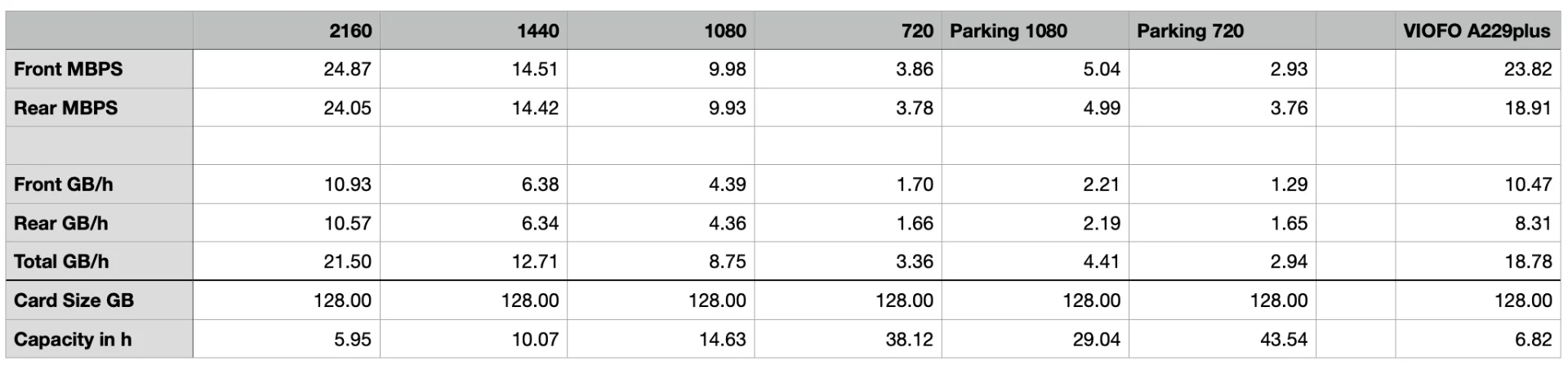
I appreciate it a lot, it can't be outlined enough, that the camera can be operated very silently, meaning without any interaction. It just works, switches between parking and driving with no worry. This is really great.
Here it becomes difficult for me, because I would like to discuss some issues observed, which probably will take more room, than the recognition of a great achievement in this useful tech.
I hope the Vantrue guys here at least recognise the context. I will put it into a bullet point list.
It warns the driver on a variety of traffic situations, like lane departure or collisions.
Maybe that's me, but: who needs this, really?
Despite the of course very distant and random false warnings - if there is no active assistance by the car, there is zero value of this.
And modern car already have those features implemented (required by law in Europe at least), so those features, they overlap what is implemented in the car already, and the car has it much better than the cam, also with active anti collision breaking etc.
Vantrue Intelligence I switched it off. It come on only after a firmware update, which only causes minutes of menu juggling to turn it off again.
A fine detail about the GPS recording, which may be relevant to my very specific use case only: Sometimes, the cam becomes my backup for GPS recordings. I record them as GPX tracks, to later do a) some trip statistics on it (including elevation climbed), as well as to geo-tag photos taken while driving.

Here I struggle with some inconsistency in the handling of GPS data.
a) I saw a log in the GPS directory, that would contain time, position and elevation data. However, this log is absent, as soon as time stamping in the video is disabled (GPS is still enabled)
b) the video I can take GPS data from, using DashcamViewer app as GPX file. However, he video is missing the elevation data (it has just time and position)
Finally, I would appreciate, if some elements of the UI could be revised, both in hardware and software.
Hardware:
Wishes
Likely I will contribute more insights over the time, this review covers the first week with some test drives only.
I will also likely add more video about the cam to my channel, probably after the Scotland trip. But those are is German language, as a warning.
Unpacking
Installation
Audio + Video quality impressions
Hardwire Kit install
In summary, it's an amazing piece of kit I enjoy, for a variety of reasons. When in operation, it is seamless. I’ve seen some room for improvements as well. And I found a bug.
First, please let me explain my use case.
The DashCam I use to film our road trips, to publish them to YouTube. This creates a slightly different requirement profile, compared to traditional Dashcam use. I've collected quite some experience with multiple models from VIOFO, for the reason of them featuring excellent video quality. This review will occasionally compare the Vantrue Sonnet S1 Pro Max to a VIOFO A229plus or earlier models I ran.
In addition, my wife came up with the wish for a DashCam to have it monitor the car when parked at work, for the obvious reasons.
In the past, she had two other cars badly scratched at the parking lot. Only for the one car that had a (not parking mode) Dashcam installed, the culprit left a message.
With the new car, she does not want to have the troubles again when it comes to covering the repairs without a known perpetrator.
Since the new car is also the one we take to vacation in Scotland, one and one came together.
The car is a Fiat 500C. C stands for convertible. In itself, it imposes a number of constraints to a 2 way Dashcam.
For example, on my Miata, I was able to put the rear facing camera onto the windshield.
Because of the construction of the Fiat 500C retractable rooftop, the windshield (there is none) and the rear window (it folds in) are not an option.
For parking surveillance, we went for the hardwire kit, a first time for myself to install.
In the image the finished setup is shown, as it is as of now.
Once a viable location for the rear cam was identified, the install was straight forward, especially given the experience from previous Dashcam installs.
If I would have wished for more, then it would be some hints for new users, with regard to taking care of safety aspects like airbags and non-blocking view.
The package is very professional designed and contains all the pieces - for a regular setup.
The casing of the camera is exceptionally robust metal, nothing can destroy it, it seems. The cam shows a very solid weight, but no issue for the 3M adhesive. I would assume the weight will help to dampen vibrations for a much more stable image.
Sound is really good, for a dashcam. Of course it has this typical high pitch and lacks bass. It seems to be sufficiently shielded against wind, there was no issue following a conversation while driving, with roof and windows put down. Only in case of announcements made by the cam itself (like an Intelligence crash warning), those appear to be screaming and distorted on the recording. I switched those announcements off anyways.
Because of the close distance of the rear cam, I had to replace the long cam cable with a short one. Luckily it is a standard USB-C cable, so one can find a good quality cable in the electronics shop. I went for a MicroConnect USB C – USB C cable 0.25 m. It features an angled connector as well, just as the original.
Something that unfortunately can not be said for the power cable provided with the hardwire kit. In contrast to the angled connector from the original cable to the 12V outlet, the hardwire kit has a straight connector only, leading into some inconsistency in the cable arrangement.
If Vantrue could align the connectors from cam and hardwire more closely, I'd bet this would be appreciated by many. In addition, there is a potential for saving, if the cables would have not a fixed connection but a USB plug instead. Just an idea.
The experiences with the cam so far are really great. The images look excellent, at least on par with the quality known from VIOFO, if not better. The images appear a bit of colder temperature, but only slightly, nothing to worry about.
The really stunning thing is, that the picture quality in 4K is achieved with a quite close bitrate compared to VIOFO in 1440p with fine mode. Comparing the 1440 modes of both, the Vantrue S1 Pro Max has a huge advantage.
I appreciate it a lot, it can't be outlined enough, that the camera can be operated very silently, meaning without any interaction. It just works, switches between parking and driving with no worry. This is really great.
Here it becomes difficult for me, because I would like to discuss some issues observed, which probably will take more room, than the recognition of a great achievement in this useful tech.
I hope the Vantrue guys here at least recognise the context. I will put it into a bullet point list.
- a well documented WIFI default password is not a good thing to have
- A firmware update resets all the user settings. All of them, including the WiFi password. Assuming the Cam is still developing, with a higher frequency of updates expected, this is pain for usability and security.
- Rear camera shows different field of view, depending on resolution selected. 4k and 1080 have full fov, 1440 and 720 have it narrowed very much. This is with both, driving and parking mode. The FoV should be constant, just like the front camera does it.
- There should be an audible warning for a SD card missing. A text is shown on display, but typically this is blocked by the mirror. The VIOFO speaks and beeps, because it really is a problematic situation for a Dashcam. I think it is an appropriate reaction.
It warns the driver on a variety of traffic situations, like lane departure or collisions.
Maybe that's me, but: who needs this, really?
Despite the of course very distant and random false warnings - if there is no active assistance by the car, there is zero value of this.
And modern car already have those features implemented (required by law in Europe at least), so those features, they overlap what is implemented in the car already, and the car has it much better than the cam, also with active anti collision breaking etc.
Vantrue Intelligence I switched it off. It come on only after a firmware update, which only causes minutes of menu juggling to turn it off again.
A fine detail about the GPS recording, which may be relevant to my very specific use case only: Sometimes, the cam becomes my backup for GPS recordings. I record them as GPX tracks, to later do a) some trip statistics on it (including elevation climbed), as well as to geo-tag photos taken while driving.
Here I struggle with some inconsistency in the handling of GPS data.
a) I saw a log in the GPS directory, that would contain time, position and elevation data. However, this log is absent, as soon as time stamping in the video is disabled (GPS is still enabled)
b) the video I can take GPS data from, using DashcamViewer app as GPX file. However, he video is missing the elevation data (it has just time and position)
Finally, I would appreciate, if some elements of the UI could be revised, both in hardware and software.
Hardware:
- the SD card slot can absolutely not be operated blindly, e.g. from driver seat to swap SD cards. Because of the vents placed around the card slot, there is zero chance to detect and eject the card from driver side (left hand drivers). But on trips, I need to change SD cards on a daily basis.
- the control button wheel, if rotated 90° anti clockwise, it would be harmony. As it is now, one need to look closely on the screen and the control, to take the right move. The initial language setting screen for example, the elements scroll sideways, but the control arrows are up/down. Rotate the control wheel and it would feel natural.
- Occasionally the connect to the cam stalls, showing a black screen with wheel. It is unfortunate, in this situation one can not go into settings, for example. Cam needs to reboot, app needs to connect, recording starts, only to wait for recording to stop when entering the settings.
- Many UI elements are very alien and need a lot of thinking sometimes. E.g. the structure of settings for parking mode, those usually are not switches but one drop-down box. The custom menu elements with x and checkmark sometimes are really strange, some default one would be much clearer.
- Don't erase user settings with each firmware update. Please, please, please.
Wishes
- A geo-fence, that would prevent activation of parking mode. Would save car battery when parked in private closed garage.
- Daylight saving time switches for European countries, not just the US.
Likely I will contribute more insights over the time, this review covers the first week with some test drives only.
I will also likely add more video about the cam to my channel, probably after the Scotland trip. But those are is German language, as a warning.
Unpacking
Last edited:


