

Chicken_Fried_Rice
New Member
- Joined
- Jan 3, 2025
- Messages
- 9
- Reaction score
- 5
- Location
- Tomball, Texas
- Country
- United States
- Dash Cam
- Viofo A129 Duo, A329, Vantrue E1 Pro
I was given the opportunity to review the Vantrue Element 1 (E1) Pro. I want to start with three disclaimers:
1. I’m not a dash cam expert, I’m slightly above normie by a few notches. I know enough to rule out manufactures from my criteria quite easily, but don’t have the equipment or time to pixel peep, compare bitrates of devices, or analyze camera internals.
2. Until now, I’ve only ever used one brand of dash cam – Viofo. I’ve used three units of A129 Duos and the new’ish A329 dual channel… So, I will unfortunately compare it to what I’m used to. In this case, the E1 Pro will be compared to the A329. Yes, I kept the A329 in 60fps while I looked at both, however, it’s a comparison and I don’t think every situation calls for apples to apples. Sometimes you compare red and green apples or apples to oranges (you get my point).
3. This is my first review of a product. And, being a level or two above normie, found it difficult to write this review, if that wasn’t obvious by how long it took me to get this out. As mentioned, I’ve only got experience on one platform and only have a mid-tier laptop. I soon realized how in-depth a dash cam review can really be and found myself a bit overwhelmed when it came time to get to work.
With that out of the way -
This is a single channel 4K camera equipped with the Sony IMX 678 Starvis 2 sensor. Per the user manual, this is their Smart Cube Voice-controlled Dashcam. Additionally, the back of the box highlights some of the features not mentioned above: 30FPS, HDR, WiFi, App compatibility, GPS, Parking Mode, Magnetic-Assists Mount, Super Capacitor, Extreme Temperature Protection, CPL Filter (optional), Remote Controller (optional), LTE Connectivity (optional).
Lets talk about what comes in the box as standard. Obviously, the camera itself, the GPS adhesive mount, the 11.5ft 12V accessory outlet charger, the USB A to USB C data cable, 2 electrostatic stickers, a cable clip, 2 “Protected by Vantrue” stickers, a plastic pry tool, and the manual. I was senttwo an optional accessoryies the polarizing filter and the hardwire kit. Correction - the polarizing lens comes in the box. The filter stayed on during the entire time of use. For comparison, my A329 also has a filter.

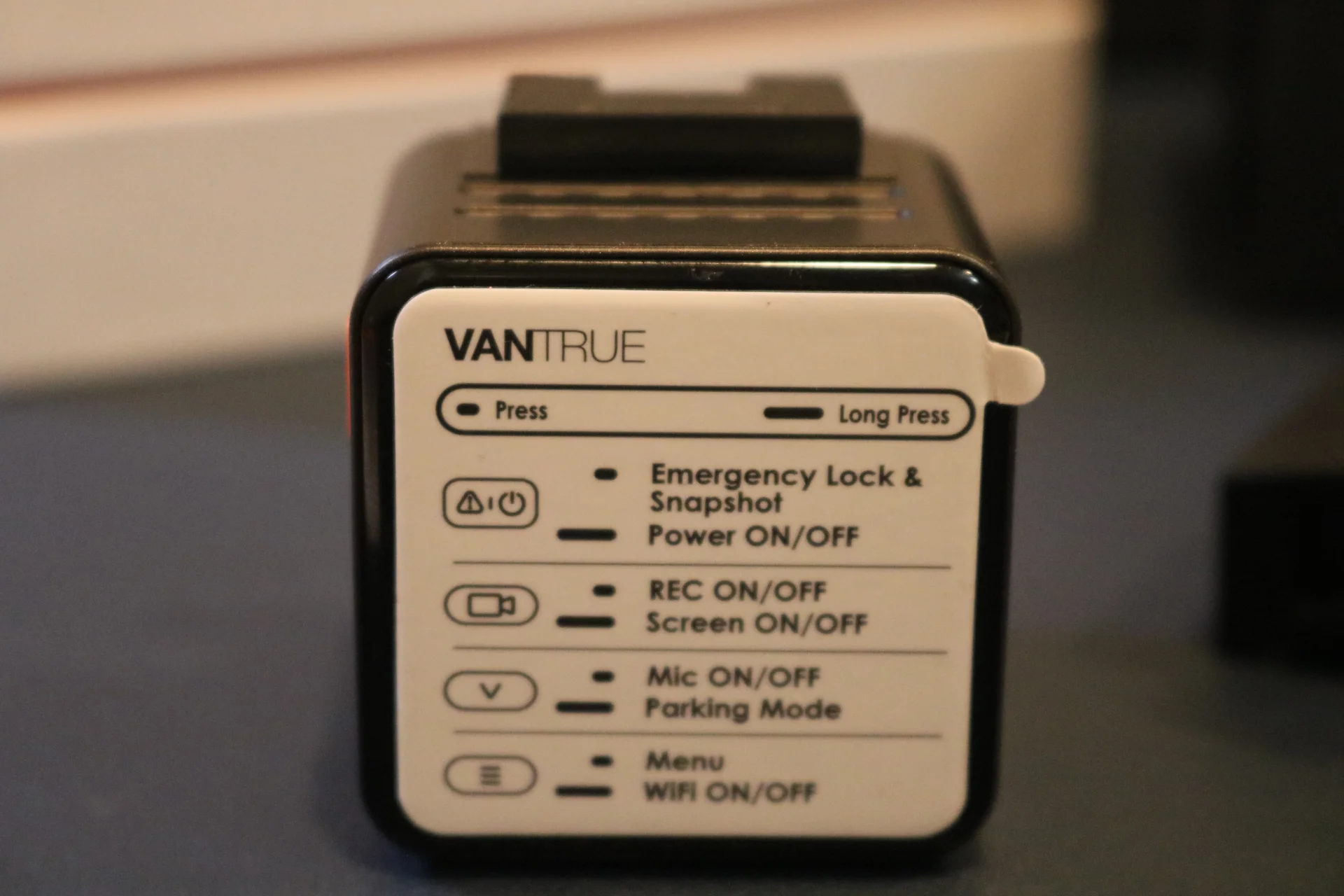
When you first take this camera out of the box, you notice its compact design. The camera feels well-built and has “respectable” weight to it – around 65g. With this compact design of the camera, the screen likewise on the back is also on the smaller side. I measured around 1.5 inches in diagonal length. When looking at the camera with the screen facing you, on the left side is the power and video capture button. Next to it is also where the micro-SD card will be placed in. On the bottom are three buttons. Starting on the left, a button with a camera icon allows you the function of turning off the screen, stopping the video, and the confirmation button. The middle button has the functions of controlling the mic, parking mode toggle, and scrolling through the menus. The button the on the right toggles the Wi-Fi on and off and the back button in the menus. On the right side of the camera unit, there’s a single USB C plug which allows for a data connection to the camera. I also believe this is where the LTE connection device would need to plug into.



The camera connects to a separate GPS module and in similar fashion and shares the camera’s compact design. The GPS module has a point where the camera can pivot up and down allowing you to adjust the height of the camera unit. I’d like to mention, the GPS module actually is magnetic at the connection point. I initially thought it slid into place and interlocked with a very tight fit. But, later found out while continuing to play with the device, it not only interlocks, but has a respectably strong magnet. I really like this. I’ve seen videos of, Viofo specifically, getting knocked out of place and losing power with a good enough impact. I’m going to pretty much say that won’t happen with this design. Out of the box, Vantrue offers the better securing method of double-sided adhesive (versus the suction cup which is offered online).
Here’s a look at the app and the menu settings. I’m not going to go too in depth of every single item, but I will mention its mostly the standard features of what you’d expect. Two things did catch my attention: 1. Even if you have your Wi-Fi off on the camera, simply going to the app to connect to the camera will turn on the Wi-Fi and give you full access to menu for your phone app – that’s great. Not having to long press on your camera’s buttons add even more convenience to the experience. 2 Vantrue gives you options for adjusting the g-sensor in which I really found interesting. More options the better in my opinion.
When it comes to the video, I left HDR off during the day and on at night. The Viofo was set to 60fps. Comparing the video of the two cameras during the day, I can’t call a clear winner. There are noticeable differences, but those differences are more in color and (over)sharpness. I don’t know the bit rates of each camera and I’m going to call that a good thing. I’m just looping the videos over and over and looking at them without bias. At night, Vantrue beats Viofo. The plates, other cars, illuminated signs and non-illuminated signs, clarity, smoothness all go toward Vantrue. I used the free version of CapCut and rendered it in 4K 60. I don’t know how that really plays out with the software of CapCut with Vantrue at 30fps and Viofo at 60fps, but the final product shows Vantrue as the video quality winner at night and a pretty much equal during the day. But, with a big caveat – audio quality. Viofo without spending more than a few seconds listening clearly shows it has the better microphone. Vantrue is a few leagues under itself in this category on this camera. When I was recording, I didn’t think of audio and played loud music the entire time, so I can’t show you all the difference. I bring up audio quality, because many people when needing to capture video and needing double insurance of capturing a license plate, will read out loud the plate number in addition to hitting the video capture button. Make sure you speak loudly and clearly with this camera. Now, this could be software issue, but I do not know at the time of writing this review. I’ve been running on Software version VT-EEA071 the entire time. Just like my first review, I also dabbled for the first time in video editing. I tried to put together different lighting and motion conditions for the comparison. Check it out:
Parking mode, listen, as a normie, I didn’t do every single variable of testing in every single parking mode. I left my camera on collision and motion detection. It worked. Testing so many scenarios is a bit outside of my scope. I’m sure others are better equipped than myself on this front.
Other things I didn’t test: The LTE connection, remote controller, and the suction cup. So, I have no information other than what can you find on the website. One thing I haven’t put the camera’s pace through is the Houston summer heat. Imagine two to three months of straight 100+ degree F weather. I’m writing this at the tail end of April and while its hot, it’s not yet Houston Nuclear Hot. This is a nice compact camera and I’m curious of how well it will handle abusive heat. I notice a small vent on the left and two rows of grills at the bottom of the camera. I’ll report back around mid October when Houston considers not being so hellish.
Overall, this is a great camera. I’m actually very surprise on the overall package from Vantrue. As someone who pretty much did not venture outside of one brand of camera, Vantrue is now on my radar. Their attention details on design choices like the magnet in the GPS mount, the level of customization of the g-sensor, how well put together the app is, and the nighttime video quality has me considering them on my next buy or when friends ask for recommendations. I don’t really have any major complaints – although I’m assuming the audio can be fixed via software update. I have intentionally not looked at other reviews prior to finishing my own. I want to keep my review purely my review without outside knowledge from other reviewers, especially from the pros. Vantrue, great job and I truly apologize for the time it took to get this out.
Edits:strikethrough on errors and purple on corrections
1. I’m not a dash cam expert, I’m slightly above normie by a few notches. I know enough to rule out manufactures from my criteria quite easily, but don’t have the equipment or time to pixel peep, compare bitrates of devices, or analyze camera internals.
2. Until now, I’ve only ever used one brand of dash cam – Viofo. I’ve used three units of A129 Duos and the new’ish A329 dual channel… So, I will unfortunately compare it to what I’m used to. In this case, the E1 Pro will be compared to the A329. Yes, I kept the A329 in 60fps while I looked at both, however, it’s a comparison and I don’t think every situation calls for apples to apples. Sometimes you compare red and green apples or apples to oranges (you get my point).
3. This is my first review of a product. And, being a level or two above normie, found it difficult to write this review, if that wasn’t obvious by how long it took me to get this out. As mentioned, I’ve only got experience on one platform and only have a mid-tier laptop. I soon realized how in-depth a dash cam review can really be and found myself a bit overwhelmed when it came time to get to work.
With that out of the way -
This is a single channel 4K camera equipped with the Sony IMX 678 Starvis 2 sensor. Per the user manual, this is their Smart Cube Voice-controlled Dashcam. Additionally, the back of the box highlights some of the features not mentioned above: 30FPS, HDR, WiFi, App compatibility, GPS, Parking Mode, Magnetic-Assists Mount, Super Capacitor, Extreme Temperature Protection, CPL Filter (optional), Remote Controller (optional), LTE Connectivity (optional).
Lets talk about what comes in the box as standard. Obviously, the camera itself, the GPS adhesive mount, the 11.5ft 12V accessory outlet charger, the USB A to USB C data cable, 2 electrostatic stickers, a cable clip, 2 “Protected by Vantrue” stickers, a plastic pry tool, and the manual. I was sent
When you first take this camera out of the box, you notice its compact design. The camera feels well-built and has “respectable” weight to it – around 65g. With this compact design of the camera, the screen likewise on the back is also on the smaller side. I measured around 1.5 inches in diagonal length. When looking at the camera with the screen facing you, on the left side is the power and video capture button. Next to it is also where the micro-SD card will be placed in. On the bottom are three buttons. Starting on the left, a button with a camera icon allows you the function of turning off the screen, stopping the video, and the confirmation button. The middle button has the functions of controlling the mic, parking mode toggle, and scrolling through the menus. The button the on the right toggles the Wi-Fi on and off and the back button in the menus. On the right side of the camera unit, there’s a single USB C plug which allows for a data connection to the camera. I also believe this is where the LTE connection device would need to plug into.
The camera connects to a separate GPS module and in similar fashion and shares the camera’s compact design. The GPS module has a point where the camera can pivot up and down allowing you to adjust the height of the camera unit. I’d like to mention, the GPS module actually is magnetic at the connection point. I initially thought it slid into place and interlocked with a very tight fit. But, later found out while continuing to play with the device, it not only interlocks, but has a respectably strong magnet. I really like this. I’ve seen videos of, Viofo specifically, getting knocked out of place and losing power with a good enough impact. I’m going to pretty much say that won’t happen with this design. Out of the box, Vantrue offers the better securing method of double-sided adhesive (versus the suction cup which is offered online).
Here’s a look at the app and the menu settings. I’m not going to go too in depth of every single item, but I will mention its mostly the standard features of what you’d expect. Two things did catch my attention: 1. Even if you have your Wi-Fi off on the camera, simply going to the app to connect to the camera will turn on the Wi-Fi and give you full access to menu for your phone app – that’s great. Not having to long press on your camera’s buttons add even more convenience to the experience. 2 Vantrue gives you options for adjusting the g-sensor in which I really found interesting. More options the better in my opinion.
When it comes to the video, I left HDR off during the day and on at night. The Viofo was set to 60fps. Comparing the video of the two cameras during the day, I can’t call a clear winner. There are noticeable differences, but those differences are more in color and (over)sharpness. I don’t know the bit rates of each camera and I’m going to call that a good thing. I’m just looping the videos over and over and looking at them without bias. At night, Vantrue beats Viofo. The plates, other cars, illuminated signs and non-illuminated signs, clarity, smoothness all go toward Vantrue. I used the free version of CapCut and rendered it in 4K 60. I don’t know how that really plays out with the software of CapCut with Vantrue at 30fps and Viofo at 60fps, but the final product shows Vantrue as the video quality winner at night and a pretty much equal during the day. But, with a big caveat – audio quality. Viofo without spending more than a few seconds listening clearly shows it has the better microphone. Vantrue is a few leagues under itself in this category on this camera. When I was recording, I didn’t think of audio and played loud music the entire time, so I can’t show you all the difference. I bring up audio quality, because many people when needing to capture video and needing double insurance of capturing a license plate, will read out loud the plate number in addition to hitting the video capture button. Make sure you speak loudly and clearly with this camera. Now, this could be software issue, but I do not know at the time of writing this review. I’ve been running on Software version VT-EEA071 the entire time. Just like my first review, I also dabbled for the first time in video editing. I tried to put together different lighting and motion conditions for the comparison. Check it out:
Parking mode, listen, as a normie, I didn’t do every single variable of testing in every single parking mode. I left my camera on collision and motion detection. It worked. Testing so many scenarios is a bit outside of my scope. I’m sure others are better equipped than myself on this front.
Other things I didn’t test: The LTE connection, remote controller, and the suction cup. So, I have no information other than what can you find on the website. One thing I haven’t put the camera’s pace through is the Houston summer heat. Imagine two to three months of straight 100+ degree F weather. I’m writing this at the tail end of April and while its hot, it’s not yet Houston Nuclear Hot. This is a nice compact camera and I’m curious of how well it will handle abusive heat. I notice a small vent on the left and two rows of grills at the bottom of the camera. I’ll report back around mid October when Houston considers not being so hellish.
Overall, this is a great camera. I’m actually very surprise on the overall package from Vantrue. As someone who pretty much did not venture outside of one brand of camera, Vantrue is now on my radar. Their attention details on design choices like the magnet in the GPS mount, the level of customization of the g-sensor, how well put together the app is, and the nighttime video quality has me considering them on my next buy or when friends ask for recommendations. I don’t really have any major complaints – although I’m assuming the audio can be fixed via software update. I have intentionally not looked at other reviews prior to finishing my own. I want to keep my review purely my review without outside knowledge from other reviewers, especially from the pros. Vantrue, great job and I truly apologize for the time it took to get this out.
Edits:
Attachments


Last edited:
