

Julian23
Well-Known Member
- Joined
- Nov 16, 2016
- Messages
- 1,315
- Reaction score
- 1,914
- Country
- Germany
- Dash Cam
- Several brands :)
Following up on my previous post, I'm excited to share the Viofo Config Viewer tool with you all! Thanks for the interest you showed.
The goal was simple: with Viofo allowing us to export settings, why not build a nice GUI to check those settings quickly and easily on a PC?
What is it?
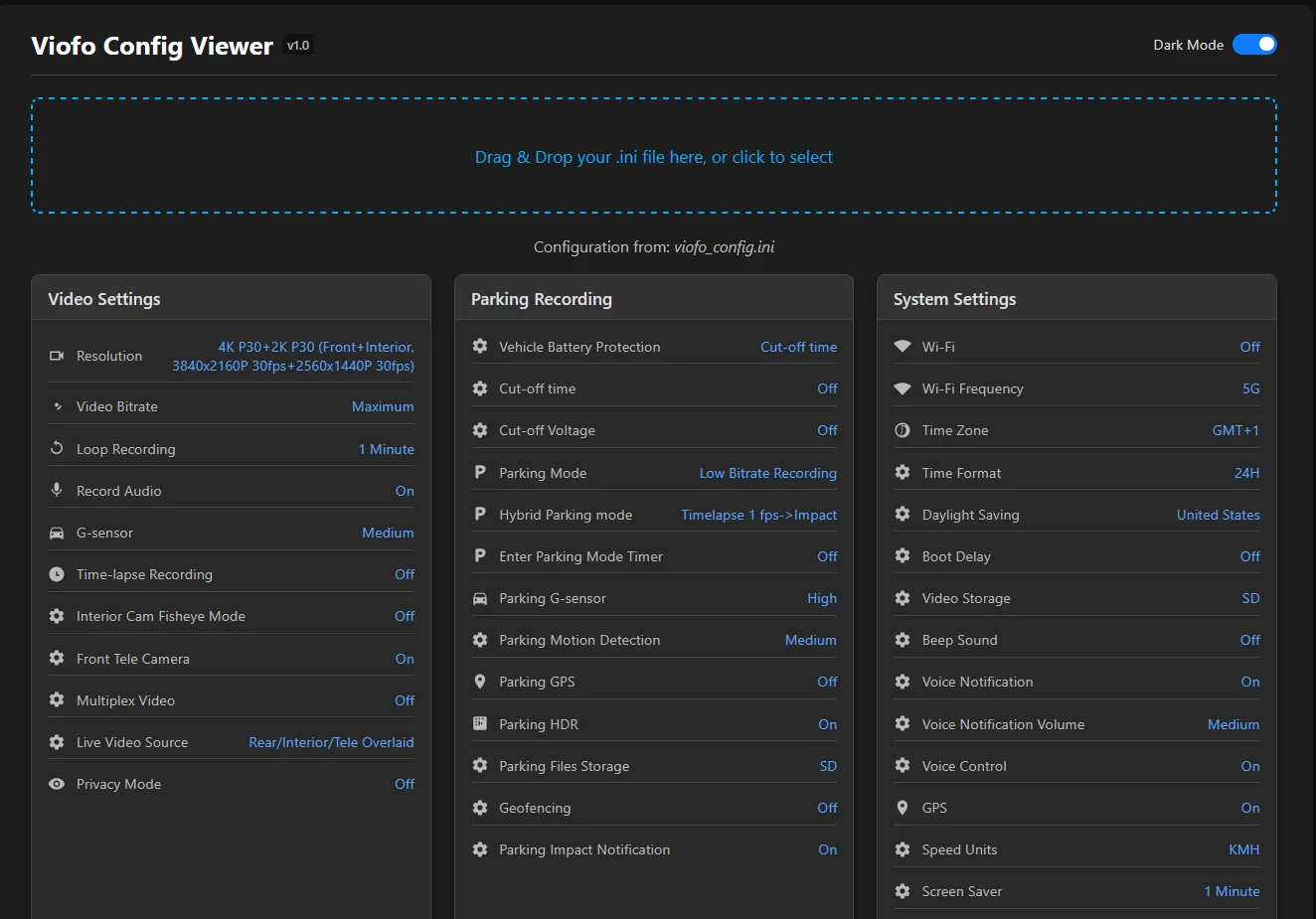
This is a single, offline HTML file that provides a clean, graphical user interface (GUI) for the viofo_config.ini file that the new V2.0 firmware can export.
It solves the common problem of "I wonder what settings I was using for that drive?" by giving you a clean, easy-to-read overview in a modern card layout with icons.

Key Features:
The file can be found on the SD card.
You can find the firmware in this thread: https://dashcamtalk.com/forum/threads/v2-0-firmware-for-public-testing.57014/
How to Use:
The "Set-and-Forget" Benefit
The best part about the V2.0 firmware is that you can enable the setting export once, and it becomes a "set-and-forget" feature. The camera will automatically keep the viofo_config.ini file on your SD card updated whenever you make changes. This means you can just pop the SD card into your computer and use this tool to instantly see your current settings, solving my exact issue of no more wondering what settings were used!
Feedback & Bug Reports
I have only been able to test this with my A329T. If you have an A329S or another variant that uses this firmware, I would be very grateful if you could test it and let me know if it works correctly.
Please report any bugs or suggestions for improvement in this thread!
Hope you find it useful!
The goal was simple: with Viofo allowing us to export settings, why not build a nice GUI to check those settings quickly and easily on a PC?
What is it?
This is a single, offline HTML file that provides a clean, graphical user interface (GUI) for the viofo_config.ini file that the new V2.0 firmware can export.
It solves the common problem of "I wonder what settings I was using for that drive?" by giving you a clean, easy-to-read overview in a modern card layout with icons.
Key Features:
- Visual Card Layout: Displays all settings in clean, easy-to-read cards instead of a plain text file.
- Easy to Use: Simply drag and drop your config file onto the page.
- Single Offline File: It's "just" one HTML file. It works entirely in your browser and does not need an internet connection.
- No Installation Needed: Nothing to install. Just save the file and open it.
- Cross-Platform: Works in any modern browser on any OS (Windows, macOS, Linux).
- Light & Dark Mode: Includes a toggle for your preferred viewing theme.
- Safe & Read-Only: The tool only reads your file; it does not and cannot modify anything. It has no access to the internet!
Important: Requirements
This tool currently only works for the following setup:- Viofo A329S series or A329T
- Firmware: Version 2.0 (Public Test Firmware)
The file can be found on the SD card.
You can find the firmware in this thread: https://dashcamtalk.com/forum/threads/v2-0-firmware-for-public-testing.57014/
How to Use:
- Download the attached Viofo_Config_Viewer.zip file below.
- Unzip the file. You will get a single HTML file (viofo-config-viewer.html).
- Open the viofo-config-viewer.html file in any web browser (Chrome, Firefox, Edge, Safari, etc.).
- Drag & Drop your viofo_config.ini file from the SD card onto the designated area on the page. Or select it from the box. That's it!
The "Set-and-Forget" Benefit
The best part about the V2.0 firmware is that you can enable the setting export once, and it becomes a "set-and-forget" feature. The camera will automatically keep the viofo_config.ini file on your SD card updated whenever you make changes. This means you can just pop the SD card into your computer and use this tool to instantly see your current settings, solving my exact issue of no more wondering what settings were used!
Feedback & Bug Reports
I have only been able to test this with my A329T. If you have an A329S or another variant that uses this firmware, I would be very grateful if you could test it and let me know if it works correctly.
Please report any bugs or suggestions for improvement in this thread!
Hope you find it useful!

