Viofo Player GPS and Map Issues

TimmieTheGeek

New Member
Joined
Jun 10, 2025
Messages
8
Reaction score
0
Location
Newburgh, Indiana
Country
United States
I am a new A329S customer as of yesterday, 6/9/2025. So far I only have the front cam installed but will get the rear cam going soon.

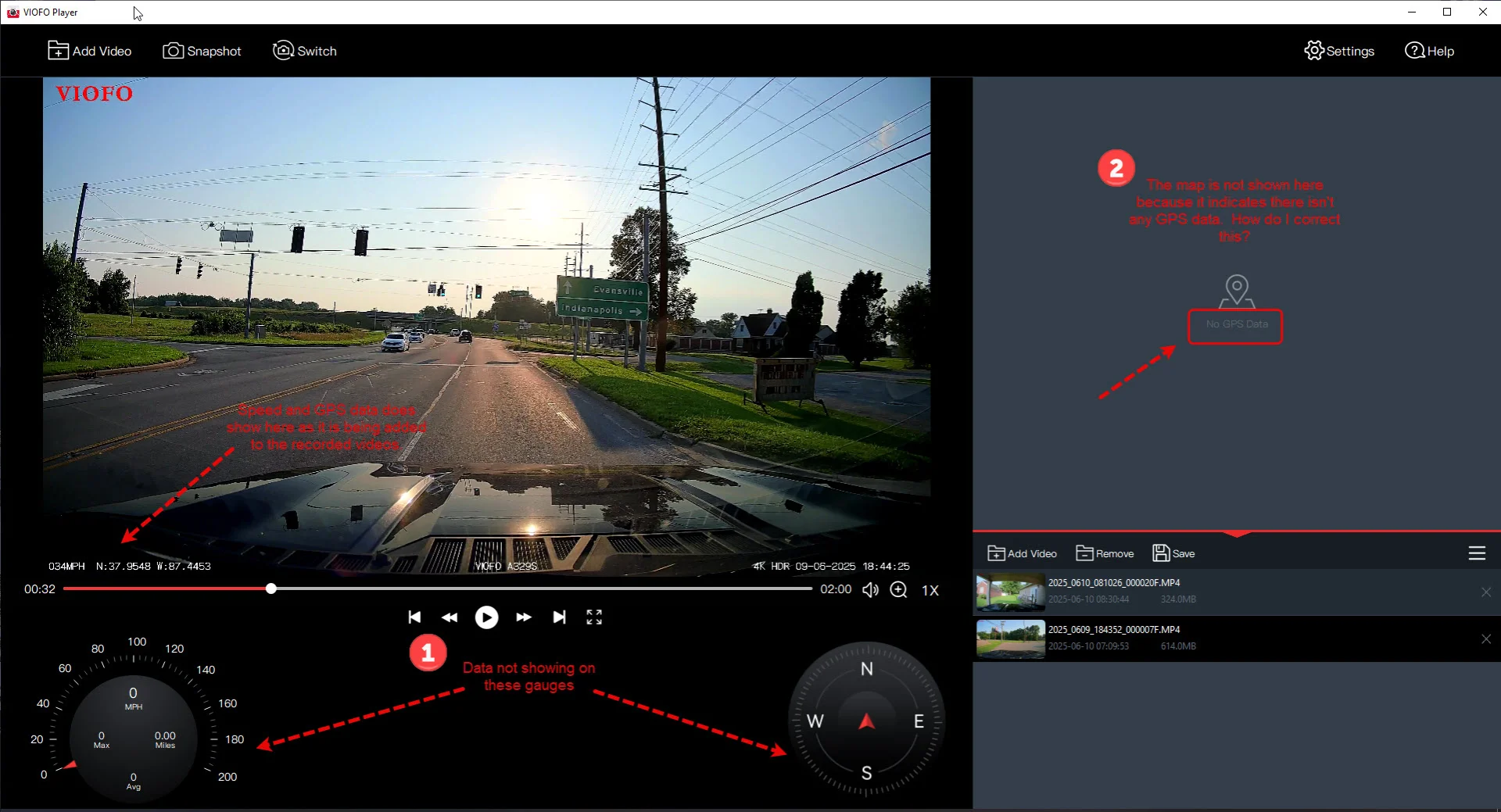
Great front camera and works fine but I am having issues when I view the recorded files in the Viofo Player on my Windows PC. Specifically, the analog speed gauge and compass do not show anything in the bottom portion of the Player window, and the Map window is blank and says "No GPS Data", so I don't get the map display.

I am recording GPS data and it is shown in the lower left of the Player display. See the attached pics. Any ideas why the speed & compass gauges don't display anything and the Map window thinks the GPS data is missing? Is there another setting I might have set wrong?

Thanks, Tim
GPS Map Issue.webp

Screenshot_2025.webp
 
I am a new A329S customer as of yesterday, 6/9/2025. So far I only have the front cam installed but will get the rear cam going soon.

Great front camera and works fine but I am having issues when I view the recorded files in the Viofo Player on my Windows PC. Specifically, the analog speed gauge and compass do not show anything in the bottom portion of the Player window, and the Map window is blank and says "No GPS Data", so I don't get the map display.

I am recording GPS data and it is shown in the lower left of the Player display. See the attached pics. Any ideas why the speed & compass gauges don't display anything and the Map window thinks the GPS data is missing? Is there another setting I might have set wrong?

Thanks, Tim
View attachment 81084
View attachment 81087
I will forward this to our engineer team for help.
 
I will forward this to our engineer team for help.
I ran a test of the v1.1.2 VIOFO player for Windows with A329S footage from this morning. The A329S is running v1.0_250527 firmware. The VIOFO player did not detect/show any GPS data for me as well.

1749585665888.webp


I wanted to run this same test with the Mac version, but I ran into installation / runtime issues for the VIOFO Player on my Mac Mini M2 running Sequoia 15.5.

During install, it wanted this to be installed [which is somewhat expected]:

1749587048006.webp


After the VIOFO Player install finished [copied player to "Applications"], I attempted to start the player and this warning is presented:

1749587840023.webp


I ran a scan of my system and the VIOFO app with Norton Antivirus and no issues were found. I used the Privacy & Security option to allow it to override the warning. I clicked on "Open Anyway", in both places.

It looks like VIOFO has some work to do on getting the Mac player installable and usable without going through all of these steps.

1749587954868.webp
1749587973308.webp


With the Mac VIOFO Player running, I used it to play the same A329S video footage. No GPS data was detected/shown.

1749588028723.webp
 
I ran a test of the v1.1.2 VIOFO player for Windows with A329S footage from this morning. The A329S is running v1.0_250527 firmware. The VIOFO player did not detect/show any GPS data for me as well.

View attachment 81094

I wanted to run this same test with the Mac version, but I ran into installation / runtime issues for the VIOFO Player on my Mac Mini M2 running Sequoia 15.5.

During install, it wanted this to be installed [which is somewhat expected]:

View attachment 81095

After the VIOFO Player install finished [copied player to "Applications"], I attempted to start the player and this warning is presented:

View attachment 81096

I ran a scan of my system and the VIOFO app with Norton Antivirus and no issues were found. I used the Privacy & Security option to allow it to override the warning. I clicked on "Open Anyway", in both places.

It looks like VIOFO has some work to do on getting the Mac player installable and usable without going through all of these steps.

View attachment 81097 View attachment 81098

With the Mac VIOFO Player running, I used it to play the same A329S video footage. No GPS data was detected/shown.

View attachment 81099
Please download to install this new version (V1.1.5) to test:
 
Please download to install this new version (V1.1.5) to test:
I downloaded and installed that version of the Player and it works great! The speed and compass gauges work now and the map displays the info it should.

Thank you!

Tim Rood
 
Back
Top