
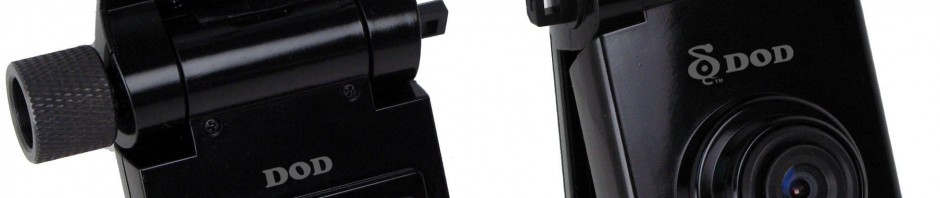
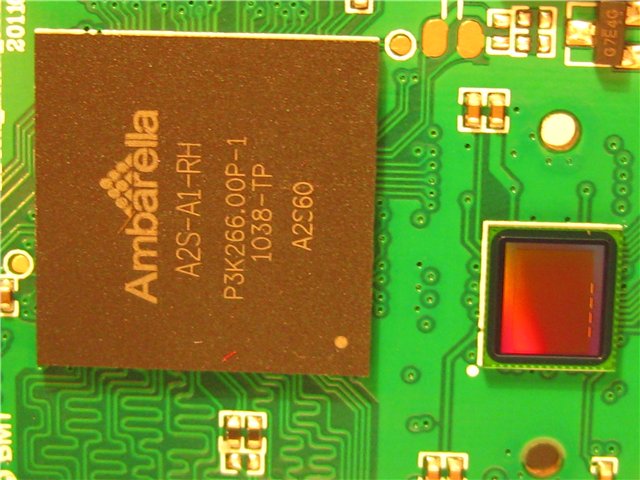
The DOD GSE550 is a GPS enabled dash cam that can record 1080p at 30FPS. Like many of the DOD models it is based on the Ambarella processor. This camera is based on the Ambarella A2S processor (the A2S60 as per the picture below – click to view larger).
It provides excellent picture quality in the day but only average quality at night. DOD has indicated the the GSE550 is the replacement for the discontinued GS600. Unlike the GS600, this camera has a display screen. This dash camera is very compact and can be folded shut when not in use. When folded, it is very difficult for people walking by to notice the camera. The DOD GSE520 is the same camera without GPS and G-sensor.
GSE550 Models
Like many of the DOD cameras there are many variations available on eBay, Aliexpress and DealExtreme. The primary models include:
- DOD GSE550 (DOD brand)
- GSE550 (Neutral OEM version)
- Kapkam Q5 (Russian version)
- ACV Q5 (Russian Version)
The non-GPS version models include:
- DOD GSE520 (DOD brand)
- GSE520 (Neutral OEM version)
- Kapkam Q3 Lite (Russian version)
- ACV Q5 Lite (Russian version)
The non-GPS version is identical to the GS600 with the exception of the GPS sensor.
Known problems
Screen Turns on Spontaneously
Many users have noticed that the screen will turn on automatically when driving (when it has been set to off). This appears to be a software bug.
Poor Night Recording
The most common complaint in this camera is poor night recording. There is not much that can be done to improve the quality.
Low Capacity Battery
The GS600 normally comes with a low capacity battery. If the battery dies it must be replaced. To replace the battery, you must disassemble the dash cam, carefully unsolder the two wires going to the battery, detach the battery from the tape, solder new wires, and then paste it back into place if necessary.
Sample Videos
Day
Night
Firmware
WARNING! MAKING CHANGES TO YOUR FIRMWARE ARE PERFORMED AT YOUR OWN RISK. WE ARE NOT RESPONSIBLE FOR ANY DAMAGE TO YOUR DASH CAM AS A RESULT OF THESE INSTRUCTIONS.
Do not try to flash dash cams with incompatible firmware. If your existing firmware does not end in 085-MFH or T24-MFH, do not use this firmware.
Firmware Backup
Before updating your firmware, it is highly recommended to backup your existing firmware. This can be easily done using the following method.
- Download the autoexec.ash file (right click and choose save as). This is a simple text file with the following contents (firmfl gen 5 bst bld pri rom dsp d:\backup.bin). This file has the necessary commands to extract the existing firmware from the dash cam.
- Make sure the camera battery is fully charged
- Use the following settings in your dash cam:USB – NO (USB IN – NO),Delay. – NO (SHUTDOWN – NO), Auto save – OFF (MOTION DET. – OFF) A.SHUT. – OFF (AUTO OFF – OFF)
- Format the SD-card (via the dash cam or your computer).
- Copy the autoexec.ash file to your formatted SD-card. DO NOT copy the autoexec.ash file to the DVR’s internal memory, only to the SD-CARD!
- Insert the SD-card with the autoexec.ash file in the dashcam and turn it on. The dashcam will be in normal standby mode. The process to backup the firmware takes about 10 seconds. However, we recommend that you wait 1 MINUTE.
- After waiting a minute, and turn off the dash cam.
- Insert the SD-card into the computer.
- Copy the firmware stored as BACKUP.BIN
- Rename the resulting BACKUP.BIN in accordance with the number of your firmware. For example, “GSE550 v5.4 T24-MFH”.
Firmware Update Instructions
- You must use an SD-Card reader to perform this operation. Do not attempt to do this directly on the dash cam.
- Download the desired firmware from the section below.
- Rename the downloaded firmware file to yamaha.bin
- Copy the file yamaha.bin on SD-card using a card reader.
- Insert the card into the dash cam and turn it on. You should see a running circle and the inscription “Firmware update”.
- Do not turn off the dash cam until the symbol and the words disappear from the screen, the whole process takes about 10 seconds.
- You should see a message to turn off the dash cam. Turn it off, remove the memory card and delete the yamaha.bin file.
- Use your dash cam with the latest firmware.
Latest Firmware
These firmware files are only compatible for cameras that have an existing firmware ending in MFH. IF THE CURRENT FIRMWARE IN YOUR DASH CAM DOES NOT END IN MFH, DO NOT UPGRADE YOUR FIRMWARE.
Note that the latest firmware for the GSE550 appears to be V1.20 T24-MFH.
Previous Firmware
Specifications
Data Sheet No specs match that search. Hardware Layout ScoresTechnical Specs
Spec DOD GSE550 Brand DOD Model GSE550 Channels 1 Channel Setup Front Form Factor Hanging Release Date Aug 2011 Country China Warranty 12 months Spec DOD GSE550 Processor Ambarella A2S60 Video Format MOV Compression H.264 Screen Size 1.5" Touchscreen No Mount Adhesive Power Supply 12V Battery Type 190mAh Spec DOD GSE550 Parking Mode No Wi-Fi No GPS Yes Apps Windows Cloud Connectivity No Voice Commands No Spec DOD GSE550 SD Card Type MicroSD Max Card Size 64GB Operating Temperature -10°C to 65°C Swivel No Error Notification No Camera Units
CMOS Unknown Max Resolution 1920 x 1080p FPS 30 Bitrate 8.0 Mbps Viewing Angle 120° Dimensions 98 x 53 x 23 HDR No Ratings
Last Updated: Feb 22, 2013