
Parking Mode not being triggered

DashCamUser123

Active Member
Joined
Jan 29, 2021
Messages
319
Reaction score
77
Location
Ontario
Country
Canada
Dash Cam
A129 Duo x 2 / A139 3-Channel / A229 Plus 3-Channel
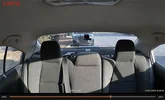
Parking mode is activated in Auto Event Detection but is not being triggered. I have the VS1 installed on the vehicle cabin roof fabric near the light dome. Image below is captured from the VS1.

I walk past the rear windshield and nothing is recorded even when set to High Sensitivity. If I run my hands across the VS1 from inside the car, it triggers the Auto Event Detection and records the event. I want to record any activity thru the rear windshield and rear side windows.

How does the sensor on the VS1 work for Parking mode? Is the VS1 sensor made to detect only when up against the windshield?

@VIOFO-Support
 

Attachments

  • vs1 - Copy.webp
    vs1 - Copy.webp
    38.7 KB · Views: 40
As a data point, mine works pretty well at the windshield, but low bitrate is probably a better choice. Tedious to review though. I'm no expert.
 
I used low bitrate on my older dashcams because Auto Event Detection was not good. I didn't have a choice so used it in that setting. It is tedious to review so I didn't review often. The A229 3-Channel did a real decent job and motion would set off the cam to record in Parking Mode. To the point where I had to set it to Low sensitivity.

But there is something else going on with the VS1. I need to find out if the dectector software is as good as in the A229 Plus or is it less sensitive if the motion is happening at a further distance and the motion covers a smaller section of the overall detection fov.
 
You’ll get the fastest service here: SUBMIT A TICKET
-Chuck
This can't be right? I know Auto Event Detection on my A229 Plus 3-Channel can be triggered by motion even if it's a car crossing the camera's FOV or me walking toward the car from a distance. And some users were advised in the past to set the motion sensitivity to Low on Viofo cams to avoid having leaves blown by the wind triggering the motion sensor. Does the VS1 auto event detection (motion detection) work differently from the other Viofo cams? I do have the VS1 G-Sensor set to Low just like on my A229 Plus 3-Channel.

@viofo

I heard back from Viofo Support.

How the VS1 Auto Event Detection Works

The VS1 uses a G-sensor-based motion detection for Auto Event Detection in parking mode. This means it detects:

- Physical vibrations and impacts are transmitted through the vehicle itself
- Direct contact or movement of the camera unit

This is why running your hand across the VS1 directly triggers a recording — you're creating a physical vibration on the sensor itself.

Why It's Not Detecting Movement Through the Windows

- 🔴 Visual movement alone does not trigger Auto Event Detection — a person walking past the windshield creates no physical vibration on the camera
- 🔴 The sensor is not a visual/PIR motion detector — it cannot detect movement it "sees" through the glass
 
Last edited:
that doesn't sound right to me
@viofo

You are absolutely right. Makes you wonder about the accuracy of information provided by Viofo Support. sheesh.

Viofo literature itself states the following about what is Auto Event Detection (but we users already know this; why doesn't Viofo Support (at least this one person) know this?

Auto Event Detection from Viofo website

1.Auto event detection

Dashcam record when it detects movements within its lens' field of view.
and stops recording when no motion is detected.

Tips:

  • You can adjust its sensitivity by option " Parking motion detection'',there are three levels to choose from, we suggest you choose low sensitivity, so minor motion caused by wind or rain doesn't trigger recording.
  • All files recorded in this mode are locked and saved in the RO folder.
  • Most of our cameras support buffer parking, so some seconds before the trigger will be saved.
 
@viofo

You are absolutely right. Makes you wonder about the accuracy of information provided by Viofo Support. sheesh.

Viofo literatuire itself states the following about what is Auto Event Detection (but we users already know this; why doesn't Viofo Support (at least this one person) know this?

1.Auto event detection

Dashcam record when it detects movements within its lens' field of view.
and stops recording when no motion is detected.

Tips:

  • You can adjust its sensitivity by option " Parking motion detection'',there are three levels to choose from, we suggest you choose low sensitivity, so minor motion caused by wind or rain doesn't trigger recording.
  • All files recorded in this mode are locked and saved in the RO folder.
  • Most of our cameras support buffer parking, so some seconds before the trigger will be saved.
I just brought the camera inside, set it to auto event detection, high sensitivities. Went into parking mode after five minutes as usual. Walked in front of it, maybe 7 feet away. It filmed me. The red light goes solid while it's filming.

I'll leave it on auto event detection when I walk today, if it stops raining. It worked okay last time I used it at that parking lot. There's not a lot of action, it is tedious going through all the files, and I do feel there is potential for missing something. Too bad there isn't a hybrid setting: low bitrate with motion highlighted, somehow.

It's probably got something to do with where you mounted the thing, headliner in middle of car vs window. Is it getting good power? Just now my VS1 wouldn't go into parking mode after 5 minutes of inactivity on the counter on the MacBook Pro adapter. It would on an old Nook plug. Then again, I did use different cables. Whatever, possible?
 
I just brought the camera inside, set it to auto event detection, high sensitivities. Went into parking mode after five minutes as usual. Walked in front of it, maybe 7 feet away. It filmed me. The red light goes solid while it's filming.

I'll leave it on auto event detection when I walk today, if it stops raining. It worked okay last time I used it at that parking lot. There's not a lot of action, it is tedious going through all the files, and I do feel there is potential for missing something. Too bad there isn't a hybrid setting: low bitrate with motion highlighted, somehow.

It's probably got something to do with where you mounted the thing, headliner in middle of car vs window. Is it getting good power? Just now my VS1 wouldn't go into parking mode after 5 minutes of inactivity on the counter on the MacBook Pro adapter. It would on an old Nook plug. Then again, I did use different cables. Whatever, possible?
It runs on a BBMyCar Powercell 8. Power is good. The VS1 announces it is entering into Parking Mode so you know Parking Mode is working. Just an issue right now with Auto Event Detection triggering when there is motion within the 140* FOV of the camera out the windshield.
 
I wonder if it could be the heater wires in the rear glass? Maybe temporarily aim it out the front windshield as a test?

edit: I haven't tried event detection out the rear window yet. It's not aimed in the wired section though.
 
@DashCamUser123
@Velvetfoot
Both of yous' guys now know why Viofo AED is the #1 reason for DCT new membership 🤣
This plays in my head when I think of Viofo AED;

 
Last edited:
@Velvetfoot said:
Upon further review, I'm going with low bitrate.
@Chuck McCoy said:
You have reached "enlightenment" lol
AED sounds great in theory but, there are 100's and 100's of complaints here on DCT saying;
1.) AED is too sensitive, and my SD Card is filled up with useless footage of leaves blowing in the wind.
or
2.) AED completely missed someone hitting my car while it was parked.

Conclusion: LBR is the only "reliable" parking mode with audio.
However, I really do like LPID.
LPID will work for a lot of customer's applications without requiring a Dash Cam Battery Pack.
I just wish VIOFO could get LPID power consumption from 35mA - 45mA down to 1mA just like Vueroid & BlackVue.
 
At that little parking lot yesterday, it caught a car leaving but not arriving. The distance to camera was very short. It did catch other activity. So, hit or miss.
 
I wonder if it could be the heater wires in the rear glass? Maybe temporarily aim it out the front windshield as a test?

edit: I haven't tried event detection out the rear window yet. It's not aimed in the wired section though.
Not likely because I have other Rear cams taht are stuck right up against the rear windshield and the heater wires are right there.
 
@Velvetfoot said:
Upon further review, I'm going with low bitrate.
@Chuck McCoy said:
You have reached "enlightenment" lol
AED sounds great in theory but, there are 100's and 100's of complaints here on DCT saying;
1.) AED is too sensitive, and my SD Card is filled up with useless footage of leaves blowing in the wind.
or
2.) AED completely missed someone hitting my car while it was parked.

Conclusion: LBR is the only "reliable" parking mode with audio.
However, I really do like LPID.
LPID will work for a lot of customer's applications without requiring a Dash Cam Battery Pack.
I just wish VIOFO could get LPID power consumption from 35mA - 45mA down to 1mA just like Vueroid & BlackVue.
Viofo's own advertisement about their dashcams say Auto Event Detection (AED) will be triggered if "motion" is detected if the motion is within the FOV of the camera. Are they lying? MIsleading consumers? What an I missing here?

My A229 Plus works fine in AED. Why not the VS1? The VS1 has not captured even one event in AED when set up like in the photos I posted here. Not one. So, obviously something is wrong. I can understand it may miss sometimes but not record anything? Sure, it is possible that some "motion" may have been missed from being captured with the A229 Plus and I didn't know about it. The AED in the A229 Plus was so good that I had to set Motion Sensitivty to LOW.
 
Out of curiosity, I tested the Viofo VS1 Parking Mode indoors with no glass between the camera and me. My tests show that the VS1 Auto Event Detection is not even close tro reliable. In low light and in bright light. It is basically useless in my testing. WHY? Either I have a bad sample or that's exactly how it works. The other cams work in AED.

It only triggered when I was 6 feet from the camera and right in front of the camera from 6-7 feet away and sometimes just to the right edge but not repeatable. If buyers knew the AED in the VS1 almost never works, people might reconsider buying the VS1 to use in AED in Parking Mode. A disappointment and maybe even false advertisement.

This is from Viofo page about AED.

1.Auto event detection

Dashcam record when it detects movements within its lens' field of view.
and stops recording when no motion is detected.

Tips:

1) You can adjust its sensitivity by option " Parking motion detection'',there are three levels to choose from, we suggest you choose low sensitivity, so minor motion caused by wind or rain doesn't trigger recording.

2) All files recorded in this mode are locked and saved in the RO folder.

3) Most of our cameras support buffer parking, so some seconds before the trigger will be saved.


What is Auto Event Detection (from VIOFO page

QUESTION: Did they dumb down the sensors in the VS1 so they can sell it for less? It is a much smaller form factor so what electronics is missing inside the VS1 so that AED doesn't work well whereas in other dashcams it does work, like my A229 Plus? I thought I had tested the VS1 a couple of weeks ago when I started to use it and it worked. But no files were ever recorded in AED mode so that was a clue it barely works.
 
Last edited:
Tedious to review though
Yes CUZ low bitrate is just one long film so to say, that is why i prefer to also have G-sensor on meanwhile to act like sort of flags for any actual events that might have occurred.
 
My main reason for having a dashcam in Parking Mode is to capture any incidents where someone approaches the car to vandalize it, like putting a scratch on it. Of course a collision will be recorded due to the impact.
 
I am not sure a keying event would be registered by G sensor i have to admit, but low bitrate would cover something like that, the only problem is finding it if your car have been parked there the last 8 hours.
But personally i will gladly sit thru X hours of footage to find such a event to get my revenge.
 
Back
Top