Mangoal MG-0xxX OEM-Style Dashcam for Volvo S60

EricSan

Well-Known Member
Joined
Dec 28, 2023
Messages
1,439
Reaction score
1,095
Location
Central PA
Country
United States
Dash Cam
There are ALWAYS user serviceable parts inside!
It seems that things have been pretty quiet this year in the context of new dashcam model releases. I wonder to what extent the AI and data center build-outs have driven processor and memory production timelines and costs through the roof. After so many new camera releases last year, I've been a bit bored with no fun new cameras to review for a while...

So, I was curious when Amber from @Mangoal Dash Cam reached out to me a little while ago and asked if I'd review one of their cameras. I hadn't heard of MANGOAL before, so I'm interested in learning about their offerings which are OEM-Style dashcameras that blend in with the car's interior and look like they were factory installed by the automaker. With a very sincere "Thank you!" to Amber, here is a quick intro to the MANGOAL dashcam.

Features:
  • Built-in WiFi
  • Built-in G-Sensor
  • Video Rotate
  • Time-Lapse Parking Mode (parking mode hardwire kit is required)
  • G-Sensor Parking Mode (parking mode hardwire kit is required)
  • Novatek 96670 Processor, Sony IMX335 Video Sensor for the front camera** (see below)
  • Novatek 96671 Processor, Galaxycore Microelectronics GC2093 (1920x1080) Video Sensor for the rear camera
  • 4K Ultra-HD 3840x2160 @30 fps** (see below)
  • Loop cycle and Split Recording Mode
  • Supports up to 256GB micro-SD cards
  • Auto Power Off
  • Time, Date
  • Time Lapse Video
  • Built-in Speaker and Microphone
Voice Notifications:
- Start Recording
- Start Emergency Recording
- Restore Factory Settings
- Turn on time-lapse recording

Maximum Resolutions Are as Follows:
- 3842x2160 @30 fps** (see below)
- 2560x1600 @30 fps
- 1920x1080 @30 fps

Camera angles:
The manual (see image below) indicates 150 degree field of view (FoV) for the front camera and does not specify the FoV for the rear camera. The product webpage (https://mangoal.com/products/mangoa...ash-cam-for-volvo-s60-v60-t5-t6-t8-b5-model-a), however, indicates "To reduce the blind areas it has the front wide angle of 170 degree and rear wide angle of 140 degree." These specs don't match and should be corrected.

Power Consumption Measurements:
I'm not sure if I'll be able to measure power consumption for this camera as uses power cord clips that are intended to interface with the power cable for my rear view mirror. I'll have to investigate a bit further here.

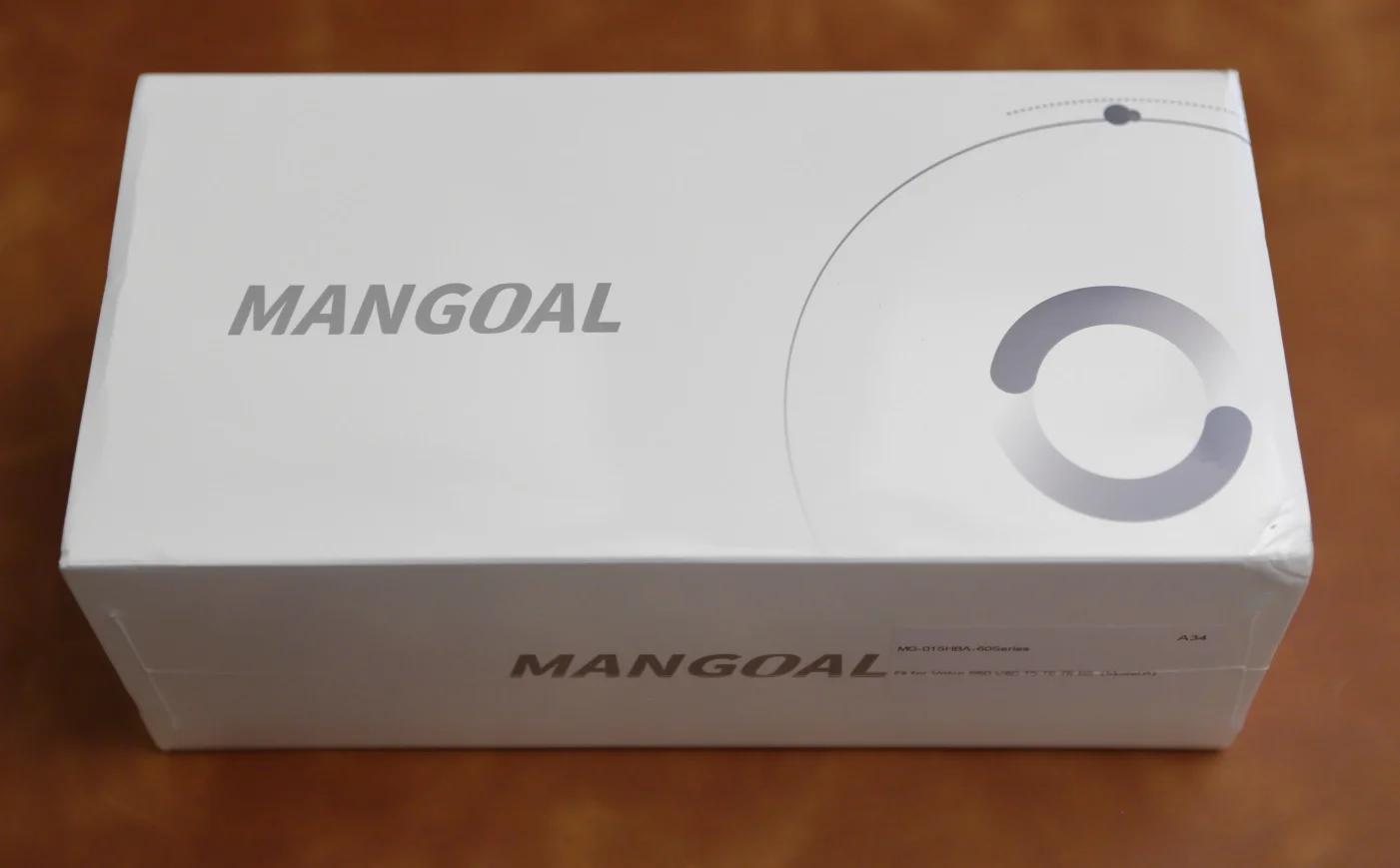
Here is what arrived. The outer box looks like it was dropped once or twice, as evidenced by the mild corner crush in the lower right of the image. The cardboard for the box isn't super heavy or thick.
IMG_26429.webp


Opening the outer box reveals some paperwork and two sub-divider boxes. Each of the pieces of paper has some troubleshooting advice and a QR code that links to an installation video. There is one video for the rear camera and one for the GPS unit. I'll have to check them out. This is a nice touch for the first-time installer 👍.
IMG_26433.webp


And here is everything that is included in the box. From left to right, we have a printed user's manual, two black zip ties, the front-facing camera, a separate GPS receiver unit, two power harness cables (one for each of Type-A and Type-B rear view wiring configurations, an orange plastic trim tool, a 128GB SD card, and the rear camera & extension cable.

IMG_26439.webp


** SOME IMPORTANT DETAILS ABOUT SPECIFICATIONS AND PRODUCT LABELING **

The user's manual indicates two details that caught my eye:
- Sony IMX335 Video Sensor for the front camera
- 4K Ultra-HD 3840x2160 @30 fps

Both of these specifications cannot simultaneously be correct, there is a mismatch in resolutions. Perhaps I have a newer camera that was packaged with an older manual, I'm not sure right now. This prompted me to do some digging that I usually don't perform.

The MANGOAL webpage indicates four available dashcam models for my 2019 Volvo S60 (https://mangoal.com/collections/all/2019-2022-volvo-s60-v60-t5-t6-t8-b5-esr2394724). Each is labelled as a "Front 4K" camera, two of which are also labelled "HRD with Starvis 2." Two are listed as having a rear camera, one of the rear camera models is listed as "1080P" and the other is listed as "Rear 2K HDR and Dual Starvis." Below is a screen capture with red highlights added:
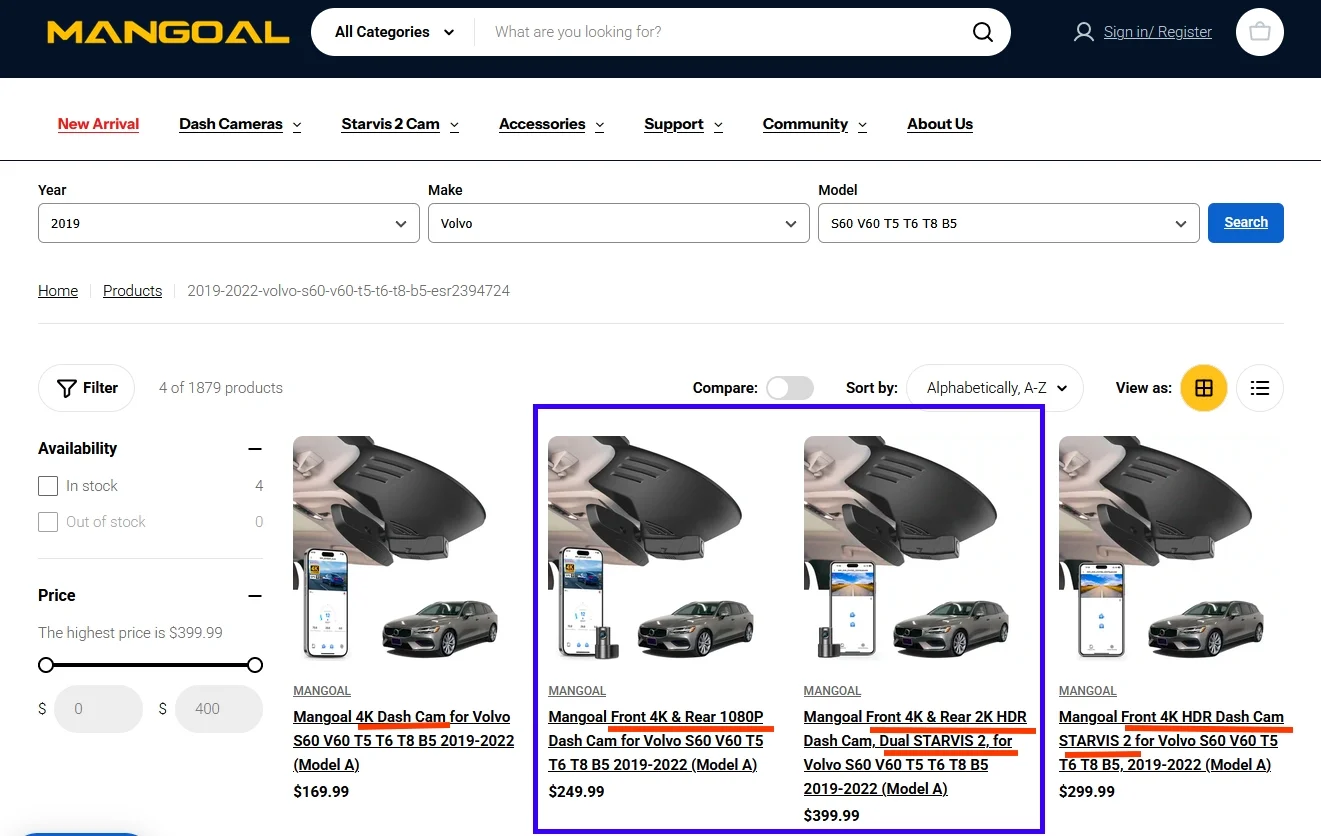
Mangoal webpage.webp


The specs on page 7 of my manual shows the following:
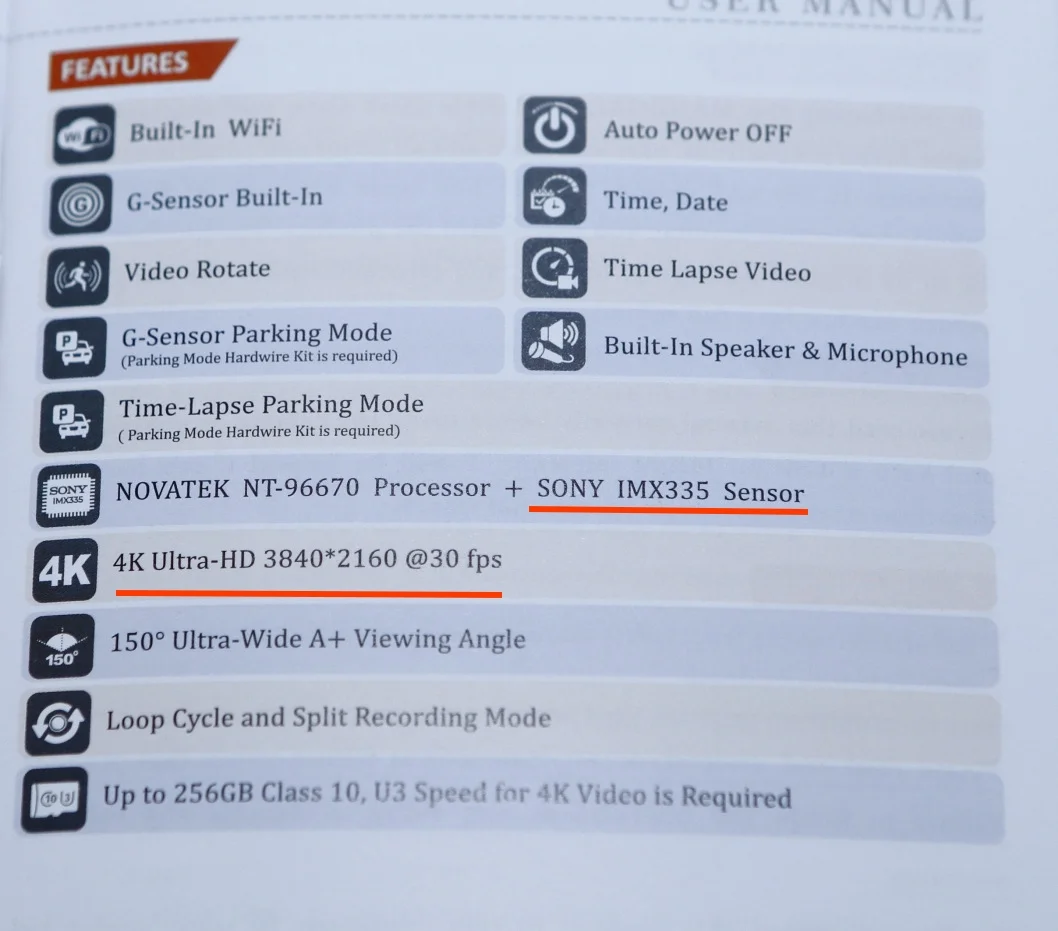
IMG_26489.webp


Additional specs are listed on page 12 of the manual:
IMG_26495.webp


The MANGOAL camera that I received came with a rear camera, so I'm assuming that I have one of the two models that is inside the blue outline I added to the image above. My manual indicates the presence of a Sony IMX335 sensor (which is not Starvis 2) which has a native resolution of 2616x1964 (often operationalized as 2592x1944), so I'm assuming that I received the model on the left side of the blue box above, though I can't be 100% sure until I get confirmation from Amber.

From the Sony IMX335 datasheet:
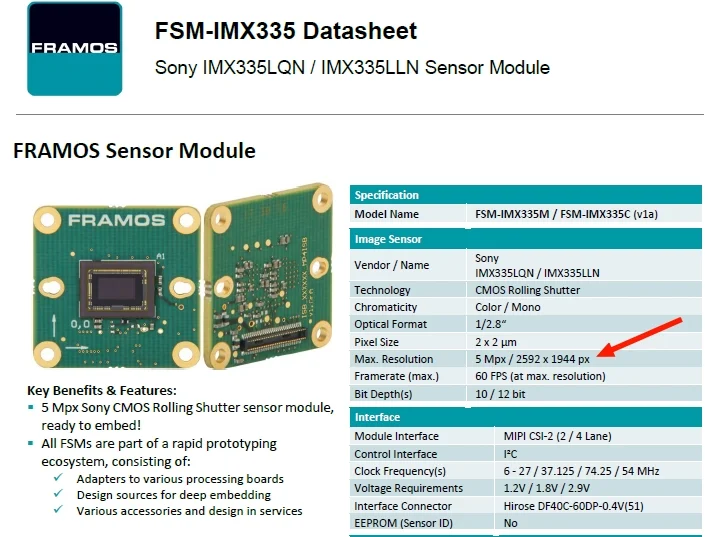
Sony IMX335 Spec.webp


Naming Conventions:
"4K" is generally defined as having 4096 × 2160 resolution (sometimes operationalized as 3840 × 2160 resolution), or 8,294,400 total pixels that can be read from the sensor.
The Sony IMX 335 spec sheet indicates 2592 x 1944 resolution. This is 5,038,848 total pixels, which is referred to as 2.5K sensor.
A general rule of thumb: 4K means 4096 (or 3840) horizontal lines of resolution, whereas 2.5K resolution means 2592 horizontal lines of resolution.

The difference between a 4K image sensor and the Sony IMX335 2.5K sensor is 3,255,552 pixels.

So, there appears to be a mismatch here (again, perhaps I am incorrect). Each of the four product variants for my 2019 Volvo S60 indicates "4K" front resolution, which means the sensor needs to be able to record at a resolution of 3840 x 2160. Yet, the Sony IMX335 sensor's maximum recording resolution is 2592 x 1944. The only way to achieve the "4K Ultra-HD 3840x2160 @30 fps" specification that appears in the user's manual with an IMX335 sensor is to use an "up-scaling" algorithm in the dashcam's processor. This is a mathematical-based routine that converts and interpolates 2592 x 1944 sensor resolution to a resulting video stream that has 3840 x 2160 resolution.

My First Conclusion / Recommendation:
To the best of my knowledge, based on the information contained in the users' manual , the camera I have received appears to be a 2.5k (2592 x 1944) front camera with a 2K (1920x1080) rear camera. All of the cameras for a Volvo S60 indicate "4K" recording. The product packaging should clearly state these technical details and clearly differentiate among various product lines so customers are not confused or unintentionally misled in any way.

Specsmanship, accuracy of printed materials, and product labeling are important elements of building consumer confidence. At present, I'm not certain which camera I have...
 
Last edited:
The larger sub-divided box contains the main forward-facing camera unit as well as the rear camera and cable, each wrapped in its own plastic bag and placed directly in the box. I was a bit surprised not to find any additional padding/packaging material to protect things while in transit. One dashcam that I received last year had sustained significant shipping damage to the box and the additional packaging materials protected the camera.

IMG_26435.webp


Here are some images of the front camera that attaches to the bottom of the Intellisafe module behind the rear view mirror of my Volvo S60 sedan. This part of the camera is vehicle-specific, which leads to the OEM-style appearance of the dashcam. This is the "top" side of the camera and after holding in my car where it is supposed to fit, it appears to be a good fit. I'll find out for sure in another day or two when I install it.

IMG_26470.webp


Below is the bottom side of the camera. From left to right are a Power Button, a Photo Button, a microphone, an LED indicator light, and a recessed Reset Button. Each of the three cable connectors is clearly labelled: Power Plug, GPS, and Rear Camera. It will be impossible to mix these up as the physical form factor for each cable is clearly different. I'm curious to see how visible the LED is after installation because it is so far recessed into the chassis.
IMG_26471.webp


Here is the front-facing camera. The camera lens was covered with a black adhesive patch to protect it from scratches. In contrast to the clear lens cover that a few people have left in place after installation from other brands (oops…), I was amused to see an opaque black lens protecting film. Forget to remove it and you have no image 😉 .
IMG_26481.webp


These two images convey the size of the front camera module in mm. It's a bit larger than I expected, but it's a good match to the interior styling of my car. I expect that once installed, it will blend in and become mostly unnoticeable.
IMG_26477.webp


IMG_26478.webp


And on the side of the front camera, you'll find the slot for the MicroSD card.
IMG_26479.webp


Just a quick note about the SD card slot: it's pretty easy to use! Some of the cameras that I have are darn near IMPOSSIBLE to remove a card from, especially if you've just clipped your finger nails because the inserted card is way too recessed into the dashcam housing. This one appears to be mounted well, the card sits more-or-less flush with the outer plastic making it easy to insert and remove. Kudos!
 
Last edited:
The rear camera comes with an 18-foot cord and when added to the 18 inch pigtail cable attached to the rear camera gives a total length of about 20 feet. This matches the length of rear cables for other manufacturers and is plenty for most vehicles (unless you happen to own a stretch limo).

IMG_26459.webp


MANGOAL uses a proprietary rear cable design featuring an 8-wire pin connector that is pretty interesting due to its small size. The male end measures a mere 9mm in diameter at its widest point while the female end measures 7mm in diameter. That should make snaking the wire back through the headliner in your car pretty easy because it is less likely to get suck somewhere. Part of me wonders just what all of those connectors are used for - clearly, all 8 wires don't need to be used to provide power and get a video signal out. There are no markings on the jacket that indicate the number of conductors or AWG.
IMG_26460.webp


Here is the rear camera connected to the 18-foot cable:
IMG_26461.webp


The rear camera, too, had an opaque black film lens protector in place, but this time, the film left a sticky mess behind on the lens when I peeled it off. On the positive side, I appreciated the extra adhesive pad that was included so the rear camera can be moved (once). Be sure to position it correctly the first time 😉
IMG_26463.webp


IMG_26464.webp


It took a bit of work, but I was able to remove the sticky residue with a microfiber cloth. As you can see, the rear camera is pretty small. In general, I prefer 90 degree angle wire adapters here so the wire can more directly be tucked into the rear headliner for a more clean installation.
IMG_26466.webp


The rear camera appears to be able to rotate infinitely (but I only rotated it back and forth through 360 degrees), which should make it easy to aim out the rear window. Much to my delight, the rotation is detented every few degrees, so once you aim it, it should remain pretty stable. I like this design aspect! In addition, the rear camera will mount VERY closely to the rear window, hopefully eliminating (most of) the reflection glare - I'll be sure to test this once it is installed.

Due to the rotational ability, you can easily mount this camera on a fully vertical rear window (camper, pick up truck, etc).
IMG_26491.webp


However, depending on the angle of your rear window, you might run into some challenges rotating the camera. In one position, the barrel from the lens protrudes out beyond the adhesive mounting surface, so it will hit the window (see yellow arrow). This can also make fitting a polarizing lens (if one is available) over the rear camera difficult. There also seems to be an LED indicator light on the end of the barrel. The manual says this will illuminate blue when it receives power.
IMG_26492.webp
 
Last edited:
The second and smaller white sub-box contains a separate GPS receiver, a plastic trim tool, power wire harnesses for two different versions of the Volvo S60, and a 128GB SD card, grouped together in ziplock bags as shown.
IMG_26437.webp


The GPS unit itself is fairly small and can be mounted to your dashboard - the instructions say to mount it with the embossed GPS lettering facing up. Mounted to the underside of the safety system in my car would likely block the GPS signal, hence the extension cord and outboard unit. The small printed manual indicates that the GPS unit is optional and isn't required for the unit to function. I do get a kick, though, out of the label "GPS Tracker." I know that's exactly what it does, but the word "Tracker" seems to invoke some kind of Orwellian "Big Brother" kind of oversight going on.
IMG_26469.webp


There is some adhesive already mounted to the bottom of the GPS unit and the cord is nicely labelled. Even if the labels come off of the cables, each cable has a different pin connector, so it will be impossible to mix them up.
IMG_26442.webp


I was pleased to see a 128GB SD card included with the camera. Most manufacturers don't include them with the camera, or if they do, they are exceedingly small (32GB).
IMG_26457.webp
 
Last edited:
Here is the "Type A" wire harness that delivers the 12v power supply to the dachsam. The green connectors are meant to tap power from the rear view mirror assembly, while the black connector attaches to the dashcam itself.

This is an interesting power supply arrangement (fewer wires to run), but it only provides power for drive mode recording. The clear appeal is that you don't have to mess around with the fusebox, have fuse taps, or try to figure out which fuses are "safe" to tap power from. I see so many YouTube videos of people who have tapped their fusesboxes in ways that are just plain not safe, or that pick a fuse that is related to a critical safety system. Both of these are significantly problematic! Finally, with this arrangement, you don't need to run a power cord up the A-Pillar for drive mode operation. I kind of like this arrangement!

A quick check with my DMM reveals that the Red and Yellow wires in the harness are connected to one another (zero resistance). Thus, when the camera is powered by this rear view wire harness, there is no possibility of parking mode recording. In order to enable parking mode, an OBDC or fusebox power cord is required, as indicated in the user’s manual. I haven't yet figured out how parking mode is triggered. The camera only powers up with +12v is applied to BOTH Red and Yellow wires and if 12v is removed from EITHER of them, the camera shuts down. Something a bit out of the norm is going on here...

Covered with adhesive foam in the leg that provides power to the dashcam is a 5A (!!) slow-blow fuse. 5 amps at 12v means the camera needs to draw 60w for a sustained amount of time before the fuse blows.

This is a DANGEROUS choice for at least two reasons:
1) That much power draw will likely cause a problem for the car's circuit that powers the rear view mirror auto dim. If there is a dashcam failure that results in excess power draw, this has potential to damage part of the car's electrical system that likely won't be covered by your warranty.
2) That much power draw into the camera will surely pose a heat/fire hazard if something goes wrong in the dashcam itself - 60w is an enormous amount of power to draw before a fuse blows!

IMG_26445.webp


Here are close up images of each connector end:
IMG_26446.webp


IMG_26447.webp


I'm hoping the misaligned pins don't cause any issues when joining the plugs...
IMG_26448.webp


And here are the familiar black, red, and yellow trio of power supply wires, though they don't function in the manner that we are accustomed to with one wire acting as the primary +12v supply and the other wire acting as the ACC trigger.
IMG_26449.webp
 
Last edited:
And finally, here is the "Type B" wire harness- I won't be using this cable for my install. I think the “Type B” harness is for a model year that comes after mine (2022 onward).

Like the “Type A” harness above, a quick check with my DMM reveals that the Red and Yellow wires in the harness are connected to one another (zero resistance). Thus, when the camera is powered by this rear view wire harness, there is no possibility of parking mode recording. Parking mode recording will require an OBDC or fuse box power cord. This camera doesn't use the normal voltage trigger that we are used to for toggling parking mode...
IMG_26450.webp


And some close up shots of the wire harnesses:
IMG_26451.webp


These are keyed, so they can't be mixed up.
IMG_26452.webp


The padding is also a nice thought to keep things from vibrating after installation.
IMG_26453.webp


These pins (below) seem a bit out of alignment, too. I'm not sure if this is a result of the fabrication process for the harness itself, or if the pins shifted while the wires were being soldered to the back end.
IMG_26455.webp


Again, here is the familiar, tri-colored set of wires that plugs into the camera.
IMG_26456.webp
 
Last edited:
I suspect a few of you will have a similar reaction to mine when I first saw this camera: its appearance seems to be very similar to that of the FitCamX camera that showed up a few years ago. Below is Amber's verbatim response when I inquired about the physical similarity between MANGOAL and FitCamX cameras. She stressed that "MANGOAL has zero affiliation with FitCamX — we are two completely separate brands operating independently."

I copied the following with her permission:

"MANGOAL and FitcamX entered the OEM-style dash cam market at roughly the same time — we are not a latecomer to this segment. Since MANGOAL owns our own manufacturing facility, we invested heavily in product R&D, reliability validation, and production process refinement to perfect our units and ensure full stability before official launch. This is why our official website went live around one year later than some competing brands.

While both brands feature OEM-style designs engineered to blend seamlessly with original vehicle interiors, which may lead to minor visual similarities, MANGOAL operates as an entirely independent brand. We have our dedicated in-house R&D team, self-contained production system, and proprietary quality control protocols, and there is no corporate connection whatsoever between us and FitcamX.

We firmly believe a premium OEM-style dash cam should not only match the factory aesthetic after installation but also deliver consistent, long-term reliable performance. As we run our own factory, we oversee every stage of production in-house: from R&D and component selection to assembly and final pre-shipment inspection. Every single unit undergoes an 8-hour burn-in test before leaving the factory to guarantee uniform quality and dependable long-term operation.

When it comes to hardware design, we integrate an all-aluminum alloy heat dissipation frame to boost thermal efficiency and stable performance under high-temperature vehicle conditions. The full lineup uses flexible FPC wiring, which enables a cleaner, more original-fit installation while strengthening connection durability. For image capture, we adopt Sony STARVIS image sensors, and we were among the first OEM dash cam brands to implement the advanced Sony STARVIS 2 sensor, drastically enhancing clarity during nighttime and low-light driving scenarios. All compatible vehicle models also come standard with built-in GPS. We additionally maintain a professional after-sales technical team to offer ongoing customer support."
 
Last edited:
Next up is installation so I can make some videos. I'm most curious about the video quality from each of these video sensors.

The IMX335 front sensor appears to be upscaled from 2616x1964 to 3824x2160. I'm curious to see how the video quality compares to that resulting from a native 2K 2592x1944 sensor like the IMX675 and the 4K 3824x2160 sensor like the IMX678.

I also haven't (to my knowledge) examined any video footage resulting from the Galaxycore Microelectronics GC2093 (1920x1080) video sensor that is used for the rear camera. All of the aforementioned sensors feature 2um x 2um pixels, so they all have the same light-gathering capability.

Given the wire harness for the rearview mirror power, I'm assuming this camera runs on a 12v power supply vs the 5v power supplies that all of the other cameras I have use. The user's manual indicates the power interface is 12v, 2A.
 
Last edited:
Very nice start EricSan, that was a good read. 🙂 I like 12VDC to the camera to be honest, especially for multi-channel units. I would rather break out 12VDC at the main dashcam for distribution to multiple channels, than have 5VDC at the main dashcam.

I look forward to the rest of your review. 👍
 
Very nice start EricSan, that was a good read. 🙂
Thanks, I'm looking forward to reviewing video footage once it is installed. I also have to download the app for making the settings since there is no screen. This is no big deal, my original Viofo camera has no screen - which I see as a plus - it's never a distraction while driving. Just set it and forget it.
 
@EricSan with all due respect, this is clearly an upscaled camera (per the IMX 335 sensor and as you pointed out). I'd be shocked if the camera even uses a Super Capacitor versus an internal LIthium battery, too.

Honestly, I wouldn't hold my breath on this camera being anything more than an entry level product with basic optics. Not to sound skeptical, but this resembles the Fitcam and I am not buying the explanation. A reputable company spending real money to develop their own product doesn't mislead about resolution.

The FitCamX also uses an IMX 335 and Claims 4k, too. I'd bet money this is simply a repackaged knockoff.
 
Ben tested a MANGOAL dash cam 2 years ago, (it was Fake 4K counterfeit trash).
FitCam X is also fake counterfeit.
@EricSan Is this a new model with genuine 4K image sensor?
@Mtz started the LIST OF SHAME FAKE 4K CAMERAS IN 2018.
It’s been 8 years, and customers are still getting ripped off by these unscrupulous companies.
Why bother with Fake 4K cameras in 2026?
Sorry to be so negative, and rain on your testing parade.
I just can't stand these lying companies stealing money from first time customers.
-Chuck


Attachments

  • Fake 4K Counterfeit Trash .webp
    Fake 4K Counterfeit Trash .webp
    141 KB · Views: 11
Last edited:
I addressed the resolution discrepancy in my first post, but perhaps I was unclear. I've edited my first post to make the details of the resolution/sensor mismatch found in the manual more clear and I'll follow up with Amber @Mangoal Dash Cam.

The problem appears to be a mismatch of what is on their webpage and what is in the manual (and potentially in the camera). Is there a way to identify the which sensor is which by look at the sensor module itself?

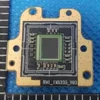
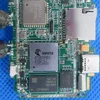
Here is an inside shot of the main camera - the sensor + lens combo (at the top of the image) and PCB mounting mechanism are glued down with a red glue. If I remove the sensor/lens or processor board, will the resulting components be identifiable in some way? The PCB with the processor is in a plastic "cage" that is screw mounted to the larger housing.

Interior.webp
 
Last edited:
I think the title should have specified exactly what this is:
Mangoal MG-0xxX OEM-Style Dashcam for Volvo S60.

I expect there will be more reviews of models for other vehicles from this manufacturer.
A model featuring the IMX678 (front) and IMX675 (rear) sensors for the VW T5.2 is currently on its way to me.
 
Last edited:
I think the title should have specified exactly what this is:
Mangoal MG-0xxX OEM-Style Dashcam for Volvo S60.

Updated as such - thank you for the suggestion! Clarity is my goal 🙂
 
Last edited:
I think the title should have specified exactly what this is:
Mangoal MG-0xxX OEM-Style Dashcam for Volvo S60.

I expect there will be more reviews of models for other vehicles from this manufacturer.
A model featuring the IMX678 (front) and IMX675 (rear) sensors for the VW T5.2 is currently on its way to me.

If they're representing 4K with IMX 335, I'd want some proof the "Updated Models" have an IMX 678 / 675.....Companies that trick consumers into selling upscaled products leave a lot to be desired.
 
I addressed the resolution discrepancy in my first post, but perhaps I was too subtle. I've edited my first post to make the resolution/sensor mismatch more clear and I'll follow up with Amber @Mangoal Dash Cam.

The problem appears to be a mismatch of what is on their webpage and what is in the manual (and in the camera). Is there a way to identify the which sensor is which by look at the sensor module itself?

Here is an inside shot of the main camera - the sensor + lens combo (at the top of the image) and PCB mounting mechanism are glued down with a red glue. If I remove the sensor/lens or processor board, will the resulting components be identifiable in some way? The PCB with the processor is in a plastic "cage" that is screw mounted to the larger housing.

The only way I know to physically tell the difference, or have at least noticed, and I won't swear to it, is that the IMX335 is a 4:3 and has a square base lens housing that attaches to the board. The IMX678 is a 16:9 and has a rectangular lens base that attaches to the board. That base also houses the lens barrel and lens, and is attached to the board with two screws.

As I recall, once the CMOS is attached to the board, you generally will not find any manufacturing ink on the CMOS itself, stating its make/model. Well, none that I noticed. The board will usually have a number on it, and if it is a FRAMOS or e-con Systems board, you can research it that way. However, dashcam manufacturers are famous for not permitting such identification. Often, you will find a board that has the dashcam brand name on it and a model/version number inked onto the board.
 
Last edited:
I don't have the dimensions at hand, but I think you will find the ribbon cable for the IMX335 is narrower than the one for the IMX678. Again, going by memory, it has been a while since I looked at these differences.
 
Is there a way to identify the which sensor is which
One way is to request / obtain FCC ID# to review legal documents they’ve submitted for certification.
Documents may contain photographs of components.
FCC ID# can be found on;
1.) Product Itself
2.) User Manual
3.) Box / Packaging
 

Attachments

  • IMX335 .webp
    IMX335 .webp
    37.3 KB · Views: 7
  • Novatek 96580 .webp
    Novatek 96580 .webp
    92.1 KB · Views: 7
Back
Top