A229 Pro Focus Issue - Remove that clear flexible protector!!

  • Thread starter Thread starter Deleted member 85644
  • Start date Start date
D

Deleted member 85644

Guest
@VIOFO-Support

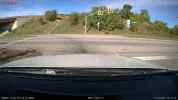
I noticed last night, the night video was out of focus. Today I took a photo while at a stop light...focus is bad. No HDR, medum bitrate, 3840x2160P, 30FPS, CPL is on.
I have the LOGO Stamp turned off, but the VIOFO logo still appears on the picture. LOGO needs to be removed on photos. Does not appear on video.
 

Attachments

  • 2023_1011_101215_F.webp
    2023_1011_101215_F.webp
    372.6 KB · Views: 166
OK, critical thinking sets in after I make the post. I had left the clear lens protector for the CPL on. <HeadSlap>. Now how to remove the unneeded VIOFO logo on
the picture?


edit:: change title name to something more appropriate. I am an idiot!! 🤣
 
Last edited by a moderator:
That is generally in the menu, at least i seem to recall so, i do run with the brand watermarks on dashcams provided for me to beat on, but i think you can turn that off on the viofo cameras.
 
There is a feature to turn off the Logo stamp, but it seems to only work on the video side. I have not found a way to disable it for photo. Maybe I missed something? I will keep looking.
 
Aaaaa okay, That is probably a bug as i would assume removing the logo should be for both video and photos.

Ill tag in @viofo so they are aware of this issue.


EDIT: once again my selective reading skip a word, did not realize you was talking about photos in the #1 post 😳
 
Yep, I just double checked the features via the app. The Logo Stamp is disabled, but the VIOFO logo still appears on the still photos. On video, the VIOFO is removed.
Maybe get fixed in next FW release.

My Kingston SD seems to be working well so far. Formatting has not been an issue and copy/deletes are working well via the app and when attached to an adapter to the PC.
 
@VIOFO-Support

I noticed last night, the night video was out of focus. Today I took a photo while at a stop light...focus is bad. No HDR, medum bitrate, 3840x2160P, 30FPS, CPL is on.
I have the LOGO Stamp turned off, but the VIOFO logo still appears on the picture. LOGO needs to be removed on photos. Does not appear on video.
1. About the focus issue, shall we have a video for analysis? If it is convenient for you, please upload it here: https://viofo.wetransfer.com/
2. We have reproduced the issue that the VIOFO logo will not disappear on photos and it will be optimized soon. Thanks for your reminder! 👍
 
1. About the focus issue, shall we have a video for analysis? If it is convenient for you, please upload it here: https://viofo.wetransfer.com/
2. We have reproduced the issue that the VIOFO logo will not disappear on photos and it will be optimized soon. Thanks for your reminder! 👍
I did experience a bug the other day when I removed the cables to make it record from 3-Channel to 1-Channel only. The dash cam asked me to Format the SD card, which I did and had no issues since.

I have set the Format Reminder in the APP settings for 30 days, but it hasn't been 30 days yet so found this a bit strange.
 
1. About the focus issue, shall we have a video for analysis? If it is convenient for you, please upload it here: https://viofo.wetransfer.com/
2. We have reproduced the issue that the VIOFO logo will not disappear on photos and it will be optimized soon. Thanks for your reminder! 👍

The focus issue was me being careless and not removing the clear, flexible, protector on the CPL. I had removed the ones from the camera lens and the screen, but failed to remove the one from the CPL. I am an idiot for leaving the protector on the CPL. 🙂

Good to hear VIOFO has a fix for the snap shot / LOGO issue. You guys are the best!!
 
Yeah i saw you gotten your big boy, hope it will serve you well.

I hope so also. 🙂 A two minute video, two channel with HDR and and bitrate creates files that total almost 800MB in size! 😱

I will leave the 512GB Kingston in the front camera and use the VIOFO 256GB for the rear A229 Pro main camera. I want to test both to see how they hold up. It seems to me that almost
every time someone complains about a memory card, they got it cheap from EBAY, or a skippy vendor on Amazon. Some manufactures do have a store on Amazon but the buyer has to
be certain they use the manufacturers shop and not another. Buying direct from the manufactures store front is still the safest way to buy and is sometimes cheaper than Amazon.
 
Back
Top