A329S Test & Review PP

Random Test Footage

At 2:10:36AM I run a stop sign.
At 2:10:49AM I almost hit a pedestrian.
At 2:10:54AM a police officer starts following me.
At 2:12:12AM I thought I was done for.

 
Random Test Footage: A329S Front & Telephoto vs. Vueroid S1-4K Front

CAMERA SETTINGS:

A329S
Firmware: V2.0_260104
Resolution: 4K30fps Front
Resolution: 2K30fps Telephoto
HDR: ON
Bitrate: MAXIMUM (highest setting)
1 Minute File Size: 384MB Front
1 Minute File Size: 172MB Telephoto
CPL Filter: Yes (front & telephoto)
SD Card: 512GB Viofo
Power Source: HK6 Hardwire Cable

S1-4K
Firmware: v.1.4.2
Resolution: 4K30fps
HDR + IPC: ON
Bitrate: HIGH (highest setting)
1 Minute File Size: 394MB
CPL Filter: Yes
SD Card: 512GB Vueroid
Power Source: Vueroid 12V Hardwire Cable

Both 4K Front Camera captures are illegible.
But the 2K Telephoto gets it no problem.
California Plate # 7YDF883
2017 Toyota Corolla


5.) Viofo Front No Zoom .webp

6.) Vueroid No Zoom .webp

7.) Viofo Telephoto No Zoom.webp

8.) Viofo Front Zoom .webp

9.) Vueroid Zoom .webp

10.) Viofo Telephoto Zoom .webp


Next post is the Arm & Leg HDR comparison.
-Chuck
 
Last edited:
Arm & Leg HDR Comparison

CAMERA SETTINGS:

S1-4K
Firmware: v.1.4.2
Resolution: 4K30fps
HDR + IPC: ON
Bitrate: HIGH (highest setting)
1 Minute File Size: 394MB
CPL Filter: Yes
SD Card: 512GB Vueroid
Power Source: Vueroid 12V Hardwire Cable

A329S
Firmware: V2.0_260104
Resolution: 4K30fps Front
Resolution: 2K30fps Telephoto
HDR: ON
Bitrate: MAXIMUM (highest setting)
1 Minute File Size: 384MB Front
1 Minute File Size: 172MB Telephoto
CPL Filter: Yes (front & telephoto)
SD Card: 512GB Viofo
Power Source: Viofo HK6 Hardwire Cable


1.) Viofo Front No Zoom .webp

2.) Vueroid Front No Zoom .webp

3.) Viofo No Zoom Telephoto .webp

4.) Viofo Front Zoom .webp

5.) Vueroid Front Zoom.webp

6.) Viofo Telephoto Zoom .webp
 
Arm & Leg HDR Comparison

CAMERA SETTINGS:

S1-4K
Firmware: v.1.4.2
Resolution: 4K30fps
HDR + IPC: ON
Bitrate: HIGH (highest setting)
1 Minute File Size: 394MB
CPL Filter: Yes
SD Card: 512GB Vueroid
Power Source: Vueroid 12V Hardwire Cable

A329S
Firmware: V2.0_260104
Resolution: 4K30fps Front
Resolution: 2K30fps Telephoto
HDR: ON
Bitrate: MAXIMUM (highest setting)
1 Minute File Size: 384MB Front
1 Minute File Size: 172MB Telephoto
CPL Filter: Yes (front & telephoto)
SD Card: 512GB Viofo
Power Source: Viofo HK6 Hardwire Cable


View attachment 90367

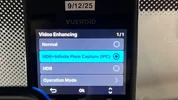
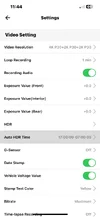
This image clearly shows that the mode was set to HDR only.
 
Relpy function not working.

@meyelow_Vue said:
HDR + IPC: ON
I don’t think the mode is set the way you described

Chuck said:
Hello James,
Ever since I started posting public test footage of S1-4K I sent a WhatsAPP PM to CTO KIM, (when we had the WhatsAPP group chat).
I told him I was confused which mode I should use for best image quality;
1.) Normal
2.) HDR
3.) HDR + IPC

He told me to use HDR + IPC.
Ever since then I have only, and always selected HDR + IPC for all my test footage.
Can you tug on his shirt to confirm?
Here is a link to the raw / original file.
Is it possible to see HDR + IPC enabled in meta data?

https://drive.google.com/drive/folders/1nAXnt1GAOH1OcBe89LcXjmoVeMiB-BHU?usp=sharing

If I’m correct, and you’re wrong, you owe me two more Vueroid soju glasses, and one bottle of soju.
If I’m wrong, and you’re correct I will re-film the test footage showing HDR + IPC enabled.
Cool, cool? lol

Also, the firmware is causing this confusion.
Maybe IPC should not disappear from the text stamp at the bottom of recorded footage when ambient light drops below the programmed threshold.
Maybe it should be permanent just like the HDR stamp?
-Chuck
 

Attachments

  • Screenshot 2026-03-26 10.55.06 PM.webp
    Screenshot 2026-03-26 10.55.06 PM.webp
    26.8 KB · Views: 54
  • 3 .webp
    3 .webp
    126.3 KB · Views: 34
  • 1 .webp
    1 .webp
    200.2 KB · Views: 48
  • 2 .webp
    2 .webp
    96.5 KB · Views: 51
@meyellow
Yo James,
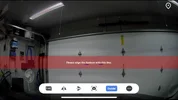
Here is a clip in my garage just before leaving for my drive cycle to gather the test footage in question.
With my garage lights on you can see the IPC stamp.
When I turn off my garage lights the IPC stamp disappears.


I have S1-4K powered from a dash cam battery pack.
However, I have the RED & YELLOW, (B+ & ACC) wires together to make sure it does NOT go into parking mode.
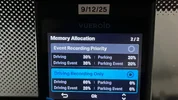
I also select Driving Recording Only in Memory Allocation setting.
I want to make sure the camera stays in DRIVING MODE for my entire drive cycle.
The reason I go to these great lengths is because I want to pre-emptively β€œeliminate” as many possible points of failure that would cause a recording malfunction when I go on a drive cycle to gather test footage.

I’ve always done this since 2019.
And I keep doing it because of the countless malfunctions Robert has reported when gathering test footage on his drive cycles.
When he goes on his weekly shopping trip he usually goes to Costco / Sam’s Club, Post Office, Carl’s Jr. etc.
This involves 4, or 5 ignition cycles where the cameras he’s testing switch from Driving Mode to Parking Mode, and back.
Sometimes by the second, or third ignition cycle a recording malfunction occurs, or a firmware setting gets inadvertently changed that exposes a firmware bug.

Of course this is how a normal customer would use the camera, and is the proper way to test the camera to expose bugs so we can report them to get fixed.
But I ain’t got time for all that! lol
I’m not billing my hours, I’m β€œworking” for free.
I’m more focused on gathering non-problematic test footage to be used for image quality comparisons.

I understand you guys are under tremendous amounts of stress riding a razor's edge to improve camera performance / sales.
But I hope you understand I make every effort I can to make sure I compare cameras on an even playing field.
Apples to apples, oranges to oranges.
If I don’t got my standards, ethics, and credibility, I got nothing.
-Chuck
 

Attachments

  • 1 .webp
    1 .webp
    121.3 KB · Views: 43
If I’m correct, and you’re wrong, you owe me two more Vueroid soju glasses, and one bottle of soju.
Hey Chuck!

I remembered that we agreed to keep HDR+ IPC enabled across all ranges in this update during an internal meeting, so I thought it had been applied…
It seems this was my mistake.

As for the soju glass and soju, I can always provide you anytime.
After all, soju is usually meant to be enjoyed with friends. lol

I’ll make sure to bring it with me on my next visit.
Have a great day~
 
@meyelow_Vue
Well, well, well.
Thank you for the confirming I enabled IPC.
I rescind my request of soju, in lieu of more β€œtraditional” reparations for our next meeting.
1.) Penalty Flick
2.) JYP Tell Me Dance

 
Random Test Footage - A329S vs. Vueroid S1-4K

At the request of you know who, I gathered DAYTIME test footage with Vueroid’s new Horizon Line Adjustment recommendation offered in VueroidHUB APP.
The new recommendation is approximately 40% Road / 60% Sky.
For comparison I’ve got Viofo A329S Front, (50% Road & 50% Sky), and the Viofo Telephoto.
Check out the GPS Coordinates & Time on both screenshots.
Jack Trotter III Esq. would say; IDENTICAL!


3.) 50% Road 50% Sky .webp

2.) 40% Road 60% Sky .webp


CAMERA SETTINGS:

S1-4K
Firmware: v.1.4.2
Resolution: 4K30fps
HDR + IPC: Who knows? I can’t be trusted πŸ˜”
Bitrate: HIGH (highest setting)
1 Minute File Size: 394MB
CPL Filter: Yes
SD Card: 512GB Vueroid
Power Source: Vueroid 12V Hardwire Cable

A329S
Firmware: V2.0_260104
Resolution: 4K30fps Front
Resolution: 2K30fps Telephoto
HDR: OFF
Bitrate: MAXIMUM (highest setting)
1 Minute File Size: 384MB Front
1 Minute File Size: 172MB Telephoto
CPL Filter: Yes (front & telephoto)
SD Card: 512GB Viofo
Power Source: Viofo HK6 Hardwire Cable


Attachments

  • 1.) Vueroid Hub APP GUIDE .webp
    1.) Vueroid Hub APP GUIDE .webp
    61.8 KB · Views: 52
Slippery When Wet
A329WW - Waterproof Left & Right

 
@Chuck McCoy , hi kind sir
Do you have a power consumption table of the A 329s 2ch? I want to compare it to my 2ch A 139 pro on parking mode (low bitrate mode) because it's really consuming a lot of the car's battery and I want to change it .
 
Reply function not working.

@Light said:
Do you have a power consumption table of the A 329s 2ch?
I want to compare it to my 2ch A 139 pro on parking mode (low bitrate mode) because it's really consuming a lot of the car's battery and I want to change it .

@Chuck McCoy said:
First off, since you want to know specific power consumption figures you need to specify which remote cameras will be uses.
Rear, Telephoto, Waterproof Rear, IR Interior, (it makes a bit of makes a difference).

If you are comparing A139 Pro 2CH Rear with A329S 2Ch Rear in LBR Parking Mode the power consumption is going to be almost the SAME.
UNLESS you switch the A329S to LPID (low power impact detection) approximately 10 times less.

If you must require LBR (continuous recording) you will be better served adding an auxiliary power source for your A139 Pro 2CH.
Something like a dash cam battery pack or similar.
Just make sure it has LiFePO4 cells instead of Li-ion, or Li-Polymer so when it gets hot in direct sunlight in the summer you don't burn your car down. lol

Let me know how useless my answers were, and if you need anymore help.
-Chuck
 
@Chuck McCoy , hi kind sir
Do you have a power consumption table of the A 329s 2ch? I want to compare it to my 2ch A 139 pro on parking mode (low bitrate mode) because it's really consuming a lot of the car's battery and I want to change it .
In my review thread for the A139 Pro, I have power consumption data for the various channel configurations. This data was gathered a long time ago, so newer firmware versions may influence the power consumption numbers while in parking mode. That's also true of the A329S power consumption data [gathered with a prototype unit and with early 1.0 test firmware].


I posted VIOFO A329S 3-channel power consumption info in this post. Since there are so many parking modes and storage media options [microSD / SSD], I only ran the 3-channel tests.


Looking at the parking mode time estimates for the 3-channel configurations, the A329S consumes about 1 watt less in low bitrate parking mode [all 3 cameras enabled].

A139 Pro 3CH:
1775250282375.webp


A139 Pro 2CH [Front + Rear]:
1775250504545.webp


A329S 3CH low bitrate info from my A329S thread:

If you look at the line for the "3CH F+R[+I]/MicroSD [(I) only on while driving / (I) Cam Off]" that has the interior camera disabled in parking mode or fully disabled in the firmware settings. That should be somewhat close to what an A329S 2-channel [front+rear] consumes in low bitrate parking mode. The A329S 3-channel [with the interior camera disabled in parking mode] consumes around 1 watt less than the A139 Pro 2-channel [front+rear] in low bitrate parking mode.
1775250383189.webp
 
LOW LIGHT FLICKER TEST

This test is for @jsmith he’s having an issue of the rear camera flickering in low light in LBR Parking Mode.
I think I duplicated it with a dim flashlight walking around my garage.
I could only manage 2, or 3 flickers.
You can see them at 12:37:42AM in the video, (only about 3 seconds of flickering).
I also filmed the test with my GoPro to show what was going on.
Oh yeah, I also have an A329S front / main unit on the rear window along with the rear camera.


Attachments

  • 1 .webp
    1 .webp
    48.7 KB · Views: 42
  • 2 .webp
    2 .webp
    45.8 KB · Views: 41
  • 3 .webp
    3 .webp
    53.6 KB · Views: 43
  • 4 .webp
    4 .webp
    47.4 KB · Views: 37
  • 5 .webp
    5 .webp
    49.7 KB · Views: 40
  • 6 .webp
    6 .webp
    49.7 KB · Views: 41
Back
Top