A329T does not come out of parking mode/shuts down/does not power back up

Triggerfish

Member
Joined
Jan 1, 2015
Messages
80
Reaction score
34
Country
United States
Greetings, I have a brand new A329T 3CH (front, Tele, Rear) and I am also using the blackboxmycar powercell8, and I am having issues with my A329 shutting down before my power runs out of the Powercell, and it refuses to auto wake upon starting the car back up and driving. Not sure what's going on here, I've been a dash cam user for over 10 years and have never had problems like I've had with this one with waking up. I am currently unplugging the camera from the USB slot, then plugging it back in in order to get it back up and running.

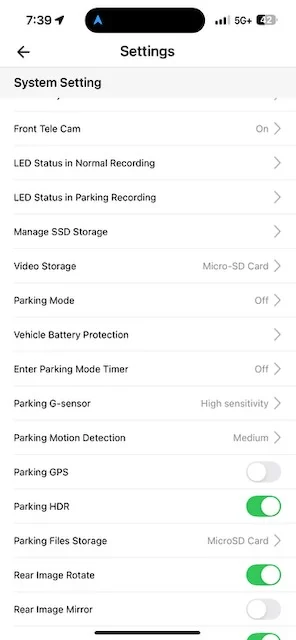
It appears that it runs for a short period of time and then goes to sleep, sometimes I see the red light (and only the one red light) and sometimes it appears fully powered down. When I check the power cell, there is always power available so the unit appears to be powering down by itself. No matter what stage I find it in when I return to my car, it will not wake back up. I want to add that it did not do this at first, but I'm not sure if I changed something in the menu to cause this?

Generally, I like to keep my dash cam running when I leave my car until the power runs out.. and if it runs out, I like it to power right back on once power is received from my car (in this instance, power being sent to the power cell immediately fires up the camera usually).

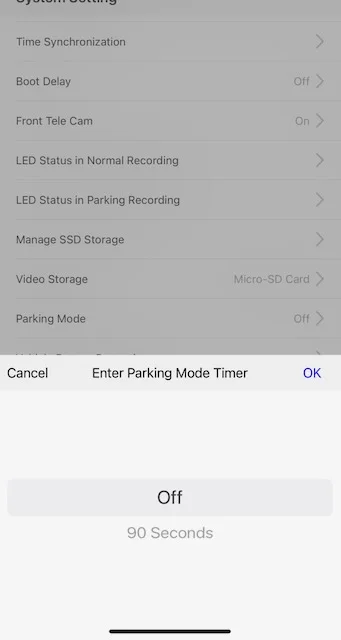
posting some pics of the settings and the Celllink info..

IMG_9118.webp
IMG_9119.webp
IMG_9122.webp
 
I have an A329S 3CH dashcam installed, paired with a Cellink NEO8+S battery pack with a capacity of 7500mAh.
The installation was carried out by a workshop specializing in professional installation of automotive security systems, dashcams, and audio equipment. I also use the HK4 hard-wiring adapter.
In my setup, the battery pack charges only when the ignition is on—that is, when the car is running. Once the car is turned off, the battery pack becomes the sole power source for the dashcam in parking mode.
I have not experienced any issues with charging or powering the camera, except for the loss of settings after a complete power outage, for example when the battery pack was fully discharged due to the car sitting unused for an extended period.
The new firmware has resolved this problem.
My case isn’t exactly a solution to your problem, but I just wanted to share that I’ve got the same setup and it’s been working fine for me.
The only difference I notice is that you’ve got the A329T with parking mode off, while I’m running parking mode with LIPD on.
 
Just to cover the basics of a new installation, please verify the following:
  • Make sure the HK4's USB-C power cable is plugged into the GPS mount's USB-C port
    • The A329T's USB-C port on the left side of the front camera will allow it to power up, but it's not the normal/supported method of powering it in the vehicle with the HK4/HK6 hardwire kit.
  • Confirm the PowerCell 8's 12V output power cable is properly spliced with the VIOFO HK4/HK6 hardwire kit
    • The red and yellow wires serve different purposes for the PowerCell 8 and the HK4/HK6
      • PowerCell 8 12V output cable wire color => HK4/HK6 12V/24V input cable wire color
        • Constant Power: Yellow => Red
        • Accessory/Switched Power: Red => Yellow
        • Ground: Black => Black
  • Make sure the HK4/HK6 low voltage cutoff slide switch is set to its lowest setting
    • To use the largest amount of the stored power in the PowerCell 8, you need to make sure the HK4 will not turn off too soon [too high of a voltage level]
    • Set the HK4/HK6 low voltage cutoff setting to 11.8V.
  • A329T's "Vehicle Battery Protection"
    • If these settings are used, their behavior will depend on what parking mode type you've selected.
 
Just to cover the basics of a new installation, please verify the following:
  • Make sure the HK4's USB-C power cable is plugged into the GPS mount's USB-C port
    • The A329T's USB-C port on the left side of the front camera will allow it to power up, but it's not the normal/supported method of powering it in the vehicle with the HK4/HK6 hardwire kit.
  • Confirm the PowerCell 8's 12V output power cable is properly spliced with the VIOFO HK4/HK6 hardwire kit
    • The red and yellow wires serve different purposes for the PowerCell 8 and the HK4/HK6
      • PowerCell 8 12V output cable wire color => HK4/HK6 12V/24V input cable wire color
        • Constant Power: Yellow => Red
        • Accessory/Switched Power: Red => Yellow
        • Ground: Black => Black
  • Make sure the HK4/HK6 low voltage cutoff slide switch is set to its lowest setting
    • To use the largest amount of the stored power in the PowerCell 8, you need to make sure the HK4 will not turn off too soon [too high of a voltage level]
    • Set the HK4/HK6 low voltage cutoff setting to 11.8V.
  • A329T's "Vehicle Battery Protection"
    • If these settings are used, their behavior will depend on what parking mode type you've selected.
Really appreciate your thorough response, THANK YOU! 🙂. I changed a few settings and I do believe I have fixed it. I did have the cord plugged into the side of the camera and not the GPS unit.. this was ONLY because when I was having problems I moved the cable around to the side so I could quickly unplug it and plug it back in to get the unit running.

I am powering my A329C with the provided USB cable from the camera ran straight into a cigarette lighter slot (via the supplied viofo cigarette lighter plus with USB-C power adapter). I have the Powercell set to the lower power mode because it's plugged into a cigarette port in my car. As soon as I start the car, power is provided to the battery, and the dash cam fires up within seconds if it is dead. It will charge when driving/car started, and when I park and shut off the car, the power to the unit turns off and the dash cam draws power from the Powercell battery until depleted. This is my preferred setup as I want as much camera coverage I can get while away from the car (I have captured many parked circumstances because my camera happened to be running btw).

I still need to examine what's going on with parking and what's going on with that, will report back. I guess I'm just staying in "camera on" at all times mode.

I always use a backup camera up front/back, but recently two of my blackvue units decided to stop working all within a month.. right after pushed software updates (yeah I'm wondering if Blackvue bricked my cameras with those updates).
 
Just to cover the basics of a new installation, please verify the following:
Man, you covered everything. Great reply! Thanks!
 
Back
Top