If the DR970X dash camera does not receive power on the ACC power wire going from the B-130X to the DR970X, I can see how it would be "stuck" in parking mode. The BlackVue B-130X battery pack is supplied with a cigarette lighter adapter [CLA] 2-wire output power plug and a 3-wire unspliced hardwiring cable. I'm assuming the DR970X is connected to the B-130X using the BlackVue 3-wire hardwiring cable.
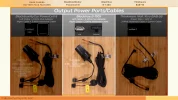
To help diagnose the issue, you must first confirm the B-130X is actually being charged by the vehicle power. When the B-130X is receiving charging power from the vehicle, it also sends 12V power through the hardwire kit's "ACC(+)" wire from the B-130X battery pack to the dash camera. When your vehicle has its engine running [or is "on" if a Hybrid/EV vehicle], you can check the status LEDs on the B-130X or use the BlackVue app to check the status of the B-130X to make sure it's charging or fully charged. If the battery pack is not receiving charging power, it will not send the 12V power needed by the DR970X to let it know to exit parking mode.
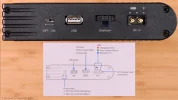
There two 3-wire cables involved in connecting the B-130X power to the DR970X dash camera. The first cable is the 3-wire cable provided with the B-130X. That cable plugs into the connector labeled "Dashcam" on the B-130X. Working from left-to-right, the yellow wire provides the "BATT(+)" power to the dash camera. The red wire provides "ACC(+)" power to the dash camera whenever the B-130X is receiving charging power from the vehicle. The black wire is the "GND" [ground] wire.
This is a picture of a PowerCell 8 battery pack, but the B-130X "Dashcam" connector has the same pin layout as the PowerCell 8 connector [both units are manufactured by EGEN].
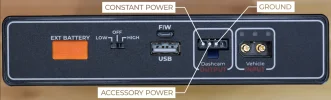
During the installation process of the dash camera and/or the B-130X, the installer needed to splice together the 3-wire cable from the B-130X with the 3-wire cable supplied with the DR970X. The wires from the B-130X cable and the wires from the DR970X cable are the same color for each circuit type, so the splicing process should have been easy to understand by the installer.
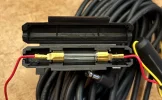
When the B-130X is receiving charging power, you should check the two inline fuses in the BlackVue DR970X 3-wire hardwire cable. You can use a test light or a multimeter to see if there is 12V [voltage value will vary depending on B-130X charge state] power on the end of the fuse furthest away from the B-130X. The ground for your test light or multimeter should be the GND from B-130X should the GND wire in the 3-wire cable. The red wire [labeled "ACC(+)"] is the wire the sends the ACC power to the DR970X which is used to let the DR970X know when to immediately enter/exit parking mode. If there is no power on the far end of the fuse in the red wire, then check for power on the other end [end nearest the B-130X]. If there is power on the end closest to the B-130X and no power on the other end of the fuse, then you have a blown fuse. You should replace the fuse if it is blown. I've never had one of these fuses blow, but if a short-to-ground condition exists along the path it takes to the dash camera, that could explain the fuse being blown. Not likely, but possible.
If the fuses are not blown, but there is still no power on the red "ACC(+)" wire with the vehicle on and the battery pack charging, either the cable connection to the B-130X is bad or the B-130X is not providing the necessary power to the red wire in the 3-wire hardwiring cable. You could press on the plastic tab on the connector that plugs into the B-130X to release it and remove the cable from the B-130X. With the cable removed from the B-130X, you could use a test light or multimeter to see if 12V power is present on the two left most pins inside of the B-130X cable connector. The ground for your test light or multimeter should be the third from the left pin which is the "ground" for these circuits. The left pin is the "BATT(+)" [or constant power] pin. There should always be 12V present on that pin as long as the B-130X has a charge and it turned on. The second from the left pin is the "ACC(+)" accessory power pin that should provide power to the red wire in the 3-wire harness. Whenever there is charging power being provided to the B-130X, that second from the left pin should have 12V power.
---
Alternate situation: The DR970X power is being supplied by the cigarette lighter power adapter [CLA] and the corresponding B-130X dash camera cigarette lighter power cable is being used
This configuration will NOT support immediate entry into/exit from parking mode. The CLA cabling does not connect to the B-130X's "ACC(+)" power because the CLA cable is a 2-wire cable and not the 3-wire cable necessary to provide the "ACC(+)" power to the DR970X so it can immediately enter into/exit from parking mode when the vehicle engine/ignition is turned off/on. The DR970X will still enter/exit parking mode, but only based on the motion of the vehicle. When the vehicle remains motionless for 5-minutes, it will enter parking mode. When vehicle starts moving [above 8 kph/5 mph] the dash camera will exit parking mode.
I hope something in this post helps you diagnose your situation.

