Hot weather issue - freezing camera

kw0n3k

Member
Joined
Aug 20, 2019
Messages
34
Reaction score
17
Location
Melbourne
Country
Australia
Hi all,

I just wanted to see if anyone has a solution to my problem.

I have a A129 pro duo, hardwired with HK3 kit, professionally installed (I'm a qualified motor mechanic and Auto electrician).

I've noticed that during the hotter days in Melbourne, upon returning to my car and starting it, driving off, the REC led is flashing. Unit doesn't respond to any button input. As a result, I would have to unmount the camera for 10 seconds, then remount.

The unit will instantly power on and record as per normal operation.

Unfortunately, the other day my vehicle was "keyed" whilst parked outside my work.

The dash cam, failed to record the incident.
In the past on 3 occasions, the dash cam has captured vehicles reversing or driving into the carpark next to me and hitting my car before driving off. Worked an absolute treat.

I was lucky enough that two of my colleagues were parked each side of me and their dash cams worked flawlessly, picking up the guy keying my car (Blackvue and 70mai)

I've seen that this is an issue for the A129 Pro and was meant to be rectified via firmware update.

Anyone got a solution for me? It's disappointing as I've only opted for Viofo installs for friend, family and colleagues.

Thanks,
Kwon

 

Attachments

  • PXL_20250123_063702505.RAW-01.COVER.webp
    PXL_20250123_063702505.RAW-01.COVER.webp
    285.2 KB · Views: 129
  • PXL_20250123_063733052.RAW-01.COVER.webp
    PXL_20250123_063733052.RAW-01.COVER.webp
    230.4 KB · Views: 146
What memory card are you using?

As far as I know, it is pretty reliable with current firmware, I haven't noticed a lot of problems being posted recently. It did have heat issues in parking mode early on, before parking mode resolution was dropped, and we don't generally recommend 4K dashcams for parking mode use in hot locations, but there are a lot of people using them, apparently without problems. Memory cards can overheat, some are much better than others.

If you want to guarantee parking mode over the hottest part of summer in your location, a small fan blowing air over it would make a big difference.
Another option is to mount it a bit further from the glass than is normal, easy if you have a car sensor pod to mount it on, or just add a spacer of some sort to add a few cm.
 
Yeh sorry forgot to add that.

SanDisk max endurance 256GB.

The SanDisk Max Endurance is one of the approved and recommended TF/MicroSDXC cards for their dash cams. I have an A129 Pro Duo ( 1 channel mode ) wired to the back of my car and have not had a heat issue with it. Nor did I have a heat issue when it was on the front windshield. This problem could be caused by a number of events...

  1. Heat
  2. Memory Card
  3. Heat and Memory Card
  4. HK3
  5. GPS Module ( If Used )
  6. Etc.
I would say to upgrade to the latest firmware, deep format the SD card (not a quick format) which will take a few hours as a start.
If possible, slightly crack side windows open to allow for some air. Park car in opposite direction, or under trees.
You could use the cigarette lighter adapter ( no parking mode ) and see if the dash cam works immediately on engine start.

I am using an HK4 on my A129 Pro, however, as the power plugs are different, I did cut the plug from the HK3 I had, about 1 meter back and then cut off the HK4 USB-C plug and crimped in the HK3 plug onto the HK4. In the past there were issues with the HK3, you may have one that has gone flaky.

What firmware is the dash cam on and how old is the A129 Pro and the HK3?
 
Thanks lufa6977,

I've got the latest firmware v2.91.
Deep format done
Reinstalled firmware
Factory reset

HK3 is the new batch that doesn't have the previous issues.

Dash cam has been installed for over 4 years. Only issue I suffer from is on hot Melbourne days 30+ (86f Fahrenheit) degrees Celsius, which means my cabin will reach 50+)

Australian sun is alot harsher.

Issue is with the unit itself and the unit alone. SD card ruled out as a factor due to having issue with Samsung, SanDisk and transcend cards.

HK3 ruled out as it supplies constant power to the unit. It's a temp related issue with the unit.

See how if it's an issue with my unit or a widespread like others have reported on forums.
 
Before it was 26c where I am.
Cabin hit 52c and camera is now flashing REC. Reset and was back to normal.

Temp has now risen to 38c, cabin temp 62c. Flashing again.

I think this is going to be due to dual camera setup at 4k Front 1080p rear maximum bitrate, parking mode auto detection.

The added rear camera is causing internal temps of the device to go into a "loop" mode.
 
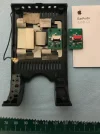
Ouch! That is a touch warm. Perhaps that second camera is causing your issue with heat. I have always used my A129 Pro as 1 channel so never had a heat issue; my camera is probably about 3 years old. I had a similar issue with the A229 Pro; I opened up the case, moved the WiFi antenna from the top to the inside back, and then drilled a about 6 or so 4mm holes in the top of the dash cam. This did help quite a bit with getting heat out of the dash cam body.
 

Attachments

  • IMG_1407.webp
    IMG_1407.webp
    274.8 KB · Views: 137
HK3 is the new batch that doesn't have the previous issues.
Check that the HK3 has plenty of ventilation, it is possible for them to overheat too if you cover them up.
 
Appreciate the responses.

Today I parked under a tree, though not hot in melb, 24c Celcius, camera worked fine upon getting to the car and starting.

This is definitely a temp issue with the unit not being able to reboot itself after self shut down due to temperature.

Appreciate any further responses especially with those with front and rear camera setup.
 
I have already created a similar topic. Reducing the resolution to helps with overheating. However, then you can not buy the "pro" version. In addition, I replaced the thermal paste and made several holes in the case. I did not notice overheating for several years. 2k video settings.
 
Back
Top