New Omni Dash Cam not working...

By-tor

New Member
Joined
Mar 6, 2025
Messages
5
Reaction score
3
Location
USA
Country
United States
Hello,

I purchased a second Omni that I recently received, but when I plugged it in and it comes on it shows the eyes/nose graphic and a 4 digit number and says to connect to the app. When I push any of the buttons to enter setup it just beeps and the screen does not change so I can go in the turn on Wifi.

Pushing any of the 3 buttons just gives me a beep...

Any idea's?

Thank you
Mark
 
it shows the eyes/nose graphic and a 4 digit number and says to connect to the app.
At that point, you need to run the app and connect the new camera, I think the app connects to the camera via Bluetooth, and sets up the wifi for you...
 
I'll give it a go and get back.

Thank you
 
No change, still won't connect.
 
No change, still won't connect.
What is the version of your Omni and the app? If there are no hieroglyphs on the box, it means you have an international version Omni and you need to install the international version of the 70mai app from the app store. Do everything as in this video by turning on wi-fi and Bluetooth:
 
Last edited:
In the video above that's the screen I get. I have the app installed and only see the one I have in the app store.

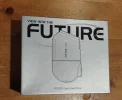
My box.
 

Attachments

  • IMG_20250307_042157703_HDR~2.webp
    IMG_20250307_042157703_HDR~2.webp
    329.9 KB · Views: 104
In the video above that's the screen I get. I have the app installed and only see the one I have in the app store.
My box.
Yes, you have an international version. Record your connection process on video. By the way, I initially misstated the model in my message, I thought you had a new 4K model, but that's not the case.
 
no 4K model box is black, old model silver box
 
I figured out what I was doing wrong. I needed to click the + in the upper right corner of the app to add the camera.

Thank you to everyone for posting and trying to help an old man...
 
Back
Top