Mtz
Well-Known Member
- Joined
- Nov 15, 2012
- Messages
- 4,582
- Reaction score
- 3,518
- Location
- Nice place
- Country
- Romania
- Dash Cam
- Viofo A329T (the best dashcam in the world!)
This is also my story:
- if you want a dashcam and want real-time impact notifications you need a dashcam which already supports this. I don't have, but my A329T 3CH is too good to abandon it for a dashcam with cloud support for now.
- I just want instant impact notification, right now I don't need snapshots or videos stored on cloud
- I have an abandoned but good Android smartphone. I have one with Android 11 and one with Android 12
- the cigarette lighter socket of the car working only when engine is on
- I also have a spare SIM card which I am not using it right now
- I want just SMS notification, not email, even are possible also email notifications
- in Romania the cheapest subscription to a mobile operator is about 2 Euros and contains unlimited SMS, unlimited internet and 200 free calls.
- searched for an APP and I found the Automate which is free for my level of requirements
Even I am not a software developer, right after I installed it I understood how it is working and I was creating my first flow which was doing what I want but with some errors. Next day I fixed the errors and I already have 4 days of tests and everything is normal.
If you want to apply this solution
1. Install the Automate App
2. Load the Car Parking Impact Detection T1.flo from the ZIP file (T1 means that is for testing, to check if it is working OK with your Android smartphone.)
3. Check all Permissions
4. Start the flow and keep the smartphone on your hands.
5. From time to time just shake it in the hands and check if you see the display toast about the alarm setting.
6. Then connect the smartphone to a power source, shake it from time to time and you should not receive more notifications. After disconnecting the power source you should receive the Alarm setting notification again.

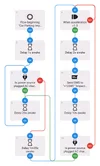
This is how it is looking the flow and you can edit with the values you want.

Please respect the work from here and if anybody wants to put on the Automate website their Impact notification flow inspired from here, please give credits to Dashcamtalk thread. I don't need credits, but I want for this forum. Thanks!
enjoy,
Mtz
- if you want a dashcam and want real-time impact notifications you need a dashcam which already supports this. I don't have, but my A329T 3CH is too good to abandon it for a dashcam with cloud support for now.
- I just want instant impact notification, right now I don't need snapshots or videos stored on cloud
- I have an abandoned but good Android smartphone. I have one with Android 11 and one with Android 12
- the cigarette lighter socket of the car working only when engine is on
- I also have a spare SIM card which I am not using it right now
- I want just SMS notification, not email, even are possible also email notifications
- in Romania the cheapest subscription to a mobile operator is about 2 Euros and contains unlimited SMS, unlimited internet and 200 free calls.
- searched for an APP and I found the Automate which is free for my level of requirements
Even I am not a software developer, right after I installed it I understood how it is working and I was creating my first flow which was doing what I want but with some errors. Next day I fixed the errors and I already have 4 days of tests and everything is normal.
If you want to apply this solution
1. Install the Automate App
2. Load the Car Parking Impact Detection T1.flo from the ZIP file (T1 means that is for testing, to check if it is working OK with your Android smartphone.)
3. Check all Permissions
4. Start the flow and keep the smartphone on your hands.
5. From time to time just shake it in the hands and check if you see the display toast about the alarm setting.
6. Then connect the smartphone to a power source, shake it from time to time and you should not receive more notifications. After disconnecting the power source you should receive the Alarm setting notification again.
This is how it is looking the flow and you can edit with the values you want.
Please respect the work from here and if anybody wants to put on the Automate website their Impact notification flow inspired from here, please give credits to Dashcamtalk thread. I don't need credits, but I want for this forum. Thanks!
enjoy,
Mtz
Attachments
Last edited: