Parking mode not working since firmwear update?

cartyre

Member
Joined
May 5, 2026
Messages
88
Reaction score
12
Location
Glasgow
Country
United Kingdom
Hi all,

There was an update to the firmwear notification yesterday and I just clicked accept.
However I lost all my settings and have done my best to put everything back where it was.
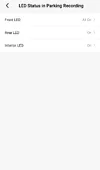
Sadly the parking mode is not working now. I dont understand why? As soon as engine is off it say "parking mode disabled" and all.lights turn off. Before the far left light (3 lines) stayed on and 2nd from left light (rec) would flash unless there was an impact at it would go solid red.
Now all lights go off as soon as engine is off.
However, after lights have all gone off if theres an impact ie door is closed. Both left lights come on solid. But the files are not saved in parking files.
What's going on and how do I get parking mode working again?
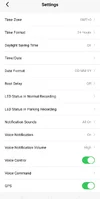
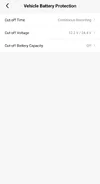
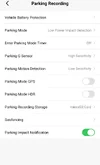
Heres current settings. It has been working fantastic since you all helped me get it working so very disappointing since firmwear update parking mode is not working again.
Really hoping for some help?
Thanks all in advance
 

Attachments

  • Screenshot_20260719_182044_VIOFO Dashcam.webp
    Screenshot_20260719_182044_VIOFO Dashcam.webp
    39.2 KB · Views: 38
  • Screenshot_20260719_182050_VIOFO Dashcam.webp
    Screenshot_20260719_182050_VIOFO Dashcam.webp
    41.3 KB · Views: 32
  • Screenshot_20260719_182054_VIOFO Dashcam.webp
    Screenshot_20260719_182054_VIOFO Dashcam.webp
    40.2 KB · Views: 30
  • Screenshot_20260719_182100_VIOFO Dashcam.webp
    Screenshot_20260719_182100_VIOFO Dashcam.webp
    42 KB · Views: 31
Heres a couple more screenshot

I just turned it on and the voice from dash cam said "an impact was detected during parking recording"....??? But theres no videos in the parking videos?
Maybe its saying "parking mode enabled" and mot disabled but why do all light go out when ignition is off and why does the recording start when theres an impact if parking recoding is not working?

The impact video is saved in the regular videos not under thr parking videos I think?

I cant figure out if parking mode is or is not working?

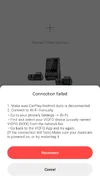
Also cant get it connected to the WIFI now either?

This firmewear update has caused loads of issues
 

Attachments

  • Screenshot_20260719_190027_VIOFO Dashcam.webp
    Screenshot_20260719_190027_VIOFO Dashcam.webp
    57.8 KB · Views: 32
  • Screenshot_20260719_185115_VIOFO Dashcam.webp
    Screenshot_20260719_185115_VIOFO Dashcam.webp
    18.7 KB · Views: 31
  • Screenshot_20260719_185105_VIOFO Dashcam.webp
    Screenshot_20260719_185105_VIOFO Dashcam.webp
    48.9 KB · Views: 28
Heres a couple more screenshot

I just turned it on and the voice from dash cam said "an impact was detected during parking recording"....??? But theres no videos in the parking videos?
Maybe its saying "parking mode enabled" and mot disabled but why do all light go out when ignition is off and why does the recording start when theres an impact if parking recoding is not working?

The impact video is saved in the regular videos not under thr parking videos I think?

I cant figure out if parking mode is or is not working?

Also cant get it connected to the WIFI now either?

This firmewear update has caused loads of issues

The parking mode you choose is Low Power Protection Detection, the camera will only start to record when there is an "impact" that triggers the camera's Parking G-sensor, otherwise, the camera will keep in standby mode without any button lights on. The video will be saved under RO files individually. So, the camera performs normally as you set actually. For the wifi connection, is there a Carplay or Android auto in your car? Please disconnect your phone from it first, then connect to camera wifi again to test.
1784547668640.webp
 
Thanks..how do I check it buffers 15 seconds before impact? Ie records 15 seconds before an impact is recorded while in parking mode?

Also the video files from an impact while in parking mode are saved in the Locaked Videos and are not saved in a RO folder. In fact there is no RO folder?
 
Last edited:
Ive tested it and it doesnt record 15 seconds before impact like it use too. It just records from point of impact.

How do I get it to record 15 seconds before impact again?
 
Heres the current settings.

How do I get it to record 15 seconds before an impact.
What do I need to change the settings too?
1000039273.webp
1000039271.webp
 

Attachments

  • 1000039275.webp
    1000039275.webp
    15.5 KB · Views: 30
  • Screenshot_20260720_184431_VIOFO Dashcam.webp
    Screenshot_20260720_184431_VIOFO Dashcam.webp
    33.6 KB · Views: 29
  • Screenshot_20260720_184350_VIOFO Dashcam.webp
    Screenshot_20260720_184350_VIOFO Dashcam.webp
    34.4 KB · Views: 25
Thanks..how do I check it buffers 15 seconds before impact? Ie records 15 seconds before an impact is recorded while in parking mode?

Also the video files from an impact while in parking mode are saved in the Locaked Videos and are not saved in a RO folder. In fact there is no RO folder?
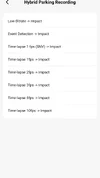
The impact detection parking mode is different from Auto Event Detection parking mode.
With impact detection parking mode, there is no buffer recording. The camera will start to record when parking G-sensor is triggered and keep recording till there is no moving event. The video is 1-3 minutes long.
Regarding the Auto event detection parking mode, the camera will start to record when there is a moving event and each clip is 45S long, and 15S is recorded before the event. Would you mind submitting a ticket here for further help?
 
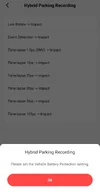
@VIOFO-Support I have issues with enabling Hybrid Parking Recording mode after the recent firmware updates.
I have the BP100, HK4 and the A329S.
Android.
BP100 app (com.viofo.battery) is ver. 1.3 from the Play Store.
Viofo Dashcam app (com.viofo.dashcam) is ver. 2.1.01 from the Play Store.

It now lets me enable Hybrid Parking Recording Mode (Low Bitrate -> Impact) only if I select the BP100 remaining %.
However if I set the Cut-Off time (for example I set it to 1 hour) the app won't let me enable hybrid parking recording.

The Cut-Off time option is now useless without setting the BP100 charge percentage.

Please address.
 
@VIOFO-Support I have issues with enabling Hybrid Parking Recording mode after the recent firmware updates.
I have the BP100, HK4 and the A329S.
Android.
BP100 app (com.viofo.battery) is ver. 1.3 from the Play Store.
Viofo Dashcam app (com.viofo.dashcam) is ver. 2.1.01 from the Play Store.

It now lets me enable Hybrid Parking Recording Mode (Low Bitrate -> Impact) only if I select the BP100 remaining %.
However if I set the Cut-Off time (for example I set it to 1 hour) the app won't let me enable hybrid parking recording.

The Cut-Off time option is now useless without setting the BP100 charge percentage.

Please address.
I think go back to prev firmware.
 
@VIOFO-Support I have issues with enabling Hybrid Parking Recording mode after the recent firmware updates.
I have the BP100, HK4 and the A329S.
Android.
BP100 app (com.viofo.battery) is ver. 1.3 from the Play Store.
Viofo Dashcam app (com.viofo.dashcam) is ver. 2.1.01 from the Play Store.

It now lets me enable Hybrid Parking Recording Mode (Low Bitrate -> Impact) only if I select the BP100 remaining %.
However if I set the Cut-Off time (for example I set it to 1 hour) the app won't let me enable hybrid parking recording.

The Cut-Off time option is now useless without setting the BP100 charge percentage.

Please address.
The issue is related to the Android app, please set the hybrid parking mode on camera first. The issue of APP will be optimized soon.
 
Back
Top