REDTIGER F77 Version 1 (128GB) Review and Impressions

DT MI

Well-Known Member
Joined
Oct 10, 2014
Messages
7,051
Reaction score
5,916
Location
Michigan
Country
United States
Dash Cam
More than my wife thinks I need.
I - Intro

RedTiger (https://www.redtigercam.com) contacted me asking if I would be willing to review their 4K front/4K rear F77 dash camera to which I agreed. It was received in short order and, based on the shipping address, was fulfilled by Newegg (https://www.newegg.com/) in California versus waiting for trans-Pacific shipping. Also provided was the hard wire kit which I didn't use in my review testing as the test vehicle already had a 'permanently' installed camera.

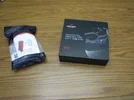
1-PkgAsReceived-sm.webp 2-PkgOpened-sm.webp


The camera has 128GB internal storage so no separate memory card is needed. A 256GB version is also available. There is a slot for a micro SD card which can be used for copying files but you cannot record directly to it. It's also used for updating firmware. Cards of up to 256GB are supported.

The following are the prices for the 128GB version I received as of 7/31/25:

NewEgg 399.99 Includes H/W kit
RedTiger 339.99 Includes H/W kit - Sale Price. Regular price is listed as 399.99 with H/W kit.
Amazon 237.49 NO H/W kit listed as being included


II - Unpacking

The hard wire unit I received has selectable cutoff voltages of 12.4, 12.0, and 11.6 volts for 12 volt systems. It can also be used on 24 volt vehicles with corresponding cutoff levels. Included in the kit is the 12v/24v to 5v converter, 8 fuse taps (2 each of 4 different types), VHB tape for mounting and a trim removal tool. RedTiger also has an optional ODB hard wire kit for those who might be interested in that option.
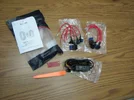
3-HardWireKitContents-sm.webp

The cameras themselves were well packed in foam inserts and all other materials neatly packed in accessory boxes, nothing was loose to rattle around and possibly break.
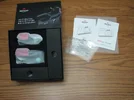
4-DashCamBoxOpened-sm.webp

In the camera box were the front and rear cameras, rear camera cable, 12V accessory power cable, spare front mount, extra VHB tapes, USB data cable, trim tool, and cable clips. Also 4 'electrostatic' stickers, user manual and quick start guide.
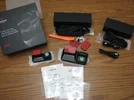
5-DashCamBoxUnpacked-sm.webp

The quick reference guide is just that, enough to get things out of the box and operational - nothing more.

The user guide is one of the better ones I've seen for a dashcam. Every function is listed with a brief description as well as how to access it - including all the voice commands. The only thing that I found missing is instruction on how to copy all files from the internal memory to the SD card - something that took some time to find on the camera itself.

Rather than go into excruciating detail about everything I'll defer to the excellent pictures and details provided by @rcg530 in his review:

The camera as received had firmware version "redtiger-f77-20241012.v11.8". Before testing I updated to "redtiger-f77-20250620.v14.5" downloaded from their website.


<Continued in next post>
 
Last edited:
III - Initial Impressions

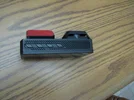
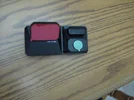
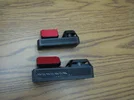
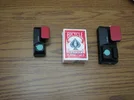
Cameras are fairly large but not extremely so, very solid - not at all cheap feeling.

6-FrontSizeCompare-sm.webp 7-TopSizeCompare-sm.webp

USB-c cable sockets are very snug, more so than any camera I've had. There's no concern about a cable coming loose.

There is no CPL provided nor is one available, and as you'll see shortly one is needed.

GPS is in the camera versus the mount or a separate unit. Handy if you should want to move the camera between vehicles.

Buttons have a decent tactile feedback as well as an audio tone that can be turned off if desired. However, the buttons themselves are virtually flush with the bottom of the camera making them difficult to locate by touch alone.

10-ButtonsBottom-sm.webp 11-ButtonsFront-sm.webp

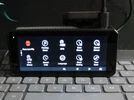
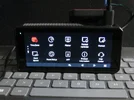
The screen is touch sensitive so function access can be done directly instead of having to use the buttons which are an option - your preference. I found there to be a slight delay when pressing an icon or dragging up/down through the menus. This is good in that it reduces the instances of inadvertent touches but involves a little bit of getting used to the delay.

You'll notice on the 3rd menu screen there's a 'DST' option where Daylight Saving Time can be turned on/off - no need to adjust the actual time or 'lie' about what time zone you're in in order to have correct time stamps.

14-cam-menu-1-sm.webp 15-cam-menu-2-sm.webp 16-cam-menu-3-sm.webp

Both the front and rear cameras have cooling vents top and bottom. This should aid in reducing the potential for overheating. I did notice in my testing that both cameras got warm, but not hot, so good cooling is appropriate. That was a bit surprising for the rear camera since I doubt there is much CPU processing happening there versus the front unit having to process two 4K video streams.

12-VentsTop-sm.webp 13-VentsBottom-sm.webp

RedTiger provides a mobile app for Android and Apple devices. They can be downloaded from the RedTiger site or Apple App and Google Play stores. The owner manual says to search "Redtiger" to find them but on Google that results in multiple apps being located so getting it directly from RedTiger or using the QR code in the manual or camera would be the best way to get it.

A viewer program is also available for Windows or Mac systems directly from the RedTiger web site. It's not a particularly elegant or sophisticated interface but it's functional.

23-ViewerScreen.webp

<Continued in next post due to limitation of 10 images>
 
Last edited:
The mobile app provides the ability to 'live' view the camera if in WiFi range and the camera is on as well as viewing or downloading video files. Given the limited WiFi range (about 10-15 feet) live view is useful only for camera alignment during installation. Many, but not all, camera settings can be done from the app as well. Most settings that most users will want to change after the initial setup are available via the app.

21-app-settings.webp


IV - Specifics

Power Supplies - the 12V adapter and hard wire kit both rated at 2.5 amps output which should be more than adequate as my testing never showed anything more than 1.8A at 5V with the screen on and recording front and rear. I did bench testing with a 120V to 5V adapter rated at 2.1A and had no issues at all.

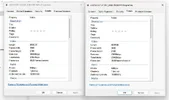
While testing I noticed that while the front and rear cameras are both 4K the bitrates differ. Front camera bitrate is around 31,000 kbps while the rear is only around 24,000 kbps. This makes the rear camera files about 20% smaller than the front. The difference in bitrate at the same resolution means the clarity of the rear camera video will be somewhat less than the front.

22-BitRate.webp

This site provides a more detailed discussion of how resolution and bitrate relate - https://www.theinfobits.com/bitrate-vs-resolution/


Power Usage

For a dual 4K camera I was surprised at how power efficient it was, especially given the supplied 12V and hard wire units are rated at 2.5A at 5V. In my bench testing I observed usage ranging from 1.27A to 1.8A at 5V with the screen on and 1.16A to 1.38A at 5V with the screen off. I did not test parking mode usage.

Recording times

The Redtiger web site claims 8 hours recording for the 128GB version of the F77. This is reasonably accurate for single channel recording.

Given the combined front & rear bit rate of approx. 55,000 kbps and available 114GB (out of 128GB) of available space about 4.1 hours of combined front and rear video can be expected. This is very close to my bench test results which included loop recording until memory space was full and files began being overwritten.

Voice control is optional - it can be turned on/off via menus. I confirmed in testing that all the listed commands work well. Also, in my testing I did not encounter any inadvertent command execution as a result of ambient noises or background voices - although that's always a possibility.

Available voice commands:

Lock Video
Take Picture
Turn on audio / Turn off audio
Turn on screen / Turn off screen
Turn on WiFi / Turn off WiFi
Show front camera / Show rear camera


Audio recording can be turned on/off with a key press, on screen icon, setup menu selection, or voice command. There is no ability to adjust recording volume but the default setting is OK.
 
Last edited:
V - Video Samples

Videos can be recorded in 1, 3, or 5 minute segments. In bench testing I confirmed all three options work but elected to use 5 minutes for actual testing and evaluation.

I tested the F77 in my daily driver alongside a Street Guardian SGGCX2Pro+ with CPL attached. The F77 front and rear cameras were mounted facing forward for 2 reasons: 1) Made it much easier to compare video quality of the 3 cameras and 2) I already had a rear camera in the vehicle and did not want to go to the trouble of installing a second one on a temporary basis.

There is no EV adjustment setting. What the camera is set at from the factory is what it is. To my eye the setting is a bit overexposed but not terribly so. This may be a side effect of the HDR which is claimed in the product description but for which there is no option to turn on or off.

I also noticed the front and rear videos are over sharpened. This is obvious because of the white 'halos' around contrasting objects in the frame. It gives the resulting video an artificial and unnatural look, and in some cases can actually obscure details. Some camera manufacturers provide configuration options as to how much sharpening to apply - Redtiger should follow that lead.

24-USM.webp

These pages explain sharpening in detail if you're interested:


There are multiple resolution and frame rate options available, but only for the front camera:

Front 4K@30fps + Rear 4K@30fps
Front 2.5K@60fps + Rear 4K@30fps
Front 2.5K@30fps + Rear 4K@30fps
Front 4K@30fps
Front 2.5K@60fps
Front 2.5K@30fps

Interestingly there is no option for 2.5K rear camera, 4K only. A lower resolution for the rear camera would make sense to extend recording time, especially in light of the fixed storage capacity of the F77. Maybe something Redtiger can consider for a future firmware update if it's possible with the hardware.

Now for the video samples.

First some overcast daytime videos as the system came out of the box. The reflections are pretty obvious and caused me to put together a DIY polarizing filter to see how it would work.

Front Camera
Rear Camera (mounted facing forward)
Front and Rear Side by Side


Because of the reflections I decided to DIY a polarizing filter along the lines of this thread: https://dashcamtalk.com/forum/threads/poor-mans-polarizer-for-sg9665xx-a118xx-and-b40xx.11698. Set the front cam at 2.5K 30fps with the PL filter compared to rear cam at 4K. Trying to show how low light transition affects exposure with PL after driving into the parking structure. (No audio in these due to private conversations in the vehicle.) This is the only testing I did at 2.5K on the front camera, all other videos are at 4K.

Front cam at 2.5K with PL
Rear cam without PL
Front and Rear Side by Side

I've included a corresponding clip from an SGGCX2Pro+ with CPL just for comparison purposes.

SGGCX2Pro+ for compare


The following clips attempt to show how the autoexposure works with changing light conditions where I removed the homemade PL while recording. Nighttime exposure and color rendition is negatively affected using the PL but nowhere near as much with some other cameras. Note the color of the road in addition to the exposure adjustment. These clips also show video quality for the front and rear cameras in sunny conditions.

11-1 Vid Clip day front
11-2 vid clip day rear
11-3 vid clip side by-side

And a short clip showing the front camera night video with and and then removing the PL filter.

12-1 Vid Clip night front

And lastly short videos of the front camera with PL filter and the rear camera without to show how exposure and color is affected with the PL filter.

13-1 Vid Clip front
13-2 Vid Clip night rear
13-3 side-by-side


<Continued in next post>
 
Last edited:
VI - Transfer times

Since the F77 records only to the internal memory you kind of have to jump through hoops to get video files off the camera.
Three ways are available:
1) Transfer to a mobile phone via WiFi,
2) Attached the camera to a computer using the supplied USB-A to USB-C cable or,
3) copy the files from the internal memory to a micro-SD card.

I tested each of these methods and they are all slow. It seems the design intent did not prioritize any form of bulk file transfer, just an occasional file or two. Even finding the option to copy more than a single file to the SD card was challenging, it's not documented and is buried in one of the playback menus.

The following are the typical transfer times I observed:

Camera to Android App over 5Ghz WiFi - 2:17 for a 5 minute file with about 5 second delay between files
Camera to card - 3:55 for a 5 minute file (Slower than a WiFi transfer :banghead: )
Camera attached to computer via USB3.1 port - 15.5MB/s (slow)

As a comparison data transfer from the SD card to the computer SSD via an adapter in a USB 3.1 port - 66MB/s
Transferring SD card to a network attached HDD - 26MB/s


VII - Thoughts, conclusions and recommendations

Reflections on both the front and rear cameras are significant. It's probably more of an issue with the front camera. My testing showed they can be mitigated effectively using a polarizing filer, unfortunately Redtiger doesn't have one so DIY is, for the time being anyhow, the only option. The front camera seemed to handle use of a PL filter fairly well both day and night so that may be something available in the future.

Fixed storage could be an issue. If just using the camera for 'local commuting' it should be fine - but it could be problematic for longer trips as there's no easy way to quickly offload videos or swap storage media. A camera with removeable recording storage (micro SD card) would be more appropriate for this use case. The same would apply if your usage involves saving all, or most, of your dash cam videos. There's just no 'quick and easy' way to get more than a few videos off the camera on a regular basis.

While not a show stopper by any means OTA firmware updates are reported to be not available even though the user manual says different. Refer to @rcg530 review at https://dashcamtalk.com/forum/threa...r-testing-review-rcg.52099/page-4#post-644999 where he confirmed this with Redtiger.

My plan is to install the F77 in my wife's car since all of her driving is 'local' and the fixed storage limitation won't be an issue for her as it would be in my vehicle.
 
Last edited:
Back
Top