Viofo A119 mini 2 Resolution question

musclesoh92467

New Member
Joined
Jul 5, 2018
Messages
13
Reaction score
2
Location
Hemet , Ca
Country
United States
Dash Cam
Blavkvue 970x LTE , Blackvue 770X , Viofo A229 pro
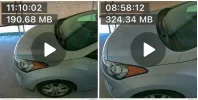
Hi, im trying to figure out why my videos when in parking mode are zoomed in more than when in normal mode . I noticed it doing this after latest firmware so i cant remember what settings i had prior to it . I currently have set at 2560x1440 60 FPS with HDR off . Is there anyway to set parking mode resolution any suggestions. Thanks
 

Attachments

  • IMG_7971.webp
    IMG_7971.webp
    39.1 KB · Views: 187
If you want to keep the same resolution, please update with this firmware.
https://drive.google.com/file/d/16VTm7kltiNeXK_gw-BAvfou4a7aIGt_Z/view?usp=sharing
Hello, I purchased this same cam last month and have updated to the latest firmware from your website yesterday, I am having the same issue as this user. I normally run 2560x1440 60 FPS with HDR OFF, and I am using Time Lapse parking mode at 10FPS, I notice when I enter parking mode that the resolution drops to 1080p and 30FPS, is this behavior expected?
 
Hello, I purchased this same cam last month and have updated to the latest firmware from your website yesterday, I am having the same issue as this user. I normally run 2560x1440 60 FPS with HDR OFF, and I am using Time Lapse parking mode at 10FPS, I notice when I enter parking mode that the resolution drops to 1080p and 30FPS, is this behavior expected?
It is not a issue, but designed as this. You can also update this special firmware (V2.1 20250114) to keep the resolution: https://we.tl/t-vdCIrbplba
 
Last edited:
It is not a issue, but designed as this.
Another new issue.

The A119 M2's native resolution is 2K.
FHD can be selected from the options.
As mentioned earlier, selecting FHD resolution on some models doesn't ensure the recorded image is as wide-angle as promised.

Choosing a lower resolution results in a recording with the edges of the frame cropped.

The parking mode created here should not switch to FHD resolution and reduce the visible area.

If you're going to lower the parking recording resolution to prevent overheating, you should ensure the full frame is fully framed. This means it should address one issue while not causing another.

If this is a later modification, it should be explained to users in the "Changes Made in the New Version" section.

Changes to the names of improvements or unnoticed bugs should not be presented as intended.

Innovations and improvements are welcome, but any downgrades should always be reported.
 
Back
Top