Viofo BP100 Battery Keeps Dying

rolltide

New Member
Joined
Apr 14, 2026
Messages
3
Reaction score
0
Location
Atlanta
Country
United States
Hello friends - I installed a Viofo A329S and BP100 battery. If I don't drive my car for one day when parked at home, the battery will be completely dead the next day.

I set the dash cam to disable parking mode when parked at home using the GPS feature, but I don't think it's working because the battery keeps dying. I'm worried that this is damaging the battery life.

Any ideas how to preserve the battery when I'm parked at home?
 
Are you able to get GPS when you're parked at home? Are you parking in a single home garage, or one of those parking decks for a bunch of cars? Have you tried recreating the GPS zone and/or making the radius larger?
 
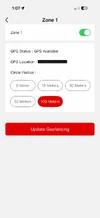
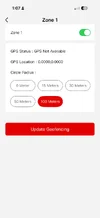
The dash cam says "GPS Available" when the car is parked in my driveway and I set it to 100 meters. However, the it says "GPS Not Available" when the car is parked in my single home garage. I just recreated the GPS zone again in my driveway, but still get "GPS Not Available" when parked in my garage.

Should I just remove the dash cam from its dock when I'm parked at home to avoid draining the BP100 battery? Or is there something else I can try? Thanks.

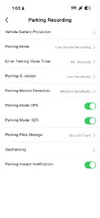
IMG_3181.webp

IMG_3186.webp

IMG_3187.webp
 
If GPS is not available at the location you're parking your vehicle, the GPS based Zone feature isn't going to be helpful. You can step back to the older [pre GPS Zone feature] steps of either using the menu/power button to power down the dash camera or if you have the BTR200 Bluetooth button, you can assign one of the buttons to the "Power Off" action.

The menu/power button option would be: 1 click of power/menu button to turn on the screen [if the screen is off], then a super long press-and-hold of that button. The settings menu will appear [still keep holding] and then the dash camera will power off.
 
Personally I don't like doing anything that could potentially have me not have my dashcam recording automatically next time I start my car, including removing the dashcam off the mount. If you do, just make it super obvious that it's off so you don't forget to remount it next time you go driving. 🙂 I do do it sometimes, especially when pulling MicroSD cards to grab some footage off of it, but I try to avoid it when possible.

I've seen inconsistent auto power off behavior in my garage too. @viofo @VIOFO-Support How does the feature work if we lose GPS while parking? Does it remember the last known location? If not, could we add that so that it effectively works with the GPS location of our driveway, right before we pull into the garage and lose GPS lock?
 
Interested in where this discussion goes. I use the lowest 15m radius geofencing on both my front A329TC and rear A329 and it has worked perfectly after I pull into my garage and shut off my vehicle. My garage is fully underneath a concrete block and slab 4 story townhome and opens into a relatively narrow driveway flanked by another row of identical townhomes (so fairly bunker-like). The only conditions in which the automatic shutoff doesn't work is if I pull out of my garage and then relatively quickly pull back in before the GPS can get a fix and also of course when I am doing something with the cam and never leave the garage--obviously there would never be a GPS connection to start with in that scenario, just like with sat radio/nav.
 
The dash cam says "GPS Available" when the car is parked in my driveway and I set it to 100 meters. However, the it says "GPS Not Available" when the car is parked in my single home garage. I just recreated the GPS zone again in my driveway, but still get "GPS Not Available" when parked in my garage.

Should I just remove the dash cam from its dock when I'm parked at home to avoid draining the BP100 battery? Or is there something else I can try? Thanks.

View attachment 91541

View attachment 91542

View attachment 91543
@rolltide
The "Parking Mode GPS" enabled or disabled is irrelevant to the geofencing function.
I recommend disabling it to minimize parking power consumption.
Ensure that GPS is enabled for Driving Mode.
Park the car outside of your garage with the engine running and dashcam is in normal recording mode.
If you just started the engine, you may need to wait a minute or two to acquire a GPS signal and then go to settings to set up a geofence.
A 100-meter radius is not necessary—a smaller value will suffice.

If still does not work:

Ensure that GPS is enabled in driving mode.
Check your regular driving recordings.
Are the GPS coordinates and/or speed displayed in the status bar? (assuming it is enabled)
If not, the GPS module is defective.

I recently encountered this exact same issue with my A229 Plus.
I replaced the GPS module—and now everything is working properly.
 
Last edited:
Back
Top