4K TV - is it worth it?

TonyM

Well-Known Member
Joined
Jul 30, 2013
Messages
6,683
Reaction score
6,734
Country
United Kingdom
Dash Cam
Many dashcams over many years
Our TV is a 42" non-smart 1080p plasma set that we bought in 2010. We use it primarily as a display device - audio goes via a receiver and 5.1 speaker setup. It's still working well.

I believe normal broadcast TV is FHD at best? We don't have any 4K video sources (not even a dashcam!). Potentially we could upgrade to Netflix premium for UHD content but we don't have enough download speed to access that.

Is a 4K TV going to be any better than my current TV? I suppose a faster UI would be nice. However it seems a shame to get rid of something that still works.
 
Our TV is a 42" non-smart 1080p plasma set that we bought in 2010. We use it primarily as a display device - audio goes via a receiver and 5.1 speaker setup. It's still working well.

I believe normal broadcast TV is FHD at best? We don't have any 4K video sources (not even a dashcam!). Potentially we could upgrade to Netflix premium for UHD content but we don't have enough download speed to access that.

Is a 4K TV going to be any better than my current TV? I suppose a faster UI would be nice. However it seems a shame to get rid of something that still works.
"Smart" TV is an antiquated term that was a buzzword for years simply to mean the TV could connect to the internet for streaming services or YouTube. Every TV does that now, and you could also buy something like a Roku or Amazon Fire stick or Google Chromecast

That aside, plasmas are good TVs but known to guzzle power like there's no tomorrow. I've had my 4K Sony TV since 2016 without issue, I stream 4K content sometimes using Plex or Netflix at times or even just while watching YouTube.

Like you said, if your internet is the constraining factor then the need for 4K isn't the best. Other things like HDR are bound to make a difference for your viewing, but nevertheless it's not a bad idea to at least have the option of 4K if down the line you decide to get faster internet or use gaming consoles (I do) like playstation or Xbox.
 
Is a 4K TV going to be any better than my current TV?
Yo Tony,
I went through a similar decision this summer.
My primary “computer monitor” for analyzing dash cam footage was a 32” 720p Samsung LED also from 2010.
I’ve been wanting a 4K TV / monitor just for dash cam footage ever since the A139 Pro (2022), but I could bever pull the trigger because my Samsung 32” still worked great.
On June 25, 2024 I bit the bullet, and bought a Hisense 43” 4K for $200 from Costco.
The picture quality was an amazing improvement.
However, I discovered the power consumption remained at 10 Watts after the TV is turned off.
The TV was “always on” no matter what, continuously communicating with my Wi-Fi router looking for firmware updates, communicating my consumer habits to the CCCP, etc. lol
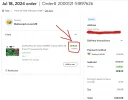
I retuned it, and bought Samsung 43” 4K from Walmart for $218.
When turned off the power consumption is 0.0 Watts, (no spyware). lol
I demoted the 32” 720p Samsung to my garage wall for use with another computer to increase my work productivity.

Well guess what, I use the garage computer, and 32” monitor so much I thought why don’t I buy a second Samsung 4K for the garage, (same model as before)?
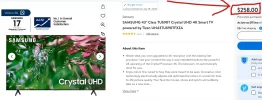
I went looking at Walmart and the price is now $258.
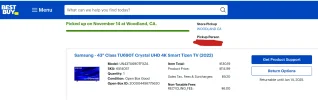
I found the exact same model open-box at Best Buy for $115.
I drove to Best Buy to inspect the returned unit.
It still had the screen protector on it, and it was never installed.
The store associate told me they get a lot of customer returns on 43” TV’s because when people get them home they realize they should have bought a 55” or 70”.
So the 43” goes back without being installed. Lol
Here’s what it looks like in my garage;


As far as answering your questions, I can’t do that but I can offer this advice;
1.) This is my go to guy for 4K TV research & reviews;


2.) After months of research, and watching reviews the first 4K TV you buy will most likely disappoint you, and you’ll want to return it, and try a different model / brand.

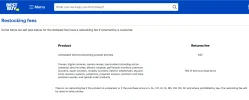
3.) For reason #2 I would only buy from a local retailer that has a minimum 30-90 day return policy with NO RESTOCKING FEES.
Best Buy charges 15% restocking fee on most items, and is arbitrarily applied depending on who’s working the return register.
Since this was my 2nd unit of the same exact model, and it was only $115 I threw caution to the wind.

4.) Always go bigger than your previous size (room permitting).
“I wish I would have bought a smaller TV” SAID NO ONE EVER!

5.) As far as “smart” internet features go I first enable Wi-Fi to download the latest firmware for the TV, and then do a factory reset.
Then I set up the TV and DECLINE all the predatory terms & conditions for using the “smart” internet connected features.
And then I disable the Wi-Fi so it never tries to connect to my router looking for updates.
I only use these TV’s as computer monitors.

6.) Make sure you research the 10 different kinds of HDR, (exaggeration)
Different manufacturers only support curtain types.

7.) Never judge picture quality in the store show room.
You must install the TV in your house, (primary viewing location) to accurately judge the picture quality, (due to lighting conditions, windows, etc).
 

Attachments

  • Samsung $115 .webp
    Samsung $115 .webp
    51.6 KB · Views: 114
  • Samsung $218 .webp
    Samsung $218 .webp
    78.9 KB · Views: 103
  • Samsung $258 .webp
    Samsung $258 .webp
    117.4 KB · Views: 93
  • Restocking Fee .webp
    Restocking Fee .webp
    57.5 KB · Views: 97
  • Hisense 43 $200 .webp
    Hisense 43 $200 .webp
    48.7 KB · Views: 107
Last edited:
Yo Tony,
I went through a similar decision this summer.
My primary “computer monitor” for analyzing dash cam footage was a 32” 720p Samsung LED also from 2010.
I’ve been wanting a 4K TV / monitor just for dash cam footage ever since the A139 Pro (2022), but I could bever pull the trigger because my Samsung 32” still worked great.
On June 25, 2024 I bit the bullet, and bought a Hisense 43” 4K for $200 from Costco.
The picture quality was an amazing improvement.
However, I discovered the power consumption remained at 10 Watts after the TV is turned off.
The TV was “always on” no matter what, continuously communicating with my Wi-Fi router looking for firmware updates, communicating my consumer habits to the CCCP, etc. lol
I retuned it, and bought Samsung 43” 4K from Walmart for $218.
When turned off the power consumption is 0.0 Watts, (no spyware). lol
I demoted the 32” 720p Samsung to my garage wall for use with another computer to increase my work productivity.

Well guess what, I use the garage computer, and 32” monitor so much I thought why don’t I buy a second Samsung 4K for the garage, (same model as before)?
I went looking at Walmart and the price is now $258.
I found the exact same model open-box at Best Buy for $115.
I drove to Best Buy to inspect the returned unit.
It still had the screen protector on it, and it was never installed.
The store associate told me they get a lot of customer returns on 43” TV’s because when people get them home they realize they should have bought a 55” or 70”.
So the 43” goes back without being installed. Lol
Here’s what it looks like in my garage;


As far as answering your questions, I can’t do that but I can offer this advice;
1.) This is my go to guy for 4K TV research & reviews;


2.) After months of research, and watching reviews the first 4K TV you buy will most likely disappoint you, and you’ll want to return it, and try a different model / brand.

3.) For reason #2 I would only buy from a local retailer that has a minimum 30-90 day return policy with NO RESTOCKING FEES.
Best Buy charges 15% restocking fee on most items, and is arbitrarily applied depending on who’s working the return register.
Since this was my 2nd unit of the same exact model, and it was only $115 I threw caution to the wind.

4.) Always go bigger than your previous size (room permitting).
“I wish I would have bought a smaller TV” SAID NO ONE EVER!

5.) As far as “smart” internet features go I first enable Wi-Fi to download the latest firmware for the TV, and then do a factory reset.
Then I set up the TV and DECLINE all the predatory terms & conditions for using the “smart” internet connected features.
And then I disable the Wi-Fi so it never tries to connect to my router looking for updates.
I only use these TV’s as computer monitors.

6.) Make sure you research the 10 different kinds of HDR, (exaggeration)
Different manufacturers only support curtain types.

7.) Never judge picture quality in the store show room.
You must install the TV in your house, (primary viewing location) to accurately judge the picture quality, (due to lighting conditions, windows, etc).
Some good points there though that YouTube guy is pretty crappy at reviewing.

Tony, i would go with the Rtings channel instead (they have a website too that goes into even more detail) - which goes into far more depth than that guy does, and which informed my 4K buying choice all the way back in 2016. Pretty happy with my TV, considering I knew everything about it going in (picture quality, HDR, brightness levels, colour gamuts, black levels, contrast levels so on and so forth). Tempted to buy a new 4K TV for my playstation 5, but diminishing returns really with only a few new features.

When it comes to size, go for whatever you need really. TVs are funny as a lot of models have VA panels in their smaller sizes (which have better black levels but worse viewing angles) compared to IPS panels in the larger sizes (much better viewing angles from the sides, at the expense of black levels / blooming etc).

As you can see, it can get quite complicated but take your time and as Chuck said, get something where you can return it in case you change your mind or stuff up.
 
Thanks for the replies guys. The TV box supplied by my ISP is no longer supported by Netflix, thus we have started looking into options. We have an old Chromecast and could consider a newer Fire stick or similar, but the convenience of all-in-one box might suit the rest of my family better, so we may end up with a 4K TV by default. Personally I'm happy with separate remotes for each device, though I've bought and programmed Harmony remotes to try and keep everyone else happy, with limited success.
 
I believe normal broadcast TV is FHD at best? We don't have any 4K video sources (not even a dashcam!).
Yes, broadcast TV is likely to stay at FHD at best, most broadcast TV channels are inferior to decent FHD, but many people are no longer watching broadcast TV, I prefer to watch BBC over iPlayer most of the time.

Personally, I watch quite a lot of Youtube, which can be 4K, but my TV is normally watched from a distance where it is not going to make much difference if it is FHD or 4K, except for people with exceptionally good eyesight, nice colour/contrast/brightness is more important to me, especially brightness in daylight.

For the cost of a good 4K TV, you could buy a good "smart TV box", such as the Apple TV, which will give you access to all sorts of extra content, including Youtube, Netflix, games, your own video/photos, use of Apple Home devices, and being able to simply play dashcam videos on the TV screen direct from your iPhone (screen sharing or AirDrop). (Check compatibility if you use a different type of phone, for some reason I think you have an iPhone.)

Whatever image quality improvement you make, you will soon get used to it, and then not notice.. It appears that you already have decent audio. Content/functionality improvement/ease of access to content can make a big difference. Being able to use your phone as a remote control for playing Youtube/photos on your TV screen is nice.

At some point, you will probably want a decent HDR TV, but we seem to be making slow progress at getting HDR content, a couple more years and we will have proper HDR on dashcams, and maybe that is the time for a screen upgrade. The price of good quality, high resolution, good HDR screens is still dropping fairly rapidly, but most people are still not using their HDR features, so people aren't noticing the current advances in technology. The good HDR is still a bit expensive, if you are still happy with your current screen then maybe delay the screen upgrade a little longer. If you have a good TV box, the screen is just a monitor, you don't need a smart TV, and a smart TV is not going to be as good as a good TV box. Although remember that the Apple TV box does not have a TV tuner, it accesses TV stations via the internet (iPlayer etc.), which changes the way you watch TV - you watch what you want, when you want.
 
We have a 2012 65" Panasonic Plasma that sidelines as infrared panel, very useful in winter as it costs us less gas 😉.
I'm still very satisfied with the picture quality, which is, imo, the sole purpose of a TV screen. It's not connected to the internet, and like @Panzer Platform noted, it never will be due to all the modern spyware features that are enabled by default. We had a high quality Netfix subscription and watched using our PS4, to get the most out of the screen, but have ended it a few years ago as the content was becoming less and less appealing.

We still have a Humax PVR which we use to record the shows we want to see, mainly in the beginning of the evening.
Long story short, no plans to replace it any time soon.

Like @Nigel said, to get the most out of your new 4K 85"HDR OLED screen, you would need to get the content for it. Some shows on Netflex seem to support the features, but only if you get the most costly subscription. Unless you are a video buff, always looking for the best, wear out your current one. 9 out of 10 times the content won't match the screen's capabilities.
 
Not sure why the old smart TV term is being used by Nigel when that was phased out years ago.

Anyways in counterpoint, there is plenty of HDR content out there on streaming services like netflix, Amazon prime, paramount and apple TV+, not so much on YouTube though. It has comes leaps and bounds in the last few years, before that it was in its relative infancy.
 
We have a 2012 65" Panasonic Plasma that sidelines as infrared panel, very useful in winter as it costs us less gas 😉.
I'm still very satisfied with the picture quality, which is, imo, the sole purpose of a TV screen. It's not connected to the internet, and like @Panzer Platform noted, it never will be due to all the modern spyware features that are enabled by default. We had a high quality Netfix subscription and watched using our PS4, to get the most out of the screen, but have ended it a few years ago as the content was becoming less and less appealing.

We still have a Humax PVR which we use to record the shows we want to see, mainly in the beginning of the evening.
Long story short, no plans to replace it any time soon.

Like @Nigel said, to get the most out of your new 4K 85"HDR OLED screen, you would need to get the content for it. Some shows on Netflex seem to support the features, but only if you get the most costly subscription. Unless you are a video buff, always looking for the best, wear out your current one. 9 out of 10 times the content won't match the screen's capabilities.
Your TV doesn't have to get super bright like some HDR standards state, for someone to get benefit out of HDR. You don't have to have a top of the line OLED with peak brightness of 3000nits to enjoy HDR content.

My Sony TV only goes up to 400/500nits, which is way below what HDR dictates, but the colour gamut is covered and I do notice HDR in movies and playstation 4/5 games. I enjoy it and I suspect most people would.
 
My challenge is easy, i simply do not own a TV.

My 32" computer screen, it is just 1440p CUZ i can not / will not afford a GFX card able to run a 4K screen
Okay all GFX card can run a 4K screen, but i am thinking in a worth while way ( not top of the line way )

I have sort of realized that my days of gaming on the PC are gone, they simply do not make games worth playing anymore.
 
It's not connected to the internet, and like @Panzer Platform noted, it never will be due to all the modern spyware features that are enabled by default.
It's not that I'm paranoid about being surveilled by my own government, Apple, Google, Amazon, etc.
I'm more worried about wasting, and paying for electricity / data usage when the darn thing is supposed to be OFF. lol
 
content for it
I also have a 55" Samsung, and 67" Samsung from 2012 that are 3D.
We were told there was going to be plenty of OTA live 3D TV broadcasts for sporting events.
Well that never happened. lol
But I still came out ahead because the TV's are true 120Hz panels, so fast motion looks really good, (smooth).
I don't think I'll ever get rid of those units.
The 55" was $1,200, and the 67" was $3,000 in 2012 both from Costco.
The 67" was a replacement for a 70" Samsung DLP from 2005.
I remember when I got it I bought an HD DVD player (720p), and the only movie available was Jarhead (2005).
I quickly returned it, and bought a Blu-ray player at the height of the format war, (Sony BDP-S300) still in use today. lol
Oh yeah, the 70" DLP was a replacement for a 60" Mitsubishi projector 4:3 from 1999, I used to rent those huge laser disks from my local "Popcorn Video" rental store before Blockbuster took over around 2000.
Man those are great memories. lol
 
Wow laser disks! We used to rent VHS-tapes, which of course where often eaten up by previous customers VHS-players, ruined some thrilling moments in films due to banding, static or no image at all. Those where the days 😆

We went from a 32"CRT to a 42" plasma. Till we decided to move around the furniture in the living room and found ourselves 6m from the TV. The wife insisted on the 65", I didn't oppose 😛

Your TV doesn't have to get super bright like some HDR standards state
Nope, but being a Panasonic panel, the black in scenes are truly black. So in a sense we had HDR way before it was invented 😉
I have sort of realized that my days of gaming on the PC are gone, they simply do not make games worth playing anymore.
I recognize that, our PS4 was used more often to stream Netflix than to play games. All though I did enjoyed playing The Last Of Us, 1 and 2.
It's not that I'm paranoid
Sorry about that, projection on my part 😆. Probably because I read to many work related security sites.
 
Be kind rewind.
We also had those separate rewinding machines so it would not wear out the VCR.
My fathers first VCR was a Fisher with a WIRED remote control! lol
 
Wow laser disks! We used to rent VHS-tapes, which of course where often eaten up by previous customers VHS-players, ruined some thrilling moments in films due to banding, static or no image at all. Those where the days 😆

We went from a 32"CRT to a 42" plasma. Till we decided to move around the furniture in the living room and found ourselves 6m from the TV. The wife insisted on the 65", I didn't oppose 😛


Nope, but being a Panasonic panel, the black in scenes are truly black. So in a sense we had HDR way before it was invented 😉

I recognize that, our PS4 was used more often to stream Netflix than to play games. All though I did enjoyed playing The Last Of Us, 1 and 2.

Sorry about that, projection on my part 😆. Probably because I read to many work related security sites.
Not gonna argue on the black levels you're right there but HDR with the whites and how bright it gets, you can't get that on a plasma lol cos the plasma just can't get bright enough - all about the brightness, not the contrast here.

Also agree about TLOU games, HDR works well enough in those games. Don't get me started about how much of a waste PS5 is in terms of decent games (but I got mine for free anyway, so of no consequences to me lol)
 
I also have a 55" Samsung, and 67" Samsung from 2012 that are 3D.
We were told there was going to be plenty of OTA live 3D TV broadcasts for sporting events.
Well that never happened. lol
But I still came out ahead because the TV's are true 120Hz panels, so fast motion looks really good, (smooth).
I don't think I'll ever get rid of those units.
The 55" was $1,200, and the 67" was $3,000 in 2012 both from Costco.
The 67" was a replacement for a 70" Samsung DLP from 2005.
I remember when I got it I bought an HD DVD player (720p), and the only movie available was Jarhead (2005).
I quickly returned it, and bought a Blu-ray player at the height of the format war, (Sony BDP-S300) still in use today. lol
Oh yeah, the 70" DLP was a replacement for a 60" Mitsubishi projector 4:3 from 1999, I used to rent those huge laser disks from my local "Popcorn Video" rental store before Blockbuster took over around 2000.
Man those are great memories. lol
Jeepers that's memories all there, I remember laser discs from my childhood so I'm not that old haha.

I'd keep those TVs indefinitely cos of how much you spent on it haha. At the time I thought 3D was a gimmick and would die out, and glad it did because it really was cumbersome. Dodged a bullet there with Hd dvd player, switching to blu ray. Still have my playstation 3, which pretty much guaranteed the win for Sony
 
For the cost of a good 4K TV, you could buy a good "smart TV box", such as the Apple TV, which will give you access to all sorts of extra content, including Youtube, Netflix, games, your own video/photos, use of Apple Home devices, and being able to simply play dashcam videos on the TV screen direct from your iPhone (screen sharing or AirDrop). (Check compatibility if you use a different type of phone, for some reason I think you have an iPhone.)

If you have a good TV box, the screen is just a monitor, you don't need a smart TV, and a smart TV is not going to be as good as a good TV box. Although remember that the Apple TV box does not have a TV tuner, it accesses TV stations via the internet (iPlayer etc.), which changes the way you watch TV - you watch what you want, when you want.
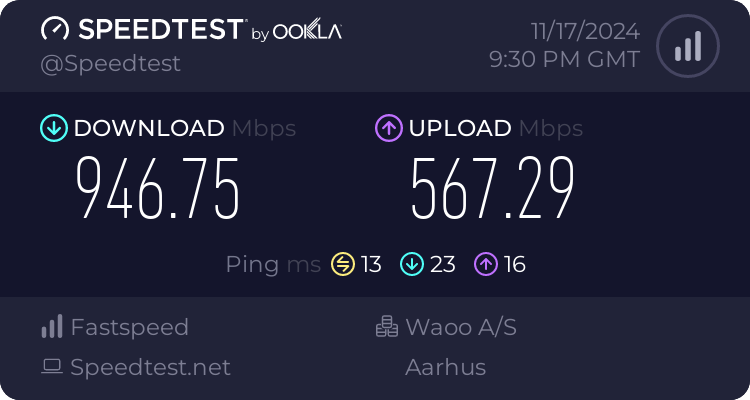
Thanks for the suggestions. I'm on Android, not Apple, but I'm sure there's comparable TV boxes available. Trouble is I can't stream much decent content at <5Mbps 😢 On a good day I get 10Mbps. The maximum to our router is 14Mbps.

1731876323120.webp


Usually I either watch DVD/Blu-ray, or save HD broadcasts on a PVR for viewing later. I don't have the time to watch any content as it's broadcast.
 
Thanks for the suggestions. I'm on Android, not Apple, but I'm sure there's comparable TV boxes available. Trouble is I can't stream much decent content at <5Mbps 😢 On a good day I get 10Mbps. The maximum to our router is 14Mbps.

View attachment 75242

Usually I either watch DVD/Blu-ray, or save HD broadcasts on a PVR for viewing later. I don't have the time to watch any content as it's broadcast.
Damn that's abysmal speeds 🙁, yeah of limited usage a 4K TV then it seems unless it's future proofing, or you play video games or you end up getting faster internet. Or you manage to get 4k / full HD movies from a friend and be able to play them on the TV ...
 
The maximum to our router is 14Mbps.
When i had my house the MAX ADSL speed was 7 - 8 mbit, so i did not mind doing document fraud ( declarations of interest on behalf of all houses in a 5 KM radius )
Only took me a year and a little after that i had fiber to and thru the wall of my house.
Mind you back then 30/30 on fiber was more expensive than what i pay for 1000 / 500 on cable now.

17022994964.png


When moving, i am only getting a new place if i can get 2500 / 2500 on fiber,,,, which should not be too difficult these days.
even if TBH it is rare i see 1000 mbit maxed out.
 
Trouble is I can't stream much decent content at <5Mbps 😢 On a good day I get 10Mbps.
I think that is plenty for normal iPlayer in SD (The other main channels all have equivalents), if you want to watch in FHD then you may need to download first, then you have great quality compared to normal TV. YouTube may not provide 4K at that speed, but it will stream fine, as long as the bitrate is consistent. You can try these out on a computer/phone, not quite the same to use as a TV box with remote control, but you can check if they will work.

I'm not sure why you would upgrade your current TV if you are not going to be watching anything but SD terrestrial TV, most of which is low bitrate SD unless you are watching BBC or Channel 4. Except maybe for power consumption reasons.

4K dashcam footage looks fine on an FHD monitor, although it is good to have a video player with a zoom function.

If you want a larger screen, and are going to sit close enough to it to be able to see the extra detail of 4K, then you will want to find a way to source 4K video, but FHD resolution was chosen because that is the amount of detail that most people can see. For most people, a 4K TV doesn't make much difference unless they have a screen that is too big for the room.


You don't have to have a top of the line OLED with peak brightness of 3000nits to enjoy HDR content.

My Sony TV only goes up to 400/500nits,
Most HDR should be displayed at 1000 nits to be accurate, 400 nits is not real HDR, and 3000 is not needed for indoor viewing. Although remember that nits are measured linearly, while our eyes are logarithmic, so 3000 nits is nowhere near twice as bright as 1000 nits!
 
Back
Top