My N4Pro Review

sanjsrik

New Member
Joined
Oct 26, 2024
Messages
7
Reaction score
0
Location
New York
Country
United States
I'm not an expert in dashcams. I have nothing but my own experience and that's what I'm writing about here.

I have a 2021 Prius AWD XLE, purchased in May 2024. It's a nifty little car and I like it. It has almost no miles on it and I don't drive it that much as I live in NYC. I have a garage that I park it in that has a valet that fetches the car when you want it. Yes, it's a schmancy thing and probably the most fanciest thing I do but it's because parking in NYC is hard without a driveway.

October 11, 2024, I decided to purchase a Vantrue N4Pro with the rear and internal camera directly from the company because I had a discount code. Not sure if it saved me a lot of money but that's what I did. It shipped and arrived in short order (delivered October 18, so about a week, not bad considering it came directly from China according to DHL)
October 17, 2024, I decided to use their installation service because from their website they had a local (NYC, Queens) installation company they recommended that only cost $50 (believe it or not when I last checked about a week ago, the price is now $150, now, this is insane that they tripled the price in less than a month, although I just checked the link again as I'm writing this, and the installation service is now $100 "on special")
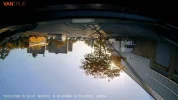
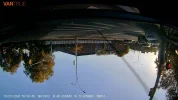
October 19, 2024, I went to the place in Queens that installed my unit in about 40 minutes. The guy was really nice and showed me how to use it and that I had to use the WiFi to connect to download video from the unit. Here's the issue with the installation however, they installed the rear camera upside-down. Now, this is SUCH A KNOWN ISSUE that there's a workaround in the mobile app. This is the company that Vantrue recommended that I use and yet they couldn't install the rear camera right-side up.
October, 25, 2024, I got an email from Vantrue that said if I posted a review with 3 photos or a 15-second video they'd give me a $50 gift card. Who am I to pass that up. I posted my review on November 7, 2024, it's still on the page for the N4Pro bundle.
I've never received anything from Vantrue in terms of a gift card or even acknowledgement after following their rules for obtaining a gift card and sending them proof. Goes to show you, they're really not that honest.

November 18, 2024, I went to get the car from the garage and the attendant said that the battery was dead. The car wouldn't even turn over. He was nice enough to bring another car around and we were able to jump the Prius. Off I went. Since I've bought one of these mini jumper batteries. Amazing thing.

The culprit for draining my battery was the parking mode in the Vantrue N4Pro. Every time someone passed by in front of my car during the weekend or the attendant moved the car or did anything to the car, the parking mode kicked in and stayed on. This drained the battery. I now know that when I park the car in the garage I need to remove the camera (which defeats the entire purpose of parking mode but it's in a secure garage so that's fine).

The camera itself works "fine". It has LOTS of gaps. I drove out the Rockaways and it failed to even record a single moment of my trip yet DID record me parking the car? How is that even possible? There are a LOT of gaps in the recording that I have noticed whenever I check the memory card. Plus the fact that it records tiny little recordings rather than a continuous one is maddening because of the proprietary file naming system (it's outlined in their manual but you have to decipher it as well).

My bottom line is for something so expensive, why doesn't it work all the time as expected? Why are there so many gaps in recording? I've gone all through the settings and asked a bunch of questions in forums to see what could be causing the problem but it's random. Just random. The battery draining issue. That's annoying but I guess I have a workaround for when I park it in the garage.

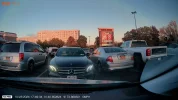
I'm posting pictures from the unit (yes both of the rear camera images are upside down, this is before I applied to software fix in the app for the known installation issue).
 

Attachments

  • 20241023_165645_00022C.webp
    20241023_165645_00022C.webp
    175.3 KB · Views: 120
  • 20241023_174934_00023A.webp
    20241023_174934_00023A.webp
    288.7 KB · Views: 111
  • 20241023_163358_00016C.webp
    20241023_163358_00016C.webp
    155.8 KB · Views: 114
Bummer to hear about the $50 gift card thing.

For the rear dashcam, it's very common that it sometimes gets installed upside down, depending on how it's more convenient to install the rear cam. For that reason there's an option in the settings to flip the rear cam's video around. Just enable the setting and it's fine. IMO it's something the installer could have helped you with, especially if they were showing you WiFi stuff, but it's easy enough to do on your own.

For the parking mode, do you know which hardwire cable they installed and what the voltage cutoff threshold is set to? Perhaps they set it too low and it's allowing the car battery to be drained too far before shutting off the dashcam.
 
Welcome to the forum sanjsrik.

The N5 had a flip & mirror option for the rear cameras that once in a wile do get mounted upside down due to convenience / the way you choose to route it.
ATM i test 2 systems 70mai A810 and A510, one is 100 % strait up, the other one i do have to flip the rear feed.
you flip / mirror the rear camera in the settings somewhere, what exactly is needed i can not say you will have to try one thing at the time, generally you can see on the LCD screen if it is OK or not.
For instance if you are parked on a road side, if you look back the roadside are to your left, so you also want it to be that way on the LCD screen,
The mirror part, well if you need to mess with that plates / signs ASO will be mirrored and unreadable by looking at the recordings, if it is, you also need to do that.

I drove a car for a while forgetting to do that, so i had funny looking rear footage.

There should not be gaps in the recordings, but there will be for instance if you have G-sensor on while driving, CUZ then if you have a event, well the footage it consist off will then be in the event folder and not the folder for the "normal " footage.
I personally do not like to have G-sensor on while driving, why should i the camera record all the time anyway, so if it is small i want to share i press event button and the event go to the event folder, if it is something MASSIVE.
Well i will not be driving anymore, so if conscious in due time take the memory card out of the devise, if you are not conscious responders should at least turn off your car ( some actually do that automatic in a big crash )
But even if say you are shunted down a hillside and no one see it, with a sufficient large memory card, you still have to be there dead or unconscious for many many hours in a powered / running car before the camera get around to overwrite the actual event that put you in that position.

My friend and my kid sister know, if i have been in a bad way, go at once to my car where ever it is stored and retrieve memory cards in several systems.
In Denmark we drive on the right side of the road. But looking at my footage it look as if i am on the left side, and of course license plates all wrong.

a3f024f70d63ba03b924e29421b4913ac5eac8cd.jpg


Looking at your 2 examples from the rear camera i think you just need to flip the image, but do keep a eye out if signs / plates are gibberish CUZ they are mirrored.
 
Last edited:
Bummer to hear about the $50 gift card thing.

For the rear dashcam, it's very common that it sometimes gets installed upside down, depending on how it's more convenient to install the rear cam. For that reason there's an option in the settings to flip the rear cam's video around. Just enable the setting and it's fine. IMO it's something the installer could have helped you with, especially if they were showing you WiFi stuff, but it's easy enough to do on your own.

For the parking mode, do you know which hardwire cable they installed and what the voltage cutoff threshold is set to? Perhaps they set it too low and it's allowing the car battery to be drained too far before shutting off the dashcam.
Hi

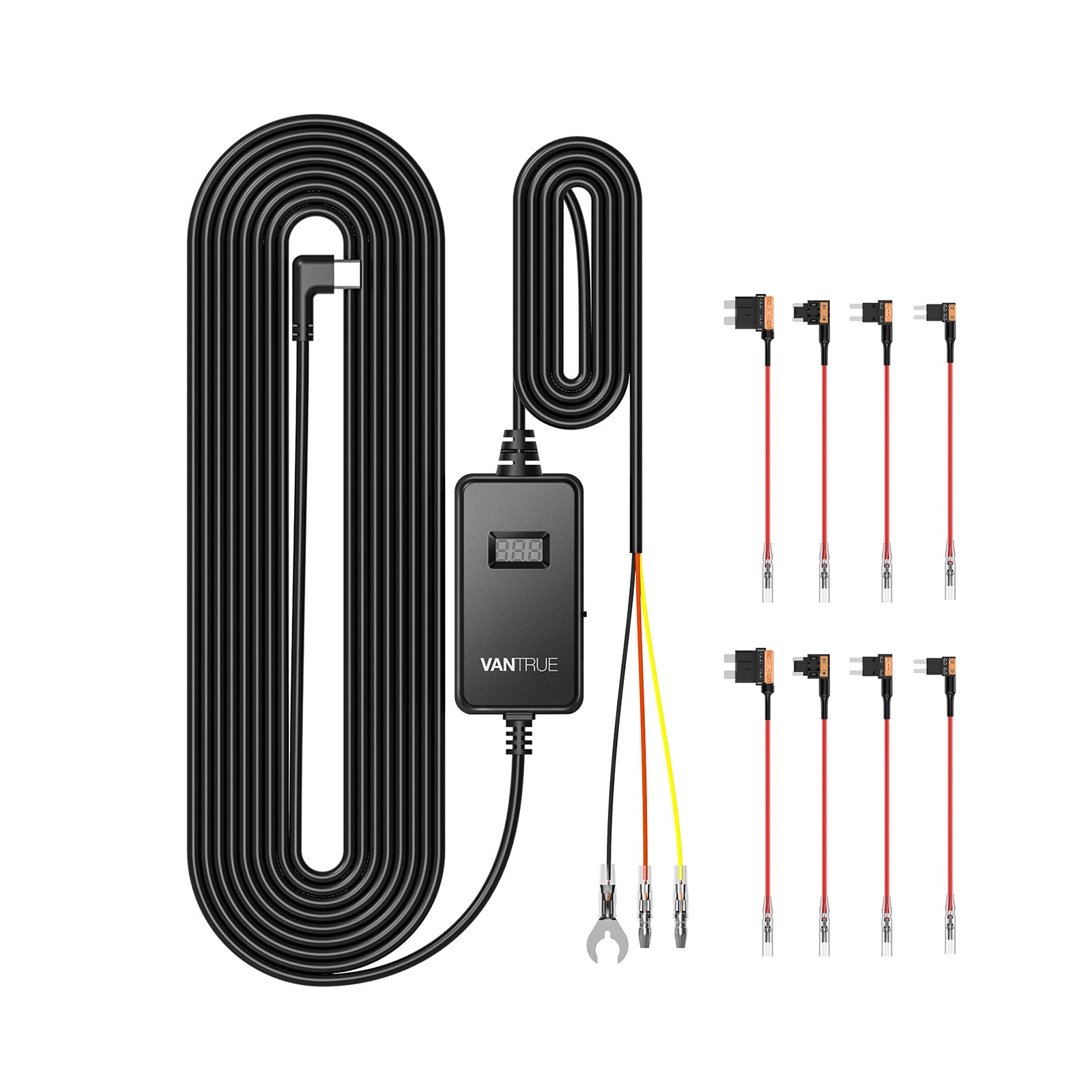
Excellent advice. I bought the kit which had the dashcam and the hardwire kit and the rear camera. The hardwire kit is this one:


I didn't find any instructions on setting this. If there's something 8 can do to ameliorate the battery drain that you can point me to, I'd be so grateful.

Thank you in advance.
 
Welcome to the forum sanjsrik.

The N5 had a flip & mirror option for the rear cameras that once in a wile do get mounted upside down due to convenience / the way you choose to route it.
ATM i test 2 systems 70mai A810 and A510, one is 100 % strait up, the other one i do have to flip the rear feed.
you flip / mirror the rear camera in the settings somewhere, what exactly is needed i can not say you will have to try one thing at the time, generally you can see on the LCD screen if it is OK or not.
For instance if you are parked on a road side, if you look back the roadside are to your left, so you also want it to be that way on the LCD screen,
The mirror part, well if you need to mess with that plates / signs ASO will be mirrored and unreadable by looking at the recordings, if it is, you also need to do that.

I drove a car for a while forgetting to do that, so i had funny looking rear footage.

There should not be gaps in the recordings, but there will be for instance if you have G-sensor on while driving, CUZ then if you have a event, well the footage it consist off will then be in the event folder and not the folder for the "normal " footage.
I personally do not like to have G-sensor on while driving, why should i the camera record all the time anyway, so if it is small i want to share i press event button and the event go to the event folder, if it is something MASSIVE.
Well i will not be driving anymore, so if conscious in due time take the memory card out of the devise, if you are not conscious responders should at least turn off your car ( some actually do that automatic in a big crash )
But even if say you are shunted down a hillside and no one see it, with a sufficient large memory card, you still have to be there dead or unconscious for many many hours in a powered / running car before the camera get around to overwrite the actual event that put you in that position.

My friend and my kid sister know, if i have been in a bad way, go at once to my car where ever it is stored and retrieve memory cards in several systems.
In Denmark we drive on the right side of the road. But looking at my footage it look as if i am on the left side, and of course license plates all wrong.

a3f024f70d63ba03b924e29421b4913ac5eac8cd.jpg


Looking at your 2 examples from the rear camera i think you just need to flip the image, but do keep a eye out if signs / plates are gibberish CUZ they are mirrored.
Man, you guys are so awesome here. I did the flip image thing in the vantrue app. There's a setting in the app that lets you flip the image because apparently a lot of these get installed upside down.
 
sorry for your bad experience with N4 Pro, could you please check your inbox, we will try our best to solve the issue for you
Welcome back Jeff.
 
but my email has nothing.
Jeff mean a personal message in here, you should be able to see that in the upper R corner of the page.

You can send personal messages to one, or even more participants of a private talk by pressing a persons avatar and select send a direct message, these will only be seen by you and the people you want to see it.
 
Please check your inbox on DashCamTalk
Order number is VT19689 and was placed on October 15, 2024.

The SD card is one from vantrue that came with the bundle.

I'm pretty sure I updated to the latest firmware right after I had the unit installed by your recommended installers in Queens. The software version says it's 1.0.56 and that it's the latest version according to the app.

I'm not sure what the voltage cutoff threshold is set to or what the starting voltage of my car is. How would I find out either one? My car is a 2021 Toyota Prius.

Any help you could offer would be greatly appreciated. I don't like the idea of the battery draining to the point where I have to jump start the car every time as an option.

sanjay

I tried responding directly to your message and the forum said that it contained "spam elements" or unallowed elements so I'm posting in the main forum here.
 
Jeff mean a personal message in here, you should be able to see that in the upper R corner of the page.

You can send personal messages to one, or even more participants of a private talk by pressing a persons avatar and select send a direct message, these will only be seen by you and the people you want to see it.
Thanks, I tried replying. The site rejected the ability for me to respond to him directly. I work in tech, just not in dashcam tech.
 
Hi

Excellent advice. I bought the kit which had the dashcam and the hardwire kit and the rear camera. The hardwire kit is this one:


I didn't find any instructions on setting this. If there's something 8 can do to ameliorate the battery drain that you can point me to, I'd be so grateful.

Thank you in advance.
It looks like the side of the hardwire cable box has a switch that lets you adjust the voltage cutoff. You can raise the threshold so it doesn’t drain your car battery so far.
 
It looks like the side of the hardwire cable box has a switch that lets you adjust the voltage cutoff. You can raise the threshold so it doesn’t drain your car battery so far.
Thank you. I'll go look at it. If it's set for 12 or lower, do I switch it to 12.4 which looks like the highest threshold?
 
Last edited:
I have always used 12.2 which i think is assumed to be a 50% depleted lead acid battery, if you have a AGM battery in the car you can go lower as these will handle that.
Lead acid batteries are not meant for deep discharge, so getting too low and you will eat into battery life.
 
Thank you. I'll go look at it. If it's set for 12 or lower, do I switch it to 12.4 which looks like the highest threshold?
yes, set it to the highest cutoff number.
I'd recommend to also change from motion detection to impact detection only, this will cut battery usage bug time and the N4 can run from car battery for a week if not longer.
If you prefer the motion detection then the N4 uses the most of battery for this all time buffered recording mode and you have ether to drive your car daily to recharge car battery to full or use extra specific power bank, which is expensive.

So, ether swatch to impact detection or even completely disable parking mode to minimize car battery drain.
I set it to impact only.

hope it helps.
 
Order number is VT19689 and was placed on October 15, 2024.

The SD card is one from vantrue that came with the bundle.

I'm pretty sure I updated to the latest firmware right after I had the unit installed by your recommended installers in Queens. The software version says it's 1.0.56 and that it's the latest version according to the app.

I'm not sure what the voltage cutoff threshold is set to or what the starting voltage of my car is. How would I find out either one? My car is a 2021 Toyota Prius.

Any help you could offer would be greatly appreciated. I don't like the idea of the battery draining to the point where I have to jump start the car every time as an option.

sanjay

I tried responding directly to your message and the forum said that it contained "spam elements" or unallowed elements so I'm posting in the main forum here.
Hi Sanjsrik, The latest firmware version of the N4 Pro is N4P_VT-EDI241. Could you please verify it in the System Info on your dash cam? The software version you mentioned likely refers to the app's system version, not the dash cam's firmware. this is the firmware on the website for your reference: https://www.vantrue.net/Support/detail/id/257.html
I will send you an email if you can't reply my direct messages
 
Back
Top