E360 Review (at the request of Vantrue)

egonvdv

Well-Known Member
Joined
Aug 9, 2013
Messages
787
Reaction score
266
Location
A Dutchy in the South of France
Country
France
Dash Cam
TWO Blackvue Elite 10's (rear cams used as side cams)
Vantrue sent me the camera yesterday and asked me to test and review.

- E360 ACE bundle (Includes rear camera and handheld/tripod)
- Hardwire cable
- 128 gb SD card

No need to post unboxing pictures as others here already did a great job with that.

I'm very excited to test it, as right now i have a 360 setup created with TWO thinkware dual cameras,
and like to see how it compares

Installing it tomorrow and will then update here as i go along

1st remark (though not about the camera itself) : it seems that the hardwire cable has voltage protection, that can not be switched off.
as i hook it up to my dashcam powerbank, this is not great.

7 TEST CLIPS

To be continued
 
Last edited:
I agree, hard wire kits today should have a BATT option to let dashcam power pack determine when the power is low.
 
Tie the red and yellow 12v input wires together when you install it. This will bypass the low voltage cutoff function and allow the camera to function until the battery is reduced to about 7.05v. Parking mode will start after 5mins of no gps motion.
 
cheers, this indeed seems to work.
The manual isn't to clear about this especially as it seems to be missing the word "parkmode" after the sentence "please wait 5 minutes to enter"
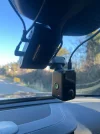
camera installed, testing next week

20250112_182921471_iOS.webp
 
So far I'm very impressed by the camera, which probably does a better job at showing what's happening around the car than my present setup.

Image is very good, though it does struggle at times to read licence plates, especially at night .

Others here have already uploaded great footage, so i decided to show how it looks (and what you can do) when you play it with the Vantrue software

3 remarks so far
Pity you can't switch-on "impact" and "motion detection" at the same time.
Why do we have to press the lock file twice ? (1st switches on the screen and 2nd locks the file)
You have to be careful when positioning the camera as it can slide out of the gps mount a bit and then won't turn on

More to come .


On the left My Thinkware U1000 / on the right the Vantrue E360:
 

Attachments

  • 20250113_144426213_iOS.webp
    20250113_144426213_iOS.webp
    137.1 KB · Views: 139
Last edited:
You have to be careful when positioning the camera as it can slide out of the gps mount a bit and then won't turn on

Hmmm... I haven't noticed the E360 coming out of its magnetic GPS windshield mount at all. I wonder if you are fully seating it. It doesn't seem to have a "snap" fit, but mine does hold securely once it's firmly seated.

Interesting - I didn't realize there is a Vantrue video player! I need to go look this up!
 
Why do we have to press the lock file twice ? (1st switches on the screen and 2nd locks the file)
The first time you press the lock button, the dash cam will wake up the screen to ensure the device is in an active state. After the screen is awakened, you need to perform the locking operation again for it to correctly respond to the lock command.
This design helps avoid accidental operations, ensuring that each locking action is intentional. Additionally, waking up the screen allows the user to confirm the current operation status, improving accuracy and reliability.
 
Hmmm... I haven't noticed the E360 coming out of its magnetic GPS windshield mount at all. I wonder if you are fully seating it. It doesn't seem to have a "snap" fit, but mine does hold securely once it's firmly seated.

Interesting - I didn't realize there is a Vantrue video player! I need to go look this up!
yes it snaps (firmly enough) into place, but can slide out when you manipulate the camera .
It's not a big deal, just something you need to pay attention to .

 
Tie the red and yellow 12v input wires together when you install it. This will bypass the low voltage cutoff function and allow the camera to function until the battery is reduced to about 7.05v. Parking mode will start after 5mins of no gps motion.

Hi again . i though this worked but unfortunately it does not :-(
 
Curious, what part didn't work? Is the camera still turning off too soon, or is parking mode not engaging?
 
camera still cuts off when voltage drops

What is the voltage level in your battery when the camera shuts down?
I learned the connecting red + yellow (on the 12v input side) trick while I was playing with my Viofo hard wire kit. I assumed the Vantrue one would function similarly, so I didn't specifically repeat this test. I'll experiment with the Vantrue regulator tonight and see how it behaves.

The PowerCore 6200 battery is 80Wh and with a ~5w draw from the E360, I'd expect it to last no longer than 80/5 = ~16 hours.
 
I have the main battery unit + 2 Extensions = My thinkware U1000 dual records for over 3 days
The built in meter in the hardwire said 11.7v
i don't think vantrue sells hardiwre kits with a setting to never cut off power ?
 
Well, bummer. I was just able to duplicate your shut off problem. I was expecting that the Vantrue hardwire kit might behave like the Viofo one. But with some additional testing tonight, I see that it doesn’t. Even with red and yellow input wires tied together, it still shuts off right where it is supposed to according to the switch position.

I was going to recommend trying the Viofo hard wire kit, but the pin on the USB-C plug that is used to trigger park/drive mode is different between the two brands. Guess that should have been more obvious before I tested them 😉.

Maybe @Jeff_Vantrue could make a hardwire kit variation that doesn’t have a minimum voltage cutoff for people that use their cameras with parking batteries?
 
Thank you for the suggestion! I will forward it to our R&D team for evaluation.
Well, bummer. I was just able to duplicate your shut off problem. I was expecting that the Vantrue hardwire kit might behave like the Viofo one. But with some additional testing tonight, I see that it doesn’t. Even with red and yellow input wires tied together, it still shuts off right where it is supposed to according to the switch position.

I was going to recommend trying the Viofo hard wire kit, but the pin on the USB-C plug that is used to trigger park/drive mode is different between the two brands. Guess that should have been more obvious before I tested them 😉.

Maybe @Jeff_Vantrue could make a hardwire kit variation that doesn’t have a minimum voltage cutoff for people that use their cameras with parking batteries?
 
i don't think vantrue sells hardiwre kits with a setting to never cut off power ?
I haven’t come across it in Vantrue, but Viofo has НK4, which, when the cutoff is set to 12.4V,
does not turn off the voltage supply to the DVR until the battery is completely discharged.
 
I was going to recommend trying the Viofo hard wire kit, but the pin on the USB-C plug that is used to trigger park/drive mode is different between the two brands. Guess that should have been more obvious before I tested them 😉.
With some effort and modification, the Viofo hard-wire kit can be made to work with Vantrue models.
Just as the Vantrue hard-wire kit can be made to work with Viofo models.
 
with some effort and modification, the Viofo hard-wire kit can be made to work with Vantrue models.

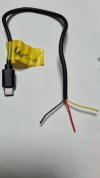
Absolutely! I would just need to learn which pin on the Vantrue hardwire kit controls park/drive mode. Some time ago, I picked up a cheap USB-C cable from Walmart and cut it up so I could measure voltage on each of the wires. Here is the standard USB-C pinout:

USB-C Pinout.webp


USB-C Connections for Viofo HK3-C:
VBUS (Red wire): +5v camera power
CC1/CC2 (Blue wire in my cable sample): +5v drive mode/ 0v park made trigger
GND (Bare/Blk wire): 0v reference
D- (White wire): not used
D+ (Green wire): not used

(Yellow wire): unknown connection on my cable
Foil & Braided Shield: not connected


EDIT: With my Viofo pinout description above, I'm assuming that the cable I purchased actually followed wire color conventions for which color wire connects to which specific pins. If this was not followed in my cheap cable, then my description of which wire is used by Viofo is incorrect.

I haven't yet mapped this for the Vantrue hardwire kit, other than to realize that Vantrue does not use the CC1/CC2 pin to carry the park/drive mode trigger. The USB-C cord that I dissected only has 6 wires in it, so some connections to the plug are not present. I need either a better cable that has all 10 wires present, or to just pick up a USB-C bare connector that has solder tabs so I can play around. I just haven't gotten around to it yet.

After I figure out which pin on the Vantrue controls park/drive mode, it's cake to build a little "adapter cable" that crosses over the appropriate wires to make each hardwire kit work with the other camera 🙂
 
Last edited:
After I figure out which pin on the Vantrue controls park/drive mode, it's cake to build a little "adapter cable" that crosses over the appropriate wires to make each hardwire kit work with the other camera 🙂
Below in the picture are the colours used in the Vantrue parking cable.

USB-C Vantrue.webp

If I'm not mistaken, the parking/driving mode in Vantrue is controlled by contacts: TX1- and TX2-
 
Last edited:
Maybe something else is going on with the hardwire
i set cut-off at 11.7, but it displays that the batteries are at 11.9
cos i've been using the camera for a month now and only the last few days will it shut down at some point
 
Back
Top