Viofo A229 Ultra vs. A229 Pro & A329S

Vortex Radar

Well-Known Member
Joined
Mar 26, 2014
Messages
1,564
Reaction score
2,733
Location
Seattle, Washington
Country
United States
So I've started working on a video going over the A229 Ultra, and I specifically wanna compare it to the A229 Pro initially. Afterwards I'll do another comparing it to the A329S.
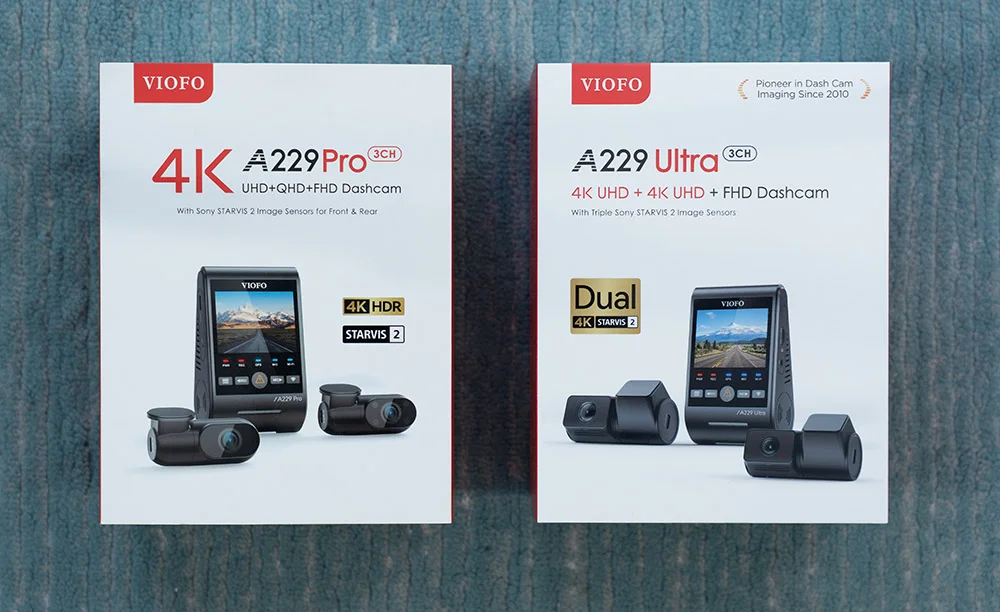
Viofo A229 Pro and Ultra boxes.webp


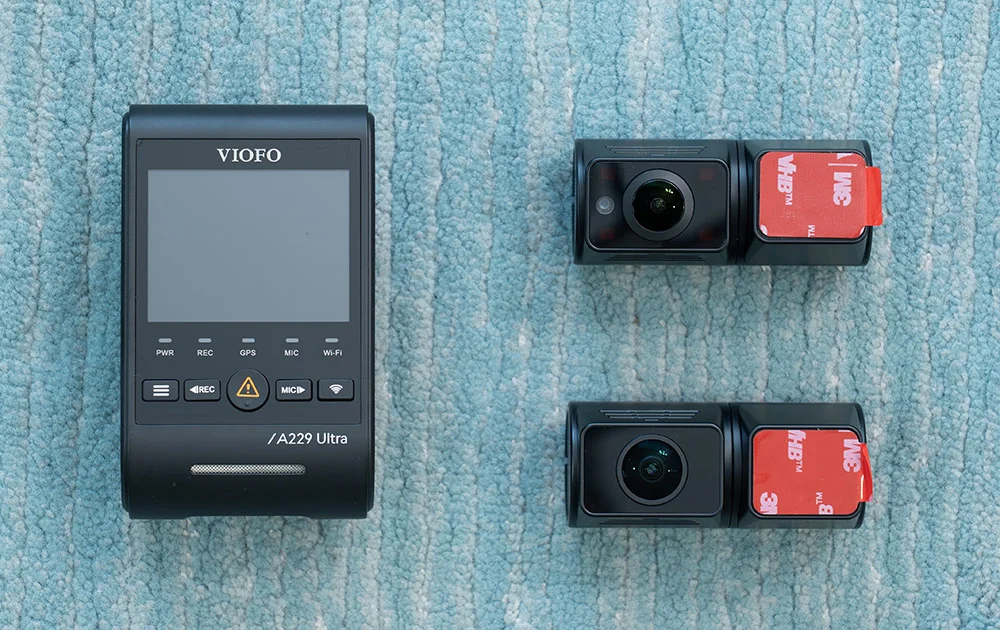
Viofo A229 Ultra 3CH on ground.webp


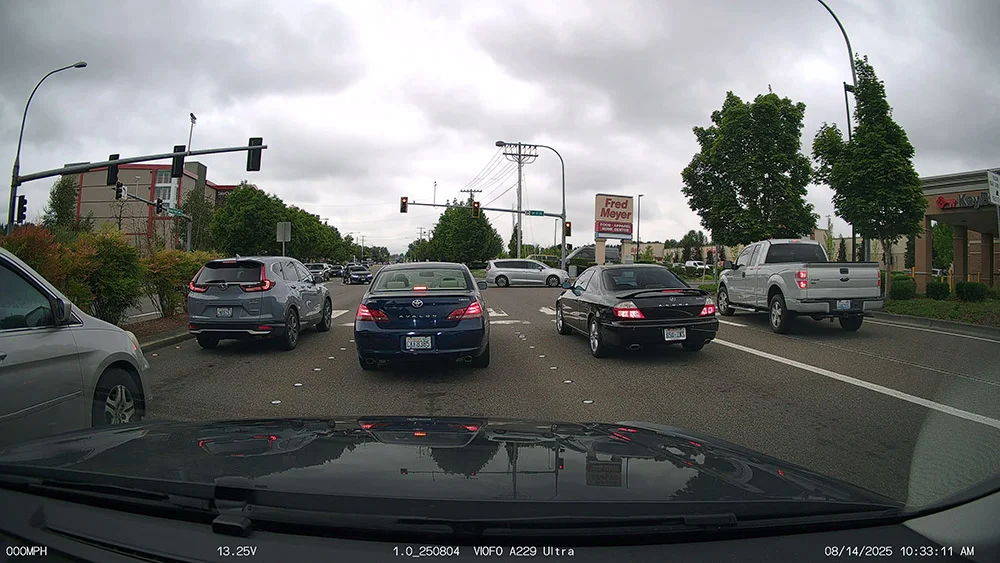
Design-wise, the front cam looks basically identical to the A229 Pro. It also uses the same 4K Sony Starvis 2 IMX678 image sensor.
Viofo A229 Ultra front sample.webp


The interior and rear cams have the updated case design from the A329S.

The rear cam gets bumped up to 4K and it's Viofo's first 4K/4K model.

Viofo A229 Ultra rear sample.webp


Compared to the A329S' 2K rear cam (same sensor as the A229 Pro), I can make out plates a little farther away given the resolution bump, but it doesn't help reduce motion blur of course. I've run standalone 4K rear cams for years now to get better rear video quality. It's certainly not game changing, but it does make a little bit of a difference. I also like that it now uses a clip-on CPL instead of a stick-on with adhesive. Easier to remove down the line if you want.

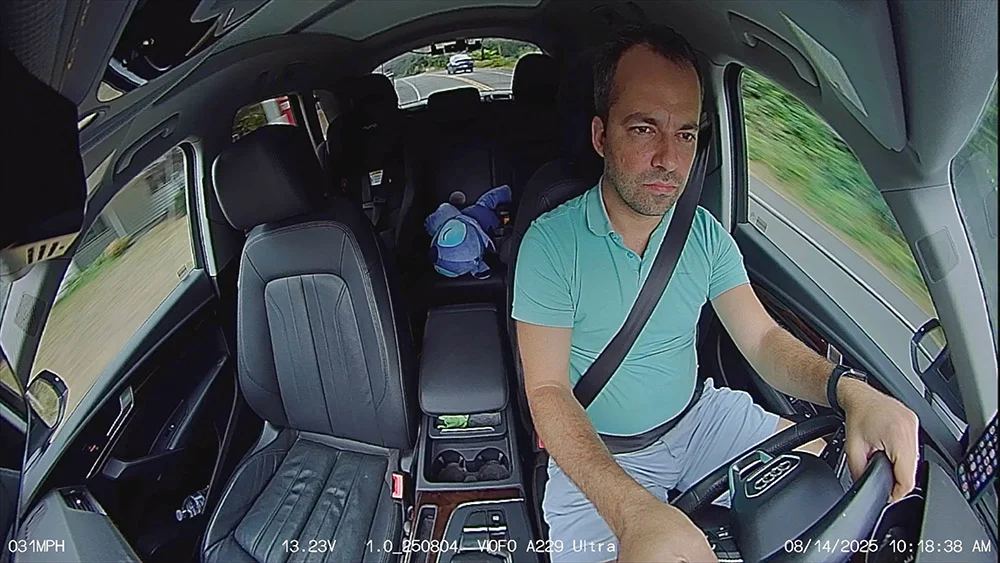
The interior cam upgrade feels more substantial. It now has a 210 degree ultra-wide angle lens like the A329S so it does a way better job at capturing out the side windows which I'm a big fan of.
Viofo A229 Ultra interior sample.webp


Unlike the A329S which has a 2K interior lens, the A229 Ultra's interior cam stays at 1080p though, so no resolution bump. It also only has an ultra-wide angle lens mode. There's no option to get the even wider fisheye option like the A329S, but I prefer the look of the ultra-wide angle view and run it on my A329S either way. HDR is always on, unlike the A329S where you can turn it off, but I prefer leaving it on so that's fine with me too.

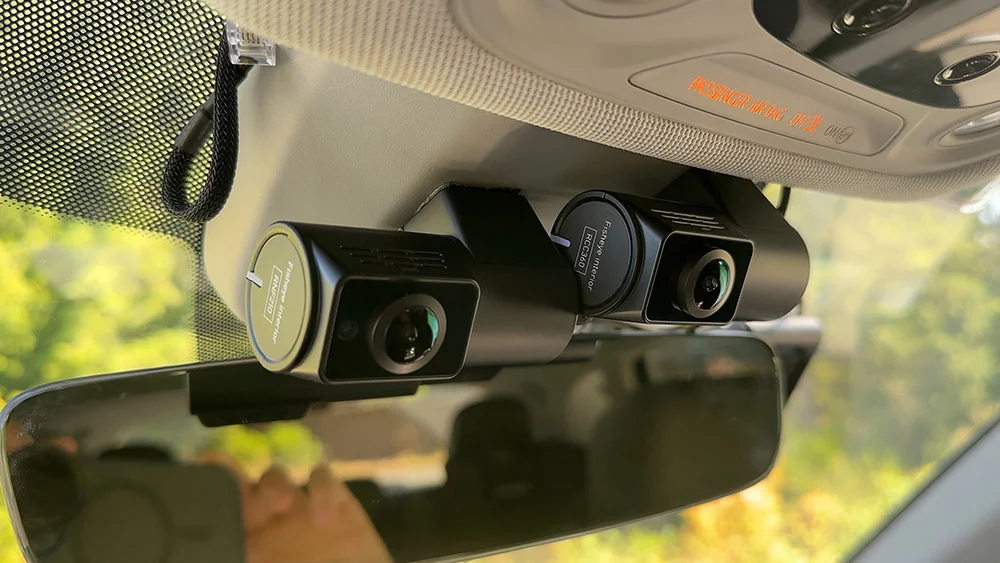
Here's the A229 Ultra interior cam (left) and the A329S interior cam (right):
A229 Ultra and A329S interior cams installed.webp


I had to install the A229 Ultra's interior cam slightly behind because its USB cable sticks straight out the side. It's not a compact L-shaped connector like the A329S uses.

If you've got it connected to the HK6, voltage info will show up on the dashcam on the bottom of the footage. (Hopefully all the dashcams that support the HK6 get updated to let us turn that display option off.)

Amusingly, the A329S next to it that's connected to an HK4 is also reading the same voltage information, lol. It looks like the HK6 broadcasts voltage information to any dashcam nearby that supports that. It doesn't have to be paired to a single dashcam.

It's available in 2CH and 3CH modes with the optional interior cam. You can also get it with a regular rear cam or an external waterproof rear cam. The A229 Ultra doesn't offer an optional telephoto cam though the way you can get with the A229 Plus/Pro and A329T.

It also sticks to USB C for the rear and interior cams like the A229 Plus and Pro. It doesn't use coax like the A329x cams.

Price-wise, and I know there's constantly sale pricing and discounts and whatnot, but it's currently $30 more to go from the A229 Pro 2CH to the A229 Ultra 2CH. The bump from 2K to 4K isn't dramatic, but $30 isn't a huge jump in price either.

Looking at the 3CH versions, it's just a $40 price jump on Viofo's website to go from the Pro to the Ultra and in that case, yeah I think going for the higher res rear cam and the wider interior cam is worth the money.
 
Last edited:
Comparing it with the A329S, I think it's an even bigger jump from the A229 Ultra to the A329S. The A229 Ultra has a higher res rear cam, but I'm not finding it to be a huge deal in practice. It's also lower priced, but otherwise the A329S has a ton of extra features.

A229 Ultra 2CH: $339
A329S 2CH: $399 (+$60)
A229 Ultra 3CH: $369
A329S 3CH: $469 (+$100)

So far, here's the main differences I've noted between the A329S and A229 Ultra:
  • A329S supports 60fps in 1CH/2CH modes (but meh)
  • Lower res rear cam (2K instead of 4K)
  • Higher res interior cabin cam (2K instead of 1080p)
  • Cabin cam supports fisheye mode
  • Cabin cam lets you turn off HDR
  • Supports options for telephoto cams
  • Thinner coax cables are easier to route
  • WiFi 6 for faster WiFi transfer speeds
  • Low power parking recording mode
  • Hybrid parking recording mode
  • Multiplexing
  • SSD support
For myself, I think the low power / hybrid parking recording features are the most useful difference. The higher res interior cam does make a difference when you're trying to capture more detail outside. The thinner cables are nicer during installation. I also like the 90 degree connectors coming out the sides of the add-on cams for a cleaner install. Being able to add a telephoto cam is a huge difference too.
 
Last edited:
Great review. Why does the A229 Ultra interior cam only run with HDR on? Does this HDR always on (running Ultra interior cam in the A229 Pro) apply to the A229 Plus too?
 
Last edited:
Comparing it with the A329S, I think it's an even bigger jump from the A229 Ultra to the A329S. The A229 Ultra has a higher res rear cam, but I'm not finding it to be a huge deal in practice. It's also lower priced, but otherwise the A329S has a ton of extra features.

A229 Ultra 2CH: $339
A329S 2CH: $399 (+$60)
A229 Ultra 3CH: $369
A329S 3CH: $469 (+$100)

So far, here's the main differences I've noted between the A329S and A229 Ultra:
  • A329S supports 60fps in 1CH/2CH modes (but meh)
  • Lower res rear cam (2K instead of 4K)
  • Higher res interior cabin cam (2K instead of 1080p)
  • Cabin cam supports fisheye mode
  • Cabin cam lets you turn off HDR
  • Supports options for telephoto cams
  • Thinner coax cables are easier to route
  • WiFi 6 for faster WiFi transfer speeds
  • Low power parking recording mode
  • Hybrid parking recording mode
  • Multiplexing
  • SSD support
For myself, I think the low power / hybrid parking recording features are the most useful difference. The higher res interior cam does make a difference when you're trying to capture more detail outside. The thinner cables are nicer during installation. I also like the 90 degree connectors coming out the sides of the add-on cams for a cleaner install. Being able to add a telephoto cam is a huge difference too.
Very nice review , been hard for me to keep up this year because I've been travelling overseas all the time but is useful for me to see a quick summation like this 🙂

You make some good points in the price comparison too between the two models and how the Ultra could be a good pick over the S model.

I too have found the same for the licence plate pickup when running a 2k camera at the back versus a standalone 4k. Helps make out those plates of cars further back at the rear by a little margin, but it's not game changing...
 
Amusingly, the A329S next to it that's connected to an HK4 is also reading the same voltage information, lol. It looks like the HK6 broadcasts voltage information to any dashcam nearby that supports that. It doesn't have to be paired to a single dashcam.
Can you use the hybrid parking mode to switch to low power impact detection on low voltage with that configuration?
Presumably they won't add LPID to the A229 because it takes too long to wake up on an impact?
 
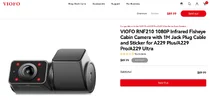
Is it possible to buy the interior camera separately (mini-jack to USB-C) for the A229 PRO 3CH, to replace the one with the narrower-angle lens?
 
Is it possible to buy the interior camera separately (mini-jack to USB-C) for the A229 PRO 3CH, to replace the one with the narrower-angle lens?
Sorry for the interruption.
Yes, you can see it here; RNF210 Fisheye With A229 Pro


Attachments

  • RNF210 .webp
    RNF210 .webp
    62.6 KB · Views: 162
Sorry for the interruption.
Yes, you can see it here; RNF210 Fisheye With A229 Pro

Thanks for the link. I tried searching for RNF210 on the Viofo site and it came up with nothing. I see it is sold out but once in stock, will buy it. $127 CAD. $88.99 USD.
 
229ultra
 

Attachments

  • IMG_20250817_093002.webp
    IMG_20250817_093002.webp
    100 KB · Views: 167
  • Like
Reactions: Mtz
Looks like the bitrate on the A229 Ultra's front cam also drops as you add more channels. The A329S' front cam bitrate is higher than that of the A229 Ultra's regardless of channel count.

1CH: 59.87 Mb/s
2CH: 36.11 Mb/s
3CH: 36.11 Mb/s

A329S front cam in 1/2/3 CH mode: 65.60 Mb/s
 
Last edited:
Looks like the bitrate on the A229 Ultra's front cam also drops as you add more channels. The A329S' front cam bitrate is higher than that of the A229 Ultra's regardless of channel count.

1CH: 59.95 Mb/s
2CH: 40.94 Mb/s
3CH: 36.11 Mb/s

A329S front cam in 1/2/3 CH mode: 65.60 Mb/s
Interesting, I cannot get 40.94 Mb/s with a 2-channel configuration [front + rear] for the A229 Ultra with bitrate set at maximum. My front camera firmware is 1.0_250804 and rear camera firmware is 4K_V1.0_250620.

1755646531960.webp
 
a229ultra 2ch with 4k waterproof bitrate is too low
i wish VIOFO can update
 
  • Like
Reactions: Mtz
Compared to the A329S' 2K rear cam (same sensor as the A229 Pro), I can make out plates a little farther away given the resolution bump, but it doesn't help reduce motion blur of course. I've run standalone 4K rear cams for years now to get better rear video quality. It's certainly not game changing, but it does make a little bit of a difference. I also like that it now uses a clip-on CPL instead of a stick-on with adhesive. Easier to remove down the line if you want.
Compared to the front camera, on the rear camera there is a lower speed because the speed of your car and opposite car is not summed. This means that on the car from behind you will always have less motion blur compared to a front camera.
Unlike the A329S which has a 2K interior lens, the A229 Ultra's interior cam stays at 1080p though, so no resolution bump
The camera cable is transferring analog signal, not digital, so it is not possible to go over 1080p.
It looks like the HK6 broadcasts voltage information to any dashcam nearby that supports that. It doesn't have to be paired to a single dashcam.
This is nice but usefull only if you have another Viofo dahscam which is recording only during driving. For example if I want a 4 cameras setup, I will keep one front telephoto dashcam to record only during driving (A329S with a telephoto lens mounted by me)
The A229 Ultra doesn't offer an optional telephoto cam though the way you can get with the A229 Plus/Pro and A329T.
Not easy to find a good 4K telephoto lens. I tested one 6-8 months ago on an A229 Pro and there was no significant gain for capturing the registration plates compared to the standard Viofo 2K telephoto camera.
It also sticks to USB C for the rear and interior cams like the A229 Plus and Pro. It doesn't use coax like the A329x cams.
The rear cam is USB-C because the rear camera has its own chipset. All Viofo dashcams with USB cables for rear have separate chipset on the rear camera. You can not put separate chipset on rear camera if using coaxial cable.
But a problem can appear on the rear camera because it is a 4K camera and a lot of heat will be produced on it. You need to consider that the rear camera body is smaller and the surface for heat dissipation is much smaller compared to the front camera. Many people are trying to protect their cars against sun by parking with the rear to the sun and in this way the 4K rear camera will be more stressed compared to the front camera.
Great review. Why does the A229 Ultra interior cam only run with HDR on?
Maybe because of the connection, the cable is transferring analog signal, not digital.
 
Interesting, I cannot get 40.94 Mb/s with a 2-channel configuration [front + rear] for the A229 Ultra with bitrate set at maximum. My front camera firmware is 1.0_250804 and rear camera firmware is 4K_V1.0_250620.

View attachment 84112
Ah yeah, I went out to test and let the dashcam run a bit longer and I'm getting 36.11 Mb/s now in 2CH mode with the same file sizes as you. Previously I'd only let the dashcam run for like 10-20 sec or so and I figured that'd it'd record at the same bitrate regardless of duration, but perhaps not.
 
Ah yeah, I went out to test and let the dashcam run a bit longer and I'm getting 36.11 Mb/s now in 2CH mode with the same file sizes as you. Previously I'd only let the dashcam run for like 10-20 sec or so and I figured that'd it'd record at the same bitrate regardless of duration, but perhaps not.
The next firmware update should "restore" 60Mbps to the front camera in 2CH rear configuration.
 
Maybe you will never understand that is much more complicated to increase the bitrate.
Already, the Viofo have the highest bitrate compared to similar dashcams and I consider Viofo should stay a little higher as bitrate compared to others.
Do not forget that for the A329 series, not only the heat should be taken into consideration but also the correct transfer via the USB SSD cable to the PSSD. Increasing too much the bitrate will affect this transfer. Just imagine that 3 videos must be encoded and transferred at the same time and when using HDR the real FPS is 60FPS.
 
Last edited:
Do not forget that for the A329 series, not only the heat should be taken into consideration but also the correct transfer via the USB SSD cable to the PSSD. Increasing too much the bitrate will affect this transfer. Just imagine that 3 videos must be encoded and transferred at the same time and when using HDR the real FPS is 60FPS.
Maybe we need multiple SD Card slots.
That would reduce / dissipate heat, and increase recording capacity.
I’m hoping the 5CH Box Unit has an SD Card for every channel, front, rear, left, right, interior.
(5) 1TB SD Cards would be awesome.
Also the option for rear, left, right, interior to be multiplexed into one file to save space for the uber drivers, (front camera gets its own separate file).
 
Maybe we need multiple SD Card slots.
That would reduce / dissipate heat, and increase recording capacity.
I’m hoping the 5CH Box Unit has an SD Card for every channel, front, rear, left, right, interior.
(5) 1TB SD Cards would be awesome.
Also the option for rear, left, right, interior to be multiplexed into one file to save space for the uber drivers, (front camera gets its own separate file).
。。。。。。how big it?
 
Back
Top