
Arese
Active Member
Vantrue N4 Pro S Review
Hi all,
I’d like to preface this by saying I’ve never set out to review a dashcam before. I’m just your average lurker, usually here when I want the community’s opinion, or occasionally to catch up on the latest news.
Recently, @Jeff_Vantrue reached out after I posted in the Viofo forum and asked if I’d be interested in reviewing the Vantrue N4 Pro S. I hadn’t posted in the “review interest” thread, and to be honest, I wasn’t even familiar with Vantrue as a brand, let alone this model.
For context, I’ve only owned Viofo dashcams. My first was recommended here over 5 years ago, and they’ve served me so well I never felt the need to look elsewhere. Today I run two A129 Pros in different cars, and recently installed an A229 Pro in a 3rd car.
As an everyday user, my priorities are simple, reliability above all else. Once a dashcam is hardwired and set up, I rarely touch it. I expect it to record consistently while driving, switch reliably into parking mode, and capture everything there too. Every now and then I’ll pull the SD card to retrieve a locked file, and while doing so I scan through recordings to confirm nothing is missing. Most importantly, in the few incidents where I needed footage, my dashcams never failed me. That’s my dealbreaker, if I ever find a missing file, especially when evidence is needed, that unit gets a zero in my book and is replaced immediately.
So to be transparent, I’m probably skewed toward Viofo, not because I’m a fanboy (I’m past the age of feeling loyalty to consumer products), but simply because their dashcams have delivered for me. It’s natural to feel more comfortable with something you know and trust from firsthand experience. Before testing the Vantrue, I honestly wouldn’t have considered any other brand, since I had no reason to. That is also why I welcomed Jeff’s invitation to test the Vantrue. In fact, that’s exactly what I told him in my response: I had never used any other dashcam but Viofo, and I could see the value in exploring what other brands can do from a curiosity standpoint. Today I’m happy to share my thoughts with you all, and I hope that a not‑so‑technical review from an average user proves useful to some of you.
Unboxing and First Impressions
The first impression was positive. 1st thing I noticed is the build quality of the front camera, it felt solid in the hand with a reassuring weight and good balance. Nothing scientific, just a good feel when unboxing it.
The way the camera attaches to the mount was new to me. Viofo dashcams slide and lock into place, while the Vantrue uses magnets. You simply align both ends and it snaps together, a bit like MagSafe, which I found very satisfying. It makes installation or removal much easier once mounted on the dashboard. Personally, I rarely remove my dashcams, but for anyone who does, this is a nice touch.
Another design difference compared to my Viofo units is the mount itself. The Vantrue mount has a swivel and can be adjusted 360 degrees, whereas Viofo lenses only tilt up or down. With Viofo, you need to make sure the camera is level during installation, otherwise it can’t be corrected later.
Vantrue is also generous with accessories. In the box you get adhesive promoters, extra 3M pads, cable management hooks, electrostatic stickers, and even dust-free cloths.

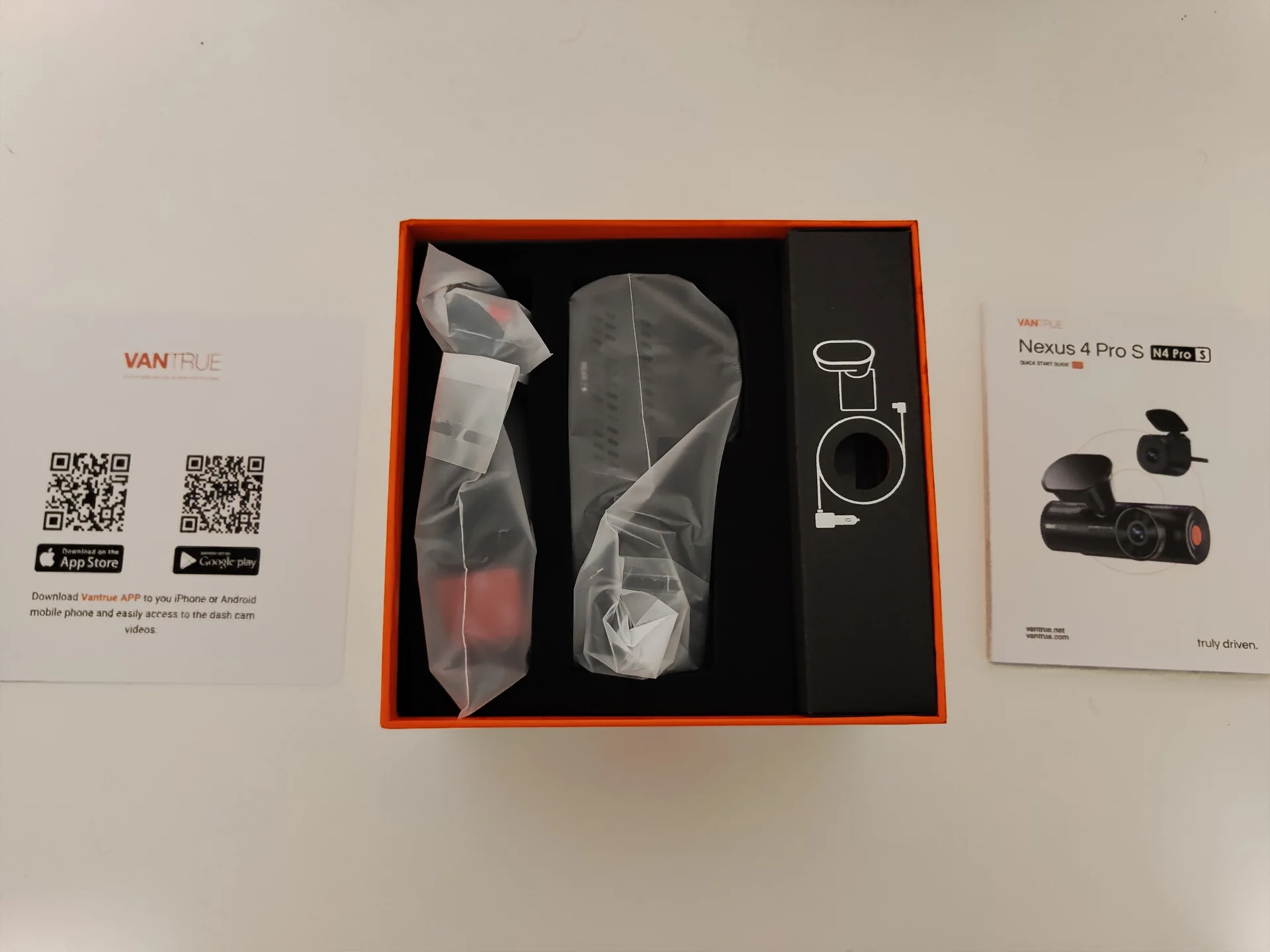
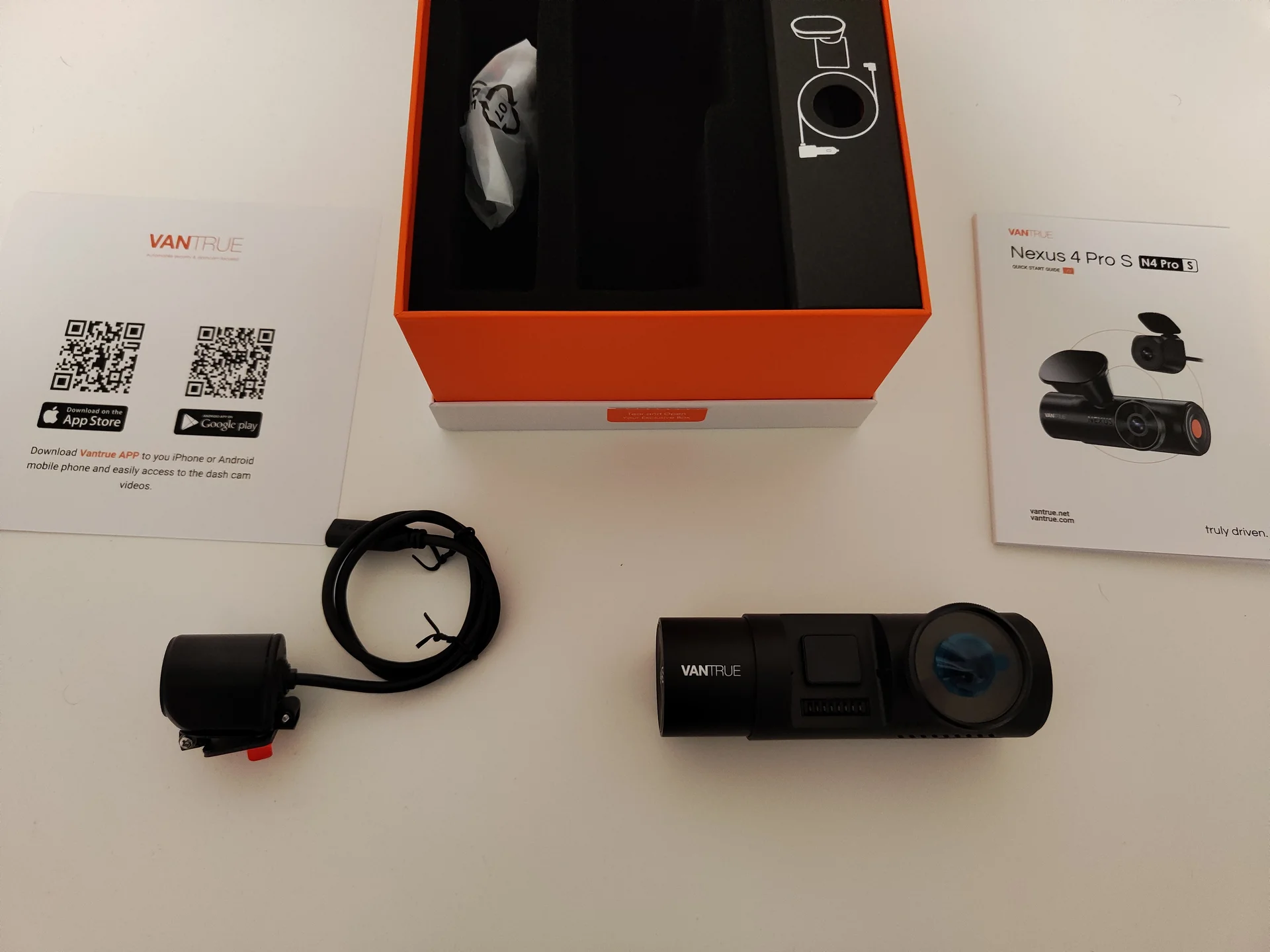
Installation & 1st Set up
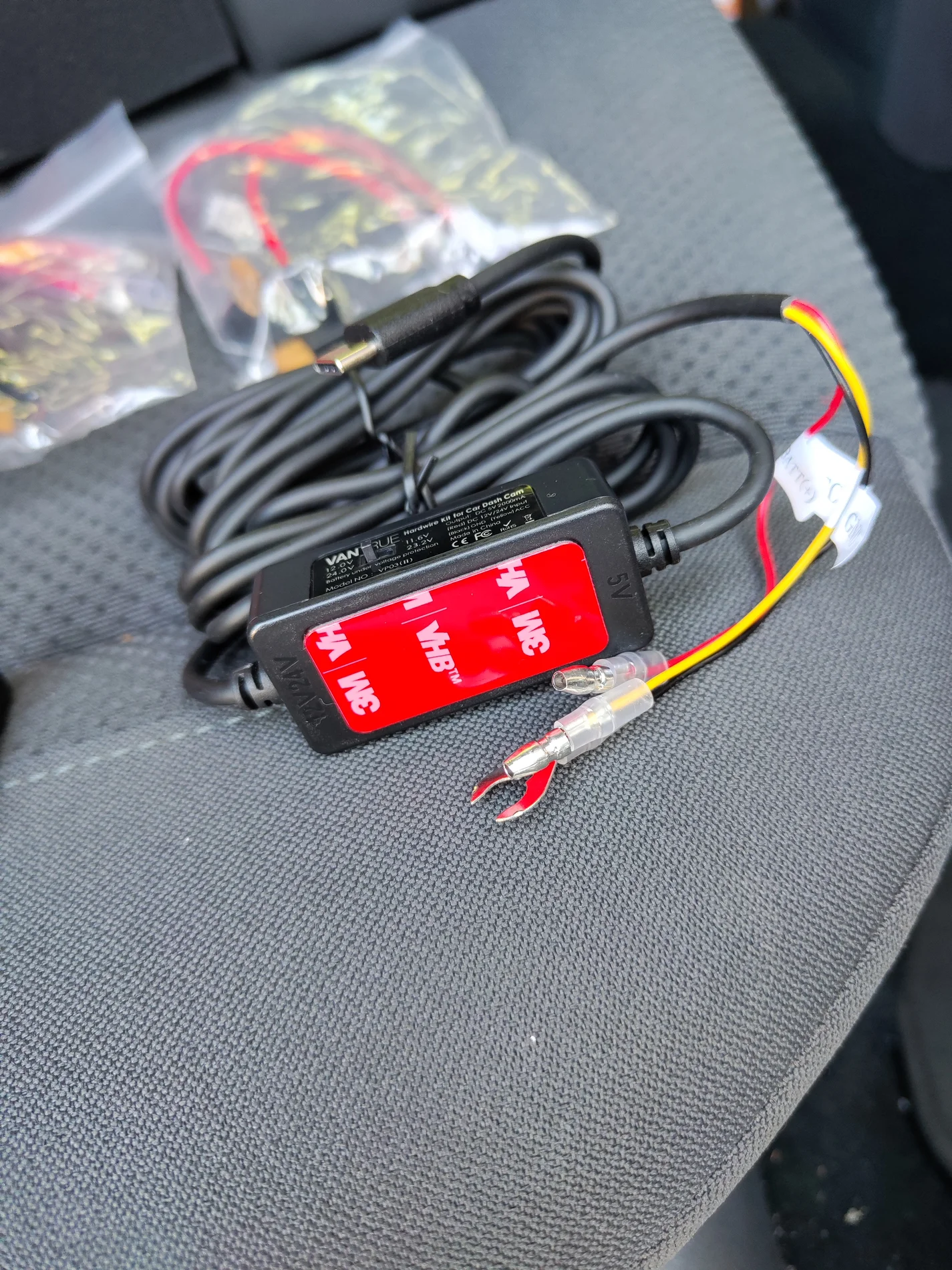
Another small detail that made my life easier was the inclusion of fuse taps in the hardware kit. When I hardwired my 3 Viofo dashcams, the process usually went like this: access the car’s fuse box, figure out which slots to use for constant power and accessory, check the fuse type (normal, mini, low profile, etc.), then drive to the local hardware store to buy two fuse taps before finally getting on with the installation.
This time, everything I needed was already in the Vantrue kit. They even included 5‑amp fuses pre‑installed in the correct slots on the taps, so I didn’t have to leave the garage. That was a thoughtful touch I really appreciated.
Another attention to detail was the sticker on the hardware unit, which makes it easier to secure inside the fuse box.
The way I see it, these details show that Vantrue had their customers in mind when putting the kit together. It feels like they asked themselves, “What would make installation easier for our users?”

Booting up the dashcam for the 1st time to very hardwire kit is correctly installed. Loved the large screen, it's bright and seems higher resolution than my Viofo. It's easier to configure the dashcam using the your phone via the Vantrue app but the screen is of enough good quality that you could do everything you want with ease there if that's what you want.

Speaking of the Vantrue app, my first impression was positive. It looks polished and runs smoothly, with a clean and easy‑to‑navigate interface. All the settings you’d expect are there, laid out in a way that feels straightforward rather than overwhelming.


Then I was prompted to do an OTA firmware update which at risk of repeating myself was a nice surprise as Viofo doesn't offer OTA firmware updates.

Unfortunately, the excitement was short‑lived. I initiated the firmware update and at first everything seemed to go smoothly. The update was sent to the dashcam, it rebooted, showed a progress bar, and then displayed “firmware update successful.” At that point I thought, great, super easy to update.
But then the dashcam rebooted again, showed the same progress bar, and once more claimed the update was successful. It kept repeating this cycle, stuck in a loop, until eventually it wouldn’t boot at all and appeared to be bricked.
On the bright side, Vantrue customer support responded quickly with clear instructions on how to reinstall the firmware the old‑school way using a microSD card, and that brought the unit back to life.
OTA updates sound great in theory, but they need to work reliably. After this experience, I’ll be sticking with firmware updates via microSD.

Front Camera Quality
Random samples of front camera footage in daytime driving, night time driving, daytime parking mode, and night time parking mode. (note regarding the night time footage, you will notice exaggerated light reflections. To clarify, this isn’t an issue with the dashcam itself, but rather with my windshield, which is likely scratched. Visibility is poor through the glass even to the human eye, and the dashcam is simply reproducing what I see when driving at night.
Rear Camera Quality
Random samples of rear camera footage in daytime driving, night time driving, daytime parking mode, and night time parking mode.
Interior Camera Quality
Random samples of interior camera footage in daytime driving, night time driving, daytime parking mode, and night time parking mode.
CPL Filter On vs OFF
Hi all,
I’d like to preface this by saying I’ve never set out to review a dashcam before. I’m just your average lurker, usually here when I want the community’s opinion, or occasionally to catch up on the latest news.
Recently, @Jeff_Vantrue reached out after I posted in the Viofo forum and asked if I’d be interested in reviewing the Vantrue N4 Pro S. I hadn’t posted in the “review interest” thread, and to be honest, I wasn’t even familiar with Vantrue as a brand, let alone this model.
For context, I’ve only owned Viofo dashcams. My first was recommended here over 5 years ago, and they’ve served me so well I never felt the need to look elsewhere. Today I run two A129 Pros in different cars, and recently installed an A229 Pro in a 3rd car.
As an everyday user, my priorities are simple, reliability above all else. Once a dashcam is hardwired and set up, I rarely touch it. I expect it to record consistently while driving, switch reliably into parking mode, and capture everything there too. Every now and then I’ll pull the SD card to retrieve a locked file, and while doing so I scan through recordings to confirm nothing is missing. Most importantly, in the few incidents where I needed footage, my dashcams never failed me. That’s my dealbreaker, if I ever find a missing file, especially when evidence is needed, that unit gets a zero in my book and is replaced immediately.
So to be transparent, I’m probably skewed toward Viofo, not because I’m a fanboy (I’m past the age of feeling loyalty to consumer products), but simply because their dashcams have delivered for me. It’s natural to feel more comfortable with something you know and trust from firsthand experience. Before testing the Vantrue, I honestly wouldn’t have considered any other brand, since I had no reason to. That is also why I welcomed Jeff’s invitation to test the Vantrue. In fact, that’s exactly what I told him in my response: I had never used any other dashcam but Viofo, and I could see the value in exploring what other brands can do from a curiosity standpoint. Today I’m happy to share my thoughts with you all, and I hope that a not‑so‑technical review from an average user proves useful to some of you.
Unboxing and First Impressions
The first impression was positive. 1st thing I noticed is the build quality of the front camera, it felt solid in the hand with a reassuring weight and good balance. Nothing scientific, just a good feel when unboxing it.
The way the camera attaches to the mount was new to me. Viofo dashcams slide and lock into place, while the Vantrue uses magnets. You simply align both ends and it snaps together, a bit like MagSafe, which I found very satisfying. It makes installation or removal much easier once mounted on the dashboard. Personally, I rarely remove my dashcams, but for anyone who does, this is a nice touch.
Another design difference compared to my Viofo units is the mount itself. The Vantrue mount has a swivel and can be adjusted 360 degrees, whereas Viofo lenses only tilt up or down. With Viofo, you need to make sure the camera is level during installation, otherwise it can’t be corrected later.
Vantrue is also generous with accessories. In the box you get adhesive promoters, extra 3M pads, cable management hooks, electrostatic stickers, and even dust-free cloths.
Installation & 1st Set up
Another small detail that made my life easier was the inclusion of fuse taps in the hardware kit. When I hardwired my 3 Viofo dashcams, the process usually went like this: access the car’s fuse box, figure out which slots to use for constant power and accessory, check the fuse type (normal, mini, low profile, etc.), then drive to the local hardware store to buy two fuse taps before finally getting on with the installation.
This time, everything I needed was already in the Vantrue kit. They even included 5‑amp fuses pre‑installed in the correct slots on the taps, so I didn’t have to leave the garage. That was a thoughtful touch I really appreciated.
Another attention to detail was the sticker on the hardware unit, which makes it easier to secure inside the fuse box.
The way I see it, these details show that Vantrue had their customers in mind when putting the kit together. It feels like they asked themselves, “What would make installation easier for our users?”
Booting up the dashcam for the 1st time to very hardwire kit is correctly installed. Loved the large screen, it's bright and seems higher resolution than my Viofo. It's easier to configure the dashcam using the your phone via the Vantrue app but the screen is of enough good quality that you could do everything you want with ease there if that's what you want.
Speaking of the Vantrue app, my first impression was positive. It looks polished and runs smoothly, with a clean and easy‑to‑navigate interface. All the settings you’d expect are there, laid out in a way that feels straightforward rather than overwhelming.
Then I was prompted to do an OTA firmware update which at risk of repeating myself was a nice surprise as Viofo doesn't offer OTA firmware updates.
Unfortunately, the excitement was short‑lived. I initiated the firmware update and at first everything seemed to go smoothly. The update was sent to the dashcam, it rebooted, showed a progress bar, and then displayed “firmware update successful.” At that point I thought, great, super easy to update.
But then the dashcam rebooted again, showed the same progress bar, and once more claimed the update was successful. It kept repeating this cycle, stuck in a loop, until eventually it wouldn’t boot at all and appeared to be bricked.
On the bright side, Vantrue customer support responded quickly with clear instructions on how to reinstall the firmware the old‑school way using a microSD card, and that brought the unit back to life.
OTA updates sound great in theory, but they need to work reliably. After this experience, I’ll be sticking with firmware updates via microSD.
Front Camera Quality
Random samples of front camera footage in daytime driving, night time driving, daytime parking mode, and night time parking mode. (note regarding the night time footage, you will notice exaggerated light reflections. To clarify, this isn’t an issue with the dashcam itself, but rather with my windshield, which is likely scratched. Visibility is poor through the glass even to the human eye, and the dashcam is simply reproducing what I see when driving at night.
Rear Camera Quality
Random samples of rear camera footage in daytime driving, night time driving, daytime parking mode, and night time parking mode.
Interior Camera Quality
Random samples of interior camera footage in daytime driving, night time driving, daytime parking mode, and night time parking mode.
CPL Filter On vs OFF

