Not there when it counted?

Just connected a 70mai camera to my PC, it look like this when connected.
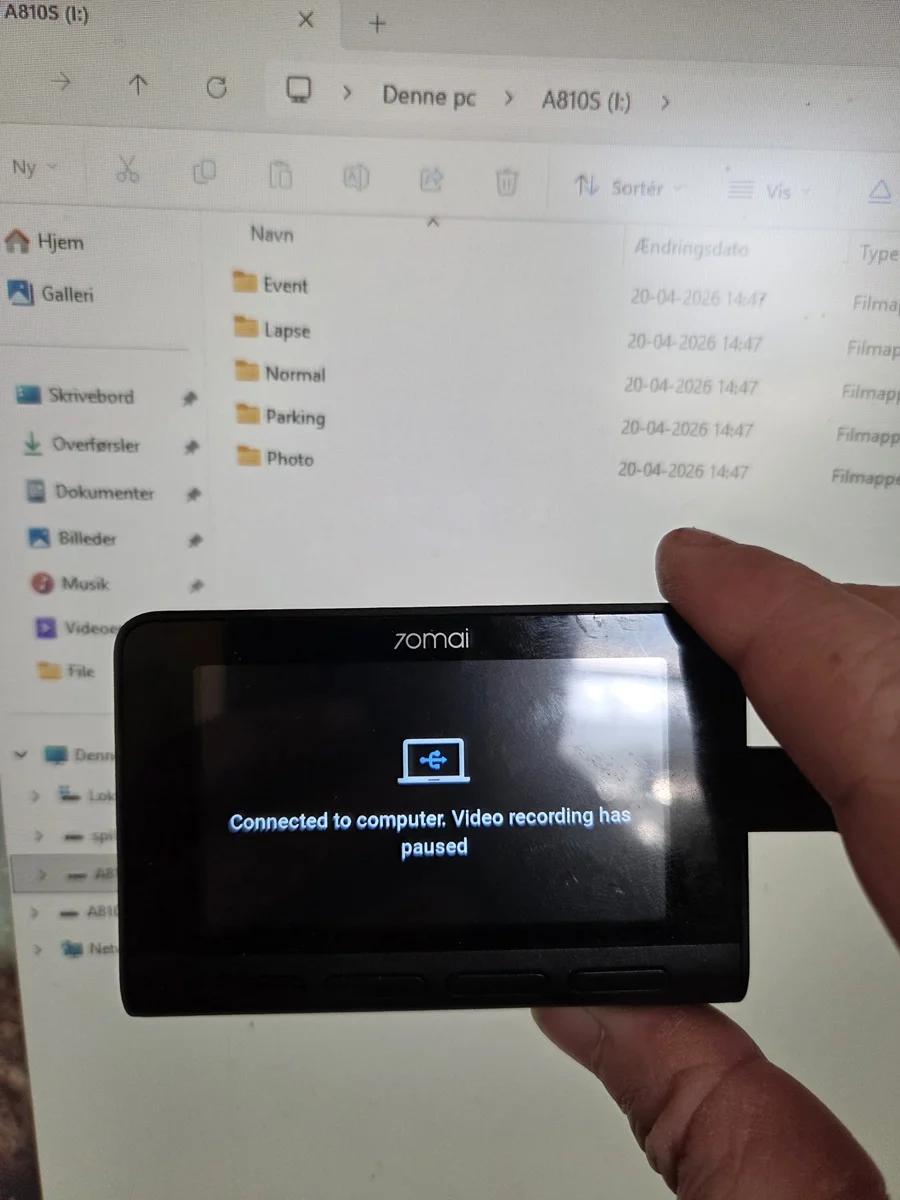
onpc.webp


Some might give you a choice to go into mass storage mode like my 70mai do default and give no other option.
But i have seen others that will give you the option to say just power the camera from a PC USB port and it would then act normally and just record

But a corrupted file is probably not detectable this way as it is just like putting memory card in a card reader.
 
Emmc is internal on devise ( PCB ) storage. some have this alongside a regular micro SD card.
 
IDK what eMMC memory is.
eMMC, (embedded Multi-Media Card) is just like an SD Card except it’s built into the dash cam, (not removable).
Your screenshot says it has “INTERNAL MEMORY”.
This means your missing video file could still be on the eMMC “internal memory” and NOT on the SD Card.
To check if the missing video file is on eMMC you need to connect dash cam to your computer with a Type-C Data Cable.
Before you connect dash cam to your computer, first remove the SD card.
As soon as you connect dash cam to your computer with Type-C Data Cable you should see a popup message on your compter to access eMMC.
Oh man, I’m so excited we might have figured this out.
-Chuck


1 .webp
 
That ! is also very much a option, did not think of that, but that might be where the event folder is hiding.
It is a bit hit / miss on how the systems with internal memory actually use it, in my entire dashcam life i have only once tried such a system.
 
internal memory actually use it, in my entire dashcam life i have only once tried such a system.
Me too.
The first, and last eMMC dash cam I tested was DDPAI Mini5, (2022).
eMMC for dash cam use is a can of worms.
It causes more problems that it solves. lol
Do you remember A129 Plus Duo eMMC version?
What a lame duck.

 
I plugged in the Dashcam to my desktop with my Amazon Kindle power cord. I don't know if that is a Type-C Data Cable or not. I just make the damn things go, I'm not good at putting them together 🙂

No file popped up and I can't find it in my file explorer. Screen message is below. It says "mass storage"

1776700833864.webp


I hit every button on the dashcam they do nothing.

This is what I see in file explorer:

1776700945721.webp


I don't think we are any closer to figuring out the issue.

It sure would have been far easier if the dashcam had performed as advertised! I appreciate everyone's help.
 
@Ganjulama
Thank you for the confirmation.
So what's next?
Are you going to buy another RedTiger product?
I would avoid any dash cam with eMMC, I just don't trust it.
 
It looks like, from what I see in the directory listing, that the file size is about right for a full length video file. Unfortunately I have never seen a tool for editing the raw data of a video file. I have a quad copter that incorrectly records interlaced video as progressive that should be easy to fix by changing a flag in the video file, but I never found a tool that would allow me to modify the file in that way. I suspect that your file has a few bytes wrong in the header which makes the player think that it is zero length. You might try other viewing software to see if they would handle the file differently, or share that particular file so others can see if they can fix it, or at least view it.
 
@DAP
Has a good idea.

@Ganjulama
Can you upload the file that won't play to a public Google Drive Folder, and post the link here?
Someone here is bound to find a way to "decode" it.
 
@Kuya you were correct the exact time point I needed was in the park file. Unfortunately, nothing was recorded. I opened the file in the app and duration was 0:00
View attachment 91061

That it does show a file size is encouraging. Do not format or attempt to recover the file with in-house Windows disk tools. The file is likely there, or most of it anyway. The FAT is showing the presence and size, but when a read attempt is made there is missing data to show the "beginning of file", or something similar, so the video container returns as empty or zero bytes.

Stellar Info

Click on "For Individuals"

There is also this from San Disk: Rescue Pro ... who are from here: LC-Tech RescuePro
 
Last edited:
@DAP
Has a good idea.

@Ganjulama
Can you upload the file that won't play to a public Google Drive Folder, and post the link here?
Someone here is bound to find a way to "decode" it.

@Chuck McCoy I will do this. I have One Drive I think I can share a folder there. Stay tuned I'll need to do this after east coast business hours. I will follow @DAP 's instructions and not alter the file in any way.

If I mess around with the 'Stellar Info' recommended by @lufa6977 I'll save the file to another location first, them play around with it.
 
@Ganjulama

I added two links to my previous post. Generally, I encourage users to have one free software tool on hand for these unhappy moments involving file recovery. There are plenty of free ones, but they sometimes are not as good at recovery as a 'paid-for' tool. Every time you buy a SanDisk SD card, look inside the cardboard packaging to find an authorization code for the free download from LC-Tech. A lot of people miss that, but it is there. Well, I presume SanDisk is still providing that authorization code.
 
I have a OneDrive link I can share. I'm a little concerned because this could be used as evidence by law enforcement and the cam footage will show the license plate number should it be recovered. I was fully stopped, rear ended, and pushed into a car which fled the scene.

I captured the plate number from a still and I provided that to the Police. However, posting it on the internet is another thing. How does this work on this forum? I don't have time to review all of the rules right now.
 
That it does show a file size is encouraging. Do not format or attempt to recover the file with in-house Windows disk tools. The file is likely there, or most of it anyway. The FAT is showing the presence and size, but when a read attempt is made there is missing data to show the "beginning of file", or something similar, so the video container returns as empty or zero bytes.

Stellar Info

Click on "For Individuals"

There is also this from San Disk: Rescue Pro ... who are from here: LC-Tech RescuePro
Stellar Info didn't work. It could not find any files when I navigated to specific file. Rescue Pro explicitly states it doesn't support 3rd party software, and even though I installed it, like Stellar Info no file could be located. Tech Rescue requires a cc number and trial subscription. I'm not doing that.
 
@Ganjulama said:
I'm a little concerned because this could be used as evidence by law enforcement and the cam footage will show the license plate number should it be recovered.
I was fully stopped, rear ended, and pushed into a car which fled the scene.
I captured the plate number from a still and I provided that to the Police.
However, posting it on the internet is another thing.
How does this work on this forum?
I don't have time to review all of the rules right now.

@Chuck McCoy said:
I’m not sure I understand your question.
Are you asking if it’s OK to post vehicle license plates on DCT, or on the internet in general?
We live in USA.
There is no expectation of privacy in public: Katz v. United States (1967)


Can you rephrase your question so I can understand?
-Chuck
 
Stellar Info didn't work. It could not find any files when I navigated to specific file. Rescue Pro explicitly states it doesn't support 3rd party software, and even though I installed it, like Stellar Info no file could be located. Tech Rescue requires a cc number and trial subscription. I'm not doing that.

Interesting. If you know how to make a .img of the SD, you could upload that and see if someone could extract the video.

IANAL. As to the license plates. Generally, in the U.S., if the eyes can see it and you are in public, there is no expectation of privacy from video or photography. Thus, in most cases, you can post videos and images. However, if you post a picture of a car with a license plate, that is not the same car and or license plate...then you could have issues. Of course, you cannot post something that is under a judicial seal for non-disclosure, or other legal arrangements concerning non-disclosure. Posting public sex acts would garner unwanted attention from some groups and organizations. But basically, if something is photographed or otherwise captured in a public space, you can publish it.
 
@Ganjulama said:
I'm a little concerned because this could be used as evidence by law enforcement and the cam footage will show the license plate number should it be recovered.
I was fully stopped, rear ended, and pushed into a car which fled the scene.
I captured the plate number from a still and I provided that to the Police.
However, posting it on the internet is another thing.
How does this work on this forum?
I don't have time to review all of the rules right now.

@Chuck McCoy said:
I’m not sure I understand your question.
Are you asking if it’s OK to post vehicle license plates on DCT, or on the internet in general?
We live in USA.
There is no expectation of privacy in public: Katz v. United States (1967)


Can you rephrase your question so I can understand?
-Chuck
Yes, that is exactly what I was asking. I suppose I could have made it more concise. Here is the link to the file:

0_2026-04-18 Accident for RedTiger Forum

Let me know if there are any issues accessing it. If so, send me a PM with your email address and I can share that way.
 
I do not see any problems with g sensors causing issues.

We have customers getting hit at 100km hr with viofo , iroad and thinkware cams in very big collisions. I have seen over the years. I mean some of these vehicles were destroyed and dash camera worked.

Number 1 problem we see with dash cameras is when they faiil it is typically sd card failed but it failed a month prior. Or it failed because a car dealer unplugged it.
 
Yes, that is exactly what I was asking. I suppose I could have made it more concise. Here is the link to the file:

0_2026-04-18 Accident for RedTiger Forum

Let me know if there are any issues accessing it. If so, send me a PM with your email address and I can share that way.
Well, I clicked on the file and it just played without any problems. I'm running Linux Mint with firefox, and it played fine in firefox.
 
Yes, that is exactly what I was asking. I suppose I could have made it more concise. Here is the link to the file:

0_2026-04-18 Accident for RedTiger Forum

Let me know if there are any issues accessing it. If so, send me a PM with your email address and I can share that way.
Video played just fine on the OneDrive link via Brave browser on my android.
 
Back
Top