70mai 4K A810S - Testing/Review - RCG

rcg530

Well-Known Member
Joined
Jan 23, 2021
Messages
2,606
Reaction score
4,418
Location
California
Country
United States
Dash Cam
70mai, BlackVue, Thinkware, Vantrue, Vueroid, VIOFO
I just received from 70mai the 4K A810S HDR Set dash camera. I'll add this to the list of units I'm testing in the next few weeks.

Front Camera: 4K UHD Sony STARVIS 2 IMX678
Rear Camera: RC24 Sony STARVIS 2 IMX662

1765870999737.webp
1765871020359.webp
 
My unboxing pics for the A810S 2-Channel dash camera.

What's In The Box

70mai_A810S_Unboxing_Pics_DCT0.webp70mai_A810S_Unboxing_Pics_DCT1.webp70mai_A810S_Unboxing_Pics_DCT2.webp70mai_A810S_Unboxing_Pics_DCT3.webp

Front Camera

70mai_A810S_Unboxing_Pics_DCT4.webp70mai_A810S_Unboxing_Pics_DCT5.webp70mai_A810S_Unboxing_Pics_DCT6.webp

Rear Camera

70mai_A810S_Unboxing_Pics_DCT7.webp
 
Power Consumption Test Results

I tested the 70mai 4K A810S 2-Channel configuration with firmware 1.1.26ww, HDR enabled. It was powered by the 70mai UP03 hardwire kit.

1766217660899.webp


Sentinel [Parking] Mode Time Estimates

I provide a 100% time estimate which is making a simplifying assumption that the dash camera can use all of the battery pack's storage capacity. The 90% time value is to account for things like the UP03 hardwire kit's low voltage power cutoff feature which won't allow the dash camera to use all of the battery pack's capacity. Bluetooth / monitoring app support and other battery pack features may reduce the battery pack's charge level by small amounts as well.

1766217717025.webp
 
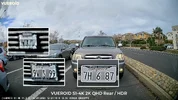
I now have the A810S 2CH installed in my car. I wanted to see how the rear 1080p FHD camera for the A810S compared with two 1440p QHD rear cameras.

As one would expect, the A810S 1080p FHD rear camera struggles a bit with plate captures compared to the 1440p QHD rear cameras [VIOFO A329S, VUEROID S1-4K Infinite].
20251226_Rear_Plates_70mai_A810S.webp20251226_Rear_Plates_VIOFO_A329S.webp20251226_Rear_Plates_VUEROID_S1-4K_Infinite.webp

The first test drive was on a mostly cloudy day. The front camera was picking up a large number of reflections from my car's dashboard/windshield. The dashboard's center storage area lid reflection and the passenger side airbag cover reflection are very noticeable in the footage [reflections are located just above the car's hood].

01_A810S_Reflections_NO20251223-135353-000018F.MP4_snapshot_00.43.webp

I purchased a 70mai ACC-CPL2 for the A810S front camera to reduce the reflections in the recorded footage. The first drive with the CPL filter installed was on a mostly sunny day [a rare thing lately]. Unfortunately, when there is a bright light source shining into the front camera lens, there are noticeable light rings on the left/right edges of the image. The CPL filter is fully pressed onto the front camera lens body. The protective plastic film on the CPL filter was removed before it was installed. I've asked 70mai about this issue. The picture of the CPL filter was taken at night and of course it started to rain as I took the picture.

02_A810S_CPL_Light_Rings_NO20251226-094016-000041F.MP4_snapshot_00.02.webp 1766910134673.webp
 
70mai has responded about the "light rings" on the left/right edges of the recorded image in certain lighting situations. The front camera lens has a very wide 146 degree diagonal field of view [FOV]. The FOV along with the CPL's elongated sides and fixed placement result in the "light rings" in certain lighting situations. During a recent nighttime drive I found that very bright LED headlights or certain brake lights will also result in the the "light rings" in the recorded image. According to 70mai, there's nothing to be fixed or replaced for this condition with the A810S. Just be aware that if you use the ACC-CPL2 with the A810S there will be certain lighting conditions that will result in the "light rings" on the edges of the recorded image.
 
Yes, glass some times mess things up, even if all you ask of it is to focus some light for you.

I have often seen some kind of " mess" with just about all systems i had ever, i don't consider this a problem CUZ it is of course not a permanent thing.

Still very down, so have not gotten around to putting A 810S in the car.
I will soon get a new model memory card to test, though it would seem i have also misplaced a 256 Gb card,,,,, again 🙄
 
@rcg530 nice measurements but I don't get what the latest table gives us?
The UP03 means you connected the camera to the car battery which is usually at least 50 Ah so it is more 50Ah*12V = 600 Wh than those values you have in the headers of the table.
 
@rcg530 nice measurements but I don't get what the latest table gives us?
The UP03 means you connected the camera to the car battery which is usually at least 50 Ah so it is more 50Ah*12V = 600 Wh than those values you have in the headers of the table.
Using the UP03 only means it's the non-LTE 3-wire hardwire kit. It does not mean it's powered by the vehicle battery.
 
Using the UP03 only means it's the non-LTE 3-wire hardwire kit. It does not mean it's powered by the vehicle battery.
OK because usually it is used to connect to the vehicle's battery and I thought that the calculations as done with respect of the this.
 
Regarding the A810S front mount assembly allowing the front camera body to shake while driving, I've experienced this as well and reported this issue to 70mai back in late December.

At first, 70mai believed that the A810S should be quite solid in its mount. I provided sample footage and video evidence that my A810S front camera could move a lot while fully inserted into the front mount on the windshield.

A810S_Front_Mount_Looseness_After_Install.gif

70mai stated that a revision to the front camera mount took place during production. The front mount piece has an "injection moulding number" present. The "V0" is the original version and the "V1" is the updated version. The front camera mount bracket was a "V1" version mount and still allowed a lot of movement of the front camera body.

1770050511926.webp


For my installation, I added two very thin strips of automotive noise reduction felt to the front camera body on the side of the area that slides into the front camera mount on the windshield. That change greatly reduced / eliminated the movement of the front camera on the windshield mount.

1770050630843.webp


I sent another email to 70mai asking for an update on this issue.
 
Wobbly mounts i have also been discussing on my thread but one user said theirs is fine.
Perhaps it's just an early production thing.

I created a short video to show the movement and a simple comparison to the T800 which uses a different mounting system.

 
This video contains day and night driving video samples from the 70mai A810S 2-channel dash camera.

 
Hi, do the A810 and A810S use the same cable? If we want to swap the A810 with the A810S, will it cause any issues?
 
The power cables should be compatible. The rear camera with the A810 is the RC12 1080p while the A810S has the RC24 1080p rear camera. I believe the cables for the rear camera between the front and rear camera are the same. I don't have an A810 to check.
 
Hi, do the A810 and A810S use the same cable? If we want to swap the A810 with the A810S, will it cause any issues?
You'd need to change the rearcam including the cable as both rearcam and cable are not compatible between A810 and A810s. Only the power cable to the main cam and the base on the windshield can be reused.
 
You'd need to change the rearcam including the cable as both rearcam and cable are not compatible between A810 and A810s. Only the power cable to the main cam and the base on the windshield can be reused.
Thanks
 
Recently, I upgraded my A810S dash camera with 1.5.40ww firmware. I did not immediately perform a detailed review of the footage after the firmware upgrade. Yesterday, I was randomly checking various A810S front video files. I found a few MP4 files that had 1 to 4 second video/audio content gaps [dropped from content in MP4 file]. I found that this issue only started after upgrading from v1.2.33ww to v1.5.40ww firmware. I also noticed the filename timestamps seem to vary by several seconds at times [forward and backward] with v1.5.40ww firmware. The filename timestamps with v1.2.33ww firmware were consistent [i.e. if the first file had "33" seconds in the filename, all files after that also had "33" in the filename for that normal mode recording session]. The MP4 files in the ".s_Front" and "Rear" directories do not appear to have this problem.

I've reported this issue to 70mai. I provided MP4 file samples with the issue in a Google Drive folder: https://drive.google.com/drive/folders/1s5pQ9qICe4dRiGigDnPNoqcQSQakoJtU?usp=sharing
  • Front
    • NO20260409-203147-002026F.MP4
      • It has video/audio frames missing about 10 seconds into the video file.
    • NO20260411-121728-002051F.MP4
      • Time offset 3 seconds [12:17:28]
        • The timestamp in the status line jumps from 12:17:29 to 12:17:33.
        • The video content also shows a major loss of content since the vehicle on the right jumps much closer to my vehicle.
    • NO20260411-131803-002074F.MP4
      • Time offset 52 seconds [13:18:56]
        • The content and timestamp show a major loss of frames within the 13:18:56 and 13:18:57 timestamps in the video
Consecutive Frames from NO20260411-121728-002051F.MP4 video file:
NO20260411-121728-002051F.MP4_snapshot_00.02_example1.webpNO20260411-121728-002051F.MP4_snapshot_00.02_example2.webp
 
@rcg530, the loss of frames is due to the slow memory card issue. The card's performance is degraded.
With the old firmware, the loss of frames resulted into a shorter video (e.g. 59s), and the timestamp in the video filenames kept the same second. However, in the recent firmware, the loss of frames causes the file end time dragged, so that each file length remains the same 60s. And the seconds in the files names are moved.
In short, you can replace the memory card, and the issue will be gone.
 
@rcg530, the loss of frames is due to the slow memory card issue. The card's performance is degraded.
With the old firmware, the loss of frames resulted into a shorter video (e.g. 59s), and the timestamp in the video filenames kept the same second. However, in the recent firmware, the loss of frames causes the file end time dragged, so that each file length remains the same 60s. And the seconds in the files names are moved.
In short, you can replace the memory card, and the issue will be gone.
I already replaced the memory card [SanDisk Max Endurance 256GB] with a 70mai 512GB card. I'll be testing the theory that the memory card is the root cause of the issue. I submitted a ticket to 70mai with the device logs to see if there's anything they can see in the logs.

I ran a h2testw data verification / speed test on the SanDisk Max Endurance 256GB card [64.3 MB/s write speed / 82.6 MB/s read speed]. It passed without errors. I also ran CrystalDiskMark benchmarks with okay results as well [similar to another SanDisk Max Endurance card]. I ran the CrystalDiskMark test on a 70mai 512GB memory card and it was faster than the SanDisk Max Endurance cards.

Adding up the bitrates of the three video files being created in normal recording mode [Front: 3.66 MB/s, Rear: 1.22 MB/s, .s_Front: 0.26 MB/s] that comes to 5.14 MB/s.

SanDisk Max Endurance 256GB card test results:
1776053994603.webp
1776054646139.webp
1776054661810.webp


70mai 512GB test results:
1776054100712.webp
 
70mai's response to my ticket with the device logs is that it appears the SanDisk Max Endurance memory card provided temporary unstable write [times] with the memory card being full requiring it to rotate off old files to make space for the new files. 70mai's recommendation was to use a 70mai memory card, let it fill up with video files and see if the problem is still present. I've already put a 70mai 512GB memory card into the A810S. Time will tell if it's the memory card or the updated firmware.
 
Back
Top