70mai 4K M800 - Testing / Review - RCG

rcg530

Well-Known Member
Joined
Jan 23, 2021
Messages
2,737
Reaction score
4,590
Location
California
Country
United States
Dash Cam
70mai, BlackVue, Thinkware, Vantrue, Vueroid, VIOFO
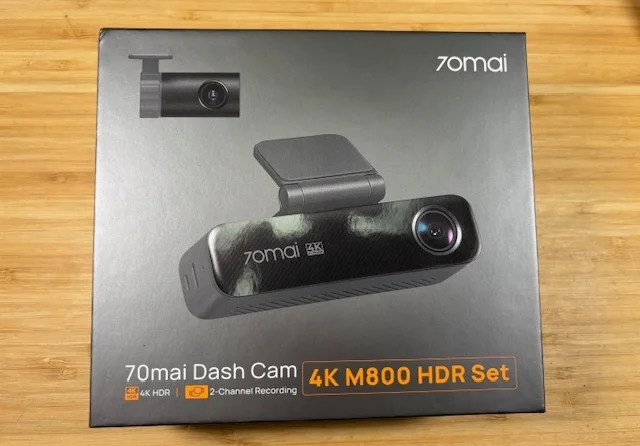
70mai sent me a 4K M800 2-channel dash camera to test/review. I received it a couple of days ago. Next week, I'll get my unboxing pics, perform a focus check, and run my power consumption test suite.

1764976897001.webp
 
If you do some dirt road driving check the Mount/camera bracket as pre production unit introduced vibrations in the video.
Adding padding to the top of the camera helped reduce/remove the vibration.
 
If you do some dirt road driving check the Mount/camera bracket as pre production unit introduced vibrations in the video.
Adding padding to the top of the camera helped reduce/remove the vibration.
Thanks for letting me know about that issue. I have several roads in my area that are in a poor state of repair with very harsh bumps. I'll look for that issue in the footage when I get it in my car.
 
I have completed my unboxing and power consumption testing of the 70mai 4K M800 2-channel dash camera. This is new to the North American market, so 70mai just recently sent me a unit to test/review.

Specifications
  • General
    • Installed Firmware: v1.00.37ww
    • Storage
      • Internal 128 GB eMMC drive
      • No microSD card slot
    • Video Codecs
      • H.265 [HEVC] - default
      • H.264 [AVC]
    • Video File Container Type: MP4
    • Power Adapter(s)
      • Midrive CC01 - Car Power Adapter / Cigarette Lighter Adapter
        • 2 USB-C Ports
      • Compatible with UP03 [non-LTE] hardwire kit
      • Compatible with UP04/UP05 4G LTE hardwire kit
  • Front Camera
    • 4K UHD 30fps
    • Sony STARVIS 2 IMX678 image sensor
    • Lens
      • Aperture F/1.7
      • Diagonal FOV 140°
    • HDR support
    • Resolution Settings
      • 3840x2160 30fps HDR
      • 1920x1080 30fps HDR
      • 1920x1080 60fps
  • Rear Camera
    • RC14 1080p FHD 30fps
    • Sony STARVIS 2 IMX662 image sensor
    • Lens
      • Aperture F/1.55
      • Diagonal FOV 130°
    • HDR support
What's In The Box
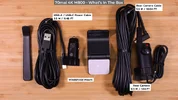
Unboxing_Pics_DCT0.webpUnboxing_Pics_DCT1.webpUnboxing_Pics_DCT2.webpUnboxing_Pics_DCT3.webpUnboxing_Pics_DCT4.webp

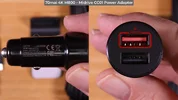
Car Power Adapter [CLA]
Unboxing_Pics_DCT5.webp

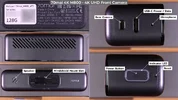
Front Camera
Unboxing_Pics_DCT6.webpUnboxing_Pics_DCT7.webp

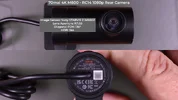
Rear Camera
Unboxing_Pics_DCT8.webp
 
Power Consumption Test Results

I performed my standard power consumption test suite for the 4K M800 2-channel dash camera. Firmware v1.0.37ww installed in the M800 when it arrived. No firmware updates were available beyond the installed firmware version.

The M800 only has two parking modes [Collision Detection, Time-Lapse]. There is no motion detection parking mode available.

I did find one concerning behavior with the collision detection parking mode. I perform a test which has me generating a series of impact events for 90-seconds. This might occur if the vehicle is being towed or hit by multiple objects over a period of time. I found that time gaps are present between the video files created by collision detection parking mode. Instead of creating consecutive recording files [with zero time gap between files], the files will have from 8 to 20 seconds between consecutive collision detection recording files. When the 30-second recording files have been completed, the M800 attempts to return to its lower power monitoring state. When there are continuous impact events taking place, the M800 should simply start new recording files instead of trying to go back into the lower power monitoring state. At a minimum, it should detect almost immediately that it has more impact event(s) that should result in more recording files with a near zero second gap between recording files.

[click on image for full size version]
1765438396515.webp

Parking Mode Time Estimates

[click on image for full size version]
1765438450674.webp
 
I did find one concerning behavior with the collision detection parking mode. I perform a test which has me generating a series of impact events for 90-seconds. This might occur if the vehicle is being towed or hit by multiple objects over a period of time. I found that time gaps are present between the video files created by collision detection parking mode. Instead of creating consecutive recording files [with zero time gap between files], the files will have from 8 to 20 seconds between consecutive collision detection recording files. When the 30-second recording files have been completed, the M800 attempts to return to its lower power monitoring state. When there are continuous impact events taking place, the M800 should simply start new recording files instead of trying to go back into the lower power monitoring state. At a minimum, it should detect almost immediately that it has more impact event(s) that should result in more recording files with a near zero second gap between recording files.
A response from 70mai on this test result seems to indicate the time gap between collision detection videos is considered normal. The 70mai M800 collision detection logic is trying to filter out false positives regarding the impacts being detected.

From the 70mai email: "This mechanism requires the current collision signal to exceed four times the cached average value to prevent misdetection from environmental noise or minor fluctuations. When collisions are continuously triggered, this average value becomes very high. The 70mai engineers interpret this as indicating a severe collision, hence the logic is designed to trigger collision detection only periodically."

Since how I was creating impacts was using the same level of force each time, the second through nth subsequent impacts were not 4-times or more intense than the first one.

When I tried this same test with the BlackVue Elite 9, it created buffered video files during the entire collision test leaving no unrecorded time during this 90-second impact test.

Regarding an issue I found with the rear 1080p camera's collision detection footage that was supposed to be recorded at 15fps, but effectively it was 7.5 fps since each frame was duplicated, the 70mai engineers have reproduced this issue. I will be getting a test firmware to fix this issue in the next few days.
 
Regarding an issue I found with the rear 1080p camera's collision detection footage that was supposed to be recorded at 15fps, but effectively it was 7.5 fps since each frame was duplicated, the 70mai engineers have reproduced this issue. I will be getting a test firmware to fix this issue in the next few days.
70mai provided to me a 1.0.38ww test firmware which fixes the "Back" (Rear) camera collision detection duplicate frame problem. Firmware 1.0.38ww creates 15fps Back/Rear camera collision detection video files with unique video frames instead of each video frame being duplicated causing the effective frame being to be 7.5 fps. I'm not sure of the public release date of 1.0.38ww [or later] that will contain this fix.

1766094483601.webp
 
I installed the M800 2-channel dash camera into my 2006 Toyota Highlander. The M800 front camera mounted just to the left of the BlackVue DR970X Box Plus front camera on the left side of the center rear view mirror.

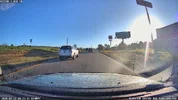
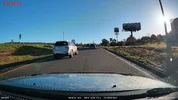
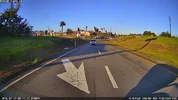
Sample frame grabs from the M800 front camera [HDR] as well as a BlackVue DR970X Box Plus [no HDR], and a VIOFO A229 Plus [HDR]. The M800 and the DR970X Box Plus front cameras do not have CPL filters since none are available for those dash cameras.

01_M800_NO20260212-082026-000033F.MP4_snapshot_00.20.webp01_DR970XBoxPlus_20260212_082035_NF.mp4_snapshot_00.17.webp01_A229Plus_2026_0212_081955_033269F.MP4_snapshot_00.53.webp

02_M800_NO20260212-082026-000033F.MP4_snapshot_00.39.webp02_DR970XBoxPlus_20260212_082035_NF.mp4_snapshot_00.35.webp02_A229Plus_2026_0212_082055_033271F.MP4_snapshot_00.11.webp

03_M800_NO20260212-082626-000039F.MP4_snapshot_00.05.webp03_DR970XBoxPlus_20260212_082540_NF.mp4_snapshot_00.57.webp03_A229Plus_2026_0212_082555_033281F.MP4_snapshot_00.38.webp

I bulk copy the video files from each dash camera's storage media. As expected, the M800's use of an internal eMMC drive as its only storage media requires the files to be copied through the USB-C port on the M800 front camera. The file copy process averaged a file transfer rate of only 18.5 MB/sec. The average user will likely use the 70mai app to download only a few files or copy only a few files from the eMMC drive via the USB-C port, so the eMMC/USB-C file copy transfer speed being slow is not likely to be a major problem for most users.
 
Rear camera video files from this morning's drive.

M800 1080p FHD / DR970X Box Plus 1080p FHD / VIOFO A229 Plus 2K QHD
01R_M800_NO20260212-082026-000033B.MP4_snapshot_00.20.webp01R_DR970XBoxPlus_20260212_082035_NR.mp4_snapshot_00.15.webp01R_A229Plus_2026_0212_081955_033270R.MP4_snapshot_00.51.webp

02R_M800_NO20260212-082026-000033B.MP4_snapshot_00.40.webp02R_DR970XBoxPlus_20260212_082035_NR.mp4_snapshot_00.35.webp02R_A229Plus_2026_0212_082055_033272R.MP4_snapshot_00.12.webp

03R_M800_NO20260212-082626-000039B.MP4_snapshot_00.04.webp03R_DR970XBoxPlus_20260212_082540_NR.mp4_snapshot_00.55.webp03R_A229Plus_2026_0212_082555_033282R.MP4_snapshot_00.36.webp
 
Since the video file transfer rate is very slow through the M800 USB-C port to a computer [18.5 MB/sec], I wanted to see if the advertised WiFi transfer rate of up to 40 MB/sec was achievable with the M800. I used a brand new Apple iPad Air 11-inch (M3) which supports Wi-Fi 6E, an Apple iPhone 15 Plus which supports Wi-Fi 6 [not 6E], and an Android 10 tablet which supports WiFi 5.

1771542438673.webp


In my tests, the M800 download speeds for video files over a WiFi connection was worse than the USB-C transfer rate. I selected two front camera files and two rear [back] camera files for this test.

70mai M800 FW 1.0.38ww
  • Files:
    • Front 1: 252.34 MB
    • Front 2: 271.19 MB
    • Rear [Back] 1: 61.55 MB
    • Rear [Back] 2: 61.55 MB
  • Apple iPad Air 11-inch (M3) iOS 18.7.3
    • Front 1: 10.09 MB/sec
    • Front 2: 10.23 MB/sec
    • Rear [Back] 1: 9.93 MB/sec
    • Rear [Back] 2: 10.09 MB/sec
  • Apple iPhone 15 Plus iOS 26.3
    • Front 1: 10.02 MB/sec
    • Front 2: 10.13 MB/sec
    • Rear [Back] 1: 9.91 MB/sec
    • Rear [Back] 2: 9.91 MB/sec
  • Android 10 Tablet
    • Front 1: 9.34 MB/sec
    • Front 2: 9.38 MB/sec
    • Rear [Back] 1: 9.06 MB/sec
    • Rear [Back] 2: 9.11 MB/sec
To see if my devices were the limiting factor in the M800 WiFi download test, I used those same devices to download two front video files from a VIOFO A119M Pro over a WiFi connection.

VIOFO A119M Pro FW v1.1_20260109
  • Files:
    • Front 1: 267.03 MB
    • Front 2: 267.11 MB
  • Apple iPad Air 11-inch (M3) iOS 18.7.3
    • Front 1: 28.26 MB/sec
    • Front 2: 28.27 MB/sec
  • Apple iPhone 15 Plus iOS 26.3
    • Front 1: 27.64 MB/sec
    • Front 2: 27.65 MB/sec
  • Android 10 Tablet
    • Front 1: 26.15 MB/sec
    • Front 2: 25.32 MB/sec

 
Since the video file transfer rate is very slow through the M800 USB-C port to a computer [18.5 MB/sec], I wanted to see if the advertised WiFi transfer rate of up to 40 MB/sec was achievable with the M800. I used a brand new Apple iPad Air 11-inch (M3) which supports Wi-Fi 6E, an Apple iPhone 15 Plus which supports Wi-Fi 6 [not 6E], and an Android 10 tablet which supports WiFi 5.

View attachment 89896

In my tests, the M800 download speeds for video files over a WiFi connection was worse than the USB-C transfer rate. I selected two front camera files and two rear [back] camera files for this test.

70mai M800 FW 1.0.38ww
  • Files:
    • Front 1: 252.34 MB
    • Front 2: 271.19 MB
    • Rear [Back] 1: 61.55 MB
    • Rear [Back] 2: 61.55 MB
  • Apple iPad Air 11-inch (M3) iOS 18.7.3
    • Front 1: 10.09 MB/sec
    • Front 2: 10.23 MB/sec
    • Rear [Back] 1: 9.93 MB/sec
    • Rear [Back] 2: 10.09 MB/sec
  • Apple iPhone 15 Plus iOS 26.3
    • Front 1: 10.02 MB/sec
    • Front 2: 10.13 MB/sec
    • Rear [Back] 1: 9.91 MB/sec
    • Rear [Back] 2: 9.91 MB/sec
  • Android 10 Tablet
    • Front 1: 9.34 MB/sec
    • Front 2: 9.38 MB/sec
    • Rear [Back] 1: 9.06 MB/sec
    • Rear [Back] 2: 9.11 MB/sec
To see if my devices were the limiting factor in the M800 WiFi download test, I used those same devices to download two front video files from a VIOFO A119M Pro over a WiFi connection.

VIOFO A119M Pro FW v1.1_20260109
  • Files:
    • Front 1: 267.03 MB
    • Front 2: 267.11 MB
  • Apple iPad Air 11-inch (M3) iOS 18.7.3
    • Front 1: 28.26 MB/sec
    • Front 2: 28.27 MB/sec
  • Apple iPhone 15 Plus iOS 26.3
    • Front 1: 27.64 MB/sec
    • Front 2: 27.65 MB/sec
  • Android 10 Tablet
    • Front 1: 26.15 MB/sec
    • Front 2: 25.32 MB/sec
I was told that it was actually WiFi 4, and that the quoted figures were an advertising error, hence the low transfer speeds. Makes sense since the M800 was released in china over a year before it's global release.
 
Last night, I went for a drive to gather nighttime footage from the M800. One thing I found quite annoying with the M800 is the LED indicator/status ring around the power button on the left end of the unit is far too bright at night. I checked the firmware settings and I did not find a LED brightness adjustment setting. For a LHD vehicle with the M800 on the left of the center rear view mirror, this is a potential distraction while driving. In my Toyota Highlander, the LED light reflected off of the windshield as well creating a second bright light within the field of view of the driver. If the M800 is mounted on the right side of the center rear view mirror, the LED may be able to be hidden a bit, but then the driver's access to the power/function recording button would be limited.

1771784377237.webp


This picture also shows a reflection from the vehicle's center dashboard console, but that's not visible to the driver. I held my phone up a bit too far, so the center console reflection was visible to the camera.

1771783914960.webp
 
Here are frame grabs from the three dash cameras I had in my car last night. I was at a stoplight. When the light turned green for my direction, a deer was slowly strolling across the roadway. After I started to slowly roll forward, I turned on my 4-way emergency flashers. The driver of the vehicle behind my vehicle was very impatient and that driver attempted to drive around me. I had to honk my vehicle's horn a few times to get the other driver to pay attention to the deer crossing the road. I'm guessing the other driver may have thought my vehicle had become disabled since I turned on the 4-way emergency flashers, but they could have been a bit slower at making their assumptions and attempting to wildly pass my vehicle mid-intersection.

Front: 70mai M800 / BlackVue DR970X Box Plus / VIOFO A229 Pro
01_M800_NO20260221-184627-000391F.MP4_snapshot_00.43.webp01_DR970XBoxPlus_20260221_184641_NF.mp4_snapshot_00.42.webp01_A229Pro_2026_0221_184644_003630F.MP4_snapshot_00.32.webp

Rear: 70mai M800 FHD / BlackVue DR970X Box Plus FHD / VIOFO A229 Pro QHD
02_M800_NO20260221-184627-000391B.MP4_snapshot_00.45.webp02_DR970XBoxPlus_20260221_184641_NR.mp4_snapshot_00.42.webp02_VIOFO_A229Pro_2026_0221_184644_003631R.MP4_snapshot_00.33.webp
 
70mai M800 Dash Camera - Day vs Night Driving Video Samples

 
M800 5 GHz Wi-Fi:

I used a Wi-Fi channel sniffer when my M800 had its Wi-Fi enabled. I found the M800 had channel 36 active for its SSID. From my research, channels 36-to-48 are low band channels for 5 GHz Wi-Fi. I then received a statement from 70mai stating that the M800 is 5 GHz capable. The reason the download speed is only 10 Mbps is because the Wi-Fi chip 70mai uses in the M800 has a maximum performance capability of just that.

New M800 Firmware v1.1.43ww:

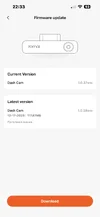
This morning, I performed my weekly firmware update check for the M800. The 70mai app stated that firmware v1.1.43ww was available for the M800.

IMG_9331.PNG
1772476305804.webp
 
Back
Top