70mai S500 Rear View Dash Camera Testing/Review - RCG

  • Image sensor: SmartSens SC200AI
  • HDR
  • FOV 138° / F 2.2
  • IPX7 water protection

You can get the firmware update 1.0.23ww in the 70mai international app.
I updated the info in my post just before you posted your info.

I have tried to locate a version of the 70mai app that will allow an update to the S500, but both the iOS and Android 70mai apps that I can download to my devices will not show any available update for my S500. I've asked my 70mai rep to see if they can provide the steps (that I haven't already tried) to get my S500 firmware updated.
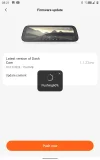
 
I've had three issues with the 70mai S500 rearview dash camera. I've made some progress on those issues.
  • Unable to upgrade firmware beyond initial 1.1.17ww
    • I provided screenshots to 70mai showing that their iOS and Android 70mai apps do not present an option to obtain any firmware updates for the S500.
    • This morning, I received an email from 70mai stating that 70mai updated something on their end and that I should be able to see/install firmware 1.1.23ww.
    • I just finished the firmware update steps to install firmware 1.1.23ww.
    • 1712590977640.webp
  • Random loss of stored configuration (goes through initial setup at power up)
    • The S500 has lost its stored configuration at least three times since it was installed in my vehicle.
    • During its power up phase, it will enter into the "new product" setup screens (language, time, etc).
      • When I arrive home and park my vehicle
        • I long press the power button to have the S500 power down.
        • I remove the memory card to bulk copy any video files from that day's drive.
        • I reinstall the memory card.
      • The next time I drive the vehicle, the S500 will sometimes power up going through its initial setup screens.
        • One annoying result of this is the Wi-Fi password is changed causing me to have to reconfigure the saved Wi-Fi info on my iOS / Android devices for the S500.
    • I've provided diagnostic logs to 70mai so they can review for any clues.
  • Screen on/off status changed when changing gears (park-to-drive / drive-to-park)
    • Passing through the reverse gear position will cause the reverse screen to appear.
    • After passing through the reverse gear position, the screen remains on even though the screen was off before passing through reverse gear.
      • I agree that turning on the screen while in the reverse gear position is fine.
      • When exiting reverse gear, the screen state should be restored to the state it was before entering reverse.
        • If the screen was off before entering reverse, the screen should be switched off when it exits reverse.
          • IMO, there's no reason the driver should have to use a voice command or press a button to turn off the screen if it was off before passing through the reverse gear position.
    • I'll check this behavior now that firmware 1.1.23ww is installed.
 
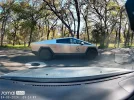
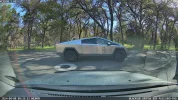
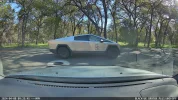
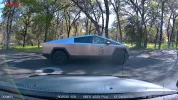
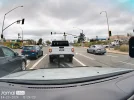
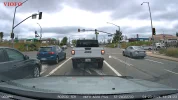
Here are frame grabs from the four dash cameras in one of my vehicles (70mai S500, BlackVue DR970X-2CH Box Plus, BlackVue DR970X Plus, VIOFO A229 Plus). They show a Tesla Cybertruck as it drove past my vehicle. The 70mai S500 frame grab (2592x1944) using the MPC-BE video player was too large for this website, so I had to scale it down a bit to load it.

1712608299828.pngbv_dr970x_box_plus_20240408_092442_NF.mp4_snapshot_00.51.pngbv_dr970x_plus_20240408_092452_NF.mp4_snapshot_00.52.pngviofo_a229_plus_nocpl_hdroff_2024_0408_092427_F.MP4_snapshot_00.34.webp
 
Here are two 1-minute daytime sample video files from the S500 front and rear cameras with firmware 1.1.23ww installed.


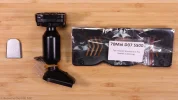
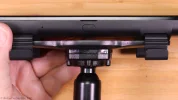
Yesterday, I received an aftermarket 70mai D07/S500 mounting bracket. It arrived one week earlier than the AliExpress predicted date of 16-Apr-2024. I have mounting bracket option "#1" for this unit which connects to the most common metal windshield mounting plate. I found the metal swivel ball socket of the aftermarket bracket was VERY tight. It was so tight, I feared it might pass more force than the windshield mounting plate could withstand (removing it from the glass) when adjusting the S500 mirror position. I inserted a plastic handled nut driver into the center hole of the bracket's swivel ball socket end that mounts to the windshield's metal plate and exercised it a bit. That helped loosen up the metal ball socket a bit which made it require slightly less effort to adjust the S500 when installed using this bracket.

s500_bracket_install_pics_dct00.webps500_bracket_install_pics_dct01.webps500_bracket_install_pics_dct02.webps500_bracket_install_pics_dct03.webp

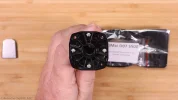
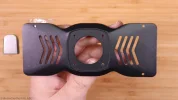
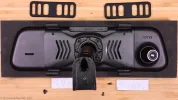
To install this aftermarket bracket, you must expose four screws on the backside of the S500 case which are located under two rubber pads that are attached with adhesive strips. I removed the rubber pads and removed as much of the adhesive residue that I could. I used the foam padding from the S500 box to make sure I didn't scratch the front mirror glass of the S500.

s500_bracket_install_pics_dct04.webps500_bracket_install_pics_dct05.webp

I attached the metal bracket from the mounting kit to the S500 case using the kit provided screws.

s500_bracket_install_pics_dct06.webp

I used the kit provided screws to mount the windshield bracket from the kit to the metal plate.

s500_bracket_install_pics_dct07.webps500_bracket_install_pics_dct08.webps500_bracket_install_pics_dct09.webp

I used a T20 torx screwdriver to remove the center rear view mirror from my car. I installed the S500 with the new mounting bracket on the windshield mounting plate in the car using a phillips screwdriver to tighten the mouting screw.

If found that this aftermarket bracket greatly reduces the amount of visible vibration in the recorded video from the front camera. It reduces the amount of visible vibration in the mirror image from a 10 out 10 to a 2 out of 10. The NVH (noise, vibration, harness) generated by my vehicle is usually very little. The weight of the S500 hanging off the end of this new mounting bracket is just enough to still get some slight vibration in the viewable image in the mirror reflection. I could notice it the most when looking at the rear window's defroster grid lines. I can see a very small mount of up/down vibration in those lines while driving. I'll have to see how noticable this amount of movement is when driving at night.
 
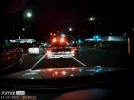
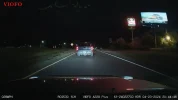
Today, I gathered some new daytime and nighttime footage from the S500 and a VIOFO A229 Plus so I can compare them to each other since they both have a Sony STARVIS 2 IMX675 image sensor in the front camera. I wanted to make sure the S500 footage was with its latest firmware v1.1.23ww installed. During the daytime, the S500 looks okay. Nighttime S500 footage has a lot of light flares and ghosting. The footage from the A229 Plus looks much better. The S500 lens makes the objects in front my car look much farther away.

Nighttime screenshots from both - both dash cameras have HDR enabled:

70mai_s500_NO20240423-204353-000323F.mp4_snapshot_00.31.webpviofo_a229_plus_2024_0423_204411_F.MP4_snapshot_00.14.webp

70mai_s500_NO20240423-204353-000323F.mp4_snapshot_00.51.webpviofo_a229_plus_2024_0423_204411_F.MP4_snapshot_00.34.webp

Daytime screenshots from both - S500 has HDR enabled all of the time and the A229 Plus had HDR turned off via the HDR Timer feature:

The S500 screenshot has a blue spot on the upper right corner because that is from the windshield's internal blue tint band at the top of the window glass. It dips down a bit around the center rear view mirror mount point which makes it visible to the S500 since the vertical field of view is very tall (2592x1944) and the S500 is mounted on the windshield's rear view mirror mount point using a third party mounting bracket.

70mai_s500_NO20240423-132423-000268F.mp4_snapshot_00.00.webpviofo_a229_plus_2024_0423_132341_F.MP4_snapshot_00.42.webp
 
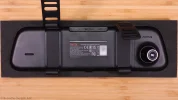
I finished my 70mai S500 rear view dash camera review video. It’s VERY long. A lot of time to show the two mounting strategies since the default mount (straps around the existing mirror) did not work well for my vehicle. The video has chapter markers in place and a reminder in the video to jump to the section that you're interested in viewing.

 
The S500 does its job. Considering the images I've seen before and the older model D07, there are pros and cons.

To talk about the cons; The power connector is micro USB.
The front camera resolution is wider in portrait orientation than the 16:9 view. There is no advantage to this.
The front camera image is sharp.
low memory capacity.
The fixing device is sold externally and other companies also sell it.

So, in general, I can say that there are two solutions with a single device for panel van vehicles without a rear window, vehicles with a narrow rear window and vehicles without a rear view camera.
Since my expectation is three solutions with one device, I am waiting for future models.
 
I finished my 70mai S500 rear view dash camera review video. It’s VERY long. A lot of time to show the two mounting strategies since the default mount (straps around the existing mirror) did not work well for my vehicle. The video has chapter markers in place and a reminder in the video to jump to the section that you're interested in viewing.

Good video and good to show alternative mounting bracket options for those older vehicles that have worn-out mounting brackets. Might be handy for 70mai to add the mounting brackets to the retail package, but those instances I would assume would be few and far between to justify them adding it
 
I've had three issues with the 70mai S500 rearview dash camera. I've made some progress on those issues.
  • Unable to upgrade firmware beyond initial 1.1.17ww
    • I provided screenshots to 70mai showing that their iOS and Android 70mai apps do not present an option to obtain any firmware updates for the S500.
    • This morning, I received an email from 70mai stating that 70mai updated something on their end and that I should be able to see/install firmware 1.1.23ww.
    • I just finished the firmware update steps to install firmware 1.1.23ww.
    • View attachment 71753
  • Random loss of stored configuration (goes through initial setup at power up)
    • The S500 has lost its stored configuration at least three times since it was installed in my vehicle.
    • During its power up phase, it will enter into the "new product" setup screens (language, time, etc).
      • When I arrive home and park my vehicle
        • I long press the power button to have the S500 power down.
        • I remove the memory card to bulk copy any video files from that day's drive.
        • I reinstall the memory card.
      • The next time I drive the vehicle, the S500 will sometimes power up going through its initial setup screens.
        • One annoying result of this is the Wi-Fi password is changed causing me to have to reconfigure the saved Wi-Fi info on my iOS / Android devices for the S500.
    • I've provided diagnostic logs to 70mai so they can review for any clues.
  • Screen on/off status changed when changing gears (park-to-drive / drive-to-park)
    • Passing through the reverse gear position will cause the reverse screen to appear.
    • After passing through the reverse gear position, the screen remains on even though the screen was off before passing through reverse gear.
      • I agree that turning on the screen while in the reverse gear position is fine.
      • When exiting reverse gear, the screen state should be restored to the state it was before entering reverse.
        • If the screen was off before entering reverse, the screen should be switched off when it exits reverse.
          • IMO, there's no reason the driver should have to use a voice command or press a button to turn off the screen if it was off before passing through the reverse gear position.
    • I'll check this behavior now that firmware 1.1.23ww is installed.

Did 1.1.23ww fix the problems?
 
Did 1.1.23ww fix the problems?
  • With 1.1.23ww installed
    • I no longer experienced the loss of stored configuration issue.
    • The screen on/off status issue is still present
    • There is now a slightly longer delay when the reverse gear/lights are on before the S500 will go into reverse camera mode.
      • This helps avoid going into backup camera mode when you're simply moving the vehicle's gear selector through the "reverse" gear position.
 
What is the actual dimensions of the rear view mirror? Some of my cars is the s2000 and dimensions matter a lot.
 
Hi, I am thinking of upgrading my 70mai D07, which is a previous version of s500. Anyone who have updated, I have got a few questions.
1. The back camera on my vehicle is used mainly as a rear view camera. Does the s500 has got better viewing angles compare to D07? Better clarity at night? Is it worth upgrading?
2. Any other improvements over the older model apart from possibility of zooming the rear view?

Thanks.
 
Hi, I am thinking of upgrading my 70mai D07, which is a previous version of s500. Anyone who have updated, I have got a few questions.
1. The back camera on my vehicle is used mainly as a rear view camera. Does the s500 has got better viewing angles compare to D07? Better clarity at night? Is it worth upgrading?
2. Any other improvements over the older model apart from possibility of zooming the rear view?

Thanks.
Hello,
I have moved from D07 to S500 as I sold my old car. I also use D07/S500 as a digital mirror with the screen always on. Here are my experience:
- Front cam image quality is definitely better. But the 4:3 frame ratio is ugly.
- Rear cam (RC13): night view is on par with D07 (RC05 night vision), or marginally better, nothing significant.
- Better control with the rear view. The up/down angle is adjustable on screen, with the angle saved separately for forward and reverse gears. With D07, the two view angles are fixed.
- Reverse view has distance guiding lines, which are adjustable too.
- No more "Something starts recording" ^welcome^ voice.
- Touch screen - quicker menu navigation, but not truly a big thing. You wont touch it frequently.

In overall, I am happy with the adjustable rearview angles. But that's it.
 
The S500 does its job. Considering the images I've seen before and the older model D07, there are pros and cons.

To talk about the cons; The power connector is micro USB.
The front camera resolution is wider in portrait orientation than the 16:9 view. There is no advantage to this.
The front camera image is sharp.
low memory capacity.
The fixing device is sold externally and other companies also sell it.

So, in general, I can say that there are two solutions with a single device for panel van vehicles without a rear window, vehicles with a narrow rear window and vehicles without a rear view camera.
Since my expectation is three solutions with one device, I am waiting for future models.
When the camera was first released, I criticized the fact that the power input was micro USB.

Last week, I recommended this camera to a user. I also told them to get a micro USB compatible parking mode cable. And to my surprise, the @70mai_Official cable has been updated over time to include a Type-C power input. In short, you need to choose the cable after you buy the camera, because the old version supports micro USB, while the new version supports Type-C.
 
Back
Top