Beeping as im driving?

Shiwarrior

Active Member
Joined
Nov 23, 2019
Messages
237
Reaction score
58
Location
Oxfordshire
Country
United Kingdom
How do I turn off the beeping when im driving? Its quite loud, and it's just started doing it
 
How do I turn off the beeping when im driving? Its quite loud, and it's just started doing it

Beeping can mean several things.

1. Is the camera still recording? Beeping can mean there's an error with writing to the memory card. I.E. Faulty Memory Card, Incompatible Memory Card, or Memory Card in need of an overwrite format to "refresh it".

2. Beeping could be ADA's like lane assist, etc enabled.
 
Since the beeping just started that's a good indication the camera is trying to alert you that something needs attention. I'm not familiar with the Blackvue brand but you should certainly check any documentation there is as to what it may be indicating. Certainly check the memory card to insure it's still recording properly.
 
Last edited:
Formated card, still doing it, couldn't see any of the advanced settings
 
Formated card, still doing it, couldn't see any of the advanced settings

Did the camera work previously and beeping just started? Or is this a new camera?

https://help.wowgadgets.com.sg/print-57.html

Beep alert
Enable Beep alert to hear beep alert when speed alert has occurred.

1.5.2.3 Hard Acceleration

Camera Settings > Event Triggers > Reckless Driving > Hard Acceleration

2. Have you updated Firmware to newest?

3. Is your Dr970X a Front and Rear? Are both Cameras showing up
 
Been working perfectly in my new car which i got installed last month, but was in my previous car for like a year with no issues

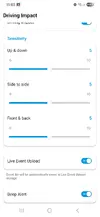
Hard acceleration etc etc are all OFF

Not sure about firmware it updates automatically

Both cameras working fine
 
Been working perfectly in my new car which i got installed last month, but was in my previous car for like a year with no issues

Hard acceleration etc etc are all OFF

Not sure about firmware it updates automatically

Both cameras working fine

Honestly, out of ideas. If it worked fine in previous vehicle, the only other thought is that maybe it's hardwired improperly where the fuse is causing conflicts with CanBus (assuming it's hardwired to fuse box).

Short of that, maybe the unit is going bad?
 
its run through a battery pack that's hardwired in

Test without hooking it to the battery pack. Use a 12V adapter. If it works without being hardwired, then your hardwire kit or battery pack is the culprit. Otherwise, the camera would be faulty.
 
What does the beep pattern sound like?

Do you have the voice guidance enabled so hopefully it can speak the issues and provide more insight?

Have you tried doing a factory reset of the dashcam to see if it takes care of any wonky settings?
 
What does the beep pattern sound like?

its the same noise like your touching the touch sensor when you first set up the camera, loud BEEP, i get that every few minutes

tried cig lighter and battery pack, same issue

yeah voice is enabled as i like to hear when it powers off/on etc

im reluctant to do factor reset

i will last resort though
 
its the same noise like your touching the touch sensor when you first set up the camera, loud BEEP, i get that every few minutes

tried cig lighter and battery pack, same issue

yeah voice is enabled as i like to hear when it powers off/on etc

im reluctant to do factor reset

i will last resort though

Did you try connecting direct to the 12V socket and unplugging from the battery pack hardwire? Eliminate the hardwire kit and battery as cause before doing factory reset.
 
Difficult as its wired through to the boot and it's plugged into a power station
 
I think I've just found the culprit!!
 

Attachments

  • Screenshot_20250706_110327.webp
    Screenshot_20250706_110327.webp
    33.2 KB · Views: 131
I drive over speed humps in the road daily, and it wasn't going off through there etc, the beeps were quite random
 
Back
Top