Dan-UK1415
Well-Known Member
- Joined
- Aug 14, 2018
- Messages
- 550
- Reaction score
- 460
- Country
- United Kingdom
- Dash Cam
- BlackVue Elite 8/9 & Viofo A329T
BlackVue ELITE 9 Firmware (v.1.008_2026.04.29)
WHAT’S NEW:
Version 1.008 (2026-04-29):
Added remote SD card format
Improved time synchronization
Added exFAT file system support
Added Hong Kong and Ukrainian language support
Improved system stability
※ Compatible software versions:
BlackVue App: Android v4.24 / iOS v4.20 and up.
Fleeta App: Android v1.24 / iOS v1.22 and up.
FLEETA Web Viewer
Important:
Make sure to use the latest versions of the BlackVue Viewer and App for full compatibility when installing a new firmware version.
 media.blackvue.com
BlackVue ELITE 9 Firmware (v.1.007_2026.03.16)
WHAT’S NEW:
Version 1.007 (2026-03-16):
※ Compatible software versions:
BlackVue App: Android v4.22 / iOS v4.18 and up.
Fleeta App: Android v1.22 / iOS v1.19 and up.
FLEETA Web Viewer.
Important:
Make sure to use the latest versions of the BlackVue Viewer and App for full compatibility when installing a new firmware version.
Version 1.005 (2026-01-19):
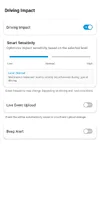
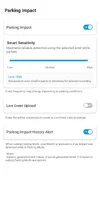
1) Added Smart Sensitivity
2) Improved video quality (especially at night)
※ Compatible software versions:
BlackVue App: Android v4.17 / iOS v4.13 and up.
BlackVue Viewer: Video playback and microSD card formatting (Please use the App to configure settings).
FLEETA App: Android v1.17 / iOS v1.14 and up.
FLEETA Web Viewer
Version 1.004 (2025-12-26):
1) Improved Cloud connection stability for certain carriers.
2) Fixed potential GPS reception instability when using accessories.
※ Compatible software versions:
BlackVue App: Android v4.17 / iOS v4.13 and up.
BlackVue Viewer: Video playback and microSD card formatting (Please use the App to configure settings).
FLEETA App: Android v1.17 / iOS v1.14 and up.
FLEETA Web Viewer
1) Improved internal system stability
2) Fixed an intermittent Cloud Live View connection issue.
※ Compatible software versions:
BlackVue App: Android v4.17 / iOS v4.13 and up.
BlackVue Viewer: Video playback and microSD card formatting (Please use the App to configure settings).
FLEETA App: Android v1.17 / iOS v1.14 and up.
FLEETA Web Viewer
Important:
Make sure to use the latest versions of the BlackVue Viewer and App for full compatibility when installing a new firmware version.
Version 1.002 (2025-11-28):
Bug fixes and stability improvements
※ Compatible software versions:
BlackVue App: Android v4.15 / iOS v4.11 and up.
BlackVue Viewer: Video playback and microSD card formatting (Please use the App to configure settings).
FLEETA App: Android v1.15 / iOS v1.12 and up.
FLEETA Web Viewer
Important:
Make sure to use the latest versions of the BlackVue Viewer and App for full compatibility when installing a new firmware version.
Version 1.001 (2025-11-14):
Initial firmware release.
※ Compatible software versions:
BlackVue App: Android v4.15 / iOS v4.11 and up.
BlackVue Viewer: Video playback and microSD card formatting (Please use the App to configure settings).
FLEETA App: Android v1.15 / iOS v1.12 and up.
FLEETA Web Viewer
Important:
Make sure to use the latest versions of the BlackVue Viewer and App for full compatibility when installing a new firmware version.
WHAT’S NEW:
Version 1.008 (2026-04-29):
Added remote SD card format
Improved time synchronization
Added exFAT file system support
Added Hong Kong and Ukrainian language support
Improved system stability
※ Compatible software versions:
BlackVue App: Android v4.24 / iOS v4.20 and up.
Fleeta App: Android v1.24 / iOS v1.22 and up.
FLEETA Web Viewer
Important:
Make sure to use the latest versions of the BlackVue Viewer and App for full compatibility when installing a new firmware version.
BlackVue ELITE 9 Firmware (v.1.008_2026.04.29)
WHAT’S NEW: Version 1.008 (2026-04-29): ※ Compatible software versions:BlackVue App: Android v4.24 / iOS v4.20 and up.Fleeta App: Android v1.24 / iOS v1.22 and up.FLEETA Web Viewer Important: Make sure to use the latest versions of the BlackVue Viewer and App for full compatibility when...
media.blackvue.com
BlackVue ELITE 9 Firmware (v.1.007_2026.03.16)
WHAT’S NEW:
Version 1.007 (2026-03-16):
- Fixed network and video quality issues.
- Improved overall system stability.
※ Compatible software versions:
BlackVue App: Android v4.22 / iOS v4.18 and up.
Fleeta App: Android v1.22 / iOS v1.19 and up.
FLEETA Web Viewer.
Important:
Make sure to use the latest versions of the BlackVue Viewer and App for full compatibility when installing a new firmware version.
BlackVue ELITE 9 Firmware (v.1.005_2026.01.19)
WHAT’S NEW:Version 1.005 (2026-01-19):
1) Added Smart Sensitivity
2) Improved video quality (especially at night)
※ Compatible software versions:
BlackVue App: Android v4.17 / iOS v4.13 and up.
BlackVue Viewer: Video playback and microSD card formatting (Please use the App to configure settings).
FLEETA App: Android v1.17 / iOS v1.14 and up.
FLEETA Web Viewer
Version 1.004 (2025-12-26):
1) Improved Cloud connection stability for certain carriers.
2) Fixed potential GPS reception instability when using accessories.
※ Compatible software versions:
BlackVue App: Android v4.17 / iOS v4.13 and up.
BlackVue Viewer: Video playback and microSD card formatting (Please use the App to configure settings).
FLEETA App: Android v1.17 / iOS v1.14 and up.
FLEETA Web Viewer
Version 1.003 (2025-12-22):1) Improved internal system stability
2) Fixed an intermittent Cloud Live View connection issue.
※ Compatible software versions:
BlackVue App: Android v4.17 / iOS v4.13 and up.
BlackVue Viewer: Video playback and microSD card formatting (Please use the App to configure settings).
FLEETA App: Android v1.17 / iOS v1.14 and up.
FLEETA Web Viewer
Important:
Make sure to use the latest versions of the BlackVue Viewer and App for full compatibility when installing a new firmware version.
Version 1.002 (2025-11-28):
Bug fixes and stability improvements
※ Compatible software versions:
BlackVue App: Android v4.15 / iOS v4.11 and up.
BlackVue Viewer: Video playback and microSD card formatting (Please use the App to configure settings).
FLEETA App: Android v1.15 / iOS v1.12 and up.
FLEETA Web Viewer
Important:
Make sure to use the latest versions of the BlackVue Viewer and App for full compatibility when installing a new firmware version.
Version 1.001 (2025-11-14):
Initial firmware release.
※ Compatible software versions:
BlackVue App: Android v4.15 / iOS v4.11 and up.
BlackVue Viewer: Video playback and microSD card formatting (Please use the App to configure settings).
FLEETA App: Android v1.15 / iOS v1.12 and up.
FLEETA Web Viewer
Important:
Make sure to use the latest versions of the BlackVue Viewer and App for full compatibility when installing a new firmware version.
Last edited: