
I had a dodgy battery that was less than a year old and it would not charge to 100% after a while. I got it replaced under warranty with the company I bought it off.What's the latest firmware on the B130X? My consumption/time data is jumping around.
I'd be happy if someone can help me how to check the FW version and update it (if there is an update available).
Thanks in advance.

You are using an out of date browser. It may not display this or other websites correctly.
You should upgrade or use an alternative browser.
You should upgrade or use an alternative browser.
DR970X Plus Series - Testing/Review - RCG
- Thread starter rcg530
- Start date

DCS Australia
Member
- Joined
- Feb 15, 2021
- Messages
- 33
- Reaction score
- 13
- Location
- Sydney
- Country
- Australia
- Dash Cam
- Viofo A329S, Vugera SV2 Pro, Lexus DRT-100L
Thank Bono(!) Love the profile photo. 🙂
DCS Australia
Member
- Joined
- Feb 15, 2021
- Messages
- 33
- Reaction score
- 13
- Location
- Sydney
- Country
- Australia
- Dash Cam
- Viofo A329S, Vugera SV2 Pro, Lexus DRT-100L
Yes, you are correct. THXI'm not aware of the B-130X having a firmware that can be user updated.
OP
OP

rcg530
Well-Known Member
- Joined
- Jan 23, 2021
- Messages
- 2,739
- Reaction score
- 4,591
- Location
- California
- Country
- United States
- Dash Cam
- 70mai, BlackVue, Thinkware, Vantrue, Vueroid, VIOFO
Over the past week, Pittasoft has released two firmware updates for all of the DR970X and DR970X Plus series dash cameras.
I’ve noticed what appears to be a bug with the latest firmware releases for the DR970X-2CH Box v1.004 and the DR970X v1.010 firmware (possibly others).
The first frame that contains a status line in the first time-lapse parking mode video file will have a “stale” date/time value from the past. The next frame will then have the “correct” date/time value.
This example is from a DR970X-2CH Box with v1.004 firmware. The timestamp of 17:52:22 is incorrect for this first frame in the time-lapse parking mode file. The filename is 20240711_180521_PF.MP4 so the time shouldn’t be 17:52:22.
The screenshots show the status line timestamp and just below that is the video filename displayed by the video player.

The next frame has the correct date/time:

In this case, the powered up the DR970X Box dash camera, the car was stationary for 5-minutes which allowed it to go into parking mode. The vehicle moved which had the DR970X Box exit parking mode, but I happened to be driving over a sidewalk curb to exit my driveway which triggered an impact event (IF/IR files). The timestamp that first appears in the impact videos is 17:52:21.

This next example is from a DR970X-2CH with firmware v1.010 installed.

The 09:28:40 time is when the previous switch from time-lapse parking mode to normal recording mode occurred.

The next frame has the “correct” date/time value.

I've sent an email to Pittasoft support about this issue including video files from these two examples.
I’ve noticed what appears to be a bug with the latest firmware releases for the DR970X-2CH Box v1.004 and the DR970X v1.010 firmware (possibly others).
The first frame that contains a status line in the first time-lapse parking mode video file will have a “stale” date/time value from the past. The next frame will then have the “correct” date/time value.
This example is from a DR970X-2CH Box with v1.004 firmware. The timestamp of 17:52:22 is incorrect for this first frame in the time-lapse parking mode file. The filename is 20240711_180521_PF.MP4 so the time shouldn’t be 17:52:22.
The screenshots show the status line timestamp and just below that is the video filename displayed by the video player.
The next frame has the correct date/time:
In this case, the powered up the DR970X Box dash camera, the car was stationary for 5-minutes which allowed it to go into parking mode. The vehicle moved which had the DR970X Box exit parking mode, but I happened to be driving over a sidewalk curb to exit my driveway which triggered an impact event (IF/IR files). The timestamp that first appears in the impact videos is 17:52:21.
This next example is from a DR970X-2CH with firmware v1.010 installed.
The 09:28:40 time is when the previous switch from time-lapse parking mode to normal recording mode occurred.
The next frame has the “correct” date/time value.
I've sent an email to Pittasoft support about this issue including video files from these two examples.
Pinebaron
New Member
- Joined
- Apr 15, 2024
- Messages
- 9
- Reaction score
- 4
- Location
- WA
- Country
- United States
- Dash Cam
- BlackVue DR970X-2CH LTE Plus with T-Mobile SIM Card
I assume you are parked at home and your dashcam is connected to your home network and you may have insufficient internet bandwidth at home. Do you know your internet connection bandwidth?Anyone know why downloading a parking video from the dashcam over the cloud would drag down/throttle my home network speeds?
Yes, parked at home and dashcam connected to the home broadband as is my iPhone and using the Blackvue app to download a parking video in original format front and rear. My broadband is poor in my area and is still only FTTC (fibre to the cabinet) as opposed to FTTH. Download is 40MB and upload is only 10MB. I’m thinking the dashcam uses the upload speed in this scenario to send the file from the dashcam to the cloud and in turn I am downloading it from the app? Also, this isn’t me selecting “upload” in the Blackvue app as I know you can do. I am selecting download.I assume you are parked at home and your dashcam is connected to your home network and you may have insufficient internet bandwidth at home. Do you know your internet connection bandwidth?

Elbeau
Member
So, they just put out the new Plus Box. No Starvis 2's. I wonder why.Thanks @DashCamMan for creating the "DR970X Plus Series" forum on this site!
Pittasoft has shipped two DR970X Plus dash cameras to me. They should be next week. I'm assuming they are the DR970X-2CH Plus and the DR970X-2CH LTE Plus dash cameras. I will compare these newer Sony STARVIS 2 dash cameras with their early models (DR970X-2CH and DR970X-2CH LTE). I'll have to see what data will be embargoed by Pittasoft for these dash cameras.
Pinebaron
New Member
- Joined
- Apr 15, 2024
- Messages
- 9
- Reaction score
- 4
- Location
- WA
- Country
- United States
- Dash Cam
- BlackVue DR970X-2CH LTE Plus with T-Mobile SIM Card
I think you've answered your own question. The only other way is to connect to the dashcam via bluetooth for downloads, however that requires you to be in the vehicle or install a suitable bluetooth extender which may work for you.Yes, parked at home and dashcam connected to the home broadband as is my iPhone and using the Blackvue app to download a parking video in original format front and rear. My broadband is poor in my area and is still only FTTC (fibre to the cabinet) as opposed to FTTH. Download is 40MB and upload is only 10MB. I’m thinking the dashcam uses the upload speed in this scenario to send the file from the dashcam to the cloud and in turn I am downloading it from the app? Also, this isn’t me selecting “upload” in the Blackvue app as I know you can do. I am selecting download.
Strange how it is dragging other things down though. I use an Orbi mesh system which has dynamic QoS so it is not prioritising one device over another.I think you've answered your own question. The only other way is to connect to the dashcam via bluetooth for downloads, however that requires you to be in the vehicle or install a suitable bluetooth extender which may work for you.
Pinebaron
New Member
- Joined
- Apr 15, 2024
- Messages
- 9
- Reaction score
- 4
- Location
- WA
- Country
- United States
- Dash Cam
- BlackVue DR970X-2CH LTE Plus with T-Mobile SIM Card
At the end of the day its a bandwidth issue; you can only slice and dice a 40/10 connection so many ways.Strange how it is dragging other things down though. I use an Orbi mesh system which has dynamic QoS so it is not prioritising one device over another.
Resolved now but there was an issueDidn't notice anything amiss last evening.
I see someone on Reddit is asking about night vision in the 970X. I wasn’t aware there ever is this feature even though it’s in the spec?! How does it look? I have the 970XLTE Plus and the image front and back would be black unless in a lit area.
stephenjones
Active Member
I have never seen this option in the black vue app. I have the same camera as well. Can't see anything unless there is light outside at nights.I see someone on Reddit is asking about night vision in the 970X. I wasn’t aware there ever is this feature even though it’s in the spec?! How does it look? I have the 970XLTE Plus and the image front and back would be black unless in a lit area.
stephenjones
Active Member
On another note, I wanted to have 2 phones connected to the app at the same time for cloud access and notification but Black Vue support told me thats a no go. I have the free account and support said one device only can be logged in at once. Bummer because 2 of us uses the vehicle.
OP
OP
rcg530
Well-Known Member
- Joined
- Jan 23, 2021
- Messages
- 2,739
- Reaction score
- 4,591
- Location
- California
- Country
- United States
- Dash Cam
- 70mai, BlackVue, Thinkware, Vantrue, Vueroid, VIOFO
My DR970X Plus 2-channel dash camera has been in my Chevy Caprice for quite some time. Late last year, that vehicle's engine suffered some severe engine problems requiring it to be sidelined until the engine repair could be funded and performed. I was able to get that vehicle back on the road a couple of months ago.
The DR970X Plus recently received a 2.00x firmware update that finally implemented HDR for this dash camera. I updated this dash camera's firmware to v2.005. Driving around my small town, there were many examples of the front camera footage capturing a large number of reflections from the windshield in this vehicle. I would have installed a CPL filter on the front camera, but Pittasold has never sold one for this model. After some feedback on some posts in another thread about the reflections, I finally purchased a third-party CPL filter for the front camera. I located a CPL filter on AliExpress. I received the CPL last week and installed it.
The third-party CPL definitely helps reduce the windshield reflections. The angle of the windshield in this vehicle seems to be result in a lot more reflections of the dash board than I get in my other vehicles.
I found a video from 19-August and from this morning which has my vehicle in the same location at about the same time of the morning. You can see frame grab from today's video definitely has a reduced number of reflections and the colors look a bit better as well. Both video files were created with 2.005 and HDR enabled.
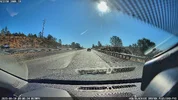
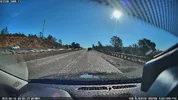
The DR970X Plus recently received a 2.00x firmware update that finally implemented HDR for this dash camera. I updated this dash camera's firmware to v2.005. Driving around my small town, there were many examples of the front camera footage capturing a large number of reflections from the windshield in this vehicle. I would have installed a CPL filter on the front camera, but Pittasold has never sold one for this model. After some feedback on some posts in another thread about the reflections, I finally purchased a third-party CPL filter for the front camera. I located a CPL filter on AliExpress. I received the CPL last week and installed it.
The third-party CPL definitely helps reduce the windshield reflections. The angle of the windshield in this vehicle seems to be result in a lot more reflections of the dash board than I get in my other vehicles.
I found a video from 19-August and from this morning which has my vehicle in the same location at about the same time of the morning. You can see frame grab from today's video definitely has a reduced number of reflections and the colors look a bit better as well. Both video files were created with 2.005 and HDR enabled.