F750..Is it the right answer? who to install and Questions..

Michael J

Member
Joined
Jan 26, 2016
Messages
49
Reaction score
2
Country
United States
I have been beating my head for weeks now trying to pick out the best dual cam solution. I am in Indianapolis Indiana and have a 2015 BMW X5 xDriver 35i MSPORT SUV. (The OEM camera system is pretty extensive with front, rear, and top camera views.. but none none are available while you are at speed.. only when you are parking or at full stop). Had it down to blackvue 650 and Lukas 7950. The form factor on the 7950 was a little large and the 650 came out in 2014 and I would think the technology is just older and it had 720 in the rear instead of 1080.
I want the best night and day video, reliable, 5 hours of record time for trips, parking mode, android and ipad access to controls and watching live streams, especially from rear camera, and more stealth. I tend to be on the cutting edge with technology. I also noticed that this model was not listed on any "Top 5 Best duo cams" anywhere.. is that because its so new maybe?

Is this the right 2 camera system for me?

If I go with the F750:
1) What exact equipment do I need to buy or should I buy? (I will have whoever installs it go directly to the battery). Do I need an extra backup battery pack, do I need the F750 wiring kit? I assume the rear camera sold separately?.. what other options are there? Definitely will use Parking Mode.
2) What are the known issues with installation I should be aware of?
3) What are the "known issues" as of today with the system that have not been solved by the firmware updates?
4) Should I have Best Buy install it? (would they have the most product knowledge..I think?). I also have a really good dash cam installer but he has no experience on this model.
5) Do I have enough room to mount this under between my radar detector and below the panel behind the rear view mirror without interference?
6) Where is the best place to buy it? Who has the best technical support?

Any help is greatly appreciated!
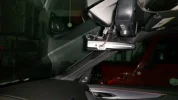
 

Attachments

  • 20160128_200607.webp
    20160128_200607.webp
    49.5 KB · Views: 101
Also, does the F750 do a buffer mode for parking? For example, if someone bumps into the side of the car, will front and rear cameras catch it?
 
Buffer mode and parking mode are two different things, I think it does do both though

Unsure if events can be triggered by either camera, logic says it should, things aren't always logical so best to check with someone that has one
 
1) If you want parking mode then you'll want the hardwire kit. To tap into the two power sources I recommend getting a couple of 'add-a-circuit' piggy-back fuse-holders and low current fuses. You may also want to try micro-USB adaptors/extension leads with right-angled plugs for a neater install, but I only had a partial success with this. My install is written up here.
2a) Routing of cables at the front camera can interfere with GPS reception.
2b) Some windscreens which have metal content can block GPS so the front camera needs to go in the special location to avoid this.
2c) The cable for the rear camera can interfere with DAB reception (not sure if this is used in the US?)
3) None that I know of. However some people have had problems with the SD cards supplied and I have just responded to one guy who appears to have had his unit 'lock-up' after a firmware upgrade.
6) We get good tech support from Thinkware in the UK. Hopefully that's true for the US too.
7) The camera has incident recording for both driving and parking modes. It officially records 10s before and after the incident, but I have found that it varies, as much as 15s before and 5 after. Similarly there is motion detection recording for parking mode, again 10s before and 10s after. The sensitivity of both incident and motion recording can be varied. Mine records if I close the doors too hard.
 
I am tempted to jump on this bandwagon. Don't shoot, I'm not stealing the thread, it is exactly the same interest!
Ordering this F750 shortly, looking for professional help in my region (Boston, MA).

Michael: The fact that ThinkWare F750 didn't get to that top 5 review, in my mind, doesn't have anything to do with technical qualities. It can be indeed the case that this model was too new when the article was written, or not easily available to author (manufacturer did not want to send a free test unit, or no authorized re-seller was established in that region yet), or the worst case - author or publisher wanted to get some terms in return to writing about this model, and someone refused to succumb... we'll never know the truth.
This camera seems got quite warm reception here on forum, people like it. And it got noticed in Russia, scoring pretty decent on blind tests Russians conducted recently (see this link, provided earlier by russ331). The only generally acknowledged drawback for this camera is the price tag. So I decided to buy it already.
And, in case you don't find anyone here to do install for you, here are two ideas I am following through on:
1) BestBuy has people in store who can install this stuff. May be not necessary every store, but if mine has and this is official, then there must be others. It worth to come and talk to blue shirts in car audio/radar/gps section, they shall know.
2) Amazon has similar service. Enter your zip code and you'll get a list of professional auto electronics installers in your area. I am going to send a few requests already.
That been said, I still would prefer to get together with someone local to me from this forum, if there's such an option.
Hopefully someone gets in touch soon.
Cheers!
 
Is there a right way or wrong way to upgrade the firmware?
I went ahead and bought the unit
 
@Michael: I believe there is a universal wisdom about right/wrong way to upgrade: don't do anything stupid, like using cheap card, or disconnect power supply in the process, or mess with buttons, etc.
I haven't bought this one yet, so can't confirm the details, you may find some posts in the forum, or someone chimes in here.
But one important caveat in any case, especially if you are not an I.T. person: DO NOT UPGRADE "just to have the latest and greatest". This is a common B.S. thrown at end users by software industry since beginning of times for many reasons, not all of them technical. Rather often than not, new versions have new bugs rather than useful features. And when they fix some bugs, they make new bugs in the process (not necessary to replace the fallen ones, though sometimes it looks like that). ;-)
I remember seeing a message in this forum (maybe about this exact camera) about after upgrade the video quality deteriorated significantly, and the guy asked to provide the old firmware. Someone else (don't remember where) noticed stability issues after switching to firmware providing higher bitrate.
Don't step on these rakes! Check the update history, what was changed/fixed, and do you really need it. If you do upgrade, check if you can roll back, and if it can affect your warranty.
If there is no details about all upgrades since the version you are on, and if you don't have any major issues, DO NOT UPGRADE.
The best approach would be to start a new thread (unless you find another talking about firmware for this model), telling your current version and ask for advice: is what you have indeed the best known firmware as of *right now*, per others' experience, or it makes sense to upgrade (or maybe downgrade) to some other.
Applies to all upgrades in all cases regardless of hardware/software/industry.
Yes, I am paranoid. "Only the Paranoid Survive" - Andy Grove (Intel).
Good luck.
 
Last edited:
Back
Top