Latest firmware V2.9 Build 20230926

Neuralgia

Member
Joined
Jul 1, 2014
Messages
55
Reaction score
11
Country
Costa Rica
Hey guys. I have two of this little guys. One the wifi has never worked and it constantly crashes.

I bought a new one that came with firmware V2.9 Build 20230926.

This one is even more recent than the one I found here and in the official Viofo support page (FWA129P.bin (31.1MB), Version: V2.9_20221215)

Is there a way to "extract" the firmware from my new camera to apply it to my old/faulty one? I want to have a last shot at reviving it
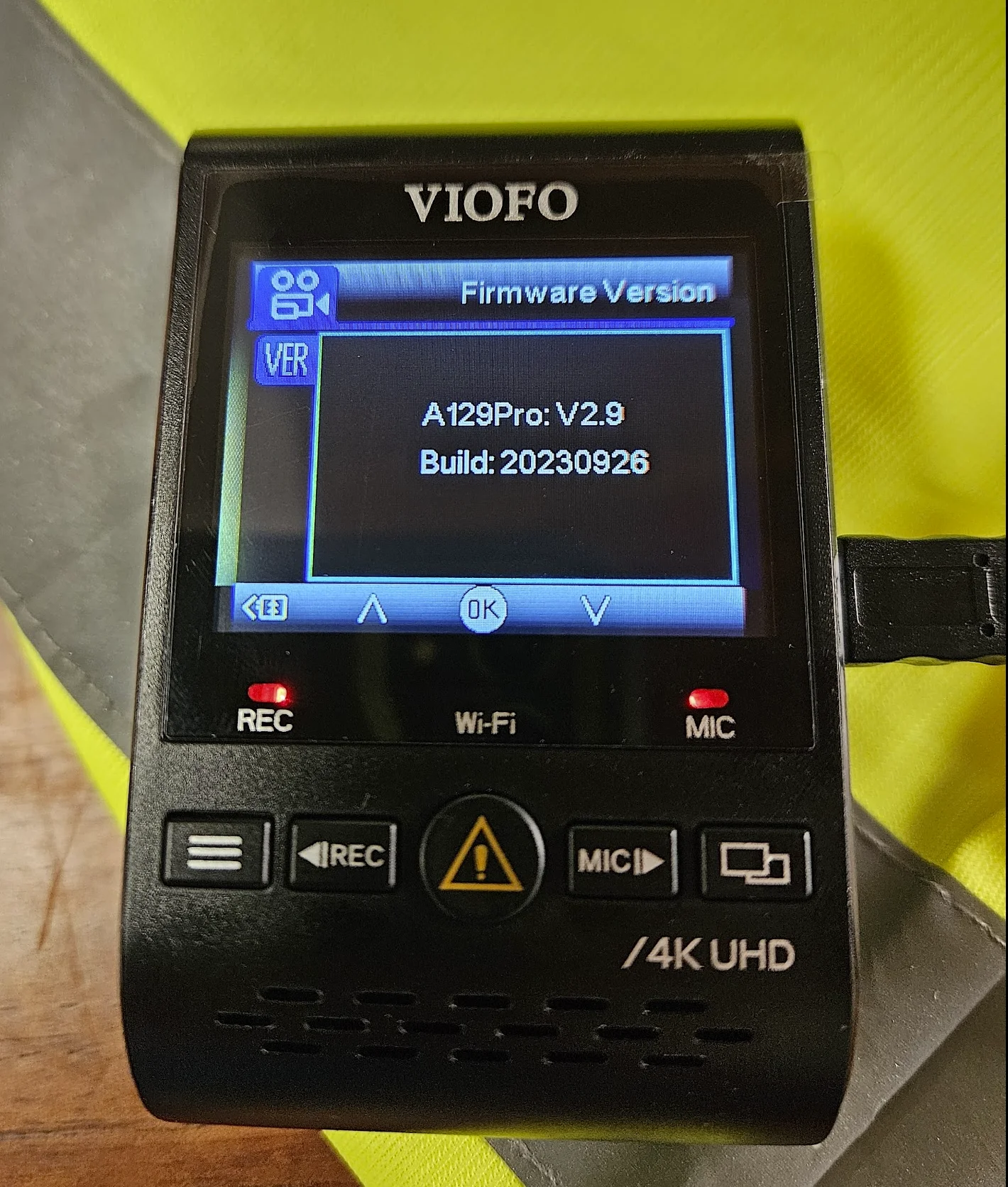
1713285859922.webp
 
Hey guys. I have two of this little guys. One the wifi has never worked and it constantly crashes.

I bought a new one that came with firmware V2.9 Build 20230926.

This one is even more recent than the one I found here and in the official Viofo support page (FWA129P.bin (31.1MB), Version: V2.9_20221215)

Is there a way to "extract" the firmware from my new camera to apply it to my old/faulty one? I want to have a last shot at reviving it

View attachment 71880
My first camera is a129 pro. I have been waiting for the new software for a long time. I do not know the way to get the software from the camera. They'll probably release it soon. @viofo @VIOFO-Support


Could you see any difference between the two cameras at first glance?
 
Both are phisically identical.

But with the new one I can connect via wifi and it's not crashing (yet?).
 
Hey guys. I have two of this little guys. One the wifi has never worked and it constantly crashes.

I bought a new one that came with firmware V2.9 Build 20230926.

This one is even more recent than the one I found here and in the official Viofo support page (FWA129P.bin (31.1MB), Version: V2.9_20221215)

Is there a way to "extract" the firmware from my new camera to apply it to my old/faulty one? I want to have a last shot at reviving it

View attachment 71880
We have updated it on our official website, you can download it to update: https://viofo.com/content/36-viofo-...61.230855714.1713316344-2038996927.1713316344
 
Hi, new from the forum and not sure if this is the right page I need to post my problem. I would like to seek solution for my VIO A129 Pro Dou issues: After 3+ years of perfect working condition, one day I had a "No GPS" error and stopped recording but it's OK when using the USB port without GPS function though. I bought a new GPS mount and upgraded the firmware (into FWA129P.bin) to no avail. It works however when powered up on the USB port but it freezes with the rear camera attached to the main body. At the moment I am using the Dash Cam powered on the USB port without GPS function and no rear camera. Appreciate for any suggestion to resolve the issue.
 
I have a short clip for you to understand more of my problem.
There are two issues: 1. The bad connection between your camera and GPS module so there is no way to transfer power via the GPS port. 2. The rear camera cause the freeze. How do you power the camera? Please use the original car charger that came with the camera to supply power from your cigarette lighter. Please try to update the firmware again.
 
There are two issues: 1. The bad connection between your camera and GPS module so there is no way to transfer power via the GPS port. 2. The rear camera cause the freeze. How do you power the camera? Please use the original car charger that came with the camera to supply power from your cigarette lighter. Please try to update the firmware again.
I bought a new GPS module but it didn't work. I tried both the hardwire and cigarette source of power attaching to the GPS module to no avail - no power at all. I have updated the firmware anew but still the same. Camera is rolling without the rear camera when power source attached to the usb port however it freezes when it (rear cam) is connected. It is still giving me the "No GPS" error the reason why I bought a new GPS module. Currently, I am using the dash cam without the rear camera. Can I revert to the original firmware? The dash cam worked perfectly well prior to upgrading the firmware.
 
Can I revert to the original firmware? The dash cam worked perfectly well prior to upgrading the firmware.

It doesn't work when used with the new GPS either, is that correct? When you use it via USB, there is still no GPS data, is it true?

Do you remember what the previous software version number was?
 
It doesn't work when used with the new GPS either, is that correct? When you use it via USB, there is still no GPS data, is it true?

Do you remember what the previous software version number was?
That is correct, it does not work with the new GPS. The camera is working on the USB but without GPS function and freezes when the rear camera is connected (happened after i downloaded the firmware upgrade FWA129P.bin). Unfortunately, i dont remember the old firmware version. Appreciate if someone could provide me an older version of the firmware to try if i can restore the functionality of the rear camera. Thanks
 
That is correct, it does not work with the new GPS. The camera is working on the USB but without GPS function and freezes when the rear camera is connected (happened after i downloaded the firmware upgrade FWA129P.bin). Unfortunately, i dont remember the old firmware version. Appreciate if someone could provide me an older version of the firmware to try if i can restore the functionality of the rear camera. Thanks
Please update the latest firmware again and then reset the camera in the camera menu to test. The new GPS still cannot transfer power indicates that there is a connection issue between the camera and the GPS module.
 
The new GPS still cannot transfer power indicates that there is a connection issue between the camera and the GPS module.
The fact that two GPS modules have the same behavior tells me that the connection problem is in the camera, not the module. Firmware can not cause a power problem. It is likely you will have to open up the camera to repair some internal wiring.
 
Please update the latest firmware again and then reset the camera in the camera menu to test. The new GPS still cannot transfer power indicates that there is a connection issue between the camera and the GPS module.
I have updated the firmware again and reset camera but did not work. I might just use at it is now; better to have something partly working than nothing at all. thanks for your help.
The fact that two GPS modules have the same behavior tells me that the connection problem is in the camera, not the module. Firmware can not cause a power problem. It is likely you will have to open up the camera to repair some internal wiring.
Oh that's unfortunate if that is the case. Thank you for taking time to reply.
 
It doesn't work when used with the new GPS either, is that correct?
That's correct, it does not work.
When you use it via USB, there is still no GPS data, is it true?
That's correct too.
Do you remember what the previous software version number was?
No i dont remember the previous software version. I never upgraded it since i bought, this is the first time i upgraded.
 
Hi, thank you for the link. I tried the version as far back as August 2020 but did not work. I think it is the connector on the ports/dash cam body that have problems. I will just continue to use it without GPS and rear camera, until i can decide to buy another unit or replace it with a different brand. Thanks again in sharing your thoughts and resources, really appreciate it.
 
Back
Top