Lost footage after pressing save button.

Theunknown87

New Member
Joined
Nov 26, 2019
Messages
12
Reaction score
1
Location
Pennsylvania
Country
United States
So we witnessed a vehicle accident on a highway which was involving a tractor trailer, a pickup truck hauling a boat and a car.

I INSTANTLY pressed the bottom to save the video.

It only saved a short video that starts, then two seconds later hear that I pressed the button.

Cool.

Went back and looked at the footage it was recording.

It was set to record 3 min videos.

Video recorded normally up until 11:11:10. Which is when the 3 min video was done.

The next locked file is 11:11:33 which is after the accident.

So is it just lost permanently then?? Just bad timing that it was at the end of the 3 min loop and starting the new video??

Edit

Just looked at my other videos. Everytime the video loops to a new 3 min clip, the camera doesn’t record for 10 seconds.

What a joke.
 
Last edited:
Just looked at my other videos. Everytime the video loops to a new 3 min clip, the camera doesn’t record for 10 seconds.
What microSD card are you using, and did you format it in the camera?

Can you post a screenshot of the file list so we can see what the dashcam is doing? I'll post an example below, from a different Viofo camera, which show the time stamps are all 1 minute apart.

1778086530044.webp
 
What microSD card are you using, and did you format it in the camera?

Can you post a screenshot of the file list so we can see what the dashcam is doing? I'll post an example below, from a different Viofo camera, which show the time stamps are all 1 minute apart.

View attachment 91373
I’m using the official card from them. And it was formatted as soon as I installed it a few weeks ago. I bought both the camera and card from their website directly.

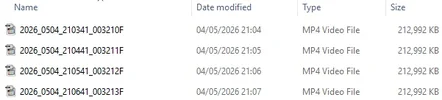
And I’m still in the car so I can’t post a picture like that. But I can post a picture of the video list.

The time is off because of driving over a time change.

The locked video started “12:11:12”. Which like a second after the video starts you hear me press the button because the chirp is audible.

The video right before that that’s shown ends at “12:11:03”. So those 10 seconds are just non existing. If I look at past videos, there is always a 10 second lapse.


1778086966967.webp


1778086854186.webp
 
Video recorded normally up until 11:11:10. Which is when the 3 min video was done.

The next locked file is 11:11:33 which is after the accident.
You refer to these as locked videos. I assume they are in the RO folder?

Are there any short 10s videos in the Movie folder that fill the gaps between the locked videos?
 
I hope this gets resolved. Everything can happen within 10 seconds.
 
You refer to these as locked videos. I assume they are in the RO folder?

Are there any short 10s videos in the Movie folder that fill the gaps between the locked videos?
Yeah, this is actually the first and only saved video I have by pressing the button. So there are no others in the locked / ro folder
I hope this gets resolved. Everything can happen within 10 seconds.
Yeah that’s what I was telling my wife while we were driving then. Like how TF are you to know if it’s in that weird loop where nothing happens in that 10 seconds??
Is it a Viofo branded card? These types of issues are almost always card related.
Yes and it’s only maybe 2 maybe 3 months old now. If that.

This also happens with a sandisk max endurance too that’s listed as one of their recommended cards too.
 
Is the firmware up to date? Update if not. After updating, go into the cameras settings and manually default the cameras settings (there is an option for this). After it reboots, press and hold the hard reset button on the side of the camera for about 5 seconds. If your already on the latest firmware, I would still manually default the cameras settings and test again.
 
I’m using the official card from them. And it was formatted as soon as I installed it a few weeks ago. I bought both the camera and card from their website directly.

And I’m still in the car so I can’t post a picture like that. But I can post a picture of the video list.

The time is off because of driving over a time change.

The locked video started “12:11:12”. Which like a second after the video starts you hear me press the button because the chirp is audible.

The video right before that that’s shown ends at “12:11:03”. So those 10 seconds are just non existing. If I look at past videos, there is always a 10 second lapse.
.
.
.

By "time change," are you referring to a Time Zone? If so, have you looked further down the file list for that time zone time stamp? I suppose it is possible that you pressed the video lock at the same time the system was rotating to a new file. Maybe that is the cause of the lost file?

I would look at every folder very carefully for any files that may fit the time stamp you are looking for, and not so much the file name.
 
By "time change," are you referring to a Time Zone? If so, have you looked further down the file list for that time zone time stamp? I suppose it is possible that you pressed the video lock at the same time the system was rotating to a new file. Maybe that is the cause of the lost file?

I would look at every folder very carefully for any files that may fit the time stamp you are looking for, and not so much the file name.
Yeah shortly before the event, we drove through the mountain time zone to central.

The times are weird but the video from an hour before the event and around it were of us driving. That was my thought too. But no luck.
 
shortly before the event, we drove through the mountain time zone to central.
Did you change the dashcam time manually? It does not change by itself when you drive from one time zone to another.
 
Did you change the dashcam time manually? It does not change by itself when you drive from one time zone to another.

Would GPS not update the time stamp? Having never driven across a time zone with mine, I never gave this much thought.
 
Would GPS not update the time stamp? Having never driven across a time zone with mine, I never gave this much thought.
The dashcam does not use its location to set the time. The user manually adjusts for time zone offset +/- from GMT, and also for daylight savings.
 
The dashcam does not use its location to set the time. The user manually adjusts for time zone offset +/- from GMT, and also for daylight savings.

I see. Firmware settings will not be honored then when crossing time zones. I wonder if that is something manufacturers should improve on? Probably not an issue for most users, but long-haul truck drivers might find
it beneficial to have the time stamp adjusted based on GPS location.
 
Back
Top