New Dashcam analysis tool with synchronized multi-channel playback

bbplay

New Member
App Developer
Joined
Mar 8, 2026
Messages
9
Reaction score
8
Location
Busan
Country
Korea, Republic Of
Dash Cam
INAVI QUANTUM
Hi everyone,

I’ve been working on a dashcam analysis tool and recently released it. The goal was to make reviewing multi-channel dashcam footage easier, especially when trying to compare multiple camera views at the same moment.

The viewer can display multiple channels (front / rear / interior / pedal, etc.) on a synchronized timeline so you can review the same time point across all cameras. It also shows GPS map data and sensor graphs aligned with the video timeline.

Main features include:

  • Multi-channel synchronized playback
  • Frame-by-frame analysis
  • GPS map and sensor graph display
  • Timeline-based navigation for easier incident review
If anyone is interested in trying it or giving feedback, I’d really appreciate it.

https://bbplay.app
 
It does look nice, but I primarily use a Mac Studio and then Linux Debian.
 
Thanks for the feedback!

Right now bbplay is Windows-only, but I know many dashcam users use macOS and Linux as well.
If there’s enough interest, I may consider cross-platform support in the future.
 
Hi again everyone,

I recorded a few short clips to show how bbplay™ works in practice.

1. 4-ch Synchronized Playback (without Defish filter)
View on Imgur

2. 4-ch Synchronized Playback (with Defish filter)
View on Imgur

3. 2-ch Synchronized Playback with GPS and G-Sensor charts
View on Imgur

Hope this helps.
 
Subject: [UPDATE] bbplay v1.26.3.18 - High-DPI Support, Drag & Drop, and Enhanced Brand Integration

Hi everyone,
We’ve just released a major update for bbplay (v1.26.3.18), focused on making your dashcam footage review experience smoother and more visually intuitive.
After some intensive "under the hood" work, we've addressed several key requests from the community. Here’s what’s new:

🚀 Key Improvements in v1.26.3.18

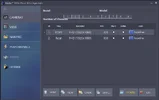
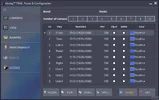
  • Flawless High-DPI Scaling: We’ve optimized the UI for 4K and high-resolution displays. Whether you're at 125%, 150%, or 175% scaling, the layout stays sharp and perfectly aligned. For visual confirmation, I have included Before & After screenshots at 125% DPI scale, showcasing the layout fixes in v1.26.3.18.
  • Intuitive Drag & Drop: No more tedious file browsing. Just drag your video files or folders directly into the file list to start playback instantly.
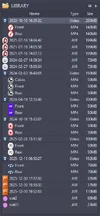
  • Enhanced Brand Recognition: We’ve added visual brand logos to the file list. It’s now much faster to identify clips from BlackVue, Viofo, Garmin, Nextbase, 70mai, and more.
  • Persistent Metadata: The player now remembers your selected brand and model settings, so you don't have to re-configure them every time you launch.
  • Refined Video Search: We’ve improved the search logic to help you navigate through large archives more accurately.

🔒 Security & Compatibility

The installer is now digitally signed with a Sectigo EV Certificate (Soondori Co.,Ltd.). Plus, we’ve optimized the software to run perfectly under standard user permissions (no admin rights required), which was essential for the new Drag & Drop feature to work seamlessly with Windows Explorer.

We’re always looking for ways to improve, so please feel free to share your feedback or any specific dashcam models you'd like to see better supported!

Happy driving and safe playback!
 

Attachments

  • Snap217.webp
    Snap217.webp
    24.3 KB · Views: 29
  • Snap221.webp
    Snap221.webp
    66.2 KB · Views: 29
  • Snap236.webp
    Snap236.webp
    35.8 KB · Views: 32
Greetings, DashCamTalk community.

I would like to express my deepest gratitude for the continued support, insights, and invaluable feedback you have shared in this thread. It is your passion for dashcam technology that fuels our innovation.

Today, it is with great pleasure that I introduce our latest updates—v1.26.03.28 and v1.26.03.23—designed to elevate your bbplay experience to a whole new level of sophistication and performance.

Our primary focus for these releases has been deepening our telemetry analysis capabilities while making the user experience as fluid and effortless as possible.

Here are the key highlights you can expect when you launch the new version:

🌟 Expanded Telemetry Mastery
We have significantly upgraded our multi-brand engine. You can now experience comprehensive GPS and ACC (G-sensor) data analysis for a wide array of esteemed brands, including BlackVue, Viofo, Vantrue, Thinkware, Dabonda, FineVu, and Ligo (JSON).

🌟 Intelligent Sensor Calibration
To ensure your motion and impact data is interpreted with absolute precision, we’ve introduced automatic Z-axis recognition alongside a default (+1G) calibration system. We've also reinforced the search signatures used by our analysis engine for unmatched accuracy.

🌟 A Seamless & Intuitive Ecosystem
Navigating your files is now smoother than ever. We've replaced complex directory paths with an elegant virtual folder routing system (e.g., 'This PC'). Furthermore, bbplay now features instant detection of external storage (SD cards, USBs) and real-time tracking of any file system changes.

🌟 Uncompromising Performance
Under the hood, we have drastically improved the loading speeds for grouped single-track files and optimized overall rendering performance. Plus, with our new seamless background auto-update system, you will always have the most refined version of bbplay ready at your fingertips without any extra effort.

A Humble Request to Our Community
While our engine has been meticulously trained to recognize a vast array of dashcam signatures, the landscape of video formats is beautifully diverse and ever-evolving. Should you encounter any specific footage where the telemetry (GPS, ACC) remains hidden, or if the files resist our new grouping logic, I would kindly ask for your assistance. Sharing the exact dashcam model name along with a brief, unedited raw video sample would be immensely helpful. Your collaborative contributions are the very cornerstone that allows our engine to learn, adapt, and ultimately serve you better.

The pursuit of the ultimate dashcam player is a continuous journey, and we are thrilled to take this next big step with you. If you already have bbplay installed, it will seamlessly update to the latest version.

As always, I eagerly await your thoughts and look forward to hearing how these new features enhance your workflow.

Warm regards,

Jinyoung
bbplay
 
If you find someone to port to MacOS, let us know. I would be willing to give BBplay a test spin. 🙂
 
If you find someone to port to MacOS, let us know. I would be willing to give BBplay a test spin.
I really appreciate your offer to test bbplay™ on macOS! Right now, my complete focus is on polishing and finalizing the Windows release. Since a Mac version would require a significant rewrite of the core framework, it isn't on the immediate roadmap. However, I'd love to explore it down the line. I'll be sure to update the forum if we ever start working on a macOS port.😊
 
Greetings, DashCamTalk community.

I am pleased to announce that a new update for bbplay™, version v1.26.408, is now live.

In this release, our primary focus was on optimizing the spatial experience and expanding our ecosystem to welcome even more users into the bbplay family. We have listened to your feedback regarding map responsiveness and hardware compatibility, and we are proud to deliver the following enhancements:

🌟 Lightning-Fast Map Performance
We have implemented a sophisticated data caching system for the map module. By optimizing the logic to pinpoint the exact starting location upon launch, we have drastically reduced map loading times and improved overall application fluidity. Your journey is now visualized more smoothly than ever before.

🌟 Expanding the Grouping Engine
Our multi-brand grouping engine continues to evolve. We have updated our naming recognition logic to seamlessly group and organize files from MIOFIVE, REDTIGER, and WOLFBOX dashcams alongside our existing supported brands.

(A quick note to users of these brands: Currently, this support applies to file grouping and playback. To unlock full GPS and ACC data analysis for these specific models, we need your help! If you could provide a short, unedited raw video sample, it would allow us to train our engine to extract their hidden telemetry in a future update.)

🌟 Refined Versioning & Stability
To provide better clarity in our development roadmap, we have streamlined our version numbering format from four parts to three (e.g., v1.26.4.8 is now v1.26.408). We have also resolved an underlying issue with license key activation to ensure a flawless experience from the moment you start.

🚀 Coming Soon: Enhanced Control
We are currently working on a per-channel context menu system, which will give you even more granular control over each video stream during your analysis. Stay tuned for this exciting feature in our upcoming releases.

As always, if you have bbplay™ installed, the update will be applied seamlessly via our background auto-updater.

Your continued insights and support are what make this journey so rewarding. I look forward to hearing how these performance gains enhance your workflow.

Warm regards,

Jinyoung
bbplay™
 
@bbplay

Hey Jinyoung.

I've been testing bbplay with video clips of 1 minute in length from a BlackVue DR770x Box. The app looks great and quite useful, but... every time there is a transition to another segment it takes quite some time to load the next clips and the Track Map resets itself and zooms out. Is there any way to avoid this behavior?

Thanks.
 
Last edited:
@bbplay

Hey Jinyoung.

I've been testing bbplay with video clips of 1 minute in length from a BlackVue DR770x Box. The app looks great and quite useful, but... every time there is a transition to another segment it takes quite some time to load the next clips and the Track Map resets itself and zooms out. Is there any way to avoid this behavior?

Thanks.
Hi Quidagis!

First of all, I must say you have an incredible setup! Viofo Mini 2, A229 Plus 3CH, and the DR770x Box... that’s a top-tier collection for any dashcam enthusiast. It’s exactly why I developed bbplay™—to provide a professional-grade experience for high-end users like you.

bbplay™ has matured to the next level thanks to your insightful observations on parts I had overlooked. To show my gratitude, I would like to gift you a bbplay™ Pro license. Please send me your email address via private message, and I will send the key to you right away.

Regarding the issues you mentioned:

  • 1. Hardware vs. High-Spec Footage: The DR770x Box is a high-spec 3-channel system (FHD + 60fps). For instance, in my tests with BlackVue Elite 10 raw footage, a 1-minute segment is about 405MB (Front) and 207MB (Rear). Processing these three streams simultaneously—while also loading real-time map tiles—demands massive system resources. If you are using a laptop or a device without a dedicated GPU, it can be challenging for any player.
  • 2. Performance Commitment: I take great pride in bbplay’s loading speed—it is already significantly faster than most other viewers on the market. However, I am committed to pushing the performance to the physical limit.
  • 3. Hotfix (Special Build): I’ve prepared a special hotfix for you. I’ve added a "Zoom Lock" button next to the Direction Icon. When enabled, it prevents the map from auto-zooming during transitions. I’ve also optimized the clip loading logic.
  • 4. Zoom Persistence: I’ve updated the app to remember your last zoom level in the registry, so you don't have to reset it every time you restart.
You can download the hotfix here: 👉 [https://drive.google.com/file/d/1BOeVf9KoPdLf86a1LuGaak5OOB12GmAW/view?usp=sharing](Simply overwrite the existing files in your installation folder with these signed binaries.)

Thank you for helping me make bbplay™ better! Please keep an eye on the upcoming official v1.26.418 update.

Best regards,
Jinyoung (Soondori Co.,Ltd.)
 
Last edited:
[Update] bbplay v1.26.418: BMW ACE 3.0 Support & New Context Menus

Hello everyone,

I've just released a new update for bbplay (v1.26.418).

For this update, I focused heavily on integrating comprehensive support for BMW ACE 3.0 dashcams, ensuring accurate playback grouping and robust telemetry data analysis. I've also added a few UI enhancements, including a new per-channel context menu to give you more layout flexibility on the fly.

Here are the full release notes for this version:

Features
  • Added full support for BMW ACE dashcam files, including intelligent playback file grouping, GPS telemetry parsing, and ACC (G-Sensor) data analysis.
  • Introduced a per-channel context menu, allowing users to customize Border Color, toggle Full Screen mode, and adjust image Stretch modes (Fill, Uniform, Uniform To Fill) on the fly.
Enhancements
  • Added a toggle button to the Map View to easily enable or disable the Auto Zoom functionality (Enabled by default).
  • Sneak Peek: The foundation for advanced channel controls has been laid. Video Filters, Presets, Window Layouts, and Snapshot tools will be unlocked in an upcoming update.
Bugs Fixed
  • Resolved an issue where BMW ACE files were incorrectly identified and parsed as BlackVue files.

You can grab the latest update directly from the Microsoft Store or Softpedia.As always, let me know if you run into any issues or have feature suggestions. Your feedback is always appreciated!
 
Back
Top