Preparing my "Best Dashcams" video

The problem with engineering is they are limited to what they have learned. A lot of stuff said in this post shows what I call “Limiting Beliefs.”
You are limiting what can be done because of rules or guidelines you have set.
For example: viofo told us low power impact detection ( 1.5 year ago) was not possible with Viofo dash cameras. They said Vueroid could only do it because no supercap.
I then said guess what Thinkware does it with a supercap.
Over a year later and Viofo has low power impact detection.
This industry when I talk to manufacturers it amazes me how much they limit their beliefs to what they can accomplish.
So I like to push them to make changes.
A lot of the stuff said in the posts above are due to limiting the beliefs of what engineering has accomplished. Not what they could possibly do.
Ah, I can design a supersonic aircraft or a spaceship, but.......
The engineering vision often conflicts with the vision of management and the available resources.
In order to push the boundaries of what is possible, a good combination of engineering skills, open minded management, and available resources is necessary.
 
Ah, I can design a supersonic aircraft or a spaceship, but.......
The engineering vision often conflicts with the vision of management and the available resources.
In order to push the boundaries of what is possible, a good combination of engineering skills, open minded management, and available resources is necessary.
I have talked to certain companies who I was told it is not possible on existing chipset and now some of these companies are figuring it out without changes of any chips. I am not trying to say that Engineering should be reckless and build the Homer Simpson car. Just mainly saying that we need to get rid of our limiting beliefs and start finding new ways to do stuff. FOr example: I keep pushing dash camera companies to reduce current draw on motion detection, time lapse, and low bitrate parking modes. The current draw is way too high and an impact to car battery.

Now maybe they all need to push chip manufacturer to fix it. Or maybe they need to rethink how they build the dash camera so it is more energy efficient.

Coming from car audio industry

-We use to use Class AB amplifiers and Class AB was if I remember correct is approx 50 - 60% energy effiency

So years later Class D car audio amplifiers were designed with 80-90% energy effiency and they were smaller in size.

Was there a trade off? Yes there was.

We got video quality looking good with STARVIS 2 lets redesign current draw to be more energy efficient with the automobile.
Lets get these dash camera withstanding higher heat.

But heres the secret if your drawing less current most likely the dash camera will run hotter. Fix 1 and you will probably fix both.

I am not an engineer but i do feel we have to change our way of thinking to further grow.
 
At first i was big on buffered parking guard ( not using parking guard at the time ) then i adopted low bitrate, which i still stick with as i do not feel a need for longer duration parking guard.
These days i am infatuated with the fast booting deep sleeping cameras, but i think that might be as a result of me now also testing / using 4G, CUZ the cameras i currently have S1pm and T800 they do finish off my 70mai power source pretty fast, which is a problem as i don't drive much, like today i have not been outside the door.

I like to say i am open to changes, but it is not 100 % true and absolutely not if the change is forced upon me for a reason i do not see or accept, then i get infuriated.
Otherwise you just have to dangle a bait in front of me and i will often attack it and the hook - line and sinker too.
 
So this video is a bit of an oddball because it includes several dashcams that I haven't had a chance to fully put through their paces, especially because some are so newly released, so I'm doing my due diligence and actively running through things.

I've got an Elite 9 installed now, and I definitely notice a video quality bump compared to the DR970X Plus which is great. That said, while most of the cloud stuff works, livestreaming over WiFi doesn't. I'm currently troubleshooting this with Blackvue.

With the U3000 Pro, I'd forgotten how sluggish connecting to the dashcam via the Thinkware app is. I also wish that auto HDR could be configured manually because it's getting dark here around 4-5pm and that's too early for auto HDR to kick in.

With the N4 Pro S, looks like it still has some frame skipping even with current firmware. IIRC that was addressed with a previous firmware on the E1 Pro, so hopefully they can take care of it here with this model too. That said, chatting with Vantrue, sounds like it may be a hardware limitation with multicam setups and so it's not very straightforward to resolve. Have people seen similar issues with other multi-channel Vantrues? Its parking mode, especially the collision detection, is weaker than the competition, but I'm thinking the two biggest advantages for that one are having the front/interior cam integrated for a simpler design and install, as well as the fact that it's the only 3CH option in my list that can do LTE. Blackvue and Thinkware a limited to just 2CH with their latest cloud setups. So with this one, I think it's going to be similar to the U3000 Pro in a way where it wouldn't be one of the default picks, but it could make sense in specific use cases.
 
Last edited:
No sweat buddy, just do what you can, anyone be a fool to judge anything on a single video, and i trust they all do the #1 thing which is record as they should.
The rest is just polish especially with brand new stuff.
 
I am not good at youtube reviews and I like very much how you are doing most of yours. For me the best was the A119 V3 review. Maybe many after that review were even better but you know that when you set a standard people are expecting for higher standards.

I will try now to make a suggestion to split your review in two main parts>
1. footage quality
2. amazing features. Here you should include also the new features from firmwares you have installed because they will will be implemented for sure.

Because the video is complex, you can make some list about each 1 and 2 and note somewhere when you are analyzing the cameras.
1. for video it is more work because you will need to watch more footage
2. for features you just need to scroll on the camera menu and note what it is interesting because you already have a big experience regarding the dashcams functions.

And finally you can have some top which is saying something about 1 but also 2. I think that right now you can not declare a clear winner. Maybe you can say Top 3 is this> X. Y. Z... Top 3-6 is this... Top 6-10 is this...

I am saying this because right now the video quality differences are not so big, maybe the Viofo will be the best because they are using high bitrate and if the video quality is the same then the features will make the buyer .
I consider it is very important to speak about HDR at 1. For HDR is not easy to declare a winner because if the license plate is more visible on dashcam X, the surrounding is darker. So maybe some people will prefer a balance with brighter areas on the sides and still good legibility for license plates. Regarding the legibility of license plate for sure here is a winner and this is the Viofo with telephoto cameras. Nobody with a normal lens can beat the Viofo legibility of license numbers. Here is not a top, is just one model.
When I am buying a dashcam right now the most important feature for me is the HDR. No HDR no buy and you should advice your fans the same. Also in your top you should not include a dashcam without HDR.

For example you can have for dashcam X the best video quality but its wake up from sleep to recording is 15 seconds. Then the user will buy the second placed camera if he wants 2 seconds wake up.

Oh, and if somebody will ask me about the poorest review from Vortex Radar was the one with hitting the dashcams from the side. But I dont watched all reviews from Vortex Radar and maybe there is some ones even better or not.
 
Last edited:
I have talked to certain companies who I was told it is not possible on existing chipset and now some of these companies are figuring it out without changes of any chips. I am not trying to say that Engineering should be reckless and build the Homer Simpson car. Just mainly saying that we need to get rid of our limiting beliefs and start finding new ways to do stuff. FOr example: I keep pushing dash camera companies to reduce current draw on motion detection, time lapse, and low bitrate parking modes. The current draw is way too high and an impact to car battery.

Now maybe they all need to push chip manufacturer to fix it. Or maybe they need to rethink how they build the dash camera so it is more energy efficient.

Coming from car audio industry

-We use to use Class AB amplifiers and Class AB was if I remember correct is approx 50 - 60% energy effiency

So years later Class D car audio amplifiers were designed with 80-90% energy effiency and they were smaller in size.

Was there a trade off? Yes there was.

We got video quality looking good with STARVIS 2 lets redesign current draw to be more energy efficient with the automobile.
Lets get these dash camera withstanding higher heat.

But heres the secret if your drawing less current most likely the dash camera will run hotter. Fix 1 and you will probably fix both.

I am not an engineer but i do feel we have to change our way of thinking to further grow.
I am with you on this,
All I am saying is that sometimes engineers can be quite stubborn, limiting themselves by relying on years of experience, and industry accepted solutions, but more often than not, the limitations come from management.
(Here I am defending my fellow engineers 🙂).
 
Last edited:
No sweat buddy, just do what you can, anyone be a fool to judge anything on a single video, and i trust they all do the #1 thing which is record as they should.
The rest is just polish especially with brand new stuff.
That's true. Most everything has some bugs at launch. The same is true for phones and operating systems. There has to be a line with how much is good enough. It can also be a bit tricky because sometimes when I review things at launch, I'll get comments for years to come on whether or not those issues have since been corrected, lol.
I am not good at youtube reviews and I like very much how you are doing most of yours. For me the best was the A119 V3 review. Maybe many after that review were even better but you know that when you set a standard people are
Ah thanks. What was it about that video that really stood out in your mind?
I will try now to make a suggestion to split your review in two main parts>
1. footage quality
2. amazing features. Here you should include also the new features from firmwares you have installed because they will will be implemented for sure.
Yeah I do think it makes sense to cover the simple and basic models as well as step it up to dashcams with more advanced options. Some people want all the bells and whistles while others want something simple and inexpensive. I do plan on addressing some of the features in the A329S beta fw.
I consider it is very important to speak about HDR at 1. For HDR is not easy to declare a winner because if the license plate is more visible on dashcam X, the surrounding is darker. So maybe some people will prefer a balance with brighter areas on the sides and still good legibility for license plates. Regarding the legibility of license plate for sure here is a winner and this is the Viofo with telephoto cameras. Nobody with a normal lens can beat the Viofo legibility of license numbers. Here is not a top, is just one model.
When I am buying a dashcam right now the most important feature for me is the HDR. No HDR no buy and you should advice your fans the same. Also in your top you should not include a dashcam without HDR.

For example you can have for dashcam X the best video quality but its wake up from sleep to recording is 15 seconds. Then the user will buy the second placed camera if he wants 2 seconds wake up.
Yeah, having separate videos covering the best for video quality, the best for parking mode, the best with cloud, etc. sounds like a good idea too.
Oh, and if somebody will ask me about the poorest review from Vortex Radar was the one with hitting the dashcams from the side. But I dont watched all reviews from Vortex Radar and maybe there is some ones even better or not.
I wasn't super thrilled with that video either, lol. I think it was an important topic to address and not just sweep under the rug, but that video turned out to be crazy long at around 45 min. Do you think the issue was with the presentation, the testing methodology, or something else?
 
Ah thanks. What was it about that video that really stood out in your mind?
I cant explain now exactly. It was something like watching a great movie and at the end I was saying „Wow!” Maybe because you pointed also my ideas, feelings and expectations about the V3? Maybe because you said there almost everything I wanted to say about the V3?

Do you think the issue was with the presentation, the testing methodology, or something else?
I don't like it because it didn't showed something what is happening in real life. I don't want to open a discussion about it with many details, but right now from memory:
- a side impact on a car is not like a side impact with a hammer on a camera support like a windshield. There is a lot of shock dissipation thru the car body.
- why is needed a video recording after a footage which was so shocking that removed the camera from the support? Do people think that can be a hit and run after such a powerful impact?
- if camera is still on the windshield there are big chances the power to be cut because of such a powerful accident.
- at such powerful impact on a side there are small chances the windshield to remain intact or even in its place. So what to see thru a broken windshield or what to see on a dashcam mounted on a windshield which is 5 meters distance from the car?
OK, I understand that can be some imaginary risks with side accidents which can affect the Viofo dashcams mounting but if they want to quickly go out from such a problem they will make a mount like on A119 with up-down mounting.
Just imagine how to make the hammer test against A119 mounting system. Hitting the windshield from the top? What to prove? If an airplane will hit a car there are some possibilities the A119 to go out from the mount but the A229 will not?
The first guy who created the side hammer impact is not so experienced as you regarding dashcams, he just wanted to have some viewers on youtube.
 
operating systems
Started using windows 11 a few days ago, i am not sure if it is a result of my GFX card dying in the switch between the 2 machines, or windows 11 itself, but i am a bit on the edge ATM

Now win 11 not new in any sense, but so much in it just feel off, spent the first day or so learning about what things to disable and remove.
 
Looks like my Elite 9's livestreaming is working now. Hooray! I'm also noticing they've readded granular control over audio notifications like we had years ago on older models, though there's no specific toggle for just "impact detected in parking mode" while keeping the rest of the startup silent. It's also super convenient being able to remotely update the firmware while the car sits in the garage.
 
Now back to my amazing features which any of the dashcam in a good review should have some to obtain some more and strong points to make people decide what to buy. Again, in 2025 is not enough to say: ”look this dashcam is recording better. Can you see that beautiful pixel?” I consider is not enough to make a top just analyzing the videos and the elementary Start - Stop recording. Like smartphones compared to phones, today dashcams have more features over their main function of loop recording. And in many cases these features are making the user to buy some model.

Vortex Radar have now a lot of experience regarding dashcams and he can easy find the correct and notable functions which can really draw attention to his watchers.

For example:
- do you want to lowest power consumption in Parking Mode? Go for X and Y and Z
- do you want the shortest wake up in Parking Mode? Go for X and Y and Z
- do you want Cloud? Go for X and Y and Z
- do you want the most hidden installation? Go for X and Y and Z
- do you want the safest and biggest storage? Go for V.
- etc

Another user wrote here about a Warning of Geofencing. I think it was already on their blog:
Viofo Geofencing.webp
Warning:
Geo-Fencing may not work in areas with limited or No satellite signal (such as heavily covered or underground parking garages).
===============

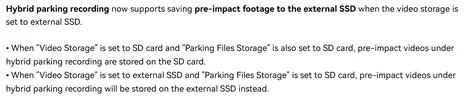
Because I wrote here things about amazing features, SSD, where to hide the SSD and why is better to record videos on SSD, here is the screenshot with the new function of Backup impact videos to SSD
Viofo SSD backup.webp

===============

Before this firmware for me it was a problem that I cannot save the parking videos on SSD so my dashcam remained exposed to heat or thieves to steal the dashcam and the SSD. Now, with V2.0 firmware, this feature was added.
Viofo SSD parking.webp
Many thanks to me because I insisted (maybe too much) constantly for more than one year, this feature to be implemented even I was told that is almost impossible. I always had the feeling that it will be possible. Viofo did it, many thanks to them. This implementation can also help Viofo for dashcam installations in hot areas, personally I strongly recommend in hot areas to install a dashcam with SSD. If there is some advice on Viofo websites to put the SSD in the glove box my advice is to remove this advice.
 
.......
Another user wrote here about a Warning of Geofencing. I think it was already on their blog:
View attachment 88513
Warning:
Geo-Fencing may not work in areas with limited or No satellite signal (such as heavily covered or underground parking garages).
===============
That couldn't possibly have been on their blog before my post.
It's literally copy-paste word for word, including the capital "No," from my post from Thursday.
I'm glad that @viofo took my suggestion into account and added it to their blog. 👍

Hopefully, they will include this in the user manual/product description in the future, but they should choose a better wording in English.
I think the phrase "heavily covered" is not very good expression.
I couldn't come up with a better option and Google-translated it from my native language.
(English is my second language).
 
By the way, regarding geofencing, @viofo:
Your blog states: "If the GPS signal is weak (within 50 m), the dashcam automatically switches to parking mode."
This is very bad if the camera behaves this way.
On the contrary, it should state: "If the GPS signal is lost (within 50 m), the dashcam turns off instead of switching to parking mode".
And the camera’s firmware should be corrected accordingly.
This allows the user to set a geofence near his/her underground garage (where they don't need parking), say within 50 m, and when car enters garage with no GPS signal, the camera turns off.

Here's the logic:
- It's practically impossible to lose the GPS signal within 50 m in an open area where the geofence was initially set.
- The only way to lose the GPS signal within 50 m of the geofence zone is if the car enters say its underground garage, where the user doesn't need parking, but cannot set a geofence due to the lack of a GPS signal.
Therefore, the user will have the option to set a geofence near the underground garage, say, within 50 m, and when they enter the garage, where there is no GPS signal, the dashcam will turn off.

In all other covered or underground parking lots, such as those in shopping malls, airports, or hotels, where there is no GPS signal and which are far from the geofences, the camera switches to parking mode regardless of the GPS signal, based on the ACC signal.

@viofo, here's the best way to implement this:
 
Your blog states: "If the GPS signal is weak (within 50 m), the dashcam automatically switches to parking mode."
This is very bad if the camera behaves this way.
This is normal behavior of all Viofo dashcams because no matter if gofencing feature is on a firmware or not, if a Viofo dashcam is turned on and the Speed is under 8km/h or the GPS signal is lost, it enters in parking mode
 
Last edited:
To clarify, does GPS loss override the hardwire cable’s ACC wire getting power from the ignition being on? If so, that’s an obvious issue to correct.
 
To clarify, does GPS loss override the hardwire cable’s ACC wire getting power from the ignition being on? If so, that’s an obvious issue to correct.
That question has been nagging me reading all these posts - glad you asked it!
 
This is normal behavior of all Viofo dashcams because no matter if gofencing feature is on a firmware or not, if a Viofo dashcam is turned on and the Speed is under 8km/h or the GPS signal is lost, it enters in parking mode no matter it there is an hardwire kit installed or not.
This was good enough when there was no geofencing, and this feature was primarily intended for those who did not use the ACC signal for parking (relying on automatic activation of parking mode after 5 minutes of inactivity).

With introduction of geofencing, the algorithm needs to be updated:
-Outside of geofence zone camera behaves as all the Viofo cameras before, no change.
-Inside the geofence zone, camera should turn Off, when turning ignition Off.

Now, to help with underground garages:
-If the camera was inside of the geofencing zone (the last known GPS position), before losing the GPS signal, it should turn Off when the ignition is switched Off.
-Otherwise, it should switch to parking recording mode.

Here's a simple "Yes/No" logic:
Was the camera within the geofencing zone (the last known GPS position), before losing the GPS signal?
Yes – turn off the camera when the ignition is switched Off.
No – switch to parking recording mode when the ignition is switched Off.
 
To clarify, does GPS loss override the hardwire cable’s ACC wire getting power from the ignition being on? If so, that’s an obvious issue to correct.
No.
No matter if you enabled or not Parking mode in the camera settings.

There was a mistake about the hardwire kit in my previous post.

Here's a simple "Yes/No" logic:
Was the camera within the geofencing zone (the last known GPS position), before losing the GPS signal?
Yes – turn off the camera when the ignition is switched Off.
No – switch to parking recording mode when the ignition is switched Off.
In theory you are right but I don't know if this is possible in real conditions.
 
To clarify, does GPS loss override the hardwire cable’s ACC wire getting power from the ignition being on? If so, that’s an obvious issue to correct.
That question has been nagging me reading all these posts - glad you asked it!
It shouldn't, that would be bad.
And it is easy to check.
Simply disable GPS in the settings (simulating a loss of GPS signal) and see if the camera enters and exits parking mode when the ignition is turned Off and On, respectively.

To be clear, when we talk about geofencing turning Off the camera or switching it to parking mode, we mean that this happens when the ignition (ACC) is turned Off.
 
Back
Top