Recording date change on saved file. Hard to explain!

ajw1100

Active Member
Joined
Mar 9, 2016
Messages
148
Reaction score
48
Location
Rolling countryside of Hertfordshire
Country
United Kingdom
Dash Cam
Now Viofo 119S. Was Mobius Action Cam
I've had a few problems with the recordings on my 119S. Noticed or rather heard some Beep-Beep noises and odd Beeps. I have tried reformatting the card (200gb) and got more beep-beeps yesterday. so unplugged the unit.
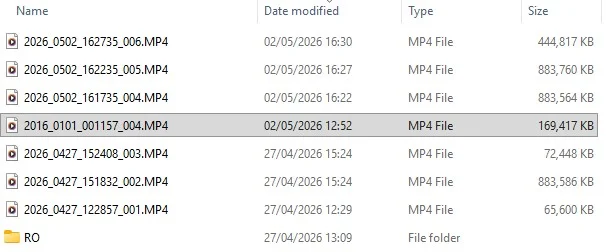
Today I connected the camera directly to my PC not just the card via an adaptor and looked at eh recordings all seemed to have recorded. Then I noticed one recording was incorrectly dated on the file whereas the date on the modified column was correct. As you will notice on the highlighted row the recording date is 2016.01.01 (Default?) whereas the recording above and below are all 2026.
Any idea why or is there a fix for this? THe 119s is rather old so maybe it's time for a new MK3. If so I hope this would be a direct swap over, the Mk3 camera would hopefully connect via the original GPS mount as I would rather not have to rewire the car!
VIOFO Screenshot 2026-05-03 104828.webp
 
Had a thought, could this be a Super Capacitor problem? I assume the SC stores the setup but if the capacity drops it may resort to an earlier setup then when the car is started and Camera is repowered, the latest setup is then active? I have no idea, total guesswork!!
Okay, so the previous date of 27/04/2026 to the 02/05/2026 is around 4/5 days with no power up. Then the camera is restarted and then, with a power increase it loads the correct the setup.?
Solution = Buy a new one?
 
Is the file with the wrong date the first file created when the camera started up? If so, does the first file from each start up have the wrong date?
 
Is the file with the wrong date the first file created when the camera started up? If so, does the first file from each start up have the wrong date?
Thank you for your reply. Tried it today, as in the screenshot the 2016 is the only one incorrect. The others are correct and the Camera is working fine, startups and exits do not cause any failures. Guess that puts my theory oiut the window!
 

Attachments

  • VIOFO 1  2026-05-05 205446.webp
    VIOFO 1 2026-05-05 205446.webp
    55.2 KB · Views: 7
Do a full format of the SD card and see what happens. Format as FAT32 or exFAT. FAT corruption may be the cause. After that, insert the SD card into the dashcam and let it format the card. Past that, I would try a Viofo-listed compatible SD card.
 
With that one filename having a 2016 date in it, that suggests that the real-time clock in the A119S had lost power from the button battery inside of the dash camera. When the real-time clock loses power, the firmware will default the date/time during the next power up to what the firmware believes to be the oldest correct starting date/time [in this 2016-01-01].

While the A119S was recording that first video file, it looks like a GPS signal lock was obtained and the dash camera updated its real-time clock value based on the time supplied in the GPS data. That's why the modified timestamp for that 2016 filename file is "current".

There may be a need to investigate how to replace the button battery inside of the A119S. It's not meant to be user replaceable, but I believe some VIOFO dash camera owners have figured it out.
 
With that one filename having a 2016 date in it, that suggests that the real-time clock in the A119S had lost power from the button battery inside of the dash camera. When the real-time clock loses power, the firmware will default the date/time during the next power up to what the firmware believes to be the oldest correct starting date/time [in this 2016-01-01].

While the A119S was recording that first video file, it looks like a GPS signal lock was obtained and the dash camera updated its real-time clock value based on the time supplied in the GPS data. That's why the modified timestamp for that 2016 filename file is "current".

There may be a need to investigate how to replace the button battery inside of the A119S. It's not meant to be user replaceable, but I believe some VIOFO dash camera owners have figured it out.
He said that this was the only file this happened to. If it was the RTC battery, it should happen upon every startup. Perhaps it only happens when the camera is off for a certain length of time (weak RTC battery)?
 
He said that this was the only file this happened to. If it was the RTC battery, it should happen upon every startup. Perhaps it only happens when the camera is off for a certain length of time (weak RTC battery)?
Given how old the A119S dash camera model is, it's very likely the RTC battery is getting very weak.
 
HI all.S
Thank you for your replies, the weak battery suggestion seems to be a good reason, but without testing day by day icreasing on a daily basis (Which I really do not have the time to do) to find the point it fails could be a rather long job. The 119S as you say is rather old so having had a look on Amazon things have moved on. Is there a more up to date model that can be mounted in the 119S GPS module and thereby use the original mini USB connector?
 
The A119 V3 is an updated model of the A119S. Both have a GPS mount that have a Mini-USB power connector. I don't know if the GPS mounts are the same [internally or how it connects to the dash camera]. I reviewed the A119S back in 2018 so I have that dash camera, but I don't have an A119 V3 to check the GPS mounts. It would probably be a good idea to use the GPS mount provided with the A119 V3 if you upgrade to the A119 V3 dash camera. If you upgrade to any other model of the A119 series [A119 Mini, A119 Mini 2, A119M Pro] that would require that the hardwire kit be replaced with either a HK4 or HK6 unit.
 
Thanks, looks like the 119V3 model may be my best option. I assume there will be a comparison somewhere detailing the main differences, probably on this forum. If there is and you know where perhaps you'd be kind enough to give me a link to it? I think I saw on one of the photos of the V3 setup it uses the USB C connector, is that correct?
 
I didn't quickly find a thread comparing the A119S with the A119 V3. The best I can suggest is to take a look in the A119 V3 forum subsection on this site.

 
If I recall correctly, the A119S used the GPS mount with the spring loaded pins (like the A119V1 model), which proved to be very troublesome. The A119V3 (and V2) GPS mount is a different contact design, which is more more reliable.

A119 New Back Cover 2.webp

A119 New GPS Mount Optional.webp
 
Back
Top