Redtiger F77 - 2-Channel - 4K Front + 4K Rear - Testing / Review - RCG

Yesterday, I received my replacement F77 dash camera. I ran a long series of data copy operations over the USB-C connection to two different computers to see if the same file corruption issues I was experiencing with my first F77 dash camera were present with the second F77. I'm happy to say that the file copy operations from the eMMC drive over the USB-C connection to my computer work correctly with the second unit. It has the same firmware version installed as the first unit. It looks like my first F77 dash camera was somehow defective causing the file copying data corruption issue.

I'm still waiting on the updated firmware from RedTiger promised that hopes to resolve the dropped/duplicated video frame issue in the front camera footage. I also want to see how well RedTiger can reduce the amount of time it takes to start recording while in "G-Trigger" parking mode [currently 12 seconds front and 13 seconds rear].
Lol well apparently firmware updates aren't necessary as long as your Redtiger is working fine, according to them....

Screenshot_2025-01-23-04-51-53-345_com.facebook.katana-edit.webp
 
I'm happy to say that the file copy operations from the eMMC drive over the USB-C connection to my computer work correctly with the second unit.

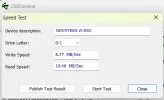
Hi, my F77 has a big issue with recording smooth video. Recorded video looks nothing like 30fps and it obviously skips frames. I've tested write/read speed over USB and it's only under 9 and 20 MB/s (tested with USBDeview). Could you please also test unit of yours and provide results here? Thank you in advance.
 

Attachments

  • Zrzut ekranu 2025-02-15 160355.webp
    Zrzut ekranu 2025-02-15 160355.webp
    11.8 KB · Views: 127
Hi, my F77 has a big issue with recording smooth video. Recorded video looks nothing like 30fps and it obviously skips frames. I've tested write/read speed over USB and it's only under 9 and 20 MB/s (tested with USBDeview). Could you please also test unit of yours and provide results here? Thank you in advance.
Unfortunately, the second F77 ended up having the same file corruption issue. While testing the file copy issue over the USB-C connection, it averaged 18 MB/sec reading from the internal eMMC drive to my computer.

The videos are stored correctly on the eMMC drive. RedTiger is working on a firmware update to resolve the file corruption issue while copying files from the eMMC drive to a computer. They're also working on a firmware update to resolve frame duplication/dropping issues with the front camera. I reported that issue to them soon after getting the F77.
 
Additional tests results:
Unfortunately, the second F77 ended up having the same file corruption issue. While testing the file copy issue over the USB-C connection, it averaged 18 MB/sec reading from the internal eMMC drive to my computer.

The videos are stored correctly on the eMMC drive. RedTiger is working on a firmware update to resolve the file corruption issue while copying files from the eMMC drive to a computer. They're also working on a firmware update to resolve frame duplication/dropping issues with the front camera. I reported that issue to them soon after getting the F77.
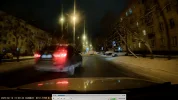
Thank you for your reply. The Redtiger support is good, but if they won't release this update soon I will have to return this purchase. At the moment this dash cam is useless for recording fast moving objects especially at night (please see screenshot).
 

Attachments

  • Zrzut ekranu 2025-02-15 163531.webp
    Zrzut ekranu 2025-02-15 163531.webp
    163.7 KB · Views: 159
  • Zrzut ekranu 2025-02-15 163520.webp
    Zrzut ekranu 2025-02-15 163520.webp
    162.7 KB · Views: 167
Additional tests results:

Thank you for your reply. The Redtiger support is good, but if they won't release this update soon I will have to return this purchase. At the moment this dash cam is useless for recording fast moving objects especially at night (please see screenshot).
So many issues by the sounds of it, glad I declined a review unit.

Meanwhile this shill on YouTube spends the first half of his video complaining that he only got his F77 unit four months later. I remember one of his earlier videos almost begging his users to leave a comment to provide details of Wolfbox to contact for review units. Pathetic.

 
Hi, my F77 has a big issue with recording smooth video. Recorded video looks nothing like 30fps and it obviously skips frames. I've tested write/read speed over USB and it's only under 9 and 20 MB/s (tested with USBDeview). Could you please also test unit of yours and provide results here? Thank you in advance.
I also got a download speed of 18-20 MB/s fron eMMC direct to my PC. Redtiger player does not play the footage from front cam smoothly however VLC plays it smoothly
 
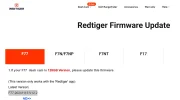
A new firmware available for download for F77 on redtiger india website. No information on what bugs have been improved. Version released for 128GB version is F77.20241115.V12.2
 

Attachments

  • Screenshot 2025-03-02 002855.webp
    Screenshot 2025-03-02 002855.webp
    33.1 KB · Views: 112
I've been working with Redtiger over the past couple of weeks to get them to make available and properly document the firmware update process for the F77. They finally added a firmware section for the F77 with somewhat newer firmware versions for the 128GB and 256GB units. Those firmware updates do not resolve the USB file copy problem I reported to them. I'm in the middle of trying to get a pre-release version of the firmware update that resolves the USB file copy problem.

Monday, Redtiger will be adding the proper steps to update the firmware for the F77 since what they included in the section for the F77 does not explain it at all. The F77 user manual (page 20 English version) incorrectly states you can update the F77 firmware OTA using the Redtiger app. I was informed that the current Redtiger app does not support updating the F77 firmware.

To update the F77 firmware you must download the zip file provided by Redtiger. The zip file contains a "bin" file that must be copied to a micro SD card (TF card). Redtiger suggests formatting the micro SD card (for example a 32GB card) in the F77 or use a format program to install a FAT32 file system with an allocation unit size of 64KB on your Windows or Mac computer.

Once the micro SD card has been formatted, copy the "bin" file [FW98529A.bin for 128GB version of F98529A2.bin for 256GB version] from the compressed zip file to the root directory of the micro SD card's file system. Eject the micro SD card from your computer using the steps to safely eject a micro SD card from your computer.

With the F77 powered off, insert the micro SD card into the F77's micro SD card slot and then power on the F77.

The F77 will detect the presence of the "bin" file on the micro SD card and automatically update the firmware without manual intervention.

After the firmware update completes, the F77 will reboot.
 
I've been working with Redtiger over the past couple of weeks to get them to make available and properly document the firmware update process for the F77. They finally added a firmware section for the F77 with somewhat newer firmware versions for the 128GB and 256GB units. Those firmware updates do not resolve the USB file copy problem I reported to them. I'm in the middle of trying to get a pre-release version of the firmware update that resolves the USB file copy problem.

Monday, Redtiger will be adding the proper steps to update the firmware for the F77 since what they included in the section for the F77 does not explain it at all. The F77 user manual (page 20 English version) incorrectly states you can update the F77 firmware OTA using the Redtiger app. I was informed that the current Redtiger app does not support updating the F77 firmware.

To update the F77 firmware you must download the zip file provided by Redtiger. The zip file contains a "bin" file that must be copied to a micro SD card (TF card). Redtiger suggests formatting the micro SD card (for example a 32GB card) in the F77 or use a format program to install a FAT32 file system with an allocation unit size of 64KB on your Windows or Mac computer.

Once the micro SD card has been formatted, copy the "bin" file [FW98529A.bin for 128GB version of F98529A2.bin for 256GB version] from the compressed zip file to the root directory of the micro SD card's file system. Eject the micro SD card from your computer using the steps to safely eject a micro SD card from your computer.

With the F77 powered off, insert the micro SD card into the F77's micro SD card slot and then power on the F77.

The F77 will detect the presence of the "bin" file on the micro SD card and automatically update the firmware without manual intervention.

After the firmware update completes, the F77 will reboot.
Thanks already did it.
1. SD card was inserted in dash cam powered by a mobile charger and formatted through dash cam menu
2. The file was downloaded from Redtiger website and bin file was extracted in the laptop
3. The dashcam was connected to the laptop through USBC to USB A data cable
4. SD card mass storage was chosen on the dashcam (Drive E: was alotted to the SD card in my laptop)
5. Transferred the bin file on E:\ directory
6. Dashcam was then disconnected from the USP data cable
7. Dashcam was then powered again through the mobile charger
8. Dashcam recognized the firmware file and loaded the same automatically and rebooted
 
The Redtiger player app plays the front camera clip for my dashcam f77 with lot of stuttering in my Asus FX504GD 8GB RAM intel 8300H with Nvidia graphic card . I also noted that although both front and rear cameras have same sensors and 4K resolution , the size of the file is bigger for the front camera. I am guessing it might be due to GPS and audio data combined in it.

Also when both front and rear clips are played together in red tiger player app in video playback option of "Two channel simulcast mode" the front video goes out of sync with the rear video and lags by almost 13-14 seconds. The rear video playback finishes in the same duration as the recorded duration but the front video finishes in 1 minute( recorded duration)+ 12 to 13 seconds at Normal playback speed.

However the same video plays smoothly in apps like VLC player and windows native media players with correct downloaded codecs and also on the redtiger mobile app and in the camera as well.
 
Sunday, I was able to get a pre-release copy of the F77 128GB firmware that addresses the USB-C file copy corruption issue. I started my testing late last night. I started with the original firmware version to confirm it still results in random corrupted video files and I then updated to the pre-release firmware. I ran three sets of my file copy test suite with the updated firmware installed and there was no corruption present in the copied video files. I've moved my testing to a second computer that encountered the problem with the original firmware, but this time using the updated firmware. It will take me a day or so to get all of the tests run on all of the computers that had the problem. So far, so good.
 
The file copy problem still exists with the pre-release firmware I'm testing. It worked with the first computer, but when I ran the same test on the second computer [one of the four computers that had the problem to begin with] same exact file copy problem occurred.

I'm testing on a third computer now. I've sent my findings to Redtiger.
 
I tested the F77 updated firmware with five different computers. Three of those computers encountered the file copy corruption issue again. There are times those same computers can run the file copy test suite successfully, but yet another test run on that same computer [at a different time] result in the files getting corrupted again. I've submitted all of my information to Redtiger [again].
 
Wonder if Wolfbox will get around the issue, like they got around the rear camera having issues on the G900 Pro. By releasing a new model with different rear camera sensor lmao
 
I see that the problem that is being discussed here is mainly a matter of copying files to the computer, but I would like to point out that my dashcam has a problem with smooth video recording, which I have tried to show in the video I am attaching. It is not possible to play smoothly a recording that was not recorded properly in the first place. I've noticed this issue only for front camera.
 
I see that the problem that is being discussed here is mainly a matter of copying files to the computer, but I would like to point out that my dashcam has a problem with smooth video recording, which I have tried to show in the video I am attaching. It is not possible to play smoothly a recording that was not recorded properly in the first place. I've noticed this issue only for front camera.
 
I see that the problem that is being discussed here is mainly a matter of copying files to the computer, but I would like to point out that my dashcam has a problem with smooth video recording, which I have tried to show in the video I am attaching. It is not possible to play smoothly a recording that was not recorded properly in the first place. I've noticed this issue only for front camera.
Back in post #18 of this thread, I mentioned the front camera video dropped/duplicated video frame problem. It was reportedly one of the things they were working for the next firmware update. I've not put the F77 back into my car to gather driving footage with the pre-release firmware to see if the dropped/duplicated video frame problem has been resolved. Redtiger is currently reviewing my findings from my file copy test suite using the pre-release firmware.
 
Red tiger has released Redtiger player version 1.52 which at least is now able to play the front and rear clips in sync. However the front video playback is still jittery
 

Attachments

  • Screenshot 2025-03-16 013514.webp
    Screenshot 2025-03-16 013514.webp
    22.5 KB · Views: 113
Last night, I had a Zoom video meeting with representatives from Redtiger to discuss the corruption of video files when copied over the USB-C connection. I explained my findings and gave them another copy of my scripts. The Windows cmd script I use invokes xcopy [I've tried robocopy and rsync as well] to copy the video files from the dash camera to the current working directory. I use a cmd script to allow me to specify a source drive letter, a date value and an optional set of hour values to be used in the filename wildcard specification used to select the video files to copy from the dash camera media to the computer.
 
Last night, I had a Zoom video meeting with representatives from Redtiger to discuss the corruption of video files when copied over the USB-C connection. I explained my findings and gave them another copy of my scripts. The Windows cmd script I use invokes xcopy [I've tried robocopy and rsync as well] to copy the video files from the dash camera to the current working directory. I use a cmd script to allow me to specify a source drive letter, a date value and an optional set of hour values to be used in the filename wildcard specification used to select the video files to copy from the dash camera media to the computer.
Lol it's been nearly three months now. Somehow either they don't know how to fix it, or are humouring you into thinking they are trying to fix it.

In the meantime, they've released the F17 Elite and Clearview 70 too lol
 
Back
Top