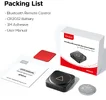
Remote

Joined
Dec 7, 2018
Messages
64
Reaction score
18
Country
United States
Have remote and did work? But now it will not pair with my camera? Hold it down for 3 /10 seconds, red light comes 0n and flashing, but no wy on camera?
What should I do?
Thanks
 
What should I do?
Didn’t see this ‘till just now.

1.) Remove CR2032 coin battery from remote check battery voltage.
Maybe try spare CR2032 battery that came with remote.

2.) Perform factory reset / default setting on A329T.

3.) After startup long press reset button on side of camera for at least 5 seconds.

4.) If that don’t work re-install the latest firmware from official website with SD Card, (V2.0_260104).
Yes, even if it’s the same firmware version sometimes that works.
OFFICIAL FIRMWARE

5.) Still no worky: SUBMIT A TICKY
 

Attachments

  • 1 .webp
    1 .webp
    299.5 KB · Views: 4
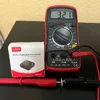
Took battery out 2.9 v reinstalled works now , must have been just not a good fit?
A brand new “fresh” CR2032 should be 3.21V or higher.
2.9V is “half dead”.
I would remove that 2.9V battery and install a new / fresh CR20232 measuring 3.21V or higher.
Note: I was too lazy to walk to garage so I used my $5 Meter for testing AA batteries and such. lol
 

Attachments

  • 3.21 Volt .webp
    3.21 Volt .webp
    284.2 KB · Views: 8
Last edited:
I just installed the remote and the ability to turn WiFi on and off is worth the purchase.
 
I just installed the remote and the ability to turn WiFi on and off is worth the purchase.
Of course you already know.
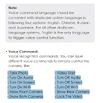
But, just in case a new user sees this you can also enable / disable Wi-Fi with the “free” voice commands, and not have to worry about losing Bluetooth pairing, or dead CR20232 coin batteries.
The voice commands are 100% accurate, and never false trigger.
Oh wait.


- Take Photo
- Turn On Audio
- Turn On Screen
- Turn On Wi-Fi
- Show Front Camera
- Show Both Cameras
- Video Start
- Turn Off Audio
- Turn Off Screen
- Turn Off Wi-Fi
- Show Rear Camera
- Lock The Video
 

Attachments

  • Voice Commands .webp
    Voice Commands .webp
    78.5 KB · Views: 2
Thanks Chuck. I did know but I prefer the touch button. It’s a reflection of my constant battle with Siri!
 
Back
Top