Safely removing SDCard on SAmsung A40, no reboot if possible!

ajw1100

Active Member
Joined
Mar 9, 2016
Messages
150
Reaction score
48
Location
Rolling countryside of Hertfordshire
Country
United Kingdom
Dash Cam
Now Viofo 119S. Was Mobius Action Cam
Just transferred my A119S to another car and I am wondering if there is a way, or perhaps an App so I can remove the card from the camera insert it into a memory stick adaptor plugged into my Samsung A40 and play the recordings. Without recieving a message of an unsafe removing needing me to restart the phone each time. I have never been able to remove the card without this problem. neither can I find a setting within the phone that will allow me to simply unplug. On the PC there is no problem, I just select Eject from the drop down. I do not want to use a music file app if I can avoid it.

TIA.
 
Did you unmount the device first? It might be in Storage>Advanced, or similar. As I recall, pulling the SD out without unmounting the SD was causing the freeze. I believe the A40 is discontinues, so if your version of Android is too old, there may be no fix for it. I think in later versions of Android, there are no issues.

By the way, this has been a known issue with Samsung for some years.
 
Hi lufa6977. Thank you for your reply, I have yet to find out how to unmount the external micro sd card, I have somehow managed to see the videos on the phone using Video Player or VLC once I connect the phone/adapter/ reader and micro sd card.. But removing any part of this 'chain' results in needing to restart the phone and opening the security # app each time. That is a real PITA and I may corrupt the dashcam recordings or worse the phone itself. I have not yet seen any option to unmount or exit the card or chain.
😒
 
Gads. Gotta be a big PITA for sure. Which version of Android? As I recall, even versions with UI.3 were an issue. I don't know if this was ever resolved to a hardware or software issue. I thought in the old versions, the info was under something like Device/Storage/Advanced, and you would see the SD with a warning triangle or similar. You would have to press that triangle, and then a pop-up appears to unmount the drive.

I presently have an OPPO Find X9 Pro on ColorOS 16 and no issues. However, that does not help you at all, but whatever the issue was, it did get fixed and is remedied in later hardware and software versions.
 
The Software version is 3.1 Android version is 11. I checked today and the SW is the latest version and everything seems up to date. Maybe it is the latest SW for the A40 but not the latest in itself.
I have gone through every link and option that may remotely look like it may work, nothing whatsoever helped. Looks like I am out of luck. Maybe both dashcam and phone are like me, a bit too old.
 
The Software version is 3.1 Android version is 11. I checked today and the SW is the latest version and everything seems up to date. Maybe it is the latest SW for the A40 but not the latest in itself.
I have gone through every link and option that may remotely look like it may work, nothing whatsoever helped. Looks like I am out of luck. Maybe both dashcam and phone are like me, a bit too old.

I get that. 🙂 I remember when my family forced me to switch from a flip phone so they could text me and keep track of me. I then stayed on a Note 4 for years. Then was forced into an iPhone. Back to Android/ColorOS
with the Oppo Find X9 Pro. Frankly, at my age, I would be happy to have only a flip phone, if not for the need for apps and connectivity now for dashcams, doctors, etc.
 
So, my A40 does not have the option to unmount an external simcard. My choice then is limited to buying a new phone that does offer that option as buying a new Dashcam would still leave me in the same boat. The Samsung A40 is smaller than most of the newer models which suits me, it's about 5.5 inches against 6.7 inches for newer models. The biggest problem seems to be how to find out which models allow unmounting in the settings. Is there a list of phones that does that or is it down to Android version?
With some phones costing more than a few days holiday in the Med I also need to keep my cost down. I have looked at A16/17 and 26 models but cannot find out if they allow unmounting.
Any Suggestions?
 
Have you considered the OPPO line? I have found ColorOS, an Android derivative, to be as good as Android. Any non-Samsung or non-Apple phone you consider would need to be the Global version if you buy from one of the Hong Kong distributors. There is a UK OPPO store you can look at.

UK OPPO Store

You will need to check whether the phone will work with your carrier. Also, I believe that OPPO has a service center in Ireland.
 
Last edited:
Thank for the tip re buying formHK. I am very non tech or as my wife says a dinasour in a digital world. I will have a look at the store link though. I have the A40 the wife has the 05, they are both linked to my Google account and I use Outlook 2010 for my emails. My wife uses the BTinternet. We can enter new contacts or calendar events on any and sync all together using DgiCal I have no idea of how that all works but it does and I certainly do not want to screw it up as I doubt I could put it back together again! There has to be a Samsung phone out there that will suit, I just need to find it............
 
According to Samsung's manual for the A40 on android 11, you -should- be able to unmount the card before removal.

Quoting the manual:

Before removing the memory card, first unmount it for safe removal.
Launch the Settings app and tap Battery and device care → Storage → 3 dots upper right → Advanced →
SD card → Unmount.
 
According to Samsung's manual for the A40 on android 11, you -should- be able to unmount the card before removal.

Quoting the manual:

Before removing the memory card, first unmount it for safe removal.
Launch the Settings app and tap Battery and device care → Storage → 3 dots upper right → Advanced
SD card → Unmount.

That is the setting I was talking about, but I could not remember exactly where it was. 🙂
 
I wish, I wish.
I had printed out the A40 manual and on pages 173 Device Care to 175 Storage, there is no mention of mounting or unmounting, maybe the UK version did not include this option dated 05/2019 Rev 1.0 English (EU)? The Manual is listed as for SM-405FM/DS and FN /DS. I will try add some screenshots. This is what you see clicking on the 3 dots. I have found a long winded route but am about to go out so not enough time to do it now.
 

Attachments

  • Screenshot_20260308-173505_Device_care[1].webp
    Screenshot_20260308-173505_Device_care[1].webp
    38 KB · Views: 31
Last edited:
I wish, I wish.
I had printed out the A40 manual and on pages 173 Device Care to 175 Storage, there is no mention of mounting or unmounting, maybe the UK version did not include this option dated 05/2019 Rev 1.0 English (EU)? The Manual is listed as for SM-405FM/DS and FN /DS. I will try add some screenshots. This is what you see clicking on the 3 dots. I have found a long winded route but am about to go out so not enough time to do it now.
The quote is directly from a manual on Samsung's UK support site (found with a Google search for 'Samsung A40 manual') - They have UK manuals listed for Android 9, 10, and 11 but the earliest one is rev1.1 dated 02/2020 for Android 9 so I'm guessing you printed the manual you're using when you first got the phone. In any case, all the manuals have similar verbiage, but it's on page 25 for android 9, 20 for android 10, or 18 for android 11 (after it shows you how to insert and remove the SD card). One of them -should- match your device.
 
I realise you are likely burned out on this by now, 🙂 but, here is a short video demonstrating what to do. Start at the 3-minute mark.

I had thought this was pretty much the same way for an unmount on various Android versions, maybe not.
.
.

 
Hi Guys.
I Think we are at cross purposes here. The manual does give guidence to remove the phones internal card on pages 24/25.🙂
The messages I am getting refer to removing the Micro SD card from the phone when it is connected, through an external card reader plugged into the USB C where you would normally connect a charger!
However I am making progress, I discovered yesterday there is an App in the phones Samsung Bundle called 'My Files' I did not know it existed. I need to play around with the App and the phone this afternoon as I reckon this may, hopefully solve my problem without going the long route I tried yesterday.
THANK you guys for being so helpful. 👍👍
 
Last edited:
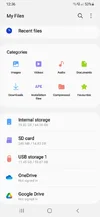
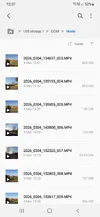
The Orange USB Storage 1 Card contains the recordings from my 119S and the second screenhot shows the recodings. So I can open them either on the PC or the Phone. If I open them on the phone or just have the USB adapter connected to the phone I need to shut the phone down, disconnect the USB and restart. Not perfect but at least it works. I would normally just use the PC to view the recordings but if I am out I can at least still access them.
 

Attachments

  • Screenshot_20260309-123634_My Files.webp
    Screenshot_20260309-123634_My Files.webp
    38.5 KB · Views: 35
  • Screenshot_20260309-123743_My Files.webp
    Screenshot_20260309-123743_My Files.webp
    60.6 KB · Views: 34
So, I have learnt something new, I was under the impression the phone could differentiate which card was removed, internal or external. Wrong. ANY card removal without correctly unmounting as in the manual generated the unsafe removal error.
My thanks to lifa6977 and sagsbbfan for their posts and helping me find a solution.
 
Back
Top