USB Switch

TonyM

Well-Known Member
Joined
Jul 30, 2013
Messages
6,730
Reaction score
6,796
Country
United Kingdom
Dash Cam
Many dashcams over many years
Is it possible to use a switch to toggle between two 5V USB power sources for a dashcam?
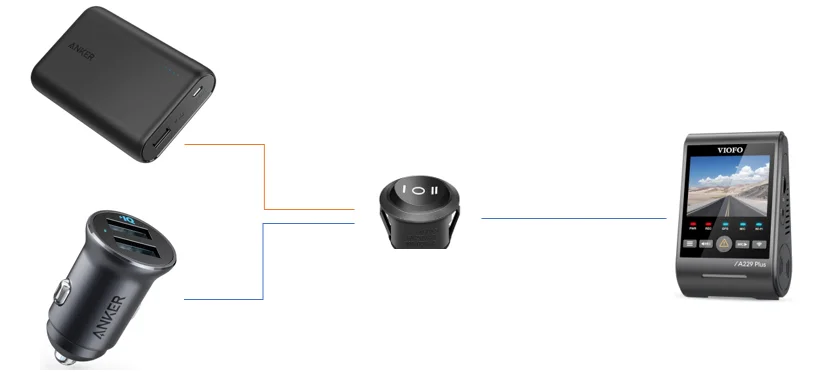
1729503386762.webp


I use a 12v-to-USB power supply when driving and a powerbank when parked. Can I do this without unplugging and replugging the cables every time I park the car?
 
Is it possible to use a switch to toggle between two 5V USB power sources for a dashcam?

View attachment 74570

I use a 12v-to-USB power supply when driving and a powerbank when parked. Can I do this without unplugging and replugging the cables every time I park the car?
It would need to be the right sort of switch, generally a rotary switch is used for this job, which selects which input goes to the output - a selector switch. If you are not using parking mode then you only need to switch the positive, if you are using parking mode, the ACC signal is not so easy, doesn't need switching, but you need to make sure that the GND is shared between the two power sources, which has the possibility of making the charging process not work correctly on the powerbank.

You may find the dashcam shuts down as you change the selection, but I suspect the current dashcams will start up again so be OK.
 
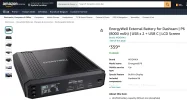
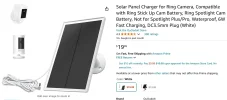
Could I use something like this to toggle between power sources? Devices like these seem designed to share 2x USB data sources with one PC or another. Could they work for power?
https://www.amazon.co.uk/gp/B0CLXYVM36
https://www.amazon.co.uk/gp/B09DSGL7KV
View attachment 74571
View attachment 74572
They probably just have a big mechanical selector switch that switches all contacts, so will work fine, except for the the dashcam possibly shutting down as it sees the voltage disappear during the transition. If they are more expensive models and work electronically then nobody knows!
 
It would need to be the right sort of switch, generally a rotary switch is used for this job, which selects which input goes to the output - a selector switch. If you are not using parking mode then you only need to switch the positive, if you are using parking mode, the ACC signal is not so easy, doesn't need switching, but you need to make sure that the GND is shared between the two power sources, which has the possibility of making the charging process not work correctly on the powerbank.

You may find the dashcam shuts down as you change the selection, but I suspect the current dashcams will start up again so be OK.
Not using an ACC source. I'm OK for the dashcam to shut down when I turn off the engine, then restart after switching over to the power station.

I like the idea of an off-the-shelf switch with USB-A ports, rather than stripping cables to wire into a switch. But I'm concerned they may only transmit 0.5A even if the input is 2A.
 
I like the idea of an off-the-shelf switch with USB-A ports, rather than stripping cables to wire into a switch. But I'm concerned they may only transmit 0.5A even if the input is 2A.
I think most cheap USB-A selector switches tend to use mechanical switches, so 2A should not be a problem. USB hubs often only give 0.5A, and an electronic switch may also have limits. No real way of knowing without trial and error!

If you can solder, then making up a mechanical selector switch in a small plastic box is pretty easy. You need to make a hole in the box for the switch, but if you don't have the necessary drill, you can use the soldering iron, preferably on a cool setting, outside, and don't breath the fumes. And do the soldering first, before you get the soldering iron dirty!
 
I have been drawing lol.
So I missed what you guys have been saying. ( Should actually be on the road for the next 2 hours helping out a friend. Not time critical)
Not the prettiest drawing but I'm sure it gives an idea how you could wire up a switch.
They refer to the switch as DPDT (Double Pole, Double Throw)

To make this work you would need to cut off the tops of the USB A and connect the
red and black wire to the centre pins of the switch.

The other wires would also have the USB A cable cut at one end stripped back
connected to the other pins keeping Polarity correct.

This should work but it isn't the tidiest solution.

1729533418758.webp
 
Last edited:
Is it possible to use a switch to toggle between two 5V USB power sources for a dashcam?
I use a 12v-to-USB power supply when driving and a powerbank when parked. Can I do this without unplugging and replugging the cables every time I park the car?
Why don’t you just connect the dash cam to the power bank, and then connect the power bank to the 12V-to-USB power supply?
Would that not work?

Are you like me, and do not use parking mode, and just operate the camera in normal recording mode when I need “parking surveillance”?
 
Why don’t you just connect the dash cam to the power bank, and then connect the power bank to the 12V-to-USB power supply?
Would that not work?

Are you like me, and do not use parking mode, and just operate the camera in normal recording mode when I need “parking surveillance”?
I record for 8 hours a day when I'm in the office. I don't drive long enough to charge a battery whilst driving.
 
An alternative is to just connect both power sources simultaneously, via diodes so that power from one doesn't go back into the other, then you don't need a switch, just plug your power bank in when you want to use it and it will be working, when the car source is off the power will come from the powerbank, when the car source is on, power will come from the car, as long as the car has a slightly higher voltage than the powerbank, which can be arranged. I would probably do this, so that you never forget to select the car power while driving, and maybe have no power at all.
 
I record for 8 hours a day when I'm in the office. I don't drive long enough to charge a battery whilst driving.
Oh, OK.
So how do you eventually charge the power bank?
Could you charge the power bank with a solar panel while the car is parked for 8 hours at the office?
 
Could you charge the power bank with a solar panel while the car is parked for 8 hours at the office?
By December, he will only have 7.5 hours of daylight each day, that is not going to charge the power bank in typical UK weather unless the solar panel is bigger than a car!
 
I record for 8 hours a day when I'm in the office. I don't drive long enough to charge a battery whilst driving.
Or you could connect the dash cam with an HK4 hardwire kit to the vehicle starter battery, and then connect a 10 Watt solar panel to the vehicle starter battery for the 8 hour daytime parking mode session.
The solar panel would keep the battery “topped up” and you would not have any wear & tear on the vehicle starter battery.

When you return home, and park just press the power button on the camera to turn off so you don’t drain the vehicle starter battery.
 
By December, he will only have 7.5 hours of daylight each day, that is not going to charge the power bank in typical UK weather unless the solar panel is bigger than a car!
I keep forgetting the UK does not have sunlight. lol
 
Oh, OK.
So how do you eventually charge the power bank?
Could you charge the power bank with a solar panel while the car is parked for 8 hours at the office?
60W USB wall charger at home every few days. As Nigel says, I don't get anywhere near enough sunlight to charge the battery.
 
As Nigel says, I don't get anywhere near enough sunlight to charge the battery.
This is true.
But, you don't need to "charge" the battery.
You just need the solar panel to provide 10 Watts, (what the dash cam consumes while parked).
This would prevent the battery from discharging.
 
Realistically, that will require a 200W solar panel to work in December, no problem in May.
We need a dash cam battery pack with a built-in solar panel.
Again, not to charge the pack but just to supply 10 Watts to power the camera, so the pack only discharges when the sun goes down.
The Energywell pack has this capability, but they are not selling it in the US.
 

Attachments

  • p6 .webp
    p6 .webp
    79.5 KB · Views: 110
  • solar .webp
    solar .webp
    81 KB · Views: 137
Back
Top