
You are using an out of date browser. It may not display this or other websites correctly.
You should upgrade or use an alternative browser.
You should upgrade or use an alternative browser.
VANTRUE E1 PRO FIRMWARE (Release time: 04/02/2026)
- Thread starter Karagandinez
- Start date
OP
OP

Karagandinez
Well-Known Member
- Joined
- Nov 27, 2020
- Messages
- 3,042
- Reaction score
- 4,106
- Location
- Deutschland
- Country
- Germany
- Dash Cam
- At the moment Viofo, Vueroid and Vantrue

Vantrue E1 Pro | Product Manuals, Firmware Upgrades, and FAQs
Explore comprehensive product manuals, firmware upgrades, and frequently asked questions (FAQs) for Vantrue E1 Pro dash cam. Access detailed instructions, troubleshooting tips, and the latest firmware updates to enhance your experience. Find answers to common queries and optimize your use of...
 www.vantrue.com
Firmware Update
Release time: 09/29/2025
Download
Version: E1PRO_VT-EEI231
1. Important Update: Improved the LTE module activation process and enhanced connection stability.
2. Important Update: Removed the creation date setting to fix mismatches between time zones and video timestamps.
3. Corrected the Japanese translation for Parking Mode enter/exit options.
4. Added support for exFAT format memory cards.
5. Adjusted certain 5G Wi-Fi frequency bands to resolve regional conflicts.
6. Optimized Parking Mode functionality.
7. Improved LTE file upload performance.
2. Important Update: Removed the creation date setting to fix mismatches between time zones and video timestamps.
3. Corrected the Japanese translation for Parking Mode enter/exit options.
4. Added support for exFAT format memory cards.
5. Adjusted certain 5G Wi-Fi frequency bands to resolve regional conflicts.
6. Optimized Parking Mode functionality.
7. Improved LTE file upload performance.
Link
New Member
- Joined
- Nov 22, 2023
- Messages
- 19
- Reaction score
- 14
- Location
- Sweden
- Country
- Sweden
- Dash Cam
- VIOFO A329T (front) + A229 Pro (back)
Hey OP, I hope you don't mind me copying your formatting for posting this new update here 🙂
Firmware Update
Release time: 10/21/2025
Download
Version: E1PRO_VT-EEJ151
Firmware Update
Release time: 10/21/2025
Download
Version: E1PRO_VT-EEJ151
1. Optimized the vehicle tracking feature to improve GPS location and time updates.
2. Fixed an issue where GPS time was incorrect upon startup.
3. Improved playback smoothness on the device.
4. Optimized GPS data archiving on the memory card to fix incorrect date entries (next-day data appearing under the previous date).
5. Fixed mosaic or screen distortion issues during playback of some 1920×1080 videos.
2. Fixed an issue where GPS time was incorrect upon startup.
3. Improved playback smoothness on the device.
4. Optimized GPS data archiving on the memory card to fix incorrect date entries (next-day data appearing under the previous date).
5. Fixed mosaic or screen distortion issues during playback of some 1920×1080 videos.
OP
OP
Karagandinez
Well-Known Member
- Joined
- Nov 27, 2020
- Messages
- 3,042
- Reaction score
- 4,106
- Location
- Deutschland
- Country
- Germany
- Dash Cam
- At the moment Viofo, Vueroid and Vantrue
Vantrue E1 Pro | Product Manuals, Firmware Upgrades, and FAQs
Explore comprehensive product manuals, firmware upgrades, and frequently asked questions (FAQs) for Vantrue E1 Pro dash cam. Access detailed instructions, troubleshooting tips, and the latest firmware updates to enhance your experience. Find answers to common queries and optimize your use of...
www.vantrue.com
Firmware Update
Release time: 12/01/2025
Download
Version: E1PRO_VT-EEK211
1. Fixed the issue where Parking Mode Quick Start showed as enabled in settings but no icon appeared on the device.
2. Corrected some Spanish translations.
3. Improved formatting speed for 1TB SD cards.
4. Optimized real-time preview loading in the app.
5. Fixed incorrect video names in the message center uploads.
6. Fixed an error that occurred when formatting a 256GB SD card on a computer in NTFS format and then attempting to format it again on the device.
2. Corrected some Spanish translations.
3. Improved formatting speed for 1TB SD cards.
4. Optimized real-time preview loading in the app.
5. Fixed incorrect video names in the message center uploads.
6. Fixed an error that occurred when formatting a 256GB SD card on a computer in NTFS format and then attempting to format it again on the device.
Last edited:

EricSan
Well-Known Member
- Joined
- Dec 28, 2023
- Messages
- 1,410
- Reaction score
- 1,066
- Location
- Central PA
- Country
- United States
- Dash Cam
- There are ALWAYS user serviceable parts inside!
6. Fixed an error that occurred when formatting a 256GB SD card on a computer in NTFS format and then attempting to format it again on the device.
How about that, I've intermittently run into this issue and just assumed it was dummy user error. I didn't recognize this as a bug... Cool!

Hack_man
Well-Known Member
@Karagandinez do you happen to still have this older version (or any other recent older version) of F/W for the E1 Pro? (E1PRO_VT-EEJ151 10/21/2025)Hey OP, I hope you don't mind me copying your formatting for posting this new update here 🙂
Firmware Update
Release time: 10/21/2025
Download
Version: E1PRO_VT-EEJ151
1. Optimized the vehicle tracking feature to improve GPS location and time updates.
2. Fixed an issue where GPS time was incorrect upon startup.
3. Improved playback smoothness on the device.
4. Optimized GPS data archiving on the memory card to fix incorrect date entries (next-day data appearing under the previous date).
5. Fixed mosaic or screen distortion issues during playback of some 1920×1080 videos.
I am having problems with the camera. For some reason I can't put it into data mode, it keeps booting into recording mode when the power cable is attached to the side data port.
I have tried two different Vantrue power cables, two different computers, reloaded recent F/W but it won't boot into data mode ever since I upgraded FW to E1PRO_VT-EEK211_12/01/2025
Last edited:
Hack_man
Well-Known Member
Thank you for helping with this!E1PRO_VT-EEJ151.zip
drive.google.com
Normally I keep old FW archives but got sloppy with the E1 Pro
I was able to download a 35.7 MB E1PRO_VT-EEJ151.zip file but when I attempt to expand it I get this error.
Is it possible this is not a zip file but rather the original FW file?
OP
OP
Karagandinez
Well-Known Member
- Joined
- Nov 27, 2020
- Messages
- 3,042
- Reaction score
- 4,106
- Location
- Deutschland
- Country
- Germany
- Dash Cam
- At the moment Viofo, Vueroid and Vantrue
Something went wrong...Thank you for helping with this!
Normally I keep old FW archives but got sloppy with the E1 Pro
I was able to download a 35.7 MB E1PRO_VT-EEJ151.zip file but when I attempt to expand it I get this error.
Is it possible this is not a zip file but rather the original FW file?
View attachment 88953
View attachment 88952
I'll get to the laptop in about 2 hours and upload the firmware again.
Hack_man
Well-Known Member
No rush at all. It's 1am here. I really appreciate the help, I'm not even sure its the F/W causing the problem.Something went wrong...
I'll get to the laptop in about 2 hours and upload the firmware again.

Your device is working as intended~ The USB (data) mode and LTE mode share the same Type‑C port. By default, the E1 Pro is set to LTE mode, so when it’s powered, it will automatically boot into recording mode.@Karagandinez do you happen to still have this older version (or any other recent older version) of F/W for the E1 Pro? (E1PRO_VT-EEJ151 10/21/2015)
I am having problems with the camera. For some reason I can't put it into data mode, it keeps booting into recording mode when the power cable is attached to the side data port.
I have tried two different Vantrue power cables, two different computers, reloaded recent F/W but it won't boot into data mode ever since I upgraded FW to E1PRO_VT-EEK211_12/01/2025
If you want to use data mode, please go into the camera menu and set the USB Mode to Udisk Mode. Once that’s done, connecting to your computer will allow data transfer as expected.
OP
OP
Karagandinez
Well-Known Member
- Joined
- Nov 27, 2020
- Messages
- 3,042
- Reaction score
- 4,106
- Location
- Deutschland
- Country
- Germany
- Dash Cam
- At the moment Viofo, Vueroid and Vantrue
https://we.tl/t-eh5gBt4Gn5@Karagandinez do you happen to still have this older version (or any other recent older version) of F/W for the E1 Pro? (E1PRO_VT-EEJ151 10/21/2015)
I am having problems with the camera. For some reason I can't put it into data mode, it keeps booting into recording mode when the power cable is attached to the side data port.
I have tried two different Vantrue power cables, two different computers, reloaded recent F/W but it won't boot into data mode ever since I upgraded FW to E1PRO_VT-EEK211_12/01/2025
EricSan
Well-Known Member
- Joined
- Dec 28, 2023
- Messages
- 1,410
- Reaction score
- 1,066
- Location
- Central PA
- Country
- United States
- Dash Cam
- There are ALWAYS user serviceable parts inside!
I also have some past firmware versions for the cameras that I have. I tend to be a digital packrat…
Hack_man
Well-Known Member
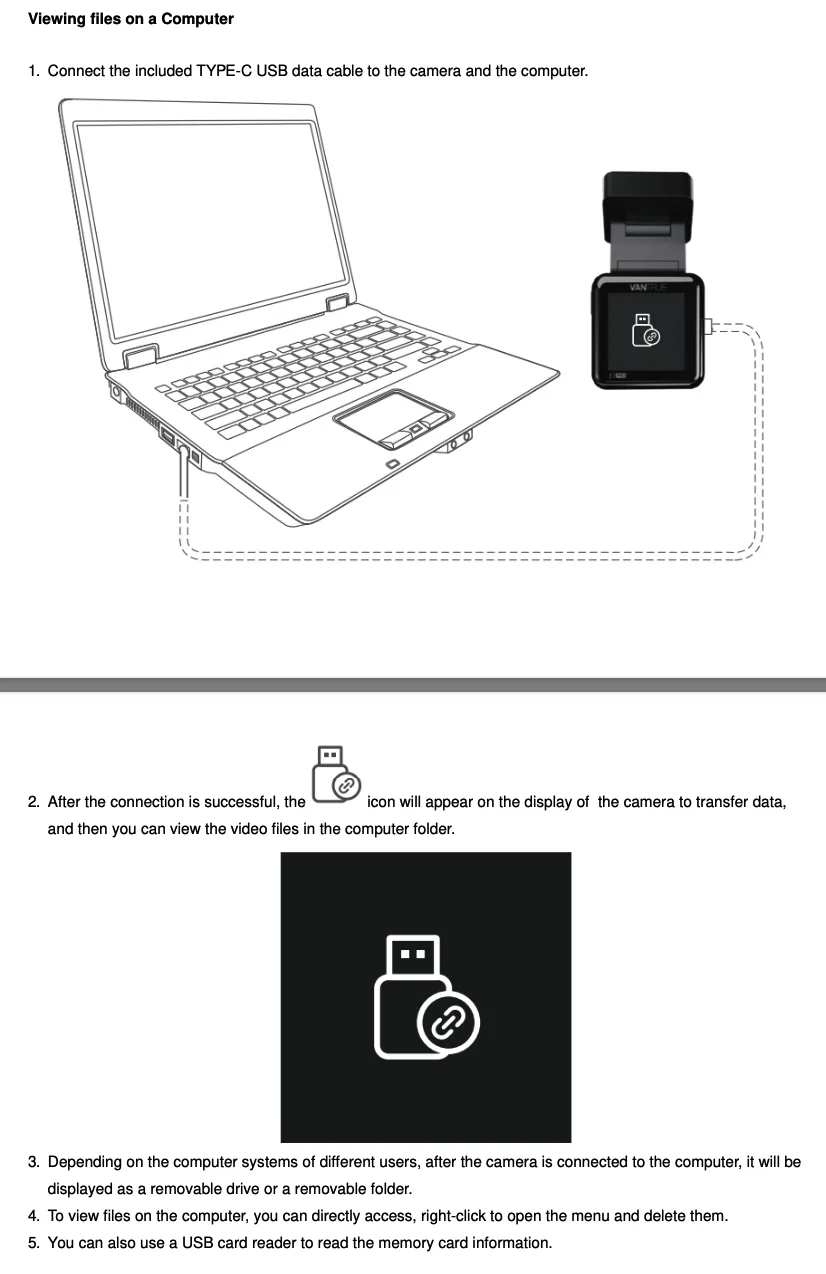
Somehow I missed that USB Mode setting that @Jeff_Vantrue kindly identified. I honestly don't remember that setting 🤔 and it's not mentioned in the E1 Pro user manual.
Hack_man
Well-Known Member
Thank you I was able to download and install into the camera.
It still booted into record mode rather than USB data mode but the option in the menu setting was available to select USB mode.
Now that I think of it I remember seeing the USB menu mode a while ago.
That is kind of cool that you used a Wetransfer link in a post, I thought you needed an email address for that to work.
Last edited:

AgentSmith007
Active Member
- Joined
- Oct 6, 2012
- Messages
- 154
- Reaction score
- 43
- Location
- Hockeytown
- Country
- United States
- Dash Cam
- Viofo A129 Pro Duo, A119 V1/2/3, Vantrue E1 Pro
Hack_man
Well-Known Member
Thanks, maybe I missed that menu setting to reconfigure to Udisk mode, but it's not in the current user manual.@Hack_man
When you upgrade to new firmware it resets all settings. And default settings for USB-C port on the body is LTE.
I upgraded to the latest firmware and then went to the menu and changed USB Mode to Udisk Mode and it works fine.
So, don't be afraid to install latest firmware.
Maybe Vantrue added it when they recently more broadly supported LTE.
I would think Udisk should be default, the whole point is to more efficiently do data transfer and my guess is there are not that many LTE users.
I was looking for older FW to see if this change was recently made to not default into data mode.
Last edited:
Thanks for pointing that out. I’ll pass this feedback to our team so we can improve and update the user manual accordingly~Somehow I missed that USB Mode setting that @Jeff_Vantrue kindly identified. I honestly don't remember that setting 🤔 and it's not mentioned in the E1 Pro user manual.
View attachment 88961
AgentSmith007
Active Member
- Joined
- Oct 6, 2012
- Messages
- 154
- Reaction score
- 43
- Location
- Hockeytown
- Country
- United States
- Dash Cam
- Viofo A129 Pro Duo, A119 V1/2/3, Vantrue E1 Pro
@Hack_manSomehow I missed that USB Mode setting that @Jeff_Vantrue kindly identified. I honestly don't remember that setting 🤔 and it's not mentioned in the E1 Pro user manual.
View attachment 88961
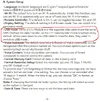
It is in the manual on page 18.
Attachments
Hack_man
Well-Known Member
Yes but if there is going to be a specific section titled "Viewing Files on a Computer" it should at least reference the "System Setup" configuration, if it's not explicitly providing the instructions in that section.
Especially since it defaults to LTE.
Last edited:
OP
OP
Karagandinez
Well-Known Member
- Joined
- Nov 27, 2020
- Messages
- 3,042
- Reaction score
- 4,106
- Location
- Deutschland
- Country
- Germany
- Dash Cam
- At the moment Viofo, Vueroid and Vantrue
Vantrue E1 Pro | Product Manuals, Firmware Upgrades, and FAQs
Explore comprehensive product manuals, firmware upgrades, and frequently asked questions (FAQs) for Vantrue E1 Pro dash cam. Access detailed instructions, troubleshooting tips, and the latest firmware updates to enhance your experience. Find answers to common queries and optimize your use of...
www.vantrue.com
Release time: 04/02/2026
Download
Version: E1PRO_VT-EFB271
1. Resolved a problem where the G-sensor sensitivity decreased after exiting the collision quick-start mode.
2. Added file pagination feature in the app.
3. Updated the memory card file system to optimize startup time when using high-capacity storage cards.
4. Added system time recovery after abnormal RTC battery power interruptions.
5. Added menu settings saving function (effective after upgrading to this version and will take effect from the next update).
6. Optimized parking monitoring and added automatic exit from parking mode based on vehicle speed.
7. Locked files in parking mode are now saved in the “Parking” folder.
8. In collision detection mode, the screen will now remain off during recording.
9. Updated the default system date to January 1, 2026.
2. Added file pagination feature in the app.
3. Updated the memory card file system to optimize startup time when using high-capacity storage cards.
4. Added system time recovery after abnormal RTC battery power interruptions.
5. Added menu settings saving function (effective after upgrading to this version and will take effect from the next update).
6. Optimized parking monitoring and added automatic exit from parking mode based on vehicle speed.
7. Locked files in parking mode are now saved in the “Parking” folder.
8. In collision detection mode, the screen will now remain off during recording.
9. Updated the default system date to January 1, 2026.