IAmATeaf
Active Member
- Joined
- Jul 19, 2015
- Messages
- 352
- Reaction score
- 225
- Country
- United Kingdom
- Dash Cam
- Viofo A119 v3
Let me start this post with an apology to Vantrue, they kindly sent me this dashcam to review last year but unfortunately for me life got in the way 🙁 Shortly after receiving the unit I fractured my left wrist, stop the s******ing in the back, it's not from what you think 😆 so I couldn't really do much including driving. I then had to rush out of the UK and was away for quite a few months, my youngest son then purchased an apartment, so it was Dad DIY mode after which he got married. Daughter has now also purchased an apartment, so Dad DIY mode part II and after this weekend I'll be out of the UK, again for a few months!
Enough of the excuses and once again apologies to Vantrue for the huge delay in reviewing.
My normal intro, I am not a professional reviewer, in fact this will be only my second review so as before comments and maybe even some mild criticisms are welcome 😀
Dashcam history, I’ve had a few cheapo Amazon specials before finally deciding to get something ‘half decent’ which was a Viofo A119 V3, my very first review compared this to the Vantrue E1, that review can be found here https://dashcamtalk.com/forum/threads/vantrue-e1-amateur-review.48036/
I still fall into the set it up and then forget all about it type of user. With the A119 V3 the only things I changed from default was to enable GPS and I increased the recording bitrate to maximum, thinking here being why not! I don’t tend to update the firmware unless there is a real need to do so, my A119 V3 is still running the v1.03 firmware that it came with. The Vantrue E1 is still on E1_VT-EBJ131 firmware that it came with and I’ve never bothered to check if there are updates, I’m sure there are but I don’t tend to update the firmware unless there is an issue that I’m experiencing that the update claims to resolve.
Onto the review.
What do you get in the box?
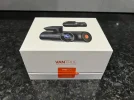
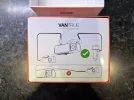
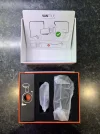
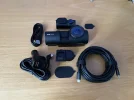
Vanture dashcams come in what I can only describe as a ‘premium’ feeling box and the N4 Pro is no exception. The main front camera and rear camera units are held securely in a foam insert with the rest of the accessories tucked away in 2 small boxes. Both the front and rear cameras do feel like quality items, the front especially which exudes quality and heft.
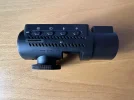
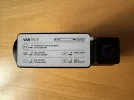
The N4 Pro is a 3-channel dashcam featuring a 4k front facing camera, a 1080p internal camera and a 1080p rear facing camera. The front camera form factor is a cylinder/tube, approximately 4cm in diameter and 12.5cm long, the internal camera is part of the front camera unit and is to the right of the unit when looking at the screen. The front camera attaches to the provided windscreen mount magnetically with a reassuring and firm clunk and is also powered via this mount which also houses the GPS unit . The rear camera connects via a supplied USB-C to USB-C cable which plugs into the front camera unit.
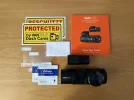
In terms of accessories, you get the following:
In terms of camera adjustments, the front camera mount allows for adjustment in both the vertical and horizontal planes, the internal camera can only be adjusted vertically, the rear camera once mounted can also only be adjusted vertically.
The front camera has a large orange power on/off button located at the left of the screen which also doubles as an emergency clip save button, this button is also a flap which is magnetically held in place which conceals the SD card slot and reset button. Short press of this orange button whilst in recording mode will take a snaphot and tag the recording as an emergency clip which will then be protected.
The screen on the front camera is large and wide and navigating the menus is super easy using 4 buttons under the screen with indication on screen as to the function of each of the buttons. These 4 buttons also double up as shortcut buttons and are context sensitive performing different functions when in recording or playback modes using either short or long presses. In recording mode for example, from the left, the 1st button allows you to pause/start the recording with a short press, 2nd button short press will switch camera view/preview between the 3 cameras, 3rd button short press will turn on/off the microphone and the 4th button long press turns on/off the Wi-Fi.
I initially powered up the N4 Pro in the house, stuck a 128Gb V30 micro SD card and formatted it, it came with the firmware version VT-ECJ161 which I upgraded to VT-EDI241 which was the latest available on the Vantrue website. The upgrade process is simple and straight forward, download the firmware, copy it to the root of the SD card, pop the card back into the dashcam and power it up. On boot it detects the new firmware and performs the upgrade. I made sure that the rear camera was connected as the upgrade process updates the firmware for all 3 cameras. After performing the upgrade it did reset the dashcam so I had to go through the first time configuration again but this was quite simple and quick.
I previously had never considered Wi-Fi as a necessary feature but that all changed when I tested the E1, I now would never ever consider purchasing a dashcam that didn’t have Wi-Fi as it adds levels of simple convenience which I would not want to be without. For example, having a larger view on a phone makes the initial mounting of the dashcam so much easier than the gawping at the small screen to work out the best placement. Going through the features and settings is also so much easier using the phone app as is reviewing and downloading clips, you no longer have to wait will you get hone and who has lost an SD card as it pinged out of the dashcam never to be found again! 🙄 The N4 Pro offers connections via both 2Ghz and 5GHz Wi-Fi, the later providing for speedy clip downloads.
Using the cameras
I powered the N4 Pro using the supplied module plugged into the cigar lighter, I have looked at hard wiring as I have always wanted to have a play around and test parking mode but haven’t got round to doing this yet. if I decide to pursue this then I’ll make sure to update my findings.
For testing I mounted the N4 Pro to the left of my existing A11 V3, not the ideal placement but it’s the best that could be done. When I received this unit, my initial thoughts were, wow the front camera is massive as it also houses the internal camera so thought I’d be severely limited where I’d be able to mount it. I was quite surprised to find that this was not the case and with the cylinder form factor and the low profile windscreen mount I found that I could in fact put it in areas where for example the Viofo A119 V3 and Vantrue E1 could not be mounted. In the UK mounting a cam to the right of the rear view mirror but tucked away in my car isn’t possible but the E4 Pro fitted quite nicely in that area, this would mean that the emergency button wouldn’t be easily accessible though which is why I mounted it to the left of the rear view mirror. You do also have to take into account the internal camera when mounting so the right side of the front camera unit can’t be covered or blocked.
Vantrue mobile app
The Vantrue mobile app can be used to both view and download video clips to your phone which I tested on my iPhone. Overall, I found the mobile app really easy to use. The mobile app is really useful when mounting the cameras to ensure that you get the best overall view, the mobile also has the ability to view and configure the dashcam over Wi-Fi, another convenience, although in reality, for me, configuration is not something that would be done on a frequent basis.
The weather here in the UK is not the best and I gave the N4 Pro a really difficult test, day time it was raining, overcast and dull and the clips show that. Overall the clip quality is outstanding, I did notice a slight yellowish hue on the front camera but the contrast/brightness and colours were spot on, what you see in the clip is what it really was like I did notice that I had difficulty capturing number plates when on the move but I didn’t have time to explore if things could be improved.
For night time clips I did notice haloing around lights but the N4 Pro somehow managed to limit the haloing to more of a corona around bright lights. I noticed a lot of haloing with both the A119 V3 and E1 and some people have commented that it might be my car and windscreen, asking if it needed a clean. I had given the inside a clean before mounting the front camera. For the rear camera, what can I say, my car is a saloon with no rear wiper so not the best!
Enough of the excuses and once again apologies to Vantrue for the huge delay in reviewing.
My normal intro, I am not a professional reviewer, in fact this will be only my second review so as before comments and maybe even some mild criticisms are welcome 😀
Dashcam history, I’ve had a few cheapo Amazon specials before finally deciding to get something ‘half decent’ which was a Viofo A119 V3, my very first review compared this to the Vantrue E1, that review can be found here https://dashcamtalk.com/forum/threads/vantrue-e1-amateur-review.48036/
I still fall into the set it up and then forget all about it type of user. With the A119 V3 the only things I changed from default was to enable GPS and I increased the recording bitrate to maximum, thinking here being why not! I don’t tend to update the firmware unless there is a real need to do so, my A119 V3 is still running the v1.03 firmware that it came with. The Vantrue E1 is still on E1_VT-EBJ131 firmware that it came with and I’ve never bothered to check if there are updates, I’m sure there are but I don’t tend to update the firmware unless there is an issue that I’m experiencing that the update claims to resolve.
Onto the review.
What do you get in the box?
Vanture dashcams come in what I can only describe as a ‘premium’ feeling box and the N4 Pro is no exception. The main front camera and rear camera units are held securely in a foam insert with the rest of the accessories tucked away in 2 small boxes. Both the front and rear cameras do feel like quality items, the front especially which exudes quality and heft.
The N4 Pro is a 3-channel dashcam featuring a 4k front facing camera, a 1080p internal camera and a 1080p rear facing camera. The front camera form factor is a cylinder/tube, approximately 4cm in diameter and 12.5cm long, the internal camera is part of the front camera unit and is to the right of the unit when looking at the screen. The front camera attaches to the provided windscreen mount magnetically with a reassuring and firm clunk and is also powered via this mount which also houses the GPS unit . The rear camera connects via a supplied USB-C to USB-C cable which plugs into the front camera unit.
In terms of accessories, you get the following:
- Quick user guide
- Windscreen GPS magnetic mount for front dashcam
- 3.5m cigar lighter power cable with right angle USB-C connector
- 6m rear camera USB-C to USB-C cable
- USB-A to USB-C data/power cable
- Spudger
- A lint free cloth
- 2 screen wipes
- 2 electrostatic sticker pads
- Spare set of sticky mounting pads, 1 of each for the front and rear dashcam
- 2 Vantrue warning security stickers
In terms of camera adjustments, the front camera mount allows for adjustment in both the vertical and horizontal planes, the internal camera can only be adjusted vertically, the rear camera once mounted can also only be adjusted vertically.
The front camera has a large orange power on/off button located at the left of the screen which also doubles as an emergency clip save button, this button is also a flap which is magnetically held in place which conceals the SD card slot and reset button. Short press of this orange button whilst in recording mode will take a snaphot and tag the recording as an emergency clip which will then be protected.
The screen on the front camera is large and wide and navigating the menus is super easy using 4 buttons under the screen with indication on screen as to the function of each of the buttons. These 4 buttons also double up as shortcut buttons and are context sensitive performing different functions when in recording or playback modes using either short or long presses. In recording mode for example, from the left, the 1st button allows you to pause/start the recording with a short press, 2nd button short press will switch camera view/preview between the 3 cameras, 3rd button short press will turn on/off the microphone and the 4th button long press turns on/off the Wi-Fi.
I initially powered up the N4 Pro in the house, stuck a 128Gb V30 micro SD card and formatted it, it came with the firmware version VT-ECJ161 which I upgraded to VT-EDI241 which was the latest available on the Vantrue website. The upgrade process is simple and straight forward, download the firmware, copy it to the root of the SD card, pop the card back into the dashcam and power it up. On boot it detects the new firmware and performs the upgrade. I made sure that the rear camera was connected as the upgrade process updates the firmware for all 3 cameras. After performing the upgrade it did reset the dashcam so I had to go through the first time configuration again but this was quite simple and quick.
I previously had never considered Wi-Fi as a necessary feature but that all changed when I tested the E1, I now would never ever consider purchasing a dashcam that didn’t have Wi-Fi as it adds levels of simple convenience which I would not want to be without. For example, having a larger view on a phone makes the initial mounting of the dashcam so much easier than the gawping at the small screen to work out the best placement. Going through the features and settings is also so much easier using the phone app as is reviewing and downloading clips, you no longer have to wait will you get hone and who has lost an SD card as it pinged out of the dashcam never to be found again! 🙄 The N4 Pro offers connections via both 2Ghz and 5GHz Wi-Fi, the later providing for speedy clip downloads.
Using the cameras
I powered the N4 Pro using the supplied module plugged into the cigar lighter, I have looked at hard wiring as I have always wanted to have a play around and test parking mode but haven’t got round to doing this yet. if I decide to pursue this then I’ll make sure to update my findings.
For testing I mounted the N4 Pro to the left of my existing A11 V3, not the ideal placement but it’s the best that could be done. When I received this unit, my initial thoughts were, wow the front camera is massive as it also houses the internal camera so thought I’d be severely limited where I’d be able to mount it. I was quite surprised to find that this was not the case and with the cylinder form factor and the low profile windscreen mount I found that I could in fact put it in areas where for example the Viofo A119 V3 and Vantrue E1 could not be mounted. In the UK mounting a cam to the right of the rear view mirror but tucked away in my car isn’t possible but the E4 Pro fitted quite nicely in that area, this would mean that the emergency button wouldn’t be easily accessible though which is why I mounted it to the left of the rear view mirror. You do also have to take into account the internal camera when mounting so the right side of the front camera unit can’t be covered or blocked.
Vantrue mobile app
The Vantrue mobile app can be used to both view and download video clips to your phone which I tested on my iPhone. Overall, I found the mobile app really easy to use. The mobile app is really useful when mounting the cameras to ensure that you get the best overall view, the mobile also has the ability to view and configure the dashcam over Wi-Fi, another convenience, although in reality, for me, configuration is not something that would be done on a frequent basis.
The weather here in the UK is not the best and I gave the N4 Pro a really difficult test, day time it was raining, overcast and dull and the clips show that. Overall the clip quality is outstanding, I did notice a slight yellowish hue on the front camera but the contrast/brightness and colours were spot on, what you see in the clip is what it really was like I did notice that I had difficulty capturing number plates when on the move but I didn’t have time to explore if things could be improved.
For night time clips I did notice haloing around lights but the N4 Pro somehow managed to limit the haloing to more of a corona around bright lights. I noticed a lot of haloing with both the A119 V3 and E1 and some people have commented that it might be my car and windscreen, asking if it needed a clean. I had given the inside a clean before mounting the front camera. For the rear camera, what can I say, my car is a saloon with no rear wiper so not the best!
Last edited: