VIOFO A119M Pro - Testing / Review - RCG

rcg530

Well-Known Member
Joined
Jan 23, 2021
Messages
2,744
Reaction score
4,594
Location
California
Country
United States
Dash Cam
70mai, BlackVue, Thinkware, Vantrue, Vueroid, VIOFO
I received a prototype A119M Pro 1-channel dash camera a couple of months ago. I've done some preliminary testing and gathered power consumption data.

Since I have an early prototype unit, any info I post about power consumption may be different than a production unit. I currently have firmware v1.0_20250926 installed in the A119M Pro.

Quick Summary:

The A119M Pro is extremely similar to the A119 Mini 2 dash camera.
  • What's the new
    • Sony STARVIS 2 IMX678 1/1.8" 8MP image sensor supporting 4K UHD resolutions
      • Resolution Options
        • 4K 30fps
        • 4K 21:9 30fps
        • 2K 30fps
        • 1080p 30fps
    • Wi-Fi 6 support [5 GHz, 2.4 GHz]
    • Supports using the HK6 hardwire kit - HK6 input voltage value available for placement on the video status line
    • Quad mode GPS module - GPS, BEIDOU, GALILEO, and GLONASS
  • What's the same as the A119 Mini 2
    • Front Camera Lens
      • F1.8 Aperture
      • Diagonal FOV 140°
    • Front Camera CPL: Yes
    • High Dynamic Range [HDR] - Supported
    • 1.5" LCD Screen
    • Bluetooth Remote: BTR200 optional accessory
    • Parking Mode [as of firmware v1.0_20250926]
      • Types
        • Auto Event Detection
        • Time-Lapse 1fps Super Night Vision
        • Time-Lapse 1/2/3/5/10 fps
        • Low Bitrate
      • Resolution
        • Auto Event Detection and Low Bitrate parking modes record videos at
          • 2560x1440 30fps resolution
          • Bitrate of 3.77 Mbps
      • Low Voltage Cutoff
        • Hardwire kit [HK6] provides that functionality
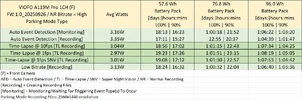
Power Consumption Data

Prototype unit with firmware v1.0_20250926 installed
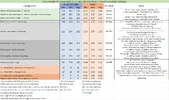
viofo_a119m_pro_power_consumption_10_250926.webp

Parking mode time estimates:
viofo_a119m_pro_pm_time_estimates_10_250926.webp
 
Last edited:
Looks like quite significant power consumption increase when being in Parking Mode compared to Mini 2, no? Almost 50% increase or something's wrong with the measurement?
1761043155882.webp
 
Looks like quite significant power consumption increase when being in Parking Mode compared to Mini 2, no? Almost 50% increase or something's wrong with the measurement?
This is a 4K dashcam, so twice the pixels, and a big sensor, so twice the image area.
We should expect a power consumption increase over the 2K dashcam, and 50% is much better than twice!
 
Here's an alternative parking mode comparison: A119M Pro vs A229 Pro 1CH. The power consumption is almost identical.

1761050496553.webp
1761050515462.webp
 
Looks like quite significant power consumption increase when being in Parking Mode compared to Mini 2, no? Almost 50% increase or something's wrong with the measurement?
View attachment 86710
I ran the power consumption tests three different times for the A119M Pro. First time with firmware that the unit arrived with [v0.18 I believe]. I couldn't complete the power tests with that firmware due to a bug in that early firmware version. The second time with a v0.29 firmware and I completed my power tests. Yesterday, I ran the tests for a third time with v1.0_20250926 firmware. The numbers decreased a bit between the v0.29 firmware and the v1.0_20250926 firmware. I believe my power consumption numbers are accurate.
 
I’m disappointed that the resolution of the buffered parking mode is limited to 2560x1440 and it isn’t 4K. The A229 Pro also had this limitation with the early versions of the firmware. But I’m not holding my breath for 4K parking recording with a future firmware update since they may be concerned about heat with this small form factor.
 
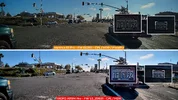
I 3D printed a wedge plate for the A119M Pro dash camera to account for the extreme curvature of my Chevy HHR's front windshield. Checking the alignment of the A119M Pro with the plate in place looks good. Here's a screenshot showing video footage from a VIOFO A329S, a VIOFO A119M Pro, a VUEROID S1-4K, and a 70mai T800 front camera. You can see the T800 has a wider FOV front lens compared to the other three cameras. All cameras have a CPL filter installed and have HDR enabled. The timestamp in the status line of the A119M Pro being truncated on the right side has already been reported to VIOFO and it will be fixed in the next firmware update for the A119M Pro.

1764008909256.webp
 
  • Like
Reactions: gse
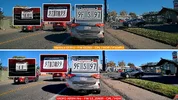
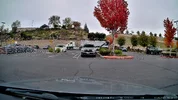
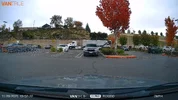
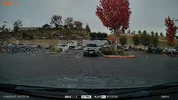
I now have a Vantrue E1 Pro and a VIOFO A119M Pro dash camera installed in one of my test cars. I ran some errands in town and here are a couple of plate capture attempts from that drive. I have HDR enabled and PlatePix enabled in the E1 Pro and HDR enabled in the VIOFO A119M Pro. Both have CPL filters. I'm testing out how well HDR performs in both of these dash cameras during the daytime.

01_20251128_E1Pro_vs_A119M_Pro.webp02_20251128_E1Pro_vs_A119M_Pro.webp
 
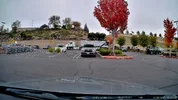
I have a two examples switching from parking mode to normal/driving recording mode to see what each one looks like for the VIOFO A119M Pro and the Vantrue E1 Pro.

The VIOFO A119M Pro reduces its resolution to 2560x1440 for parking mode recordings. The Vantrue E1 Pro low frame rate highest resolution option is 1920x1080 @ 15fps.

The brick wall in the background shows up well in recordings for both cameras. The license plate of the vehicle directly in front of my vehicle is readable in all except the Vantrue E1 Pro 1920x1080 parking mode footage. You can see the general shape of the characters on the plate, but not as clearly as the VIOFO A119M Pro 2560x1440 recording. The E1 Pro image darkens when HDR and PlatePix are active in normal/driving recording mode. I'll post this same info in my Vantrue E1 Pro thread.
  • VIOFO A119M Pro Low Bitrate HDR + CPL
    • 00_A119MPRO_LBR_HDR_20251128105711_000081P.MP4_snapshot_00.12.webp
  • VIOFO A119M Pro Normal/Driving Recording HDR + CPL : 2-second transition time
    • 00_A119MPRO_NR_HDR_20251128105726_000082.MP4_snapshot_00.00.webp
  • Vantrue E1 Pro Low Frame Rate + CPL
    • 00_E1PRO_LFR_20251128_105443_00064_P_A.MP4_snapshot_02.39.webp
  • Vantrue E1 Pro Normal/Driving Recording HDR+PlatePix + CPL : 4-second transition time
    • 00_E1PRO_NR_HDR_PP_20251128_105726_00065_N_A.MP4_snapshot_00.00.webp
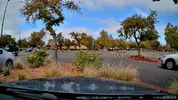
A second set of examples from later in the day when the fog burned off enough to show some blue sky.
  • VIOFO A119M Pro Low Bitrate HDR + CPL
    • 01_A119MPRO_LBR_HDR_20251128123521_000181P.MP4_snapshot_00.46.webp
  • VIOFO A119M Pro Normal/Driving Recording HDR + CPL : 3-second transition time
    • 01_A119MPRO_NR_HDR_20251128123611_000182.MP4_snapshot_00.00.webp
  • Vantrue E1 Pro Low Frame Rate + CPL
    • 01_E1PRO_LFR_20251128_123353_00113_P_A.MP4_snapshot_02.14.webp
  • Vantrue E1 Pro Normal/Driving Recording HDR+PlatePix + CPL : 4-second transition time
    • 01_E1PRO_NR_HDR_PP_20251128_123612_00114_N_A.MP4_snapshot_00.00.webp
 
This video contains VANTRUE E1 Pro and VIOFO A119M Pro day and night driving video samples with plate captures.

 
I upgraded my A119M Pro to firmware v1.1_20260109. This firmware version gets rid of the problem of not being able to mount a memory card on a Mac when the A119M Pro formatted the memory card.

I ran a test of formatting the memory card in the A119M Pro, created a few minutes worth of video files and I then moved that card to my Mac Mini. The memory card mounted successfully [without error]. I was able to access the files on the memory card.

The 128GB card was formatted with the exFat file system.

1769901798579.webp


There were two strange file sequence numbers assigned to the last two video files created after exiting the menu system and it resumed recording. I'll ask VIOFO about that situation.

1769901883250.webp
 
  • Like
Reactions: gse
This video contains VANTRUE E1 Pro and VIOFO A119M Pro day and night driving video samples with plate captures. The dash cameras have their latest firmware version installed. I've include nighttime footage with and without the camera's CPL filter installed.

 
I am so confused.
Since 2022 for maximum image quality we’ve been told to not use HDR during daytime, and only use HDR during night time on Viofo dash cams, (daytime HDR has ghosting).
For the past 11 months your Viofo test footage is with HDR enabled during daytime.

@rcg530
1.) Are we at a point where Viofo HDR tuning is so good, we can leave HDR enabled all the time?

This would make it so much easier.
No more HDR Timer needed.
No more customer complaints about automatic HDR Timer adjustment as the sunrise / sunset changes throughout the year.
-Chuck

 
I am so confused.
Since 2022 for maximum image quality we’ve been told to not use HDR during daytime, and only use HDR during night time on Viofo dash cams, (daytime HDR has ghosting).
For the past 11 months your Viofo test footage is with HDR enabled during daytime.

@rcg530
1.) Are we at a point where Viofo HDR tuning is so good, we can leave HDR enabled all the time?

This would make it so much easier.
No more HDR Timer needed.
No more customer complaints about automatic HDR Timer adjustment as the sunrise / sunset changes throughout the year.
-Chuck
Hi Chuck,

I'm of the opinion that using HDR during daylight hours should be the default setting for all dash cameras. If the image quality with HDR enabled during daylight hours results in poor quality footage, then that's a case for using the non-HDR mode and it's something the dash camera company should fix. If you "need" 60 fps footage [which I have a hard time accepting it's needed] then you can't use HDR for daytime footage.

I'd rather a dash camera user select one mode that works well all hours of the day. Trying to chase that perfect mix of daytime settings vs nighttime settings is a challenge that most dash camera users don't want to do or know they can do. I'd rather not have a scheduler/timer feature enable/disable HDR since it interrupts the recording process to make that configuration change. Using a timer also creates an additional task for the user to maintain the on/off times in the timer feature to account for sunset/sunrise times throughout the year. Most dash camera users don't interact with their dash camera at that level on a regular basis.
 
Since 2022 for maximum image quality we’ve been told to not use HDR during daytime, and only use HDR during night time on Viofo dash cams, (daytime HDR has ghosting).
During the day, in good visibility conditions, HDR does its job.
In daylight, in poor visibility conditions, HDR reduces the readability of oncoming license plates due to ghosting,
but manufacturers are addressing this.
At night, with HDR enabled, ghosting is also very noticeable, but license plates are still legible. At least on European license plates.

I hope that manufacturers will finally improve the quality of their models' photography to a level where HDR is always on
and the image remains unchanged in changing lighting conditions.
 
I'm of the opinion that using HDR during daylight hours should be the default setting for all dash cameras.
I'd rather a dash camera user select one mode that works well all hours of the day.
I hope that manufacturers will finally improve the quality of their models' photography to a level where HDR is always on
and the image remains unchanged in changing lighting conditions.
👍
 
Agreed. I installed a A329 in my wife's car after trying a couple of cheaper cams.

Blown away by the 60 FPS which makes a big difference on oncoming number plates. Then tried HDR and plates were mostly unreadable again, but more readable at night, as you say.

I'm hoping a A119M Pro installed today will manage oncoming plates despite being limited to 30 fps.
 
Back
Top