viofo A229PRO keeps requesting to reformat viofo memory card

polarTech

New Member
Joined
Jul 25, 2026
Messages
7
Reaction score
4
Location
north hollywood
Country
United States
I have the Viofo A229Pro 4K 2 channel camera and this is the memory that I'm using,

VIOFO 256GB Industrial Grade High Endurance microSDXC Card for Dash Cam U3 A2 V30, up to 100MB/s, Support 4K UHD & Continuous Loop Recording, High Temperature Resistant

I've been using this setup for about 7 months and no problems. I have it set to request a format intermittently and that works fine. Recently the camera posts that it needs to be reformatted about every 2 days.

I'm guessing that I'm not the first one to see this and curious if this means that the memory is degrading, or something else? I'm feeling that it's not dependable.

Thanks for any insight into the problem!
 
Welcome to the club @polarTech

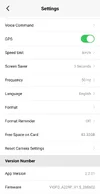
1.) Can you tell us what firmware version is in your A229 Pro?

2.) In the past I’ve seen VIOFO recommend a ā€œdeep formatā€ using the GUI FORMAT TOOL
This requires a Windows PC, or MAC Computer.

3.) It’s also possible the card is worn out, or malfunctioned.
VIOFO SD Cards have a 12 MONTH WARRANTY
If the GUI Format Tool does not work, you may want to SUBMIT A TICKET for warranty.

-Chuck
 
Thanks for that!

I'll try the format on my laptop.

Here's my firmware version (front/rear)
VIOFO_A229P_V 1.3.1_250214
Rear Camera: V1.3.1_250118
 
Doing the full format with the Viofo format tool, but it appears to keep resetting itself and starting over.

Researching the original problem that I've been having, it sounds like powering from the USB port may cause a corrupted file when power is pulled in the middle of a write.

I have a hardwire kit but never installed it. Maybe that would help the situation.

Here's what my formatting looks like,
FAT32_format.webp
 
Here's my firmware version (front/rear)
VIOFO_A229P_V 1.3.1_250214
Rear Camera: V1.3.1_250118
VIOFO will most likely recommend updating your A229 Pro to the LATEST FIRMWARE
Front: V1.5_260602
Rear: V1.3.1_250421
However I think you should contact VIOFO directly to ask about updating firmware by SUBMIT A TICKET
See important note, (see attached screenshot).
IMPORTANT NOTE:
If your rear camera is currently functioning normally, we strongly recommend NOT updating the rear firmware. This specific update is intended only for resolving certain hardware issues. Updating a perfectly working unit may cause unexpected errors.
Researching the original problem that I've been having, it sounds like powering from the USB port may cause a corrupted file when power is pulled in the middle of a write.
VIOFO recommends to power the camera through the GPS Mount Type-C power connector, (see attached screenshot).
I have a hardwire kit but never installed it. Maybe that would help the situation.
If you decide to use a Hardwire Cable I recommend you use the new upgraded HK6 Hardwire Cable.
HK6 AMAZON

Hk6 Viofo.com
 

Attachments

  • 1 .webp
    1 .webp
    104.3 KB · Views: 22
  • 2 .webp
    2 .webp
    49 KB · Views: 21
I have the Viofo A229Pro 4K 2 channel camera and this is the memory that I'm using,

VIOFO 256GB Industrial Grade High Endurance microSDXC Card for Dash Cam U3 A2 V30, up to 100MB/s, Support 4K UHD & Continuous Loop Recording, High Temperature Resistant

I've been using this setup for about 7 months and no problems. I have it set to request a format intermittently and that works fine. Recently the camera posts that it needs to be reformatted about every 2 days.

I'm guessing that I'm not the first one to see this and curious if this means that the memory is degrading, or something else? I'm feeling that it's not dependable.

Thanks for any insight into the problem!
Did you deeply format the card during 7 months? The camera does overwrite. However, as there are random file sizes, it often clogs the card up. A deep format will return it to its original capacity and makes it run smoothly again. We usually suggest deeply formatting the card reglartly, maybe once a month.
 
I used the default from the formatting app, but no worky! The most it ever got to was about 7%. I think the cluster size was too big (see picture above).

Anyway, i just right-clicked on the memory card instead and did a windows format with no problem followed by a front camera firmware update and then did a reformat with the camera. Going to see how it goes.

Thx!
 
Was the Windows format a Quick Format or full format? I only ask as a quick format will only rewrite / clear the file allocation table and not the entire card. While it is usually recommended to quick format SD cards due to the finite write cycles they have, it is recommended to perform the full format when used in continuous record systems. If the full format in Windows also fails, it sounds like the card is likely failing and needs to be replaced.

If you are using a Viofo card and it is within warranty then log a support ticket with them to get it replaced. If it is older than 12 months then you will likely need to purchase a new card
 
Was the Windows format a Quick Format or full format? I only ask as a quick format will only rewrite / clear the file allocation table and not the entire card. While it is usually recommended to quick format SD cards due to the finite write cycles they have, it is recommended to perform the full format when used in continuous record systems. If the full format in Windows also fails, it sounds like the card is likely failing and needs to be replaced.

If you are using a Viofo card and it is within warranty then log a support ticket with them to get it replaced. If it is older than 12 months then you will likely need to purchase a new card
I did the full format using the windows formatter and it worked fine. I used a much smaller cluster size, 128Kb
 
reporting back,
- did the low level format with windows
- did a firmware update at the same time
- then the quick format from Viofo

I haven’t had any problems since doing that stuff! all good! šŸ‘
 
reporting back,
- did the low level format with windows
- did a firmware update at the same time
- then the quick format from Viofo

I haven’t had any problems since doing that stuff! all good! šŸ‘
Great to hear.

So it was either the format or the firmware update that resolved it or the sector size you selected.

So many variables to be sure which one solved it.

I currently have a similar problem with the A329(H) hdmi model. on camera boot up it prompts to format the card, problem is it doesn't matter what card I am using.

Viofo suggested a low level format but In my case that's not the reason unless all my memory cards have exactly the same fault.

Point is I'm more inclined to think a firmware update on your system is what resolved it.
Perhaps the simple fact of a hardware reset may have fixed it and not the firmware update.

If it happens again can you try a hardware reset first to help prove disprove my theory.

Happy dashcaming. šŸ™‚
 
ok, so i have the same issue that was raised in the first post. i also have a genuine 512gb viofo memory card.
what i have noticed is that once the card is full, this error will show up every 2nd or 3rd time you power on the camera.
if i change the loop recording to anything other than 1 minute the issue goes away. so can anyone else replicate this?
im also in the process of trialling if a full low level format using the viofo formatting tool fixes the issue (currently have about 70gb of empty space left to write on the card since the format)
 
i have the same issue that was raised in the first post.
Welcome to the club @dashcamausguy
Can you please post a screenshot of the APP showing;
1.) Camera Firmware
2.) APP Version
Just like this, (see attached).
-Chuck
 

Attachments

  • APP Screenshot .webp
    APP Screenshot .webp
    48.1 KB · Views: 5
done. as you can see its running the older firmware (new one got release a week or so ago) ive just updated the firmware after i took the screen shot and i'm waiting for the sd card to be full to see if the error happens. my suspicion is that it will, until i change the loop recording to a higher minute interval
 

Attachments

  • Screenshot_20260822_103522_VIOFO Dashcam.webp
    Screenshot_20260822_103522_VIOFO Dashcam.webp
    38 KB · Views: 6
on a side note, i have noticed that the camera itself formats the sd card in exfat format, however the viofo format tool still formats it in fat32.
 
done. as you can see its running the older firmware (new one got release a week or so ago) ive just updated the firmware after i took the screen shot and i'm waiting for the sd card to be full to see if the error happens. my suspicion is that it will, until i change the loop recording to a higher minute interval
on a side note, i have noticed that the camera itself formats the sd card in exfat format, however the viofo format tool still formats it in fat32.
Based on OP's post HERE
It looks like updating the firmware, and a "deep format" fixed the issue.
After you get those two things done if you still have a malfunction, can you please start a new thread so we don't go off topic?
-Chuck
 
Based on OP's post HERE
It looks like updating the firmware, and a "deep format" fixed the issue.
After you get those two things done if you still have a malfunction, can you please start a new thread so we don't go off topic?
-Chuck
So which one fixed the problem?
The deep format or the firmware update?
Or was it the disrupting of the firmware?

It's not really a satisfactory solution having an either or method.
It would be ideal if viofo drilled down on the problem.

Eg so the car won't start replace the starter motor and the battery and voila it is fixed.
But what if it was just the cable being touched that was the real cause!

Is it a cold start firmware problem? Rhetorical.
 
Could the problem be that the Dashcam is trying to check the memory card before the memory card controller has finished its internal process's?

And this only shows up on a cold start?
Oddly only after the card has been in use for a relatively short time.

Would it help if the firmware of the Dashcam doubled checked the memory card? Allowing it a moment to finish its processes?

@viofo your thoughts.
 
Back
Top