VIOFO Improvement Wishlist 2026

I understand what both of you are saying. However, many of these Wishlist items are not for new features but improvements of existing ones (e.g., request to reduce boot up time from nearly 19 seconds to anything faster, even if not 0.2 seconds). The updates from the competitor I mentioned are also for improvements of existing features and not bug fixes.


Of course if the camera software was truly buggy, I'm sure Viofo would respond with a timely fix. And I understand some of the issues customers are reporting may not be fixable with a firmware update and are likely more hardware related (e.g., management of how hot the camera gets / how to handle hot internal car and camera temperatures to prevent a camera shutdown) so any fix would have to come with the next product generation.

It's just personally disappointing to see a very similar product that is also mature (released only 2 months after Viofo's) and working well "as is" gets provided consistent updates that are not bug-fix related while Viofo has not released any updates since January

I've made several comments related to boot up time optimization since it was suggested (by Viofo) that it's being worked on. But as far as I can tell Viofo has not responded, I'm assuming that actual attempt are not being made.
 
I'm still waiting for the BTR-200 to turn off the Rear cam on A229 Plus 3-Channel. 🙂 This was brought up by me and @viofo chimed in awhile back in another thread. Basically, provide more programming options for the buttons on the BTR-200.
 
I'm still waiting for the BTR-200 to turn off the Rear cam on A229 Plus 3-Channel. 🙂 This was brought up by me and @viofo chimed in awhile back in another thread. Basically, provide more programming options for the buttons on the BTR-200.
What is the firmware version on your camera? The Bluetooth button can be set to turn off rear cam already.
 
How to assign rear camera toggle on BTR200
Update Firmware: Ensure your VIOFO dash cam (such as the A329S, A229 Pro, or A229 Plus) is running the latest firmware from the VIOFO Support Center to support this feature.

Access Menu Settings: Power on your dash cam and go to the Settings menu.

Configure Buttons: Scroll down and locate the Bluetooth Button Function option.
Select Rear Cam: Assign either of the customizable side buttons (the Mic Button or the Action Button) to Turn On / Off Rear Cam.
Save & Exit: Confirm the change.

You can now press the assigned button to toggle the rear camera view and recording on or off on demand.
 
Remote access wont need a ground up redesign.
It's already implemented in service mode, but only for local connections.
An external LTE module via USB-C port is possible.

People get scared when it's called 'Cloud' as that implies a lot more features than it actual is, when they only want remote access (which is why I tried to clarify the point above).

Viofo already have implemented for business clients - just not end users (yet).

Viofo's website for business users refer to Cloud services and remote viewing access for business users.

"Fleet Management Solutions
Dashcams are pivotal in fleet management, offering live monitoring and cloud integration solutions. Through the application of Dash Cams, fleet managers can track vehicle routes in real-time, monitor driving behavior and vehicle status, as well as record road conditions and incidents. These devices capture high-definition videos and audio, serving as strong evidence to resolve disputes and clarify responsibilities.

Moreover, integrating dashcams with cloud-based systems allows secure data storage, analysis, and historical footage utilization. This cloud integration uploads collected data to cloud storage, enabling managers to access vehicle information and real-time monitoring remotely, which provides an indispensable tool for effective fleet management."
How did Viofo add this functionality? Do they use a peripheral or different software?
 
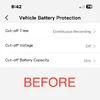
In an effort to make "Vehicle Battery Protection" APP setting less confusing, and more clear.
1.) Would it be helpful to add “HK6” to Cut-off Voltage?
2.) Would it be helpful to add “BP100” to Cut-off Battery Capacity?
See attached screenshots.
@viofo @VIOFO-Support
 

Attachments

  • After .webp
    After .webp
    33.2 KB · Views: 14
  • Before .webp
    Before .webp
    29.8 KB · Views: 12
In an effort to make "Vehicle Battery Protection" APP setting less confusing, and more clear.
1.) Would it be helpful to add “HK6” to Cut-off Voltage?
2.) Would it be helpful to add “BP100” to Cut-off Battery Capacity?
See attached screenshots.
@viofo @VIOFO-Support
Yes so that would be the perfect way I will utilise my battery park.
I'm assuming you can set it to low bit rate recording till the battery capacity reaches to 15 percent then will automatically go into low power impact detection.

I'm hoping this gets sorted soon because I'm booking my electrician for install in a few weeks and I don't plan to use any voltage hardwire kit in the hope the battery percentage option appears ASAP.

I don't see why you would choose a battery cut off voltage option if you can choose battery percentage option. Maybe I'm missing something there
 
I don't see why you would choose a battery cut off voltage option if you can choose battery percentage option. Maybe I'm missing something there
I suspect it's either Cut-off Voltage for the car battery, or Cut-Off Battery Capacity for the BP100 battery?

Perhaps Viofo could grey out or hide the unavailable option depending on whether HK6 or BP100 is connected over bluetooth?
 
Back
Top