Vueroid S1-QHD Infinite - Testing/Review - RCG

rcg530

Well-Known Member
Joined
Jan 23, 2021
Messages
2,744
Reaction score
4,594
Location
California
Country
United States
Dash Cam
70mai, BlackVue, Thinkware, Vantrue, Vueroid, VIOFO
The VUEROiD S1-QHD Infinite dash camera is now available.

I've been testing the S1-QHD Infinite in 1-channel, 2-channel, and 3-channel configurations for several months. The Vueroid HUB app [iOS and Android] is the app used to configure the Vueroid S1-QHD Infinite dash camera. Firmware updates are performed over-the-air [FOTA] which makes the firmware upgrade process a very easy task to perform.

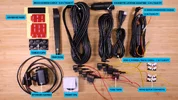
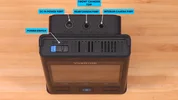
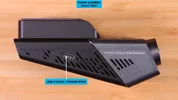
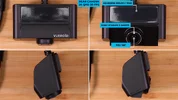
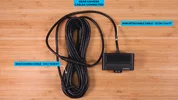
Here are my unboxing pictures for the S1-QHD Infinite 3CH dash camera.

vueroid_s1qhd_unboxing_pics_qhd00.webpvueroid_s1qhd_unboxing_pics_qhd01.webpvueroid_s1qhd_unboxing_pics_qhd04.webp
vueroid_s1qhd_unboxing_pics_qhd09.webpvueroid_s1qhd_unboxing_pics_qhd10.webpvueroid_s1qhd_unboxing_pics_qhd11.webpvueroid_s1qhd_unboxing_pics_qhd12.webp
vueroid_s1qhd_unboxing_pics_qhd05.webpvueroid_s1qhd_unboxing_pics_qhd06.webpvueroid_s1qhd_unboxing_pics_qhd07.webp
  • Front Camera
    • Resolution: 2K [2.5K] QHD – 2560x1440 pixels
    • Image Sensor: Sony STARVIS 2 IMX675
    • Lens FOV: 160 degrees
    • CPL Filter Available: Yes
      • S1-QHD CPL filter is specific to the S1-QHD
      • S1-4K CPL filter is specific to the S1-4K
    • Video Enhancing Modes
      • Driving Footage
        • Normal [SDR / No HDR] – Front Camera Only
        • Infinite Plate Capture [IPC] – Front Camera Only
          • The front camera status line shows "IPC" when IPC is active.
          • IPC is a specially tuned version of HDR with a focus on trying to capture license plates as clearly as possible.
        • HDR
          • High Dynamic Range [HDR] is supported for the front, rear, and interior cameras. You can configure when HDR is enabled for the front camera, but HDR is always enabled for the rear and interior cameras.
        • HDR or IPC for the front camera can be enabled all the time, or a "Timer" feature is present to enable/disable HDR or IPC based on a time schedule.
      • Parking Footage
        • Normal [SDR / No HDR] – Front Camera Only
        • HDR – Can be enabled for the front camera, always enabled for rear and interior cameras
        • Premium Night Vision [PNV] – Front Camera Only
    • 60 FPS recording is supported by the front camera [1-channel, 2-channel] for driving recording mode only.
      • HDR and IPC video enhancing settings are not supported for the front camera when configured to record at 60 FPS
      • When operating in 3-channel mode [with rear and interior cameras] the front camera is limited to 30 FPS
  • Rear Camera
    • Resolution: 2K QHD
    • Image Sensor: Sony STARVIS 2 IMX675
    • Lens FOV: 160 degrees
    • CPL Filter Available: No
    • Rear Camera Cable
      • The S1-QHD Infinite rear camera cable looks like the Vueroid D21-4K rear camera cable, but they are not compatible.
      • If you're upgrading from the D21-4K dash camera, you must use the rear camera cable supplied with the S1-QHD Infinite [6 M / 19.68 FT]
  • Interior Camera [3-Channel configurations]
    • Resolution: 1080p FHD
    • Image Sensor: Sony IMX307
    • Lens FOV: 170 degrees
    • CPL Filter Available: No
    • IR LEDs: Three are used to help illuminate the vehicle's passenger compartment at night
    • Ambient Light Sensor: Yes
  • Video Files
    • File Container Type: MP4
    • Video Codec: H.264
    • Audio Codec: AAC
  • Power Options
    • The S1-QHD Infinite is designed to not need an internal battery or supercapacitor
      • The TFF system [see above] is how this dash camera handles power loss events [when / if they occur].
    • 12V/24V
      • Included cigarette lighter adapter [CLA]
      • Included 3-wire 12V/24V hardwire cable [required for parking mode operations]
    • 5V
      • The USB-C port on the side of the front camera case can be used to power the front camera
      • This power source will not support parking mode operations
    • Low Voltage Cutoff
      • A low voltage cut-off feature is present when powered by the 12V/24V hardwire power cable or VUEROiD OBD-II power cable
      • A minimum voltage cut-off value of 11.0V is present to help support the use of a dash camera battery pack's full storage capacity
  • Storage
    • MicroSD:
      • Max capacity of 512GB
      • Recommended: 256 GB minimum
    • The microSD card's file system must be formatted by the S1-QHD to configure the TFF [Three Free File] system used by the S1-QHD.
    • The TFF system is a FAT32 compatible file system, so any computer or phone that can read files from a FAT32 formatted microSD card can access the files on the microSD cards formatted by the S1-QHD [just like with the older D21-4K dash camera from Vueroid]
  • Optional Accessories
    • The fuse tap kit shown in my unboxing pictures is an optional accessory
 
Last edited:
I performed several parking mode tests and power consumption tests for the S1-QHD Infinite dash camera. Here are my findings.
  • Parking Modes
    • Requires the use of the 3-wire 12V/24V hardwire cable or the optional VUEROiD OBD-II power cable.
    • Types
      • Impact & Motion [IM&MO]
        • The S1-QHD waits for a triggering impact or motion event based on the dash camera’s impact and motion sensitivity settings for parking mode.
        • Buffered 30-second video(s) [10 seconds before / 20 seconds after] will be created for any camera allowed to operate in parking mode.
        • The front, rear, and interior cameras are monitored for motion.
        • When the vehicle’s ignition is turned on so that accessory power is restored, the S1-QHD will resume driving mode recording operations.
        • You can disable the motion detection portion of this parking mode by setting the “Camera > Event Sensitivity > Parking Motion Sensitivity” setting to “Off”.
      • Impact + Time-Lapse [IM+TL]
        • The S1-QHD will record video at 1 FPS. The time-lapse video has a playback speed of 5 FPS, and the playback length is 20-seconds which equals 100-seconds of wall clock time per video file.
        • When an impact event occurs, the time-lapse video recording stops for 20-seconds while the S1-QHD creates a 30-second buffered impact video file [10-seconds before / 20 seconds after]. The time-lapse recording resumes when the buffered impact video file(s) are finished.
        • When the vehicle’s ignition is turned on so that accessory power is restored, the S1-QHD will resume driving mode recording operations.
      • Extreme Low Power Mode [ELPM]
        • This mode allows the S1-QHD to enter a very low power mode consuming only 1 mA of power [0.01W] while it waits for an impact event.
        • ELPM operates in conjunction with the other selected parking mode [IM&MO or IM+TL] in the parking mode settings.
        • The S1-QHD will also enter ELPM when the dash camera has detected an overheating condition while in parking mode. This is the “Durashift” parking mode feature. Every 30 minutes, the S1-QHD will check the current internal temperature and if it has cooled down sufficiently, it will return to the original parking mode.
        • ELPM has three operational settings, off, on, or hybrid
          • Off
            • ELPM is not enabled
          • On
            • ELPM is the main parking mode for the S1-QHD. ELPM is partnered with IM&MO or IM+TL parking modes.
            • When the vehicle’s engine/ignition system is turned off, the S1-QHD does not immediately enter ELPM:
              • The S1-QHD first enters IM&MO or IM+TL parking mode [as configured in the settings].
              • After a short period of time [see below], if no triggering events occur, the S1-QHD enters ELPM drawing only 1 mA [0.01W].
              • 75 seconds if using IM&MO before entering ELPM
              • 110 seconds if using IM+TL before entering ELPM
              • While the S1-QHD is in ELPM, it waits for a triggering impact event to awaken it.
              • The S1-QHD starts recording 1-second after the triggering impact event
                • It creates 30-second unbuffered video recordings for all cameras enabled in parking mode.
                  • After the unbuffered ELPM 30-second recordings have finished recording
                  • The S1-QHD monitors the vehicle environment by operating in the IM&MO or IM+TL parking mode selected in the configuration settings
                  • 50 seconds if using IM&MO
                  • 110 seconds if using IM+TL
                • If no additional triggering events occur during the post ELPM wait period, the S1-QHD will re-enter ELPM again.
                • If triggering events are detected while in the post ELPM wait period, buffered video recording(s) will be created and the S1-QHD will enter another wait period before re-entering ELPM.
          • Hybrid
            • After parking mode starts, the device operates in the selected parking mode (Impact & Motion or Impact+Timelapse) until the Low Power Mode Entry Time. It then switches to ELPM until the battery voltage reaches the Power Off Voltage + 0.2V, and it powers off when it reaches the Power Off Voltage.
        • When the vehicle’s ignition is turned on so that accessory power is restored, the S1-QHD will resume driving mode recording operations.
Power Consumption In Parking Mode & Time Estimates

The S1-QHD has a low voltage cut-off feature along with a time-based cut-off feature for parking mode. The lowest low voltage cut-off value available is 11.0V to be used when the S1-QHD is powered by a dash camera battery pack. Based on several tests of dash camera battery packs, they usually will provide power to the dash camera into the mid to low 10V range. This means the dash camera battery pack's internal storage charge will not be fully depleted by the S1-QHD, thus not truly consuming 100% of the battery pack's full storage capacity.

I have included a 100% time estimate column and a 90% time estimate column in my parking mode time estimates. The 90% time estimate is far more likely to be "closer" to what you may see in real world usage. There are other factors that can impact the dash camera battery pack's storage capacity as well [temperature, internal power use {Bluetooth for app monitoring}].

With regard to the ELPM time estimates, it is hard to be confident in such long time estimates for that parking mode. ELPM draws only 1 mA @ 12.6V [0.01W] which makes the calculation for the total runtime to be quite long. As I mentioned above, the battery pack itself will not always provide full storage capacity for long time periods. If the battery pack has very little internal power drain/draw, it should last a long time, but not the 360 to 400 days as the math calculations project. There's just no realistic way to give a fully accurate time estimate when the power draw amount is so low and the power source's [battery pack] storage capacity may change due to issues not related to the dash camera power draw.

ELPM allows this dash camera to be used with vehicles without a dash camera battery pack. Just make sure the low voltage cut-off feature is set to a realistic voltage value that will not leave your vehicle inoperable.

The "Waiting" values are the absolute "best case" situation for that parking mode. The dash camera is waiting for the "triggering" event(s) for that parking mode. The "Recording" values are when the dash camera is busy handling a triggering event for that parking mode type. The "Recording" state should not be the most active state for that parking mode, but it could be a highly used state for that parking mode [especially for motion detection]. If the "Impact" triggering event is the most active state for a parking mode, that vehicle might need to be moved to save it from destruction of that many impacts 🙂or the sensitivity setting needs to be adjusted or they're false positives.

S1-QHD 1-Channel [Front] Parking Mode Time Estimates
1781541812184.webp


S1-QHD 2-Channel [Front+Rear] Parking Mode Time Estimates

1781541911015.webp

S1-QHD 3-Channel [Front+Rear+Interior] Parking Mode Time Estimates

With the addition of the interior camera to the mix, this creates several different parking mode power modes and thus time estimates. In the "Avg Watts" column, there are four different power consumption values.
  • Day
    • Parking Mode - Interior Camera = On / IR LEDs = Off
  • Night [as it would be in dark locations or at night]
    • Parking Mode - Interior Camera = On / IR LEDs = On
  • ICOff Day
    • Parking Mode - Interior Camera = Off
  • ICOff Night [as it would be in dark locations or at night]
    • Parking Mode - Interior Camera = Off
The "ICOff Day" and "ICOff Night" were made part of my test suite to confirm whether turning off the interior camera in parking mode would truly save power. Having the interior camera plugged into the S1-QHD front unit will result in a small amount of power being consumed even with the interior camera being disabled in parking mode. That's why the "ICOff" values in the 3-channel chart are not as low as the 2-channel power consumption values when the interior camera is not plugged into the S1-QHD front unit.

When operating in ELPM, the priority for ELPM is to start recording within 1-second of the impact event. To achieve the quick booting and recording start, the quick booting [RTOS] operating system does not turn off the interior camera when it first boots the S1-QHD to start recording. The ELPM "ICOff Day" and ELPM "ICOff Night" environments will result in consumption of slightly more power during the first 20-seconds after the impact event. At the 20-second mark, the S1-QHD is booted enough to reconfigure the interior camera and turn it off if so configured in the parking mode settings.

1781542155356.webp
 
Last edited:
S1-QHD Power Cable / Source Options

What cables / power adapters are in the box:

vueroid_s1qhd_unboxing_pics_qhd08.webp


DC-IN Power Port

vueroid_s1qhd_unboxing_pics_qhd10.webp


3-Wire Hardwire Cable - Connects to S1-QHD's DC-IN port

This power option provides full functionality for the S1-QHD [driving recording, parking recording including low voltage cutoff monitoring].

The 3-Wire hardwire cable can be connected to the vehicle's fuse box or a dash camera battery pack. Make sure to set the S1-QHD's low voltage cut-off setting [Parking Recording > Vehicle Battery Protection > Discharge Cut-off Voltage] to a value that is appropriate for your vehicle or battery pack. There is an 11V setting available which can be used when the S1-QHD is powered by a dash camera battery pack to get the most out of the dash camera battery pack's stored charge.

Cigarette Lighter Adapter [CLA] - Connects to S1-QHD's DC-IN port

This power option provides limited functionality for the S1-QHD [driving recording only].

The CLA should be connected to a cigarette lighter [power] port in the vehicle that has the power turn off when the vehicle's ignition system is turned off. This is to prevent the S1-QHD from operating continuously in driving recording mode and potentially draining the vehicle's battery.

USB-C Power - Connects to the USB-C port on the right side of the S1-QHD

vueroid_s1qhd_unboxing_pics_qhd12.webp


This power option provides limited functionality for the S1-QHD [driving recording only].

No USB power adapter is provided with the S1-QHD, so the user is responsible for providing a USB power source and cable that will connect with the USB-C port on the right side of the S1-QHD front camera. When in the user's vehicle and depending on the S1-QHD configuration, the maximum power draw can reach up to 12W [3ch, front+rear+interior cameras, IR LEDs on, screen on, LEDs on, speaker active, etc]. The user must provide a USB power adapter or have a USB power port in the vehicle capable of providing 5V @ 2.5A [minimum]. When used in a vehicle, the user is responsible for providing a USB power cable to provide power from the USB power adapter to the USB-C port on the S1-QHD.

Since the S1-QHD does not support parking mode operations when powered by the USB-C port, the USB power supply must turn off power to the S1-QHD when the vehicle's ignition system is turned off. This is to prevent the S1-QHD from operating continuously in driving recording mode and potentially draining the vehicle's battery.

A USB-C data / power cable is provided in the box with the S1-QHD with a length of 1M [3.28 FT]. This cable's primary use is for connecting the S1-QHD to another USB-C capable device [cell phone, computer, or power source]. USB power sources in the vehicle [native to the vehicle or third-party power adapters] must be used with cabling that will support the 5V @ 2.5A power rating.

Optional Power Adapter(s):

VUEROiD OBD-II Power Adapter

This optional accessory can make it easier to install the dash camera in your vehicle since there is no need to deal with the vehicle’s fuse box for the 3-wire hardwire cable installation.

Your vehicle’s OBD-II data link connector port has a dedicated power pin [16] and dedicated ground pin(s) [4 and 5]. The OBD-II data link connector’s specification does not require a vehicle manufacturer to include a pin that has vehicle accessory power [switches on/off based on the vehicle’s running state].

Because there is no pin within the OBD-II data link connector port that is guaranteed to have switched accessory power, all OBD-II power adapters monitor various factors to determine when to turn the dash camera accessory power on [exit parking mode or turn on] and off [enter parking mode or turn off]. This unit monitors several pins within the vehicle’s OBD-II data link connector port to make an educated guess when to toggle the dash camera accessory power on/off. You should test this method of powering the S1-QHD to make sure it’s fully compatible with your vehicle and your driving habits.

Even though it is more difficult to install the 3-wire hardwire cable to power your dash camera, it can be the better solution if your vehicle is not fully compatible with the OBD-II power adapter’s logic for turning the dash camera’s accessory power on/off.
 
Last edited:
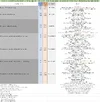
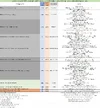
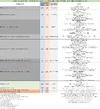
The following information was gathered during my power consumption tests. These tests focus on the four parking mode combinations available with the S1-QHD [see above]. For the tests that involve the use of the interior camera [3CH with interior camera plugged into the front camera] it has two power consumption values. One is for daytime which means the IR LEDs will be off and the other is for nighttime when the IR LEDs will be used.

3-Channel / Parking Mode: Interior Camera = On

[click on thumbnail image to see full size image]
1781543839699.webp

3-Channel / Parking Mode: Interior Camera = Off

Since you can configure whether to use the interior camera while in parking mode, this set of tests were performed with the interior camera turned off in parking mode.

[click on thumbnail image to see full size image]
1781543993722.webp

2-Channel : Front + Rear Cameras

[click on thumbnail image to see full size image]
1781544103104.webp

1-Channel : Front Camera

[click on thumbnail image to see full size image]
1781544172940.webp
 
Last edited:
1.) What processor / chipset does S1-QHD use?
2.) Does S1-QHD use same lens as S1-4K?
3.) Does S1-QHD & S1-4K have identical FOV?
4.) Is the REAR camera identical to S1-4K?
5.) Is REAR camera night time HDR performance any better than S1-4K?
6.) Is the IR Interior camera identical to S1-4K?
7.) What is Maximum Bitrate, (1CH, 2CH, 3CH)?
8.) Is the GPS mount identical to S1-4K?
9.) What is USD MSRP difference between S1-QHD & S1-4K?
10.) Does S1-QHD have anything S1-4K doesn’t?
11.) Does 60fps capture license plates any better than 30fps, (daytime)?
12.) What is the heat signature difference between S1-QHD & S1-4K in parking mode measured with Thermal Camera?
13.) Is audio volume level identical to S1-4K?
14.) What is Wi-Fi download speed for transferring clips to smartphone?
 
This VS 4K model, do the lesser resolution translate to a higher bitrate ?
I would hope it was same hardware as 4K model, but then just pushed harder.

I think 1440p is what i would be looking for, thinking it is plenty for EURO plates
 
1.) What processor / chipset does S1-QHD use?
I have not been given that information from NC&/VUEROiD.

2.) Does S1-QHD use same lens as S1-4K?
3.) Does S1-QHD & S1-4K have identical FOV?
The S1-4K and S1-QHD have different FOV values:

S1-4K FOV 151 degrees
S1-QHD FOV 160 degrees

Due to the S1-4K and S1-QHD front camera lenses having a different FOV, there is a dash camera model specific CPL filter for each of them.

4.) Is the REAR camera identical to S1-4K?
Yes

5.) Is REAR camera night time HDR performance any better than S1-4K?
I've not observed any noticeable difference.

6.) Is the IR Interior camera identical to S1-4K?
Yes

7.) What is Maximum Bitrate, (1CH, 2CH, 3CH)?
My power consumption tests have the bitrate setting set to the "High" setting which is the highest available level. The video bitrate values are listed in my power consumption spreadsheet "Notes" section.

The bitrates in my spreadsheet are with pre-release firmware 0.7.16. I just reviewed video files created with production firmware v1.0.2 and the bitrates look to be the same as with firmware 0.7.16.

S1-QHD 3CH: 22.00 Mbps (F) + 22.00 Mbps (R) + 15.00 Mbps (I)
S1-QHD 2CH: 22.00 Mbps (F) + 22.00 Mbps (R)
S1-QHD 1CH: 22.00 Mbps (F)

S1-4K 3CH: 48.00 Mbps (F) + 22.00 Mbps (R) + 15.00 Mbps (I)
S1-4K 2CH: 48.00 Mbps (F) + 22.00 Mbps (R)

8.) Is the GPS mount identical to S1-4K?
Yes

9.) What is USD MSRP difference between S1-QHD & S1-4K?
That will vary based on whether the units have an active discount/sale.

Right now, the Vueroid website has an active sale for both the S1-4K and S1-QHD dash cameras. Price does not include a memory card nor the optional fuse tap kit.

S1-QHD 3CH $280 USD [10% Off]
S1-QHD 2CH $240 USD [14% Off]

S1-4K 3CH $400 USD [20% Off]
S1-4K 2CH $350 USD [19% Off]
S1-4K 1CH $280 USD [20% Off]

10.) Does S1-QHD have anything S1-4K doesn’t?
The S1-QHD firmware has some new features [ELPM Hybrid mode for example]. The S1-4K firmware was recently updated so those same features are making their way into the S1-4K firmware as well.

11.) Does 60fps capture license plates any better than 30fps, (daytime)?
I don't actively test 60 fps any longer since it has never made a meaningful difference in the video quality for the dash cameras I have tested in the past. It's certainly something that can be tested at a later date.

12.) What is the heat signature difference between S1-QHD & S1-4K in parking mode measured with Thermal Camera?
I have not measured the heat signature of the two dash camera models. Measuring the temperature of the dash camera case has proven to be insufficient in proving the performance or stability of various dash cameras. I have encountered some dash cameras with cooler case temps that are less reliable than others that have higher case temps. This can be tested if needed at a later date.

13.) Is audio volume level identical to S1-4K?
Based on my quick comparison, the audio recording level is the same.

14.) What is Wi-Fi download speed for transferring clips to smartphone?
I have not performed a timed download test recently for this dash camera. I had some data on this several months ago, but I apparently did not include this in my main testing notes.


This VS 4K model, do the lesser resolution translate to a higher bitrate ?
I would hope it was same hardware as 4K model, but then just pushed harder.

I think 1440p is what i would be looking for, thinking it is plenty for EURO plates
The internal H/W is totally different with S1 4K. The bitrate is lower than S1 4K
 
I don't actively test 60 fps any longer since it has never made a meaningful difference in the video quality for the dash cameras I have tested in the past. It's certainly something that can be tested at a later date.
Agree.
Ever since we did that side by side test with original A329 2CH (2024) I don’t think 60fps is ever going to capture plates any better during daytime.
However, I still think it’s important to have as a customer option, because it forces the manufacturer to build a beefier / more powerful camera.
So even if the customer never selects 60fps they still benefit from the extra headspace / horsepower, additional cooling, increased durability / reliability.
I’m still bummed A119M Pro did not get 4K60fps.
I’m guessing because the physical case size is so small there is a limit to how much heat it can dissipate, and I bet 60fps would cause overheating malfunctions so it’s understandable.
I have not measured the heat signature of the two dash camera models. Measuring the temperature of the dash camera case has proven to be insufficient in proving the performance or stability of various dash cameras. I have encountered some dash cameras with cooler case temps that are less reliable than others that have higher case temps. This can be tested if needed at a later date.
Agree.
I was just wondering if S1-QHD runs cooler than S1-4K because we have a member here from Saudi Arabia whose main concern is overheating during parking mode.
 
12.) What is the heat signature difference between S1-QHD & S1-4K in parking mode measured with Thermal Camera?
I have not measured the heat signature of the two dash camera models. Measuring the temperature of the dash camera case has proven to be insufficient in proving the performance or stability of various dash cameras.
The S1 records the internal temperature at specific events (e.g. boot, transition to parking mode, shutdown etc). It may be possible to place an S1 QHD and S1 4K in the same vehicle and compare temperatures logged by each dashcam.

That may not tell the whole story though, because one dashcam may be able to continue operating at a certain temperature whilst the other may shut down to protect itself.

@qusejr2 are the durashift trigger values the same for the S1-QHD and the S1-4K?
 
I wonder why you ask it ? novatek NT98529
Basic specification.
When car shopping, do you not ask what kind of engine?
In past years Thinkware & BlackVue did not have HDR because they did not use Novatek.
You should be proud to show your high quality component specifications to show customers the difference between all the counterfeit / junk on the market.

All counterfeit / junk dashcam brands "never" disclose component specifications because they know they are old & low quality.
Here is a perfect example.
It says 4K with IMX675


Attachments

  • Screenshot 2026-06-16 5.22.18 AM.webp
    Screenshot 2026-06-16 5.22.18 AM.webp
    129.1 KB · Views: 14
The S1 records the internal temperature at specific events (e.g. boot, transition to parking mode, shutdown etc). It may be possible to place an S1 QHD and S1 4K in the same vehicle and compare temperatures logged by each dashcam.

That may not tell the whole story though, because one dashcam may be able to continue operating at a certain temperature whilst the other may shut down to protect itself.

@qusejr2 are the durashift trigger values the same for the S1-QHD and the S1-4K?
Yes, that was the point of my question.
Based on past testing 2K runs "cooler" than 4K.
So a 2K dash cam may continue to operate in parking mode versus a 4K camera in extreme Saudi Arabia heat.

Now that you mention it I forgot to ask if S1-QHD & S1-4K use identical heat sink.
Back when A229 Pro 4K & A229 Plus 2K were released that was a question from members.
So I took them apart, and photographed they used identical heat sinks.

@qusejr2 Does S1-QHD & S1-4K use identical HEAT SINK?
 
The S1 records the internal temperature at specific events (e.g. boot, transition to parking mode, shutdown etc). It may be possible to place an S1 QHD and S1 4K in the same vehicle and compare temperatures logged by each dashcam.

That may not tell the whole story though, because one dashcam may be able to continue operating at a certain temperature whilst the other may shut down to protect itself.

@qusejr2 are the durashift trigger values the same for the S1-QHD and the S1-4K?
@qusejr2 Does S1-QHD & S1-4K use identical HEAT SINK? => you can think it's is same. S1 QHD is more strong than S1 4k regarding heat resistance. c
 
Yes, that was the point of my question.
Based on past testing 2K runs "cooler" than 4K.
So a 2K dash cam may continue to operate in parking mode versus a 4K camera in extreme Saudi Arabia heat.

Now that you mention it I forgot to ask if S1-QHD & S1-4K use identical heat sink.
Back when A229 Pro 4K & A229 Plus 2K were released that was a question from members.
So I took them apart, and photographed they used identical heat sinks.

@qusejr2 Does S1-QHD & S1-4K use identical HEAT SINK?
@qusejr2 Does S1-QHD & S1-4K use identical HEAT SINK? you can think it's same .
 
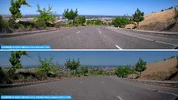
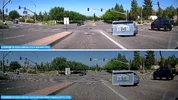
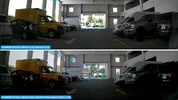
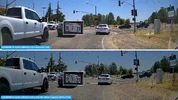
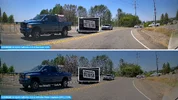
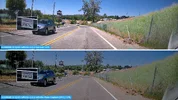
Here are some daytime S1-QHD front camera frame grabs along with plate captures with firmware v1.0.2 installed. The image on the top 1/2 is from the S1-QHD with its "Video Enhancing" mode set to "Normal". The image on the bottom 1/2 is from the S1-QHD with its "Video Enhancing" setting set to "Infinite Plate Capture" [IPC]. The horizon alignment is set to about 60% sky / 40% ground using the VUEROiD HUB app alignment bar/band.

The "Normal" video enhancing mode tends to capture plates a bit better than the IPC video enhancing mode during the day. This suggests that using the "IPC/HDR Timer" feature would be helpful to enable IPC or HDR only during nighttime hours.

I have nighttime S1-QHD footage, but it was created with a pre-production firmware installed. I will be gathering some nighttime footage over the next week with firmware v1.0.3 installed.

01_20260522_102_normal_vs_ipc.webp02_20260522_102_normal_vs_ipc.webp03_20260522_102_normal_vs_ipc.webp04_20260522_102_normal_vs_ipc.webp05_20260522_102_normal_vs_ipc.webp
06_20260522_102_normal_vs_ipc.webp07_20260522_102_normal_vs_ipc.webp08_20260522_102_normal_vs_ipc.webp09_20260522_102_normal_vs_ipc.webp10_20260522_102_normal_vs_ipc.webp
 
Last edited:
Hello,
thank you for this deep review.

I receive mine a couple of weeks ago (3chanels QHD with extended interior camera cable), i mainly uses it for parking recording feature and I am still trying to get the correct setup.
As stated before, it comes with a hardwire kit in order to connect it to the car's battery, that's what I planned to do anyway so I don't mind not having the OBD.

In motion detection set to "low" it seems that the camera will record only if something happens quite close and in the middle of the "screen". Mine is set a bit too much upward at the moment and it misses car parking behind mine.
The view angle of all the 3 sensor is large enough for capturing eveyrhing, including the interior camera that I put in the back of the car and allow to see through all the windows clearly.
Regarding plate capture, it does perfectly the job I bought it for, when a car is passing by at arround 50km/h the plate is readable everytime.
The impact detection is not sensible enough in my point of view, even set as the highest sensibilty possible, you need quite a strong hit for the dashcam to record.
Current temperature outside is quite high, reaching about 40+°C in the car and under the sunlight, the camera is turning off to prevent overheating. But it also turns back on automatically when the internal temperature allows it, which is great.

I use wifi to access and retrieve the video, its a bit clunky. The wifi takes a long time to connect, sometimes the app crashes when I try to look at other cam than front one. You can't dowload more than 4 videos at once and it takes about 1 min to download each of the 30s QHD mp4 video. I got a good phone and I doubt that's the bottleneck.
App translation is not optimal neither but it is correct, as long as you stick to english ...
 
Hello,
thank you for this deep review.

I receive mine a couple of weeks ago (3chanels QHD with extended interior camera cable), i mainly uses it for parking recording feature and I am still trying to get the correct setup.
As stated before, it comes with a hardwire kit in order to connect it to the car's battery, that's what I planned to do anyway so I don't mind not having the OBD.

In motion detection set to "low" it seems that the camera will record only if something happens quite close and in the middle of the "screen". Mine is set a bit too much upward at the moment and it misses car parking behind mine.
The view angle of all the 3 sensor is large enough for capturing eveyrhing, including the interior camera that I put in the back of the car and allow to see through all the windows clearly.
Regarding plate capture, it does perfectly the job I bought it for, when a car is passing by at arround 50km/h the plate is readable everytime.
The impact detection is not sensible enough in my point of view, even set as the highest sensibilty possible, you need quite a strong hit for the dashcam to record.
Current temperature outside is quite high, reaching about 40+°C in the car and under the sunlight, the camera is turning off to prevent overheating. But it also turns back on automatically when the internal temperature allows it, which is great.

I use wifi to access and retrieve the video, its a bit clunky. The wifi takes a long time to connect, sometimes the app crashes when I try to look at other cam than front one. You can't dowload more than 4 videos at once and it takes about 1 min to download each of the 30s QHD mp4 video. I got a good phone and I doubt that's the bottleneck.
App translation is not optimal neither but it is correct, as long as you stick to english ...
Hi there,

Thanks for picking up the Vueroid S1 QHD and sharing your thoughts! I'm absolutely thrilled to see such a detailed review.

It sounds like you felt the impact event detection was a bit lacking.
Just to clarify, we didn't run this test ourselves, and it’s completely non-sponsored. We’re sharing it because it looks like a pretty objective test. We’re curious—are you saying your S1 QHD doesn’t trigger a response even at the impact levels shown in this clip? Let us know, and we’ll definitely look into it for you.

On the temperature side, the Vueroid S1 QHD sometimes goes into Extreme Low Power Mode (ELPM) when it gets too hot. VUEROID named it "Durashift". Like you noticed, once it cools down after a while, it goes right back to normal. But just so you know, if an impact happens while it's in ELPM (it’s not actually dead/turned off), the S1 QHD will wake up no matter the temperature and record the event. After that, it stays in Motion Parking mode for a bit, and if nothing else moves, it drops back into ELPM to keep monitoring the internal temperature. Of course, if it has already cooled down by then, it’ll just go back to its regular mode.

We’ll run an internal check on the app crashing issue you mentioned. By the way, capping the video downloads at 4 at a time was actually a deliberate design choice on our end.
Could you roll over your smartphone model and OS version for the Vueroid HUB app?

Also, if you have any notes or feedback on the app translation, we’d love to hear them! We can bake those changes into the next update or roll them out with our upcoming new products.

You can also just shoot me a DM if that’s easier.
Have a good day~
 
Back
Top