
l4zza
New Member
So, I did a thing, after looking for a while at a rear-view camera for the van (a la Polestar 4) following some research I decided on the Wolfbox G900 Pro. I ordered it and it was promptly delivered.
A couple of days was spent loitering around various forums looking for installation tips and I had noticed that Wolfbox was offering further demo units for evaluation. A quick email to them and hey presto! Another unit was winging its way to me.
I must say that the customer service from them was exceptional when returning the original unit. I was kept in the loop at all times and a full refund was given.
Any how, to the best bit, the install.
My main goal was to have as near to an OEM look as possible, and I would say that it is very well packaged. Starting with the unpackaging of the individual items, everything felt nicely built and the components had a premium feel to them.
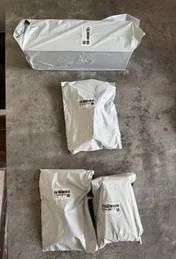

Unboxing the unit, you will be greeted with an insert with a diagram of the mirror and all its connections - very helpful. Also, all internal boxes are nicely labelled with graphics showing what’s in each box. The display (it’s a biggun!) itself felt solid and looked the part.
For the install, I actually worked from the back of the vehicle to the front and installed the rear view camera first. Following some pointers from the very knowledgeable forumites, the location of the camera and the wiring install should be a breeze and I had decided on attaching the camera to the number plate light housing.
What a pain, but this was no fault of Wolfbox. Feeding the wires through from the door into the side panel via the door cable grommet should haver been easy given that I had a dedicated draw line. But this proved to be tricky and frustrating in equal measure, but after a while of cursing and sweating, eventually the cable was installed and the rear view camera was mounted.
I proceeded to install the cable behind panels until I had it at the A pillar, then I moved onto the camera install.
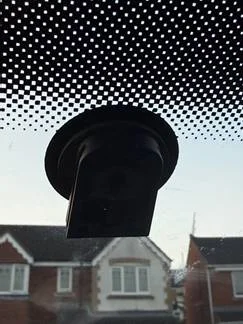
I had the mounting attachment already applied to my windscreen for a VW mirror and was keen to utilise this feature to enable the required OEM look. Following further reading of some of the installs I realised I required an adapter to attach the Wolfbox arm to the windscreen.
To mount a Wolfbox mirror dash cam directly to my VW T5.1's windscreen, I needed the ASP mirror mount 03. This was a wedge shaped mount that fitted over the VW applied mount and allowed the Wolfbox arm to slide over it.
https://www.steel-mate.co.uk/product/mirror-monitor-mount-03/
All in all, a solid solution that enabled the Wolfbox arm to interface directly with the VW mount. It does exactly what I needed it to do, utilise the Wolfbox display as a rear view camera and an OEM look.
The wiring was relatively simple, I used two of the supplied piggy back fuses to tap into a permanent and ignition feed. Again, browsing some of the installs gave me some pointers.
All the wiring was fed around the A pillar and tucked in the head lining and then connected to the display. I decided to site the GPS antenna on the left hand side (just beside the front speaker grill) and also fed this wire to the display. I bought some USB C right angled adapters to keep the plugs into the display unit as low profile as possible. A small touch but improves the look I think.

How is the G900 TriPro as a dash cam?
I’ve had the chance to use the G900 on a recent trip to Cornwall and it suits my requirements perfectly. The dash cam portion works very well and captures forward video in decent 4K clarity. The rear-view camera also captures decent video. The rear-view function does take it a step further by allowing you to tap into a reverse signal to force the rear-view mirror to display the rear camera with parking lane lines. This is helpful for backing up, although the parking lane lines don’t feel as integrated as the stock back up camera. You can change the lines in only 3 positions – high, mid, and low. I think Wolfbox could make these lines more adjustable, perhaps with the ability to adjust width and more height adjustment, to make the parking lines more helpful and in sync with the vehicle.
Video playback in day and night are pretty clear due to the Sony Starvis sensors. There are situations in which each is superior to the other. The Wolfbox camera feed has great clarity and the rear camera has decent 2K quality video feed, but a lot will depend on where the camera is mounted. For both views, I would personally like a wider field of view, but these cameras do what is intended and get enough of the picture (or video) should you need it. The one positive about not having a wider field of view is less distortion, especially at the edge of frame.
In summary, pros
• 2 available views right on the display in front of you, can choose either single view, or show both
• Flexible placement for the rear camera
• Parking mode
• Camera views have great clarity
• Easy installation, and pretty much everything needed is included depending on mounting method
• All-in-one dash camera
• Settings and adjustments can be made on the mirror screen instead of through an app on your mobile device
• User interface is very intuitive making menu navigation easy to manipulate and adjust on the fly
• Can tap into reverse light signal to enable back-up mode with parking aid lines
• GPS captures speed, location, date and time
• Voice commands - pretty basic but useful
• Screen capture
• Excellent build quality
Cons
• Partial blocked view when drivers visor is down
• Quite a bit of reflective glare over the mirror screen making video feed difficult to see. Adjusting brightness mitigates the issue somewhat but takes a lot of getting used to. I will purchase the anti glare screen to see if this improves matters.
• Rear-view mirror height is much narrower than the actual video feed. But you can scroll up and down to adjust what you see. Basically, the camera is capturing more than you can see on the mirrors screen.
Final Verdict
I was very eager to try out a dash camera that could be used as a rear view camera. I wanted a 2-channel setup with 4K front camera. I also needed something easy to mount to a VW T5 window adhesive mount to give an OEM look. The Wolfbox G900 Pro checked all the boxes and gave a few extras I was not looking for. It has 4K and settings can be done on the mirror’s touchscreen, and I found the user interface to be exceptional. The dash cam video is excellent, and I think it will work well in the event of any insurance disputes. I will say I like the video feed vs a regular rear-view mirror and the high resolution makes it very good for seeing details on things that are very close to you.
10/10 from me!!
A couple of days was spent loitering around various forums looking for installation tips and I had noticed that Wolfbox was offering further demo units for evaluation. A quick email to them and hey presto! Another unit was winging its way to me.
I must say that the customer service from them was exceptional when returning the original unit. I was kept in the loop at all times and a full refund was given.
Any how, to the best bit, the install.
My main goal was to have as near to an OEM look as possible, and I would say that it is very well packaged. Starting with the unpackaging of the individual items, everything felt nicely built and the components had a premium feel to them.
Unboxing the unit, you will be greeted with an insert with a diagram of the mirror and all its connections - very helpful. Also, all internal boxes are nicely labelled with graphics showing what’s in each box. The display (it’s a biggun!) itself felt solid and looked the part.
For the install, I actually worked from the back of the vehicle to the front and installed the rear view camera first. Following some pointers from the very knowledgeable forumites, the location of the camera and the wiring install should be a breeze and I had decided on attaching the camera to the number plate light housing.
What a pain, but this was no fault of Wolfbox. Feeding the wires through from the door into the side panel via the door cable grommet should haver been easy given that I had a dedicated draw line. But this proved to be tricky and frustrating in equal measure, but after a while of cursing and sweating, eventually the cable was installed and the rear view camera was mounted.
I proceeded to install the cable behind panels until I had it at the A pillar, then I moved onto the camera install.
I had the mounting attachment already applied to my windscreen for a VW mirror and was keen to utilise this feature to enable the required OEM look. Following further reading of some of the installs I realised I required an adapter to attach the Wolfbox arm to the windscreen.
To mount a Wolfbox mirror dash cam directly to my VW T5.1's windscreen, I needed the ASP mirror mount 03. This was a wedge shaped mount that fitted over the VW applied mount and allowed the Wolfbox arm to slide over it.
https://www.steel-mate.co.uk/product/mirror-monitor-mount-03/
All in all, a solid solution that enabled the Wolfbox arm to interface directly with the VW mount. It does exactly what I needed it to do, utilise the Wolfbox display as a rear view camera and an OEM look.
The wiring was relatively simple, I used two of the supplied piggy back fuses to tap into a permanent and ignition feed. Again, browsing some of the installs gave me some pointers.
All the wiring was fed around the A pillar and tucked in the head lining and then connected to the display. I decided to site the GPS antenna on the left hand side (just beside the front speaker grill) and also fed this wire to the display. I bought some USB C right angled adapters to keep the plugs into the display unit as low profile as possible. A small touch but improves the look I think.
How is the G900 TriPro as a dash cam?
I’ve had the chance to use the G900 on a recent trip to Cornwall and it suits my requirements perfectly. The dash cam portion works very well and captures forward video in decent 4K clarity. The rear-view camera also captures decent video. The rear-view function does take it a step further by allowing you to tap into a reverse signal to force the rear-view mirror to display the rear camera with parking lane lines. This is helpful for backing up, although the parking lane lines don’t feel as integrated as the stock back up camera. You can change the lines in only 3 positions – high, mid, and low. I think Wolfbox could make these lines more adjustable, perhaps with the ability to adjust width and more height adjustment, to make the parking lines more helpful and in sync with the vehicle.
Video playback in day and night are pretty clear due to the Sony Starvis sensors. There are situations in which each is superior to the other. The Wolfbox camera feed has great clarity and the rear camera has decent 2K quality video feed, but a lot will depend on where the camera is mounted. For both views, I would personally like a wider field of view, but these cameras do what is intended and get enough of the picture (or video) should you need it. The one positive about not having a wider field of view is less distortion, especially at the edge of frame.
In summary, pros
• 2 available views right on the display in front of you, can choose either single view, or show both
• Flexible placement for the rear camera
• Parking mode
• Camera views have great clarity
• Easy installation, and pretty much everything needed is included depending on mounting method
• All-in-one dash camera
• Settings and adjustments can be made on the mirror screen instead of through an app on your mobile device
• User interface is very intuitive making menu navigation easy to manipulate and adjust on the fly
• Can tap into reverse light signal to enable back-up mode with parking aid lines
• GPS captures speed, location, date and time
• Voice commands - pretty basic but useful
• Screen capture
• Excellent build quality
Cons
• Partial blocked view when drivers visor is down
• Quite a bit of reflective glare over the mirror screen making video feed difficult to see. Adjusting brightness mitigates the issue somewhat but takes a lot of getting used to. I will purchase the anti glare screen to see if this improves matters.
• Rear-view mirror height is much narrower than the actual video feed. But you can scroll up and down to adjust what you see. Basically, the camera is capturing more than you can see on the mirrors screen.
Final Verdict
I was very eager to try out a dash camera that could be used as a rear view camera. I wanted a 2-channel setup with 4K front camera. I also needed something easy to mount to a VW T5 window adhesive mount to give an OEM look. The Wolfbox G900 Pro checked all the boxes and gave a few extras I was not looking for. It has 4K and settings can be done on the mirror’s touchscreen, and I found the user interface to be exceptional. The dash cam video is excellent, and I think it will work well in the event of any insurance disputes. I will say I like the video feed vs a regular rear-view mirror and the high resolution makes it very good for seeing details on things that are very close to you.
10/10 from me!!
