A329S Test & Review PP

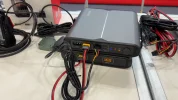
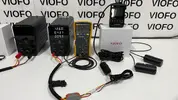
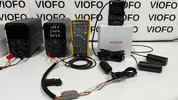
What is the big grey battery pack looking block in bottom left of your test rig?
It has Viofo logo on it. I didn't think Viofo do their own battery packs?
(Just curious)

1000059885.webp


Apologies for veering a bit off topic, but curious--what is the capacity of the primary and secondary Viofo battery? Are they essentially aligned with the other existing 7500mah options (Blackvue, Powercell, 70mai and Thinkware)? Are there any compelling features that differentiates them from the other options or perhaps features specific to when powering Viofo cams?
 
Night Time Focus Check

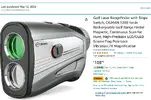
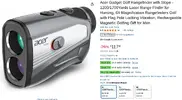
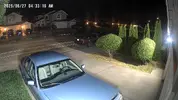
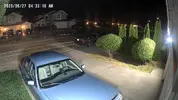
The test rig is 28 Meters from CA Plate # 7NKC927 measured with my trusty CIGMAN CT-1000 laser rangefinder, (now ACER Gadget).
The most prominent lighting source is my two LED porch lights on either side of my 20’ x 20’ garage, (2,500 lumen each / 5,000K color temp, $20 at Costco).
You can actually see the porch lights with the IR Interior Fisheye.
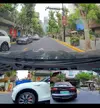
After looking at all ten video files I don’t spot any focus issues, and the biggest standout is the improvement of the new RTC400 telephoto over the older RTC300 Telephoto.
I wasn’t expecting improvement in image quality because they both have the same Image Sensor, Lens, Focal Length, Optical Zoom, FOV, but I’ll take it.
The only difference is the new processor.

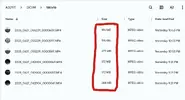
A quick word on the difference of Bitrate & 1 Minute Files Sizes of the 10 cameras;
54 Mbps - 384MB Front A329S 3CH
54 Mbps - 384MB Front A329T 3CH
60 Mbps - 430MB Front A229 Pro 2CH
66 Mbps - 472MB Front A329 2CH

24 Mbps - 172MB Rear A329S 3CH
24 Mbps - 172MB Rear A329T 3CH (waterproof)
27 Mbps - 196MB Rear A329 2CH

24 Mbps - 172MB Telephoto A329T 3CH
24 Mbps - 174MB Telephoto A229 Pro 2CH
24 Mbps - 172MB IR Interior Fisheye A329S 3CH

A229 Pro RTC300 Telephoto

3.) RTC300 Telephoto .webp


A329T RTC400 Telephoto

4.) RTC400 Telephoto .webp


Here’s 1 Minute clips from each camera;


Next post is daytime focus check.
 

Attachments

  • CIGMAN C-1000 .webp
    CIGMAN C-1000 .webp
    83.5 KB · Views: 137
  • ACER Gadget .webp
    ACER Gadget .webp
    151.2 KB · Views: 149
  • 1.) 28 Meters Downrange .webp
    1.) 28 Meters Downrange .webp
    282.8 KB · Views: 131
  • 2.) Test Rig Location .webp
    2.) Test Rig Location .webp
    280.5 KB · Views: 140
  • Like
Reactions: gse
What is the big grey battery pack looking block in bottom left of your test rig?
It has Viofo logo on it. I didn't think Viofo do their own battery packs?
(Just curious)
Apologies for veering a bit off topic, but curious--what is the capacity of the primary and secondary Viofo battery? Are they essentially aligned with the other existing 7500mah options (Blackvue, Powercell, 70mai and Thinkware)? Are there any compelling features that differentiates them from the other options or perhaps features specific to when powering Viofo cams?
We got a sneak peak at SEMA 2024.
I would love to talk your guys' ears off about it but, unfortunately all test data & specifics is confidential.
No official release date but "very soon".
Yes, and yes.

 
Quick question.. are you able to hit 95-100 MB/s in 1CH mode? I'm seeing 65 Mb on the current fw. Not sure about previous/beta fw's.

Also thanks for the clip walking through the SEMA floor and seeing all the vendors and people. Makes me feel a longing to go back, lol.
 
Quick question.. are you able to hit 95-100 MB/s in 1CH mode? I'm seeing 65 Mb on the current fw. Not sure about previous/beta fw's.
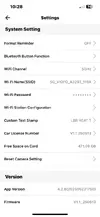
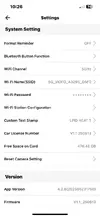
Best I can do is 638MB for 1 Minute.
638 ÷ 7.17 = approximately 89 Mbps.
See attached screenshots.
That’s disappointing because the A329 does 700MB for 97.5 Mbps
I think these elevated Bitrates are only available in 60fps mode.
Also thanks for the clip walking through the SEMA floor and seeing all the vendors and people. Makes me feel a longing to go back, lol.
That video was the beginning of the “interview” with Bill.
I’m PM you the rest of the chat.
 

Attachments

  • 1 .webp
    1 .webp
    25.8 KB · Views: 124
  • 2 .webp
    2 .webp
    61.1 KB · Views: 119
I’m going over my Day Time Focus Check footage, and it looks like either the extra light, or turning HDR Off gives a bump in Bitate.
See attached screenshot.

Night Time HDR On;
54 Mbps - 384MB Front A329T 3CH
24 Mbps - 172MB Rear A329T 3CH (waterproof)
24 Mbps - 172MB Telephoto A329T 3CH
102 Mbps - 728MB (total)

Daytime HDR Off;
66 Mbps - 472MB Front A329T 3CH
27 Mbps - 196MB Rear A329T 3CH (waterproof)
27 Mbps - 196MB Telephoto A329T 3CH
120 Mbps - 864MB (total)
 

Attachments

  • What A Difference A Day Makes .webp
    What A Difference A Day Makes .webp
    71.8 KB · Views: 135
Best I can do is 638MB for 1 Minute.
638 ÷ 7.17 = approximately 89 Mbps.
See attached screenshots.
That’s disappointing because the A329 does 700MB for 97.5 Mbps
I think these elevated Bitrates are only available in 60fps mode.
Oh maybe it's only 60 fps. Once Viofo fixes the bug in the A329S so that 60 fps is truly 60 fps, we can check again.

Also to check bitrate, I've been using quicktime. It shows me the bitrate directly without having to do any math based off the file size. You can use it to open a video, then show the movie inspector, and you'll see something like this:

Screenshot 2025-06-27 at 5.56.56 PM.webp

Under data rate, it says 65.35 Mbit/s. This is with a 1CH 4K30 clip at max bitrate.
 
I have a VIOFO A329S 3CH installed in my car, connected to a dedicated 7500 mAh power bank, along with the Hardwire Kit ACC USB-C (HK4-C). Everything works well — when the engine is turned off, the power bank takes over powering the dashcam, and it recharges while the car is being driven.

That brings me to my question: the "parking mode" settings offer many options, and since this is my first dashcam, I’m not quite sure which ones to choose.
My main priorities are to maximize the power supply duration for the A329S, enable reliable event detection, and ensure video recording in various lighting conditions.

Can anyone guide me on the best settings to meet these needs? Or perhaps there are features I’m unaware of that I should consider. Thank you in advance for your help.
 
I have a VIOFO A329S 3CH installed in my car, connected to a dedicated 7500 mAh power bank, along with the Hardwire Kit ACC USB-C (HK4-C). Everything works well — when the engine is turned off, the power bank takes over powering the dashcam, and it recharges while the car is being driven.

That brings me to my question: the "parking mode" settings offer many options, and since this is my first dashcam, I’m not quite sure which ones to choose.
My main priorities are to maximize the power supply duration for the A329S, enable reliable event detection, and ensure video recording in various lighting conditions.

Can anyone guide me on the best settings to meet these needs? Or perhaps there are features I’m unaware of that I should consider. Thank you in advance for your help.
Hello, and welcome to the club.
Congrats on your A329S 3CH.
Myself, and others here are 100% dedicated to helping you get the most out of your dash cam.
However, your post is misplaced in this specific thread.
This thread is for my testing & review of the A329S.
If you could please start a new thread to address your questions we’ll all be happy to help.
I would suggest calling the thread; “A329S 3CH Best Parking Mode Settings With Battery Pack”
Also let us know what remote cameras you have just to clarify, (Rear & IR Interior Fisheye).
Once you start the thread I’ll be right over with some suggestions to get you started.
Thanks for stopping in.
-Chuck
 
Thank you for pointing it out to me. I’ll start a new thread right away! Thank you!
 
Last edited:
Thank you for pointing it out to me. I’ll start a new thread right away! Thank you!
Right on here you go;
 
Daytime Focus Check
The test rig is 28 Meters from CA Plate # 7NKC927 measured with my trusty CIGMAN CT-1000 laser rangefinder, (now ACER Gadget).
This was filmed 8 minutes after sunrise, (not ideal).
So far I don’t see any issues.
A quick word on the difference of Bitrate & 1 Minute Files Sizes of the 10 cameras, (HDR Off for daytime, HDR was On for night time);

60 Mbps - 430MB Front A229 Pro 2CH
66 Mbps - 472MB Front A329 2CH
66 Mbps - 472MB Front A329S 3CH
66 Mbps - 472MB Front A329T 3CH

27 Mbps - 196MB Rear A329 2CH
27 Mbps - 196MB Rear A329S 3CH
27 Mbps - 196MB Rear A329T 3CH (waterproof)

24 Mbps - 174MB Telephoto A229 Pro 2CH
27 Mbps - 196MB Telephoto A329T 3CH
27 Mbps - 196MB IR Interior Fisheye A329S 3CH

Here’s 1 Minute clips from each camera;


Attachments

  • 3.) Filmed 8 Minutes After Sunrise .webp
    3.) Filmed 8 Minutes After Sunrise .webp
    55.1 KB · Views: 143
  • 1.) 28 Meters Downrange .webp
    1.) 28 Meters Downrange .webp
    282.8 KB · Views: 136
  • 2.) Test Rig Location .webp
    2.) Test Rig Location .webp
    280.5 KB · Views: 116
LPID vs. LBR - Heat Comparison
(low bitrate parking mode vs. low power impact detection parking mode)

By now we all know LPID uses less power than previous parking modes.
What I’ve been wanting to know is exactly how much less HEAT does it generate.
Driving down the road widows down, A/C blowing I’ve never has a dash cam overheat, and shut down.
But we’re all familiar reading about someone’s dash cam overheating, and shutting down in parking mode on a hot day.
And don’t use sunshades according to @Mtz it will bake the camera to death.

For this heat comparison I set up two “identical” A329S 3CH cameras as close as I could, (what I mean by that);
A329S 3CH (Rear & IR Interior Fisheye) with HK6
A329TW 3CH (Telephoto & Waterproof Rear) with HK4
Both cameras have default settings except;
A329S = LPID
A329TW = LBR
Both cameras have 512GB Viofo Brand SD Cards.
Both powered by “identical” power supplies.

I’ve only got one Fluke Meter, so I’m using my UNI-T 210E Pro Amp Clamp as a “better than nothing”.
We can see LPID when powered by HK6 fluctuates between 39mA - 40mA.
LBR on the other hand is the neighborhood of 430mA.
(LBR) 12.6V x 430mA = 5.4 Watts
(LPID) 12.6V x 40mA = 0.5 Watts

1.) Test Configuration .webp


I let the cameras acclimate to operating temperature by letting them bake for 1 hour in my garage.
Ambient temperature of my garage was 82℉ (28℃) 46% Humidity.
After 1 hour the hottest temperatures achieved measured with my TOPDON TC004 Thermal Imaging Camera;
144℉ (62℃) = LBR
94℉ (34℃) = LPID

1.) LBR Front .webp
2.) LPID Front .webp


3.) LBR Right Side .webp
4.) LPID Right Side .webp


5.) LBR Left Side .webp
6.) LPID Left Side .webp


It looks like LPID operates approximately 50℉ (28℃) degree cooler, (that sounds like a lot).
This should hopefully prevent overheating shutting downs on even the hottest days parked in direct sunlight.
Bravo Viofo!
Now if we could just get LPID power consumption down to Vueroid levels, and sub 1-Second wake up times that would be great. lol

Interesting side note for @Nigel & @rcg530
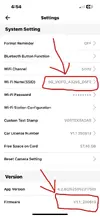
When the A329S (LPID) camera was “asleep” in LPID parking mode, I configured the A329TW (LBR), and when I powered it up it displayed on the LCD screen it paired to the HK6.
Even though the HK6 was physically plugged into the A329S, and the A329TW was plugged into the HK4.
I downloaded the last recorded file from the A329TW, and sure enough it displayed battery voltage in the text stamp at the bottom of recorded footage.
Is this a bug, or a feature, (see attached screenshot)?
Does this mean we can finally pair a single BTR200 Bluetooth Remote with multiple cameras simultaneously? lol
 

Attachments

  • 4.) Bluetooth Bleed Over .webp
    4.) Bluetooth Bleed Over .webp
    92.2 KB · Views: 127
  • 3.) A329TW Firmware .webp
    3.) A329TW Firmware .webp
    47.9 KB · Views: 127
  • 2.) A329S Firmware .webp
    2.) A329S Firmware .webp
    48.1 KB · Views: 121
Does this mean we can finally pair a single BTR200 Bluetooth Remote with multiple cameras simultaneously? lol
No, but you can pair multiple cameras with a single battery!

If you have front and rear A329, you presumably only need one HK6 (Does it have enough Bluetooth range?), and neither camera actually needs to be connected to it.

It would be nice if you could connect the cameras to any convenient USB socket, maybe the one provided by the car manufacturer on the back of the rear view mirror to minimise cabling and installation effort, and in hybrid parking mode they will still go into LPID when the battery gets low, as long as you have an HK6 somewhere in Bluetooth range.

From what rcg530 said, I assume that you can't plug them into any USB socket, they need the parking (ACC) signal to be active on the USB-C socket, so it must be a Viofo hardwire kit plug, until someone makes a dummy HWK adaptor for standard USB-C sockets...


Is this a bug, or a feature, (see attached screenshot)?
Seems like a useful feature to me!

Of course the low voltage cutoff might not work? What happens when you turn the HK6 off, does the A329TW power off? If not, you could consider that a bug... Viofo could get it to do so... waking up again might be more difficult...
 
use some tools
u can see any what u want
 

Attachments

  • Screenshot_20250629_055154.webp
    Screenshot_20250629_055154.webp
    85.4 KB · Views: 137
  • Screenshot_20250629_055227.webp
    Screenshot_20250629_055227.webp
    146.7 KB · Views: 151
  • Screenshot_20250629_055023.webp
    Screenshot_20250629_055023.webp
    69.5 KB · Views: 134
  • IMG_20250629_054538.webp
    IMG_20250629_054538.webp
    42.2 KB · Views: 138
Since I already had the camera set up I wanted to answer @TonyM question.
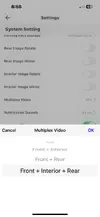
Q: Does Multiplex reduce LBR parking mode power consumption due to writing a single file, instead of three separate files?
A: Yes, and no.

A329S 3CH Rear & IR Interior Fisheye:
First I checked normal recording mode just because;
452mA @ 12.6V = 5.695 Watts - No Multiplex
442mA @ 12.6V = 5.569 Watts - Multiplex
10mA = 0.126 Watt REDUCTION

LBR parking mode;
426mA @ 12.6V = 5.3676 Watts - No Multiplex
428mA @ 12.6V = 5.3928 Watts - Multiplex
2mA = 0.0252 Watt INCREASE
 

Attachments

  • LBR 3CH With Multiplex .webp
    LBR 3CH With Multiplex .webp
    129.4 KB · Views: 120
  • LBR 3CH No Multiplex .webp
    LBR 3CH No Multiplex .webp
    131.1 KB · Views: 125
  • Multiplex .webp
    Multiplex .webp
    33 KB · Views: 128
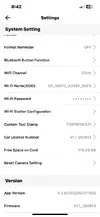
  • A329S Firmware .webp
    A329S Firmware .webp
    48.9 KB · Views: 124
Last edited:
A329S 3CH Rear & IR Interior Fisheye:
First I checked normal recording mode just because;
452mA @ 12.6V = 5.695 Watts - No Multiplex
442mA @ 12.6V = 5.569 Watts - Multiplex
10mA = 0.126 Watt REDUCTION
That is a 2.2% decrease, to make it a little easier to understand.

LBR parking mode;
426mA @ 12.6V = 5.3676 Watts - No Multiplex
428mA @ 12.6V = 5.3928 Watts - Multiplex
2mA = 0.0252 Watt INCREASE
That is a 0% increase.

But why the difference? Maybe the LBR Multiplex uses more bitrate than the No Multiplex, while the Normal Recording Multiplex uses less bitrate than the No Multiplex?

It would also be interesting to have figures for the 2 channel multiplex, since that does not decrease resolution, so there is no need for extra power for rescaling. The result probably isn't very interesting, but you never know until someone tries it!
 
Back
Top