Parking Battery-Power Station, 3X capacity and 3X cheaper than dedicated options + extra functionality

Yes, that was my logic too, but it all falls apart when you realize you have to carry that thing about 2 km every second day or so, or possibly each day depending on the load, and it gets tiring. If you can charge a big station at home, this isn’t a problem, but I can’t, so there are two solutions to this problem. Get a dashcam that consumes 0.1W power in parking mode and a dedicated battery, or keep carrying the bricks each day. I have spent a lot on various dashcams and power stations now and realized that option 1 seems to be the way to go for me. Sure, this EcoFlow 3 or Solix 300 DC isn't that big; of course, you could easily carry that in a backpack each day, but even the connecting and disconnecting gets annoying fast.
........................
You already have a Solix 300DC, which is far superior to any dedicated battery on the market.
So why not use it with a dascam that uses 0.1W when parked instead of paying a ton of money for a much less capable dedicated battery?
And if it comes down to it, you'll have to carry a dedicated battery 2km to charge, at least twice as often as the Solix, and you'll need some kind of third party charger for it.
Am I missing something?
I think the Solix 300DC after all the firmware updates and adding some extra features is as good as the River3 or even better.
I would be more confident if I got some user feedback on how it performs in high temperature conditions.

So far the River3 works flawlessly, with outside temps up to 35°C in my area (up to 55°C inside cabin when parked).
High temperature protection shuts off charging at 53°C, but the output ports continue to supply power to the dash cam.
 
Last edited:
I already have everything to be fair. Waiting for the HW cable only to finalize my setup. Then even 15 minutes charging a day should probably top it up and it also lasts a long time idling.

Now I think I have the best of the best for the dashcam to make it an install and forget thing.

I will still be using the Solix and River for the security camera but that's different because I have one of each and can carry it to my office once a week just upstairs from my car and not the full 2km distance.

I do have my stuff in my trunk where it only once reached 50°C+ because I messed up with the DC fans and didnt cover my windshield so made a cooking environment inside. Other than that, it stays under 40°C most of the time because the car is fully covered and only the back side triangle windows stay open where the Tapo C120 looks out through a heavily tinted window, so there is that.

I have never flashed the Solix before and dont know if they added anything useful. Right now mostly missing the remote shutdown funciton. Dont have it with me right now as its sitting in my car and running one Tapo camera just to test the longetivity.

The Ecoflow also lasted longer then it actually said it would. Replaced it with the Anker when it still had 45% left so I guess either of this 2 is ok to buy.
 
Ecoflow have just released to rival ankers solix 3000

On offer at the moment if your in the US
 
I've had a quick look at the Ecoflow TRAIL 200 and 300, the new DC-only power stations, and I have mixed feelings, or rather disappointment, mainly because they don't have app support, so we don't know the default settings, and I'm not sure if they can be changed.

They've improved the USB-C PD ports (couple of them), which now have 140W/100W input/output, but still retain the outdated legacy USB-A ports (no 18W USB-A QC 3.0 ports like the Solix).

On a positive side - they are really small in physical size and currently are much cheaper compare to Solix
 
I guess it's better than nothing if it's the only brand that is willing to ship to you officially. I will look up some trusted reviewers, but no app is just sad.
 
With the release of the Ecoflow Trail 200DC and 300DC, Anker has lowered its prices on Amazon US:
The Solix 200DC is now priced at $119.99, the same as the Trail 200DC.
The Solix 300DC is now priced $169.99 vs Trail 300DC is $159

I think the Solix got a "port memory" feature with firmware updates, but I haven't heard of a "power off" feature in the app.
 
Couldn't resist and bought Solix C200 DC for $119 from Amazon for overnight delivery.

On Temu it is actually only $99.49! but I didn't want to wait a week or so, and I like Amazon's return policy better.
And Solix C300 DC is only $133.25! - on Temu!
 
Updated firmware, then cycled 100%-0-100% and then tested Anker Solix C200 DC:
  • Useful capacity is 172.5Wh or 90% of the rated 192Wh - (very good)
  • Charging with USB-CPD (140W port) the initial charge speed was 138W, then somewhere in the middle of SoC it started to switch between 138W and 100W with final average charging speed 115W - (very good and same as most dedicated batteries)
  • The highest temperature in the app during charging was 45°C, however I measured at USB-C connection much higher at around 70°C - (OK, I guess)
  • Charging with XT-60 DC input port the charge speed was around 97W - (good)
  • Combining USB-CPD and XT60 DC port, the charge speed is up to 200W! - (very good)
  • -----------
  • USB-A port unloaded voltage is 5.1V, with 2.1A/10.3W load the voltage drops to 4.91V - (good and better than River 3, but it is not QC 3.0 spec as I thought) - (OK)
  • USB-C (15W) port works like USB-A port and does not require trigger.
  • USB-CPD (100W out) works with USB-C-15V cable similar to River3.
  • -----------
  • All ports auto activate with charging from turned off state, as long as Solix C200 DC has some remaining charge - (good)
  • But all ports will not activate if Solix C200 DC is completely discharged, requiring port cycling via unplugging and re-plugging the cable - (bad).
  • -----------
  • App is informative but very basic with no much adjustments – (OK)
  • No charging current adjustment (OK)
  • No option to turn it off remotely via the app (bad)
  • No 12V output and port memory (bad)
  • Physical size is really small - (very good)
Verdict - I think the Anker Solix C200 DC is OK - option as long as it doesn’t go completely flat at which point manual port recycling will be required.
Personally, I like the Ecoflow River 3 much better because it has more of the features needed for a good dash cam battery.
Edited 10/26/25, GPack
 
Last edited:
After several days of testing my U3000, I’m beginning to think I may not need a dashcam battery at all. The power consumption in radar mode is very low, and if the voltage cutoff via OBD2 works as intended, I may opt to install the largest car battery available at the next battery cycle, which is expected to occur next year. We’ll see, but for now I have had no trouble topping up the dashcam battery during my brief five-minute drives. However, I’m not sure if I should try it now because I have seen as low as 12.1 V on the battery via the Thinkware app. I may need to manually test the battery to verify whether this is accurate or not. It has a cutoff for sure but dunno if this actually works in radar mode.

However, this restricts you to radar mode or collision mode only, since running anything else on battery power alone isn’t advisable. I’m not confident relying on the built-in voltage protections.
 
Combining USB-CPD and XT60 DC port, the charge speed is up to 200W! - (very good)

How are you doing this ?
 
Do you think if I bought a usb-c splitter cable, could I have my camera on one, and use the other one to charge the ecoflow river 2 at the same time?
 
Im not sure what's going on, but i now have a little problem

I use my Anker Solix to charge my exoflow river 2 pro up via Ankers car output to XT60 using the ecoflow car cable

Has been working fine, until I switched the ecoflow to solar charging, so now my ecoflow charges at 150W when im driving.
But now the Anker solix won't charge the river 2.

I tried putting it back to car charging mode and it still won't charge

When I power on the Anker, it starts to charge then cuts off...

I haven't got another xt60 cable to try

Any ideas?
 
Im not sure what's going on, but i now have a little problem
I use my Anker Solix to charge my exoflow river 2 pro up via Ankers car output to XT60 using the ecoflow car cable
Has been working fine, until I switched the ecoflow to solar charging, so now my ecoflow charges at 150W when im driving.
But now the Anker solix won't charge the river 2.
I tried putting it back to car charging mode and it still won't charge
When I power on the Anker, it starts to charge then cuts off...
I haven't got another xt60 cable to try
Any ideas?
The River 2 Pro can draw up to 220W from the solar panel.
The Solix C300 DC can output up to 120W from the cigarette lighter.
So you overloaded the Solix by pushing 150W.
I am not sure why the Solix overcurrent protection didn't prevent the 150W output from cigarette lighter?

And now I am guessing here:
Maybe the difference between 120W and 150W wasn't enough to trigger the overcurrent protection? (at 12V it is 10A vs 12.5A)?
So, it worked until somthing got damiged inside DC circutry.
It could be that one out of two discharge Mosfets got damaged (if there are two of them), so the other one is still working and probably can support low load up to say 40-50W?
You can try it to check.
 
hanks for you email!To address the issue with the 12V cigarette port on your Anker SOLIX C300 DC Power Bank Station, please try the following troubleshooting steps: Reset the Device: Insert a paper clip or pin into the reset hole for 1 second to perform a factory reset. Then, long press the main power button for 3-5 seconds to check if the device powers on and the port functions correctly. Check the Battery Level: Ensure the power station has sufficient charge. If the battery level is low, recharge it using a verified USB-C to USB-C cable or a solar panel. Inspect the Port: Verify that the 12V cigarette port is clean and free of debris. Sometimes, dirt or dust can cause connectivity issues. Test with Another Device: If possible, test the port with another low-powered device to confirm whether the issue persists.If these steps do not resolve the issue or if you've already tried them, please provide the following information for further assistance: Order number and the invoice from the purchase with the order number on it (already provided: 206-0536601-0604339). Serial number located on the product. A short video showing the issue, if possible. Your current shipping address.Let me know if you need further help!
 
Hi have noticed that my blackvue 970x lte consumes on ecoflow about 8w

I turned the motion section off and switched to time lapse

I dont see any difference when I checked the recording, ecoflow says 6W

now I've switched from Usb to 12v DC (im actually using a barrel to cig lighter) so I can keep the cig plug from jumping out

Im now going from 4w !


Thanks to the Anker , i wouldn't have tested it

I'll be getting a 590x 2ch installed on the side windows next month so I want to keep the power usage down
 
I tried a reset,

Put a usb car charger in, worked fine

Tried the river 2 and it won't charge it

Have to use USB only
 
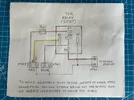
One way to extend the parking time is to charge Power Station from the car when driving and from a small portable Solar Panel while parked.
It is quite simple by using 5 pin automotive Relay
Here is a video to show how it works on the bench.

And short follow up video to show the same in real car and portable solar panel

And a link to some more photos for the similar design I made for the LTO battery.
https://dashcamtalk.com/forum/threa...r-dash-cam-parking-mode-diy.50484/post-631316
 

Attachments

  • IMG_8620.webp
    IMG_8620.webp
    195.6 KB · Views: 187
no offence, but although i have thought about solar panels , I'm not going to put them across my dashboard every time, also potential of the car to be broken into would be higher
 
Back
Top